Introduction
This manual provides essential instructions for the safe and efficient operation, maintenance, and troubleshooting of your Xiaomi Mijia Robot 2-in-1 Sweeping and Wet Mopping Robot Vacuum Cleaner. Please read this manual thoroughly before using the product and retain it for future reference.
Маанилүү коопсуздук маалыматы
To reduce the risk of injury or damage, read and follow all safety precautions. This appliance is for household use only.
- Балдарга шайман менен ойноого уруксат бербеңиз.
- Ensure the charging dock is placed on a level surface against a wall.
- Чачты, кенен кийимдерди, манжаларды жана дененин бардык бөлүктөрүн тешиктерден жана кыймылдуу бөлүктөрдөн алыс кармаңыз.
- Роботту ачык жалын же жарылуучу материалдар бар жерлерде иштетпеңиз.
- Роботту чоң таштандыларды, суюктуктарды же күйүп жаткан нерселерди чогултуу үчүн колдонбоңуз.
- Always remove the water tank and dustbin before moving or cleaning the robot.
- Өндүрүүчү тарабынан берилген түпнуска кубат адаптерин жана кубаттоочу докту гана колдонуңуз.
Пакеттин мазмуну
Пакетте бардык буюмдар бар экенин текшериңиз:
- 1 x Xiaomi Mijia Sweeping Mopping Robot
- 1 x 2-in-1 Water Tank
- 2 x Side Brush
- 1 x заряддоо стенди
- 1 х кубат адаптери
- 1 x Mop Bracket
- 2 x Wiper (Mopping Pad)
Продукт бүттүview
Робот чаң соргучуңуздун негизги компоненттери менен таанышып алыңыз.

Сүрөттүн сүрөттөлүшү: Жогорку view of the Xiaomi Mijia Robot Vacuum Cleaner, showing the main body, the LDS laser navigation system dome, and the power/home buttons.
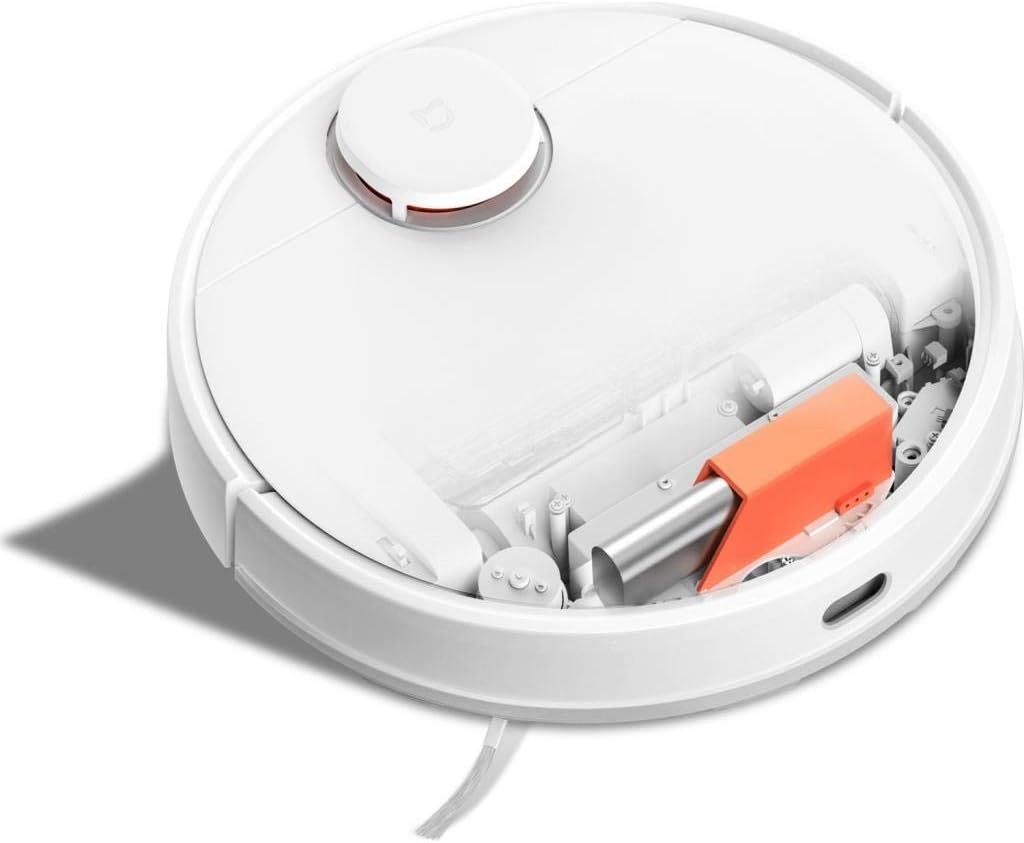
Сүрөттүн сүрөттөлүшү: Жогорку view of the Xiaomi Mijia Robot Vacuum Cleaner with its top lid open, revealing the dustbin compartment and internal mechanisms, including an orange component.
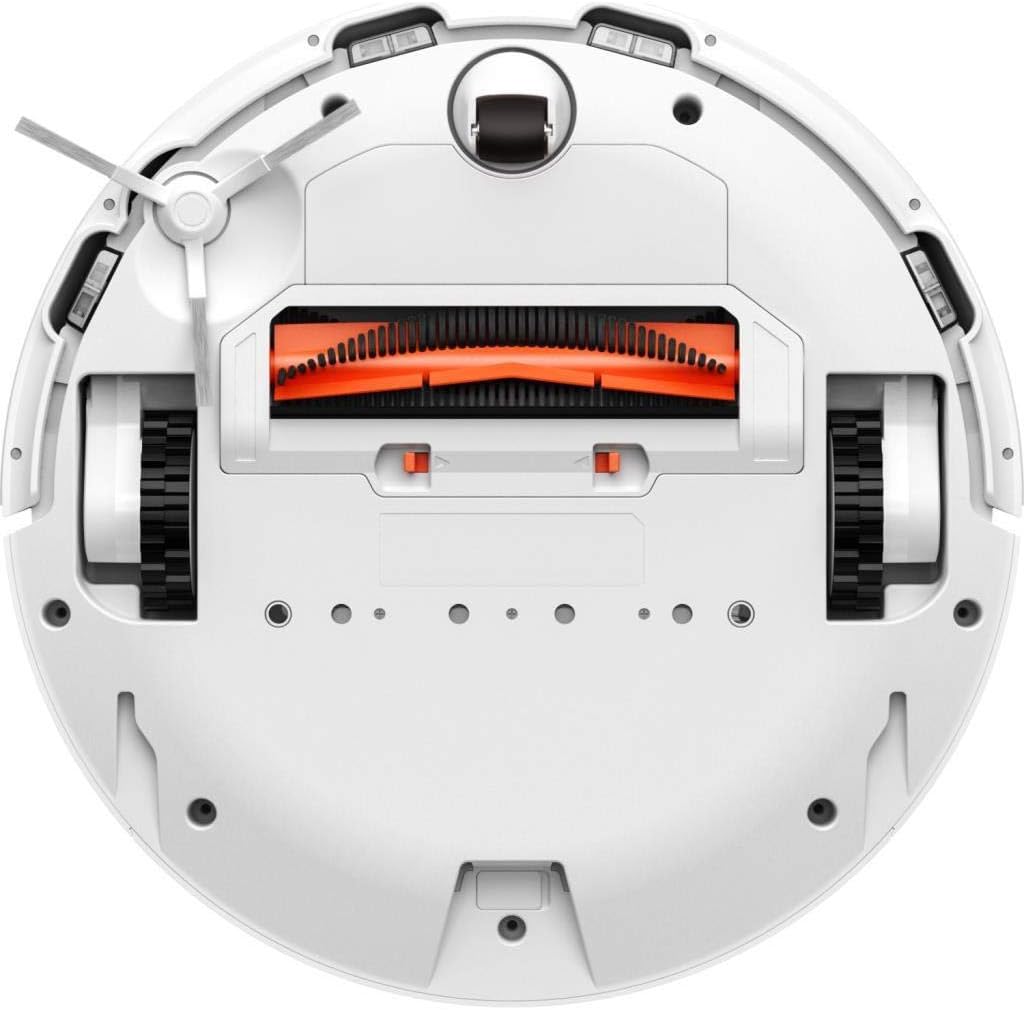
Сүрөттүн сүрөттөлүшү: Төмөнкү view of the Xiaomi Mijia Robot Vacuum Cleaner, displaying the main roller brush (orange), side brushes, charging contacts, and various sensors.
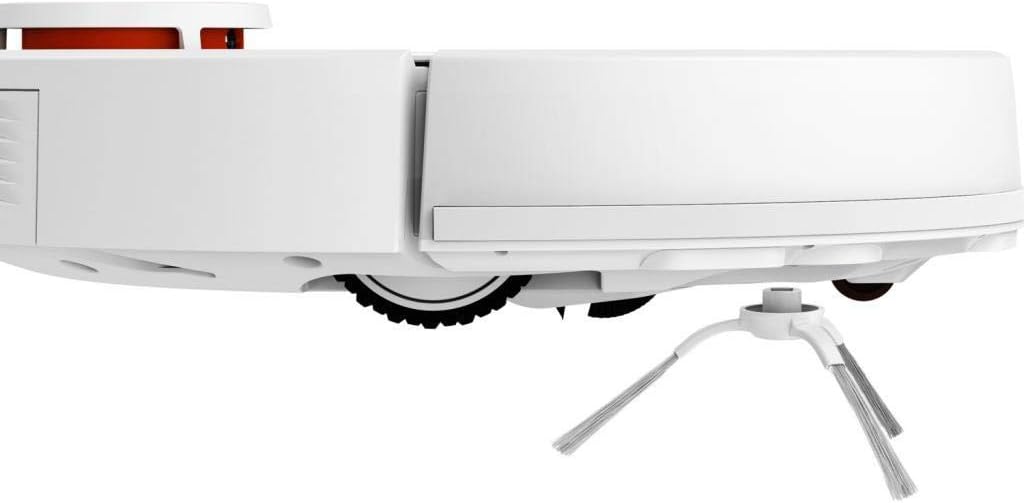
Сүрөттүн сүрөттөлүшү: Side profile of the Xiaomi Mijia Robot Vacuum Cleaner, highlighting one of the side brushes and a main wheel.
Жайгашуу
1. Заряддоо докунун жайгашуусу
Place the charging dock against a wall on a hard, level surface. Ensure there are no obstacles within 0.5 meters (1.6 feet) to either side and 1.5 meters (4.9 feet) in front of the dock. Connect the power adapter to the charging dock and plug it into a power outlet.

Сүрөттүн сүрөттөлүшү: The Xiaomi Mijia Robot Vacuum Cleaner positioned next to its compact white charging dock, ready for charging.
2. Баштапкы заряддоо
Place the robot onto the charging dock. The robot will automatically align itself and begin charging. For first-time use, ensure the robot is fully charged before operation. A full charge typically takes several hours.
3. Колдонмону орнотуу жана туташуу
Download the "Mi Home" app from your smartphone's app store. Follow the in-app instructions to add your Xiaomi Mijia Robot Vacuum Cleaner. This process involves connecting the robot to your home's 2.4 GHz Wi-Fi network. The app allows for remote control, scheduling, and map management.
Иштөө нускамалары
1. Тазалоо режимдери
The robot supports three cleaning modes:
- Sweeping and Mopping: The robot simultaneously vacuums and mops the floor. Ensure the 2-in-1 water tank with a mop pad is installed.
- шыпыруу: The robot only vacuums. Use the dustbin for this mode.
- сүртүү: The robot only mops. Ensure the 2-in-1 water tank with a mop pad is installed and the HEPA filter is removed from the water tank if only mopping is desired.
2. Тазалоо циклин баштоо
Press the power button on the robot or use the Mi Home app to start a cleaning cycle. The robot will automatically map its environment using its LDS laser navigation system and begin cleaning.

Сүрөттүн сүрөттөлүшү: The Xiaomi Mijia Robot Vacuum Cleaner actively cleaning a modern room with light-colored flooring, demonstrating its compact size and ability to navigate open spaces.
3. Pausing and Stopping
Press the power button once to pause cleaning. Press it again to resume. To stop cleaning and send the robot back to its charging dock, press and hold the power button, or use the app.
4. Пландуу тазалоо
Use the Mi Home app to set up cleaning schedules. You can specify times and days for the robot to automatically start cleaning.
5. Zone Cleaning and Virtual Walls
Through the Mi Home app, you can define specific areas for cleaning (zone cleaning) or set up virtual walls and forbidden sweep areas to restrict the robot's access to certain zones.
6. Үн менен башкаруу
The robot supports voice interaction via the Mi Home app and is compatible with Amazon Echo (Alexa). Follow the instructions in the Mi Home app to link your robot with your voice assistant for hands-free control.
Техникалык тейлөө
Үзгүлтүксүз тейлөө оптималдуу иштешин камсыз кылат жана робот чаң соргучуңуздун иштөө мөөнөтүн узартат.
1. Dustbin and Water Tank Cleaning
Empty the dustbin after each cleaning cycle. Remove the 2-in-1 water tank, empty any remaining water, and clean the mop pad. The mop pad can be washed and reused.
2. Негизги жана каптал щеткаларды тазалоо
Periodically remove the main brush and side brushes to clear any tangled hair or debris. Use the cleaning tool provided (if any) or scissors to cut tangled hair.
3. Сенсорду тазалоо
Wipe the cliff sensors, wall sensors, and charging contacts with a soft, dry cloth to ensure they remain free of dust and debris. Clean the LDS laser navigation system dome as well.
4. Фильтрди алмаштыруу
The HEPA filter in the dustbin should be cleaned regularly and replaced every 3-6 months, depending on usage. Refer to the Mi Home app for filter status and replacement reminders.
Проблемаларды чечүү
Эгерде сиз роботуңуз менен көйгөйлөргө туш болсоңуз, төмөнкү кеңири таралган чечимдерди караңыз:
| Көйгөй | Мүмкүн себеп | Чечим |
|---|---|---|
| Робот башталбайт же жооп бербейт. | Аз батарея; кубат баскычы туура басылган жок. | Ensure robot is fully charged. Press and hold the power button for a few seconds. |
| Робот Wi-Fi'га туташа албайт. | Туура эмес Wi-Fi сырсөзү; 5 ГГц тармак колдонулууда; робот роутерден өтө алыс. | Ensure correct 2.4GHz Wi-Fi network and password. Move robot closer to router. Reset Wi-Fi on robot if necessary. |
| Начар тазалоо көрсөткүчү. | Full dustbin; clogged brushes; dirty filter. | Empty dustbin. Clean main brush and side brushes. Clean or replace filter. |
| Робот бат-баттан тыгылып калат. | Obstacles on the floor; high thresholds; dark surfaces (cliff sensors). | Clear floor of cables and small objects. Use virtual walls for problematic areas. Ensure sufficient lighting for dark floors. |
| Чыпкалоо функциясы иштебейт. | Суу резервуары бош; швабра орнотулган эмес; суу түтүкчөлөрү бүтүп калган. | Fill water tank. Attach mop pad correctly. Clean water tank outlets. |
Техникалык шарттар
| Өзгөчөлүк | Деталь |
|---|---|
| Бренд | XIAOMI |
| Модель аты | 26200 |
| Өзгөчө өзгөчөлүк | High Precision Sensors, LDS Laser Navigation |
| Түс | Ак |
| Камтылган компоненттер | Sweeping Mopping Robot, 2-in-1 Water Tank, Side Brushes, Charging Stand, Power Adapter, Mop Bracket, Wipers |
| Чыпка түрү | кездеме (HEPA) |
| Батареянын иштөө мөөнөтү | Up to 130 minutes (Sweeping), 60 minutes (Mopping) |
| Тtage | 240 Volts (Input) |
| Таштанды кутусунун сыйымдуулугу | 0.3 литр |
| Power Source | Батарея менен иштейт |
| Башкаруу ыкмасы | App (Mi Home) |
| Шайкеш түзмөктөр | Amazon Echo (Alexa) |
| Форма фактору | Робот |
| Продукциянын өлчөмдөрү | 13.58 x 13.58 x 3.78 дюйм (34.5 x 34.5 x 9.6 см) |
| Элемент Салмагы | 4.4 фунт (2 кг) |
| Батарея түрү | Lithium-ion (3200mAh capacity) |
| Climb Capability | 2см |
Кепилдик жана колдоо
Кепилдик маалыматы жана техникалык колдоо үчүн расмий XIAOMIге кайрылыңыз webсайтка же кардарларды тейлөөгө кайрылыңыз. Сатып алганыңыздын далили катары сатып алуу дүмүрчөгүңүздү сактаңыз.


