Introduction
The Sonoff S26 Smart WiFi Socket is an intelligent plug designed to bring smart automation to your home. It allows you to remotely control connected devices via the eWeLink app, set schedules, and integrate with voice assistants like Amazon Alexa and Google Home. This manual provides detailed instructions for setting up, operating, and maintaining your Sonoff S26 Smart WiFi Socket.

Сүрөт 1: Алдыңкы view of the Sonoff S26 Smart WiFi Socket, showing the power button and the Brazilian standard outlet.
Коопсуздук маалыматы
- Ensure the socket is used within its specified voltage (220 Volts) and load limits (Max. load: 2200W/10A).
- Аппаратты ажыратпаңыз же өзгөртпөңүз.
- Аппаратты суудан, нымдан жана жогорку температурадан алыс кармаңыз.
- Үй ичинде гана колдонуу үчүн.
- Тазалоодон мурун аппаратты розеткадан сууруп алыңыз.
Пакеттин мазмуну
- 1 x Sonoff S26 Smart WiFi Socket
- 1 х Колдонуучунун колдонмосу (бул документ)
Орнотуу колдонмосу
1. Физикалык орнотуу
- Plug the Sonoff S26 Smart WiFi Socket into a standard Brazilian wall outlet.
- Plug the appliance you wish to control into the Sonoff S26 socket.
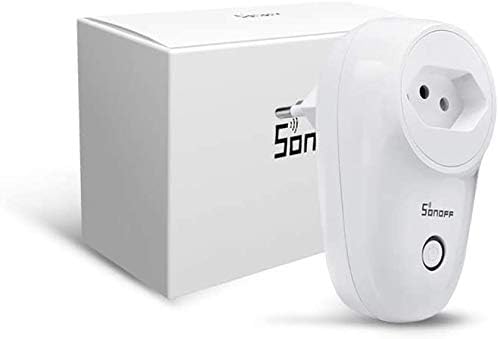
Figure 2: Sonoff S26 Smart WiFi Socket alongside its packaging, illustrating the compact design.
2. Колдонмону орнотуу
Download the eWeLink app from the App Store (iOS) or Google Play Store (Android). Alternatively, scan the QR code usually found on the product packaging or quick start guide.
- Издөө "eWeLink" in your app store.
- Install the app and register a new account if you don't have one.
3. Device Pairing (Wi-Fi Connection)
- Ensure your Sonoff S26 is plugged in and the indicator light is blinking rapidly (Quick Pairing Mode). If not, press and hold the manual control button for 5-7 seconds until it blinks rapidly.
- Open the eWeLink app, tap the "+" icon at the bottom center, and select "Quick Pairing".
- Confirm the indicator light is blinking rapidly and tap "Next".
- Enter your Wi-Fi network name (SSID) and password. Ensure your Wi-Fi is 2.4GHz.
- The app will search for and connect to the device. Once connected, you can rename your device.
Иштөө нускамалары
1. Негизги күйгүзүү/өчүрүү башкаруусу
- Кол менен башкаруу: Press the physical button on the Sonoff S26 to manually turn the connected appliance on or off.
- Колдонмону башкаруу: Open the eWeLink app, select your Sonoff S26 device, and tap the power icon to toggle its status. The app will display the real-time status of the device.
2. Пландаштыруу жана Таймерлер
The eWeLink app allows you to set various timers for automated control:
- Schedule Timer: Set specific times for the device to turn on or off daily or on selected days of the week.
- Артка саноо таймери: Set a countdown for the device to turn on or off after a specified duration.
- Цикл таймери: Program the device to cycle on and off repeatedly for set intervals.
3. Scene Creation
Create "Scenes" in the eWeLink app to automate actions based on conditions or to control multiple devices simultaneously:
- Акылдуу көрүнүш: Trigger actions based on environmental conditions (e.g., temperature, humidity) or other device statuses.
- One-Tap Scene: Create a shortcut to turn on/off a group of devices with a single tap.
4. Үн менен башкаруу интеграциясы
The Sonoff S26 is compatible with popular voice assistants:
- Amazon Alexa: Link your eWeLink account in the Alexa app. Once linked, you can say commands like, "Alexa, turn on [device name]."
- Google Home: Link your eWeLink account in the Google Home app. Use commands such as, "Hey Google, turn off [device name]."
- IFTTT: Integrate with IFTTT (If This Then That) for advanced automation recipes.
Техникалык тейлөө
- Тазалоо: Түзмөктүн бетин тазалоо үчүн жумшак, кургак чүпүрөктү колдонуңуз. Суюк тазалоочу каражаттарды же аэрозольдорду колдонбоңуз.
- Сактагыч: Аппаратты колдонбогондо салкын, кургак жерде сактаңыз.
- Программалык камсыздоонун жаңыртуулары: Оптималдуу аткарууну жана коопсуздукту камсыз кылуу үчүн eWeLink колдонмосун маал-маалы менен текшерип туруңуз.
Проблемаларды чечүү
| Көйгөй | Мүмкүн себеп | Чечим |
|---|---|---|
| Device fails to connect to Wi-Fi. | Incorrect Wi-Fi password, 5GHz Wi-Fi network, device too far from router. |
|
| Түзмөк колдонмодо оффлайн режиминде. | Күч алtage, Wi-Fi disconnected, device malfunction. |
|
| Үн башкаруу иштебейт. | Incorrect device name, eWeLink account not linked, voice assistant issues. |
|
Техникалык шарттар
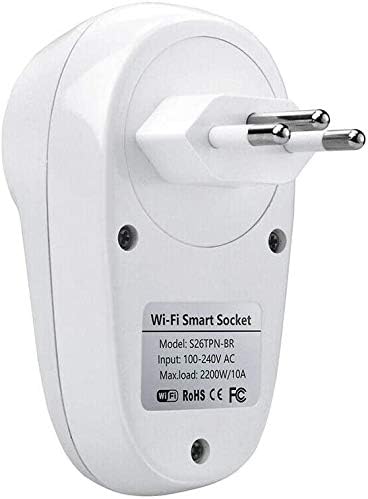
3-сүрөт: Арткы view of the Sonoff S26 Smart WiFi Socket, displaying the model number (S26TPN-BR) and electrical input/load details.
| Өзгөчөлүк | Деталь |
|---|---|
| Модел | S26 (Part Number: 0301XNWG30V) |
| Бренд | SONOFF |
| Киргизүү көлөмүtage | 100-240V AC (Bivolt) |
| Макс. Жүктөө | 2200Вт / 10А |
| Wi-Fi стандарты | IEEE 802.11 b / g / n 2.4GHz |
| Материал | PC V0 |
| Өлчөмдөр | 6 x 5 x 9 см (Узундугу x Туурасы x Бийиктиги) |
| Салмагы | 120 г |
| Түс | Ак |
| Шайкештик | Amazon Alexa, Google Home, IFTTT |
Кепилдик жана колдоо
Чектелген Кепилдик: SONOFF products typically come with a limited warranty covering manufacturing defects. Please refer to the warranty card included with your product or visit the official SONOFF webатайын кепилдик шарттары жана шарттары үчүн сайт.
Кардарларды колдоо: For technical assistance, troubleshooting, or product inquiries, please contact SONOFF customer support through their official website or the eWeLink app. You can also visit the Amazon'догу SONOFF дүкөнү көбүрөөк маалымат алуу үчүн.


