Introduction
This manual provides instructions for the Elekpia NS-RC4NA-14 remote control, designed as a replacement for various Insignia LCD LED TV models. This remote control is pre-programmed and does not require any additional setup or pairing. Simply insert batteries, and it is ready for immediate use.
The NS-RC4NA-14 remote control is compatible with most 2013 and 2014 Insignia TV models, including but not limited to:
- NS-28ED200NA14, NS-50D400NA14, NS-19ED200NA14, 55E4400A14, NS-58E4400A14, NS-24E400NA14, NS-60E4400A14, NS-65E4400A14, NS-50L440NA14, NS-46D400NA14, NS-65D4400A14, NS-22E400NA14, NS-46L400NA14, NS-46E440NA14, NS-32E2000A14, NS-39D400NA14, NS-32DD2000A14, NS-39L400NA14, NS-55E4400A14, NS-19E200NA14, NS-50E440NA14, NS-24E200NA14, NS-32E400NA14, NS-32D200NA14, NS-55D440NA14
- NS-39D310NA15, NS-48D510NA15, NS-19E310NA15, NS-24D510NA15, NS-28D310NA15, NS-32D310NA15, NS-32D510NA15, NS-50D550NA15, NS-42D510NA15, NS-40D510NA15, NS-32D311NA15, NS-55D550NA15, NS-29D310NA15, NS-32D512NA15, NS-32D312NA15, NS-65D550NA15
- NS-32D200NA14, NS-46D400NA14, NS-28E200NA14, NS-32E830N14, NS-42E860N14, NS-50E860N14, NS-39E850N14, NS-50L440NA14, NS-39L700A12, NS-40D40SNA14, NS-24E40SNA14, NS-37D20SNA14, NS-32D20SNA14, NS-39D40SNA14, NS-32D201NA14, NS-46D40SNA14, NS-50DSNA14, NS-42D40SNA14, NS-19E310A13
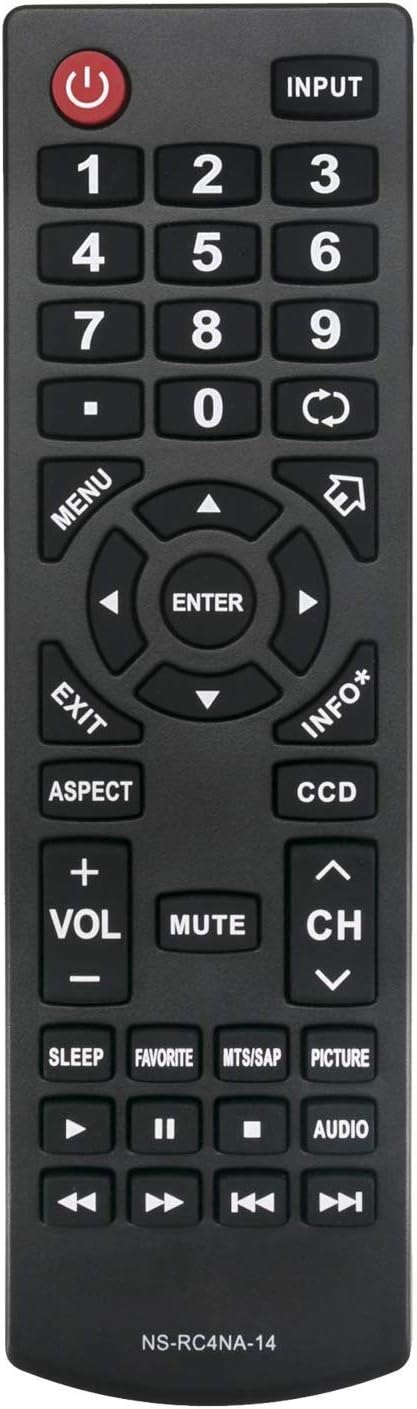
Сүрөт 1: Алдыңкы view of the NS-RC4NA-14 Remote Control.
Жайгашуу
Батарея орнотуу
The NS-RC4NA-14 remote control requires two (2) 1.5V AAA alkaline batteries for operation. Batteries are not included with the remote control.
- Пульттун артындагы батарея отсегин табыңыз.
- Батарея бөлүмүнүн капкагын ачуу үчүн ылдый же жебе менен көрсөтүлгөн багытта жылдырыңыз.
- Эки AAA батарейкасын салып, оң (+) жана терс (-) терминалдары бөлүмдүн ичиндеги белгилер менен туура дал келгенин текшериңиз. Туура эмес салынса, пульттун иштешине тоскоол болушу мүмкүн.
- Батарея бөлүкчөсүнүн капкагын бекем чыккыча ордуна жылдырыңыз.
Once batteries are installed, the remote control is ready for use with your compatible Insignia TV without any further programming or pairing.
Иштөө нускамалары
This section details the functions of the buttons on your NS-RC4NA-14 remote control.

2-сүрөт: Бурчтуу view of the NS-RC4NA-14 Remote Control, showing button layout.
Негизги функциялар
- Күч (⏻): Телевизорду күйгүзөт же өчүрөт.
- КИРҮҮ: Cycles through available input sources (e.g., HDMI 1, AV, Component).
- Сан баскычтары (0-9): Directly select channels or input numerical values.
- Volume (+VOL-): Adjusts the sound volume. Press +ТОМ көбөйтүү, -ТОМ азайтуу.
- Үнсүз: Silences the TV audio. Press again to restore audio.
- Channel (CH ∧/∨): Changes the TV channel. Press CH ∧ to go up, CH ∨ to go down.
Навигация жана меню башкаруулары
- МЕНЮ: Сыналгынын негизги менюсун ачат.
- Arrow Buttons (◄ ▲ ► ▼): Менюнун параметрлери жана жөндөөлөрү аркылуу өтүңүз.
- КИРҮҮ: Тандоону ырастайт же кошумча менюга кирет.
- ЧЫГУУ: Учурдагы менюну же экрандагы дисплейди жабат.
- INFO*: Учурдагы программа же киргизүү жөнүндө маалыматты көрсөтөт.
Special Functions and Playback Controls
- АСПЕКТ: Changes the screen aspect ratio (e.g., 16:9, 4:3).
- DCC: Жабык субтитрлерди иштетүү же өчүрүү.
- УЙКУ: Sets a timer for the TV to automatically turn off.
- ФАВОРИТ: Сүйүктүү каналдардын тизмесине кирүү мүмкүнчүлүгү.
- MTS/SAP: Selects Multi-channel Television Sound (MTS) or Secondary Audio Program (SAP) audio tracks.
- СҮРӨТ: Adjusts picture modes (e.g., Standard, Movie, Dynamic).
- АУДИО: Adjusts audio modes or settings.
- Playback Controls (◄◄, ►►, ❚❚, ■, ►): Used for controlling media playback (e.g., rewind, fast forward, pause, stop, play) when connected to compatible devices or media.
Техникалык тейлөө
Алыстан башкарууну тазалоо
Алыстан башкаруу пультун көрүнүшүн жана функционалдуулугун сактоо үчүн, аны үзгүлтүксүз тазалап туруңуз:
- Пульттун бетин сүртүү үчүн жумшак, кургак чүпүрөктү колдонуңуз.
- өжөр кир үчүн, бир аз гampчүпүрөктү суу же жумшак, абразивдүү тазалагыч менен жууп салыңыз. Ашыкча нымдуулуктан сактаныңыз.
- Катуу химиялык заттарды, абразивдүү тазалоочу каражаттарды же эриткичтерди колдонбоңуз, анткени алар пульттун сырткы көрүнүшүнө же ички компоненттерине зыян келтириши мүмкүн.
Батареяга кам көрүү
- Replace batteries when the remote control's response becomes sluggish or stops working.
- Always replace both batteries at the same time with new ones. Do not mix old and new batteries, or different types of batteries.
- Эгерде алыстан башкаруу пульту көпкө чейин колдонулбаса, агып кетүүнүн жана мүмкүн болгон зыяндын алдын алуу үчүн батарейкаларды алып салыңыз.
- Колдонулган батарейкаларды жергиликтүү эрежелерге ылайык жок кылыңыз.
Проблемаларды чечүү
If you experience issues with your NS-RC4NA-14 remote control, refer to the following common problems and solutions:
| Көйгөй | Мүмкүн себеп | Чечим |
|---|---|---|
| Пульт иштебей жатат. | Батареялар өлүп калган же туура эмес салынган. | Replace batteries with new 1.5V AAA alkaline batteries. Ensure correct polarity (+/-). |
| Remote control has limited range or intermittent response. | Low battery power; Obstruction between remote and TV; Infrared sensor on TV is blocked. | Replace batteries. Ensure a clear line of sight between the remote and the TV's infrared sensor. Remove any obstructions. |
| Remote control does not control the TV. | TV is not a compatible Insignia model; Remote control is faulty. | Verify your TV model is listed in the compatible models section. This remote does not require programming; if it's not working with a compatible TV after new batteries, the remote may be defective. |
Эскертүү: This remote control is designed to work out of the box with compatible Insignia TVs and does not require any programming or pairing procedures.
Техникалык шарттар
- Модель номери: NS-RC4NA-14 (Elekpia Insignia-14)
- Бренд: Elekpia
- Шайкеш түзмөктөр: Insignia LCD LED Televisions (specific models listed in Introduction)
- Электр камсыздоо: 2 x 1.5V AAA щелочтуу батарейкалар (кошулган эмес)
- Продукциянын өлчөмдөрү: 6.5 x 2 x 0.7 дюйм (болжол менен)
- Элемент Салмагы: 2.64 унция (болжол менен)
- Түсү: Кара
- Өзгөчө өзгөчөлүгү: Эргономикалык дизайн
Кепилдик жана колдоо
Information regarding specific warranty terms or direct customer support contact for the Elekpia NS-RC4NA-14 remote control was not provided in the product details. For any issues or inquiries, please refer to the retailer or the original point of purchase for assistance.


