1. Киришүү
Сатып алганыңыз үчүн рахматasing the Dolphin SP-17RBT 15 Inch Party Speaker. This portable PA system is designed to deliver powerful audio with its 15-inch woofer and horn tweeter, complemented by an engaging LED light display. Featuring WaveSync Technology for wireless stereo pairing, multiple input options (Bluetooth, AUX, USB), and included accessories like a microphone and tripod stand, the SP-17RBT is ideal for various audio applications. This manual provides essential information for safe operation, setup, and maintenance of your speaker.
2. Коопсуздук нускамалары
- Динамикти иштетүүдөн мурун бардык көрсөтмөлөрдү кунт коюп окуп чыгыңыз.
- Динамикти суудан, нымдан жана экстремалдык температурадан алыс кармаңыз.
- туура желдетүүнү камсыз кылуу; вентиляция тешиктерин жаап салбаңыз.
- Өндүрүүчү тарабынан берилген кубат адаптерин гана колдонуңуз.
- Do not attempt to open or repair the speaker yourself. Refer all servicing to qualified personnel.
- Динамикти кургак, жумшак чүпүрөк менен гана тазалаңыз.
- Укуунун бузулушуна жол бербөө үчүн жогорку үн деңгээлинин узакка созулушунан качыңыз.
3. Пакеттин мазмуну
Төмөндө тизмеленген нерселердин баары пакетиңизге камтылганын текшериңиз:
- Dolphin SP-17RBT 15 Inch Party Speaker
- Tripod Stand
- Микрофон
- Алыстан башкаруу
- 9V кубаттуу адаптер
4. Продукт бүтүп калдыview

4.1-сүрөт: Фронт view of the Dolphin SP-17RBT speaker with its included tripod stand, showcasing the main woofer, horn tweeter, LED light strips, and control panel at the top. The speaker features a black finish with blue LED accents.
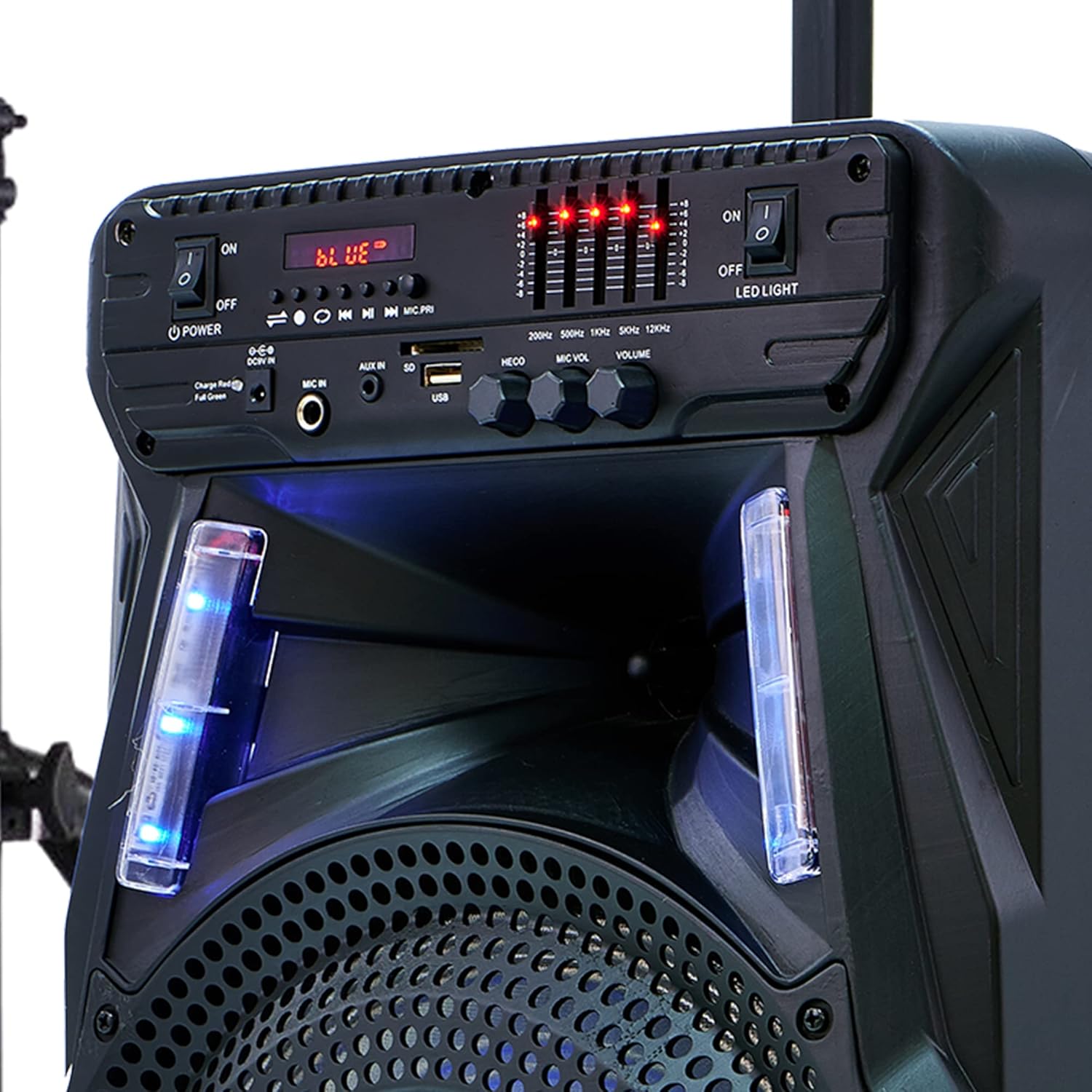
4.2-сүрөт: Close-up of the speaker's control panel, displaying buttons for power, LED light control, input selection (Bluetooth, AUX, USB), microphone inputs, volume controls, and an equalizer display. The display shows 'BLUE' indicating Bluetooth mode.

4.3-сүрөт: Detail of the speaker's base, highlighting the integrated wheels for portability and the sturdy feet for stable placement. The wheels facilitate easy transport of the unit.
Башкаруу панелинин функциялары:
- POWER которуштуруу: Динамикти КҮЙГҮЗӨТ же ӨЧҮРөт.
- LED LIGHT Switch: Toggles the LED light display ON or OFF.
- MODE баскычы: Switches between input modes (Bluetooth, AUX, USB).
- ОЙНОО/ТЫНДЫРУУ баскычы: Plays or pauses audio playback in Bluetooth/USB mode.
- МУРУНКУ/КИЙИНКИ баскычтары: Skips to the previous or next track in Bluetooth/USB mode.
- MIC IN (6.35mm): Input jack for connecting the included microphone.
- AUX IN (3.5 мм): Input jack for connecting external audio devices via an AUX cable.
- USB порт: Аудио ойнотуу үчүн fileUSB флешкасынан.
- MIC VOL баскычы: Туташкан микрофондун үнүн тууралайт.
- ECHO баскычы: Микрофон үчүн жаңырык эффектин тууралайт.
- VOLUME баскычы: Controls the master volume of the speaker.
- Equalizer Display: Visual representation of audio levels.
- DC 9V киргизүү: Динамикти кубаттоо үчүн кубат киргизүү.
5. Орнотуу
5.1 Пакеттен чыгаруу
Бардык компоненттерди таңгактан кылдаттык менен алып салыңыз. Таңгакты келечекте ташуу же сактоо үчүн сактаңыз.
5.2 Спикерлер стендинин жыйыны
- Штативдик стенддин буттары толугу менен жазылып, туруктуу болгонго чейин жазыңыз.
- Adjust the height of the stand to your desired level, ensuring the locking pin is securely engaged.
- Carefully place the Dolphin SP-17RBT speaker onto the pole of the tripod stand. Ensure it is seated firmly and balanced.
Alternatively, the speaker can be placed directly on a flat, stable surface.
5.3 Күйгүзүү жана заряддоо
- Connect the supplied 9V power adapter to the DC 9V input port on the speaker and then to a power outlet.
- For first-time use, it is recommended to fully charge the speaker for approximately 3 hours. The charging indicator light will show the charging status.
- Flip the POWER switch to the 'ON' position to turn on the speaker.
Толук заряд 5 сааттан ашык ойнотуу убактысын камсыз кылат.
6. Иштөө нускамалары
6.1 Күйгүзүү/өчүрүү
To turn the speaker on, flip the POWER switch located on the control panel to the 'ON' position. To turn it off, flip the switch to the 'OFF' position.
6.2 Bluetooth байланышы
- Turn on the speaker. The default mode is typically Bluetooth, indicated by 'BLUE' on the display and a blinking Bluetooth icon. If not, press the MODE button until Bluetooth mode is selected.
- Мобилдик түзмөгүңүздө Bluetooth'ду иштетиңиз (смартфон, планшет ж.б.).
- Издөө жеткиликтүү Bluetooth түзмөктөрүн тандап, тизмеден "Dolphin SP-17RBT" тандаңыз.
- Once paired, the speaker will emit a confirmation sound, and the Bluetooth icon will stop blinking. You can now play audio from your device through the speaker.
6.3 AUX киргизүү
- 3.5 мм аудио кабелдин бир учун (кошулмада жок) динамиктеги AUX IN портуна туташтырыңыз.
- Кабелдин экинчи учун тышкы аспабыңыздын гарнитура уячасына же аудио чыгышына туташтырыңыз.
- Press the MODE button on the speaker until 'AUX' is displayed.
- Тышкы түзмөгүңүздөн аудио ойнотуңуз.
6.4 USB ойнотуу
- MP3 аудиосу бар USB флэш-дискти салыңыз fileсту динамиктин USB портуна сайыңыз.
- Динамик автоматтык түрдө USB режимине которулуп, аудиону ойнотууну баштайт files. If not, press the MODE button to select USB mode.
- Use the PLAY/PAUSE, PREVIOUS, and NEXT buttons to control playback.
6.5 Микрофонду колдонуу
- Connect the included microphone to the MIC IN (6.35mm) port on the speaker.
- Микрофондун үнүн башкаруу үчүн MIC VOL баскычын тууралаңыз.
- Turn the ECHO knob to add or reduce the echo effect for vocals.
6.6 WaveSync Technology (TWS Pairing)
WaveSync Technology allows you to wirelessly connect two Dolphin SP-17RBT speakers for a true stereo sound experience.
- SP-17RBT динамиктеринин экөө тең күйгүзүлүп жана Bluetooth режиминде экенин текшериңиз.
- On one of the speakers (this will be your primary speaker), press and hold the dedicated WaveSync button (if available, or a combination of buttons as per specific model instructions, typically the PLAY/PAUSE button for a few seconds).
- Негизги динамик кошумча динамикти издейт. Туташтырылгандан кийин, эки динамик тең ырастоо үнүн чыгарат.
- Now, connect your mobile device to the primary speaker via Bluetooth as described in section 6.2. Audio will play simultaneously through both speakers in stereo.
6.7 LED Light Display
The speaker features an integrated LED light display that dances and changes color with the music. To turn the LED lights ON or OFF, use the dedicated LED LIGHT switch on the control panel.
6.8 Алыстан башкаруу
Камтылган алыстан башкаруу ар кандай функцияларга ыңгайлуу мүмкүнчүлүк берет:
- Күч: Динамикти КҮЙГҮЗҮҮ/ӨЧҮРҮҮ.
- Режим: Киргизүү булактарын которот.
- Көлөм +/-: Башкы үнүн тууралайт.
- Ойнотуу/тындыруу: Медианы ойнотууну көзөмөлдөйт.
- Мурунку кийинки: Skips tracks.
- EQ: Эквалайзердин алдын ала коюлган жөндөөлөрү аркылуу айланып өтөт (эгер бар болсо).
7. Техникалык тейлөө
7.1 Тазалоо
Wipe the speaker's exterior with a soft, dry cloth. Do not use abrasive cleaners, waxes, or solvents, as they may damage the finish. Avoid spraying liquids directly onto the speaker.
7.2 Сактоо
When not in use for extended periods, store the speaker in a cool, dry place, away from direct sunlight and extreme temperatures. If possible, use the original packaging for protection.
7.3 Батареяга кам көрүү
To prolong the life of the built-in Lithium Ion battery, charge it regularly, even if the speaker is not in frequent use. Avoid completely draining the battery before recharging.
8. Кыйынчылыктарды
- Кубат жок:
Ensure the power adapter is securely connected to both the speaker and a working power outlet. Check if the POWER switch is in the 'ON' position. If operating on battery, ensure the battery is charged. - Үн жок:
Check the master VOLUME knob on the speaker and the volume on your connected audio device. Ensure the correct input MODE (Bluetooth, AUX, USB) is selected. Verify all audio cables are securely connected. - Bluetooth туташпай жатат:
Make sure the speaker is in Bluetooth mode and discoverable (Bluetooth icon blinking). Ensure Bluetooth is enabled on your device and it's within range (typically 10 meters). Try forgetting "Dolphin SP-17RBT" from your device's Bluetooth list and re-pairing. - Бурмаланган үн:
Reduce the volume on both the speaker and the audio source. Check if the audio source itself is of good quality. Ensure no cables are damaged or loosely connected. - Микрофон иштебейт:
Ensure the microphone is securely plugged into the MIC IN port. Adjust the MIC VOL knob. Check if the microphone itself is functional. - WaveSync Pairing Fails:
Ensure both speakers are SP-17RBT models and are in Bluetooth mode before attempting to pair them via WaveSync. Make sure they are close to each other.
9. Техникалык шарттар
- Модел: SP-17RBT
- Чыгуу Wattage: 2700 Ватт (чоку)
- Вуфердин өлчөмү: 15 дюйм
- Байланыш технологиясы: AUX, Bluetooth, USB
- Кубат булагы: Батарея менен иштейт (орнотулган литий-ион)
- Батареянын иштөө мөөнөтү: Over 5 Hours (approx.)
- Заряддоо убактысы: 3 саат (болжол менен)
- Элемент Салмагы: 18 фунт
- Түсү: Кара
- Монтаж түрү: Полюс тоо
- UPC: 850006218448
10. Кепилдик жана колдоо
For warranty information, technical support, or service inquiries, please refer to the official Dolphin webсайтка же түздөн-түз кардарларды колдоо менен байланышыңыз. Сатып алуу квитанциясын кепилдик дооматтары үчүн сатып алуунун далили катары сактаңыз.


