
1. Киришүү
Thank you for choosing the ROMOSS Large Capacity Portable Charger. This device is designed to provide reliable and efficient power to your mobile devices on the go. Please read this manual carefully before use to ensure proper operation and to maximize the lifespan of your product.
2. Коопсуздук маалыматы
Аспабыңызга жаракат же зыян келтирбөө үчүн, төмөнкү коопсуздук чараларын сактаңыз:
- Электр кубаты банкын экстремалдык температурага (60°C/140°F жогору же 0°C/32°F төмөн) тийгизбеңиз.
- Аппаратты түшүрүп алуудан, ажыратуудан же өзүңүз оңдоого аракет кылуудан качыңыз.
- Суу, ным жана күйүүчү материалдардан алыс кармаңыз.
- Тастыкталган заряддоо кабелдерин жана адаптерлерин гана колдонуңуз.
- Балдар жетпеген жерде сактаңыз.
- Продукцияны жергиликтүү эрежелерге ылайык таштаңыз.
3. Продукт бүтүп калдыview
The ROMOSS Large Capacity Portable Charger features multiple ports for versatile charging and an LED indicator for battery status.
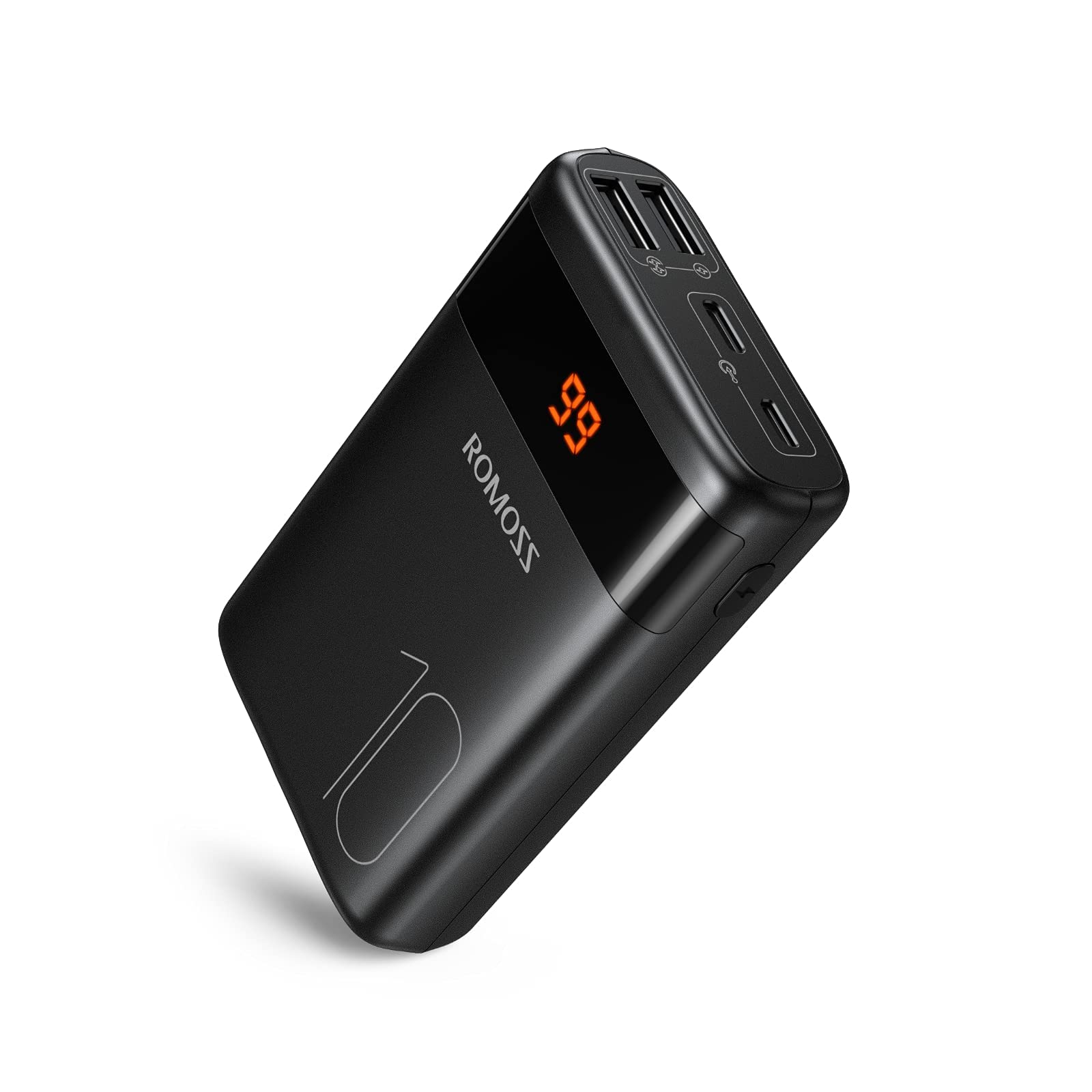
Сүрөт: алдыңкы view of the ROMOSS Portable Charger, showing input/output ports and LED battery indicators.
Компоненттери:
- Кубат баскычы: Press once to check battery level, press and hold to activate/deactivate (if applicable).
- LED көрсөткүчтөрү: Display the remaining battery capacity.
- Киргизүү порттору: Used to charge the portable charger itself (e.g., Type-C, Micro USB, Lightning).
- Чыгуу порттору: Used to charge other devices (e.g., USB-A, Type-C).
4. Орнотуу
4.1 Баштапкы төлөм
Before first use, fully charge your ROMOSS portable charger. This ensures optimal battery performance and accuracy of the battery indicator.
- Connect the portable charger to a power source (e.g., wall adapter, computer USB port) using a compatible charging cable (e.g., Type-C cable).
- The LED indicators will illuminate to show the charging progress.
- Once all LED indicators are solid, the portable charger is fully charged. Disconnect it from the power source.
5. Иштөө нускамалары
5.1 Түзмөктөрдү заряддоо
To charge your mobile phone, tablet, or other USB-powered devices:
- Connect your device to an output port on the portable charger using its charging cable.
- The portable charger should automatically begin charging your device. If not, press the power button once.
- The LED indicators will show the remaining battery level of the portable charger during charging.
- Once your device is fully charged, disconnect it from the portable charger.
5.2 Батареянын деңгээлин текшерүү
To check the remaining battery capacity of the portable charger:
- Кубат баскычын бир жолу басыңыз.
- The LED indicators will light up, showing the current battery level. For example, four solid LEDs typically indicate a full charge, while one blinking LED indicates a low battery.
6. Техникалык тейлөө
6.1 Тазалоо
Wipe the portable charger with a soft, dry cloth. Do not use harsh chemicals or abrasive materials.
6.2 Сактоо
Store the portable charger in a cool, dry place away from direct sunlight and extreme temperatures. If storing for an extended period, charge the device to approximately 50-75% capacity every three months to maintain battery health.
6.3 Батареяга кам көрүү
To prolong battery life, avoid fully discharging the portable charger frequently. It is recommended to recharge it before it completely runs out of power.
7. Кыйынчылыктарды
| Көйгөй | Мүмкүн себеп | Чечим |
|---|---|---|
| Portable charger not charging | Cable issue, power source issue, or charger fault. | Try a different charging cable and wall adapter. Ensure the power source is active. |
| Device not charging from portable charger | Portable charger is out of power, cable issue, or device compatibility. | Recharge the portable charger. Try a different charging cable. Ensure your device is compatible with USB charging. |
| Жай кубаттоо | Cable quality, device input limit, or portable charger output limit. | Use a high-quality charging cable. Check if your device supports faster charging. Ensure the portable charger's output port supports the desired speed. |
| LED көрсөткүчтөрү иштебейт | Түзмөктүн катасы. | If the device is still charging/discharging normally, this might be a minor fault. If not, contact customer support. |
If you encounter issues not listed here or if the problem persists, please contact ROMOSS customer support.
8. Техникалык шарттар
| Өзгөчөлүк | Деталь |
|---|---|
| Бренд | ROMOSS |
| Модел | Large Capacity Portable Charger |
| ASIN | B085RSRFQS |
| Киргизүү | Type-C (specific voltage/current not provided in source data) |
| Чыгуу | USB-A, Type-C (specific voltage/current not provided in source data) |
| Сертификация | PSE Certified |
| First Available Date (Amazon.co.jp) | 25-июль, 2019-жыл |
9. Кепилдик жана колдоо
ROMOSS products come with a standard warranty. For detailed warranty information, please refer to the warranty card included with your product or visit the official ROMOSS website. For technical support, troubleshooting assistance, or warranty claims, please contact ROMOSS customer service through their official channels.
Көбүрөөк маалымат жана байланыш маалыматтарын даректен таба аласыз ROMOSS Brand Store on Amazon.


