Introduction
Welcome to the user manual for your SNDWAY SW-T60 Digital Laser Rangefinder. This device is designed for precise and efficient measurement of distances, areas, and volumes. Please read this manual carefully before using the device to ensure safe and optimal operation and to understand all features.
Коопсуздук маалыматы
Лазердик коопсуздук
The SNDWAY SW-T60 emits a Class II laser. Observe the following precautions:
- Лазердик нурга тике карабаңыз.
- Лазер нурун адамдарга же жаныбарларга багыттабаңыз.
- Көздүн түз тийүүсүнөн сактаныңыз.
- Аппаратты ажыратпаңыз же өзгөртпөңүз.
Жалпы коопсуздук
- Аппаратты балдар жетпеген жерде сактаңыз.
- Аппаратты жарылуучу чөйрөдө колдонбоңуз.
- Аппаратты нымдан жана тике күн нурунан сактаңыз.
- Use only specified batteries (2 x 1.5V AAA).
Продукт бүттүview
Аппараттын компоненттери
The following image illustrates the main components of the SNDWAY SW-T60.

А фронт view of the SNDWAY SW-T60 Digital Laser Rangefinder, showing the display screen, "READ" button, and other function buttons. A bubble level is visible on the right side.

Жакын план view highlighting the integrated bubble level on the side of the SNDWAY SW-T60, used for ensuring horizontal alignment during measurements.
Дизайнды көрсөтүү
The LCD provides various measurement readings and status indicators. Key elements include:
- Кубат менен камсыздоо көрсөткүчү: Батареянын деңгээлин көрсөтөт.
- Record/Memory Indicator: Indicates data storage status.
- Laser On Indicator: Confirms laser is active.
- Максималдуу/минималдуу маани дисплей: Shows highest and lowest values in continuous measurement.
- Length Measurement Display: For single distance measurements.
- Area, Volume, and Pythagorean Measurement Indicators: Icons for selected measurement modes.
- Continuous Measuring Indicator: Active during tracking mode.
- Major Display: The primary measurement result.
- Auxiliary Display: Secondary measurement results or previous values.
Баскычтоптун функциялары
The device features several buttons for different operations:
- ОКУ: Activates the laser, initiates a measurement, or confirms a selection.
- +: Used for adding measurements.
- -: Used for subtracting measurements.
- Area/Volume/Pythagorean: Cycles through Area, Volume, and various Pythagorean measurement modes.
- Save/Memory: Saves current measurement data or recalls stored data.
- Reference Point/Unit Switch: Toggles the measurement reference point (front/rear edge) or switches between measurement units (m/in/ft).
- ӨЧҮРҮҮ/ТАЗАЛОО: Turns off the device or clears the current measurement/selection.
Жайгашуу
Батарея орнотуу
The SNDWAY SW-T60 requires two 1.5V AAA batteries for operation.
- Аппараттын артындагы батарея бөлүкчөсүнүн капкагын табыңыз.
- Slide or open the cover to access the battery slots.
- Insert two AAA batteries, ensuring that the positive (+) and negative (-) terminals match the indicators inside the compartment.
- Батарея уясынын капкагын бекем жабыңыз.
Иштөө нускамалары
Күйгүзүү/өчүрүү
- Аппаратты күйгүзүү үчүн басыңыз ОКУ баскычы.
- Өчүрүү үчүн, баскычын басып кармап туруңуз ӨЧҮРҮҮ/ТААЗ button. The device will automatically shut off after 150 seconds of inactivity to conserve battery.
Basic Distance Measurement
- басыңыз ОКУ Лазерди иштетүү үчүн баскычты бир жолу басыңыз.
- Лазердик чекитти максаттуу чекитке багыттаңыз.
- басыңыз ОКУ Өлчөө үчүн баскычты кайра басыңыз. Натыйжа негизги экранда көрсөтүлөт.

The SNDWAY SW-T60 shown alongside a reflective plate. A reflective plate can be used to improve measurement accuracy and range, especially in bright conditions or on non-reflective surfaces.
Бирдикти которуу
To switch between measurement units (meters, inches, feet), press the Reference Point/Unit Switch баскычын кыскача.
Reference Point Setting
The device can measure from the front or rear edge. Press and hold the Reference Point/Unit Switch button to toggle the reference point. An icon on the display will indicate the current reference point (e.g., an arrow pointing from the top or bottom of the device icon).
Үзгүлтүксүз өлчөө (Көз салуу)
This mode allows for dynamic measurement, displaying minimum and maximum distances as you move the device.
- From standby, press and hold the ОКУ баскычы.
- The device will continuously measure and display the current, minimum, and maximum distances.
- Басыңыз ОКУ again to stop continuous measurement.
Аймакты өлчөө
To measure the area of a rectangular space:

A close-up of the device's display showing the icon for area measurement, which is a square.
- басыңыз Аянт/Көлөм/Пифагор button once until the area icon (square) appears on the display.
- Measure the first side (length) by pressing ОКУ.
- Measure the second side (width) by pressing ОКУ.
- Түзмөк автоматтык түрдө аянтты эсептеп, көрсөтөт.
Volume Measurement
To measure the volume of a space:

A close-up of the device's display showing the icon for volume measurement, which is a cube.
- басыңыз Аянт/Көлөм/Пифагор button twice until the volume icon (cube) appears.
- Басуу менен узундугун өлчөө ОКУ.
- Басуу менен туурасын өлчөө ОКУ.
- Баскычты басып, бийиктикти өлчөңүз ОКУ.
- Түзмөк автоматтык түрдө көлөмдү эсептеп, көрсөтөт.
Пифагордук өлчөө
The device supports various Pythagorean modes for indirect measurements, useful for calculating heights or distances that cannot be measured directly.
A close-up of the device's display showing the icon for Pythagorean measurement, which is a triangle.
- басыңыз Аянт/Көлөм/Пифагор button repeatedly until the desired Pythagorean mode icon appears (e.g., single Pythagorean for height, double Pythagorean for partial height).
- Follow the on-screen prompts to measure the required sides (e.g., hypotenuse, base).
- Түзмөк белгисиз тарапты эсептеп, көрсөтөт.
Кошуу жана кемитүү
Өлчөөлөрдү кошуу же кемитүү үчүн:
- Take the first measurement.
- басыңыз + button for addition or the - button for subtraction.
- Take the second measurement.
- The result will be displayed. You can continue adding or subtracting further measurements.
Маалыматтарды сактоо жана кайра чакырып алуу
The device can store up to 30 sets of measurement data.
- Өлчөөдөн кийин баскычты басыңыз Save/Memory button to save the result.
- Сакталган маалыматтарды кайра чакырып алуу үчүн, баскычын басып кармап туруңуз Save/Memory баскычы. колдонуу + жана - buttons to navigate through stored records.
Техникалык тейлөө
- Аппаратты жумшак, гamp кездеме. Абразивдүү тазалагычтарды же эриткичтерди колдонбоңуз.
- Ensure the laser lens is clean for accurate measurements.
- Аппарат узак убакыт бою колдонулбай турган болсо, батарейкаларды алып салыңыз.
- Store the device in a dry, dust-free environment.
- Түзмөктө бар IP54 rating, meaning it is protected against dust and splashing water, but it is not waterproof.
Проблемаларды чечүү
| Көйгөй | Мүмкүн себеп | Чечим |
|---|---|---|
| Түзмөк күйбөйт | Low or dead batteries, incorrect battery polarity | Батареяларды алмаштырыңыз, полярдуулукту текшериңиз |
| Туура эмес өлчөөлөр | Dirty laser lens, unstable measuring surface, target too reflective/dark | Clean lens, ensure stable position, use a reflective plate for difficult targets |
| Лазер көрүнбөйт | Жарык чөйрө жарыгы | Use in lower light conditions, use a target plate |
| Ката билдирүү дисплейде | Measurement out of range, internal error | Re-measure within range, restart device |
Эгерде көйгөйлөр чечилбесе, кошумча жардам алуу үчүн кардарларды колдоо кызматына кайрылыңыз.
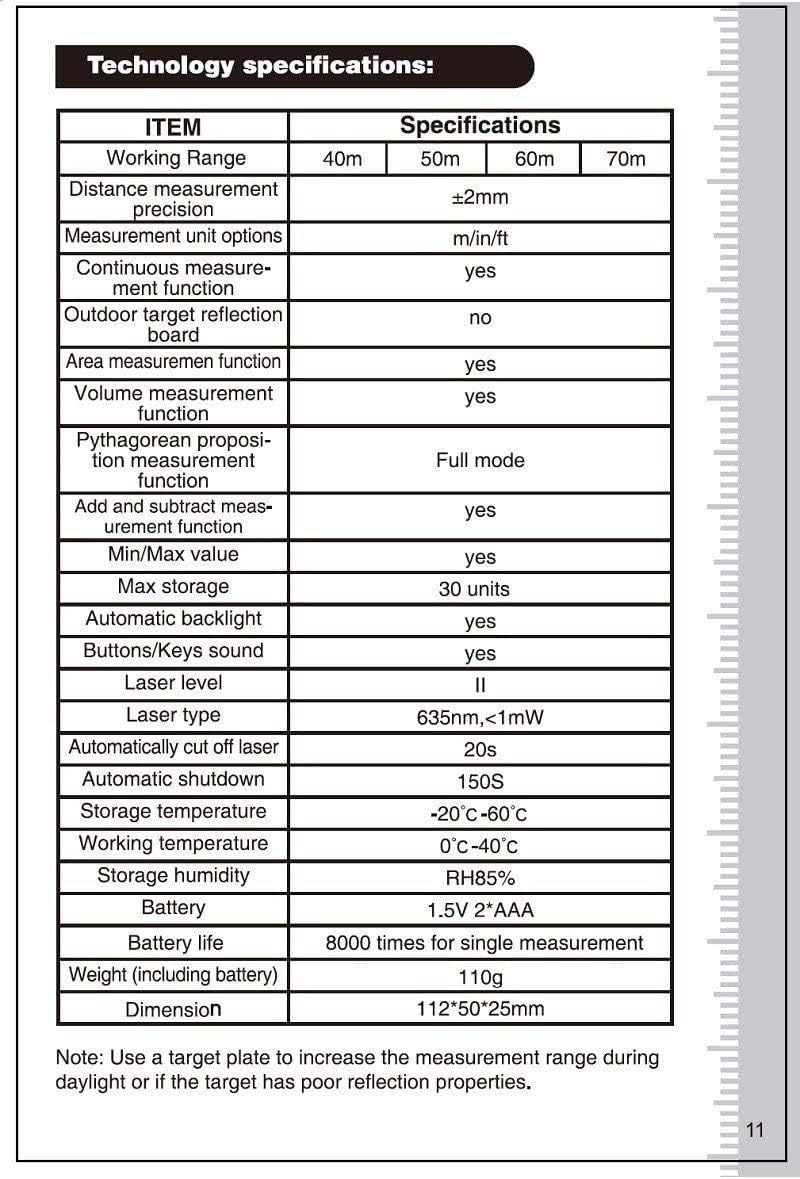
Техникалык шарттар
| пункт | Спецификация |
|---|---|
| Иштөө диапазону | 0.05 - 60м |
| Дистанцияны өлчөө тактыгы | ±2мм |
| Measurement Unit Options | м/д/фут |
| Continuous Measurement Function | Ооба |
| Outdoor Target Reflection Board | No (recommended for daylight/poor targets) |
| Area Measurement Function | Ооба |
| Volume Measurement Function | Ооба |
| Pythagorean Measurement Function | Толук режим |
| Add and Subtract Measurement Function | Ооба |
| Минималдуу/Макс | Ооба |
| Макс сактагыч | 30 бирдик |
| Автоматтык арткы жарык | Ооба |
| Buttons/Keys Sound | Ооба |
| Лазердик деңгээл | II |
| Лазердик түрү | 635нм, <1мВт |
| Automatically Cut Off Laser | 20с |
| Автоматтык өчүрүү | 150с |
| Сактоо температурасы | -20°C - 60°C |
| Иштөө температурасы | 0°C - 40°C |
| Сактоочу нымдуулук | RH85% |
| Батарея | 1.5V * 2 AAA |
| Батареянын иштөө мөөнөтү | Бир өлчөө үчүн 8000 жолу |
| Салмагы (батареяны кошкондо) | 110г |
| Өлчөм | 112 x 50 x 25 мм |
| Эл аралык коргоо рейтинги | IP54 |
Note: A target plate is recommended to increase the measurement range during daylight or if the target has poor reflection properties.
Кепилдик жана колдоо
For warranty information and technical support, please refer to the documentation provided with your purchase or contact SNDWAY customer service. Keep your purchase receipt as proof of purchase for any warranty claims.