1. Киришүү
Welcome to the user manual for your TELLUR CK-B1 Bluetooth Car Kit. This manual provides essential information for the safe and efficient operation of your device. Please read it thoroughly before use to ensure optimal performance and to understand all features.
2. Продукт бүтүп калдыview
The TELLUR CK-B1 is a versatile Bluetooth car kit designed to enhance your driving experience by providing hands-free communication and audio streaming. It features advanced noise and echo cancellation for clear calls, multipoint technology for connecting two devices simultaneously, and voice control integration with Siri and Google Assistant.
Негизги өзгөчөлүктөрү:
- Коопсуз Айдоо: Designed for hands-free communication, allowing you to focus on the road.
- Noise & Echo Cancellation: Microphone with noise suppression and echo cancellation for improved call clarity.
- Көп чекиттүү технология: Connects with two smartphones simultaneously, enabling call answering from either device.
- Үн менен башкаруу: Supports voice assistant control via Siri, Google Assistant, or Samsung Bixby.
- Easy-to-Locate Buttons: Large, intuitive buttons for call management and volume control.
- Multi-Language Voice Prompt: Supports English, German, French, Italian, Spanish, Japanese, and Chinese.
- Автоматтык күйгүзүү/өчүрүү: Built-in vibration start-up function and automatic power-off after 5 minutes of inactivity or when out of range.
- Узартылган батареянын иштөө мөөнөтү: 17 саатка чейин сүйлөшүү убактысы.
Продукт компоненттери:

The front of the device features a central multifunction button for call management, along with dedicated volume up (+) and volume down (-) buttons. The speaker grille is prominently located at the bottom. The TELLUR logo is visible below the call button.

The rear of the device includes a sturdy metal clip designed for easy attachment to a car's sun visor. Product model and specification details are printed on the back.
3. Орнотуу
3.1 Аппаратты заряддоо
Before initial use, fully charge the TELLUR CK-B1. Connect the device to a USB power source using the provided charging cable. The LED indicator will show charging status and turn off when fully charged. A full charge provides up to 17 hours of talk time.
3.2 Mounting the Car Kit
The TELLUR CK-B1 is designed for easy mounting on your car's sun visor. Use the integrated clip on the back of the device to securely attach it to the visor. Ensure the speaker and microphone are facing towards you for optimal audio performance.
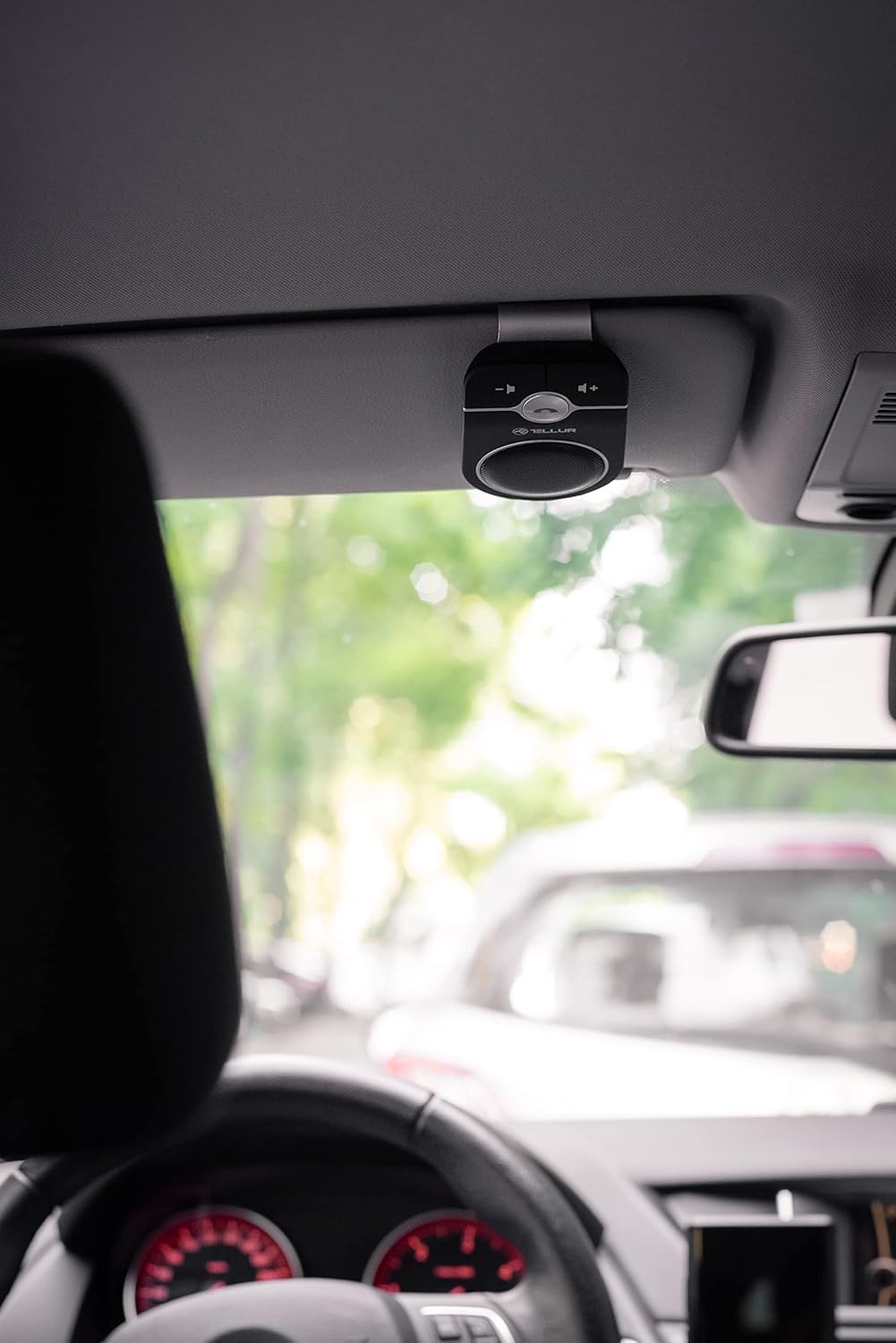
This image demonstrates the typical mounting position on a car's sun visor, providing convenient access and optimal microphone placement.
3.3 Bluetooth жупташтыруу
- Ensure the TELLUR CK-B1 is powered on. If it's off, open/close the car door or tap the device to activate the motion sensor and power it on.
- On your smartphone, navigate to the Bluetooth settings and enable Bluetooth.
- Издөө available devices. The TELLUR CK-B1 will appear as 'TELLUR CK-B1' or similar.
- Select the device name to initiate pairing. A voice prompt will confirm successful connection.
- If prompted, enter '0000' as the PIN.

This image shows a smartphone displaying the Bluetooth pairing prompt, confirming the device is discoverable and ready for connection.
Көп чекиттүү туташуу: The device supports connecting to two smartphones simultaneously. After pairing the first phone, disable its Bluetooth, then pair the second phone. Re-enable Bluetooth on the first phone, and both devices should connect automatically.
4. Иштөө нускамалары
4.1 Кубатты КҮЙГҮЗҮҮ/ӨЧҮРҮҮ
- Кол менен күйгүзүү/өчүрүү: Use the physical ON/OFF switch located on the side of the device.
- Автоматтык күйгүзүү: The built-in vibration sensor will automatically power on the device when it detects motion, such as opening a car door.
- Автоматтык түрдө өчүрүү: The device will automatically power off if it is not used for 5 minutes or if it moves more than 10 meters away from the paired smartphone.
4.2 Чалууларды башкаруу
- Чакырууга жооп берүү: Көп функциялуу баскычты бир жолу басыңыз.
- Чакырууну четке кагуу: Көп функциялуу баскычты 2 секунд басып туруңуз.
- Чакырууну аяктоо: Чалуу учурунда көп функциялуу баскычты бир жолу басыңыз.
- Акыркы номерди кайра терүү: Көп функциялуу баскычты эки жолу басыңыз.
- Чалууну телефонго которуу: During a call, press and hold the multifunction button for 2 seconds to transfer the call to your phone. Repeat to transfer back to the car kit.

This image illustrates the ease of access and interaction with the main control button while the device is mounted in the car.
4.3 Үндү башкаруу
Use the volume up (+) and volume down (-) buttons located on the device to adjust the call and media volume.
4.4 Үн менен башкаруу (Siri/Google Жардамчысы)
The TELLUR CK-B1 supports voice assistant activation. Press and hold the multifunction button for approximately 3 seconds to activate Siri, Google Assistant, or Samsung Bixby on your paired smartphone. You can then use voice commands for navigation, music playback, making calls, and more.

This image depicts a driver using voice commands, highlighting the hands-free operation and integration with smart assistants.
4.5 Медиа ойнотуу
The car kit can stream audio from your smartphone, including music, podcasts, and GPS directions, through its built-in speaker.
4.6 Тилди алмаштыруу
To switch the voice prompt language, long-press the left small round button (MUTE Button) on the device. The device supports English, German, French, Italian, Spanish, Japanese, and Chinese.
5. Техникалык тейлөө
- Тазалоо: Түзмөктү тазалоо үчүн жумшак, кургак чүпүрөктү колдонуңуз. Катуу химиялык заттарды же абразивдүү материалдарды колдонуудан алыс болуңуз.
- Сактагыч: Аппаратты түз күн нурунан жана экстремалдык температурадан алыс салкын, кургак жерде сактаңыз.
- Батареяга кам көрүү: Батареянын иштөө мөөнөтүн узартуу үчүн, бат-баттан батарейканы толук зарядсыздандырбаңыз. Аппаратты узак убакыт бою колдонбосо дагы, үзгүлтүксүз заряддаңыз.
- Суудан качуу: The device is not waterproof. Keep it away from liquids.
6. Кыйынчылыктарды
- Түзмөк күйбөй жатат:
- Ensure the battery is charged. Connect it to a power source.
- If using auto power-on, ensure there is sufficient motion (e.g., opening a car door or tapping the device). - Смартфон менен жупташуу мүмкүн эмес:
- Ensure the car kit is in pairing mode (usually indicated by a flashing LED).
- Make sure Bluetooth is enabled on your smartphone.
- Move the car kit closer to your smartphone.
- Try restarting both the car kit and your smartphone.
- If you manually disconnected the device from your mobile, it will not reconnect automatically next time. You will need to manually reconnect it from your phone's Bluetooth settings. - No sound during calls/media:
- Check the volume levels on both the car kit and your smartphone.
- Ensure the car kit is properly connected to your smartphone via Bluetooth.
- Verify that the audio output is directed to the car kit on your phone. - Чалуу сапаты начар:
- Ensure the microphone is not obstructed.
- Move away from sources of strong electromagnetic interference.
- Check if the noise cancellation feature is active. - Auto power-off too quickly/not turning on automatically:
- The motion sensor requires a certain level of vibration to activate. Ensure the device is securely mounted and that there is sufficient motion when you enter the car.
7. Техникалык шарттар
| Бренд | TELLUR |
| Модель аты | CK-B1 |
| Элемент моделинин номери | TL622061 |
| Продукциянын өлчөмдөрү | 10.9 x 6.7 x 2 см |
| Элемент Салмагы | 180 г |
| Байланыш технологиясы | Bluetooth 5.0 + EDR |
| Bluetooth Pro колдоого алынатfiles | HSP, HFP, DSP, A2DP, AVRCP |
| Өзгөчөлүктөр | Noise Cancellation, Echo Cancellation, Voice Control (Siri, Google Assistant), Multipoint Connection, Auto Power ON/OFF Motion Sensor |
| Шайкеш түзмөктөр | Car Stereo System, Laptop, Smartphone, Tablet |
| Аудио киргизүү | Микрофон |
| Аудио чыгаруу режими | Стерео |
| Аудио чыгаруу түрү | Баяндамачы |
| Power Source | Батарея менен иштейт |
| Батарея түрү | Литий Полимер (1 камтылган) |
| Тtage | 3.7 вольт |
| Материал | Пластик |
| Монтаж түрү | Dashboard Mount (typically used on sun visor) |
| Колдоого алынган медиа түрлөрү | MP3, WAV, AAC, FLAC |
8. Кепилдик жана колдоо
For warranty information and customer support, please refer to the documentation provided with your purchase or visit the official TELLUR webсайт. Кепилдик дооматтар үчүн сатып алганыңыздын далилин сактаңыз.
If you encounter any issues not covered in this manual, please contact TELLUR customer service or your retailer for assistance.


