1. Коопсуздук боюнча маанилүү маалымат
Please read this entire manual carefully before assembling or operating the Tunturi T20 Treadmill. Retain this manual for future reference.
- Кандайдыр бир көнүгүү программасын баштоодон мурун ар дайым дарыгер менен кеңешиңиз.
- This equipment is intended for home use only.
- Иш учурунда балдарды жана үй жаныбарларын чуркоо жолунан алыс кармаңыз.
- Чуркоо жолун тегиз, туруктуу бетке коюп, айланасында жетиштүү боштук бар экенин текшериңиз.
- Тийиштүү көнүгүү кийимин жана спорттук бут кийимди кийиңиз.
- Use the safety key at all times. In an emergency, pulling the safety key will immediately stop the treadmill.
- Эгер чуркоо жолу бузулса же иштебей калса, аны иштетпеңиз.
- Колдонуучунун максималдуу салмагы: 120 кг (264 фунт).
2. Орнотуу жана чогултуу
2.1 Пакеттен чыгаруу
Carefully remove all components from the packaging. Verify that all parts listed in the 'Included Components' section (see Specifications) are present. Keep packaging materials until assembly is complete.
2.2 Ассамблея
The Tunturi T20 treadmill requires some assembly. Follow the detailed instructions provided in the separate assembly guide included with your product. Ensure all bolts and nuts are securely tightened before use.
2.3 Жайгаштыруу жана Power Connection
Place the treadmill on a level surface, ensuring at least 2 meters (6.5 feet) of clear space behind it and 0.5 meters (1.6 feet) on each side. Connect the power cord to a grounded electrical outlet. Ensure the power switch is in the OFF position before plugging in.

Сүрөт: Demonstrating the folding mechanism of the Tunturi T20 treadmill. The treadmill can be folded vertically for compact storage, making it suitable for home environments with limited space.
3. Иштөө нускамалары
3.1 Күйгүзүү/өчүрүү
To power on, plug in the treadmill and flip the main power switch located near the front base to the 'ON' position. The console display will illuminate. To power off, flip the switch to 'OFF' and unplug the unit.
3.2 Console Overview

Сүрөт: The Tunturi T20 treadmill console. This display shows key workout metrics such as time, distance, incline level, and current speed. It also features a visual 400-meter track and indicators for Bluetooth and heart rate connectivity.
The console features an LED or LCD display showing time, distance, incline, calories burned, and steps. Control buttons for speed, incline, program selection, start, stop, and mode are located below the display.
3.3 Коопсуздук ачкычы
Attach the safety key clip to your clothing before starting any workout. Insert the magnetic end of the safety key into the designated slot on the console. The treadmill will not operate without the safety key in place. Removing the safety key will immediately stop the treadmill.
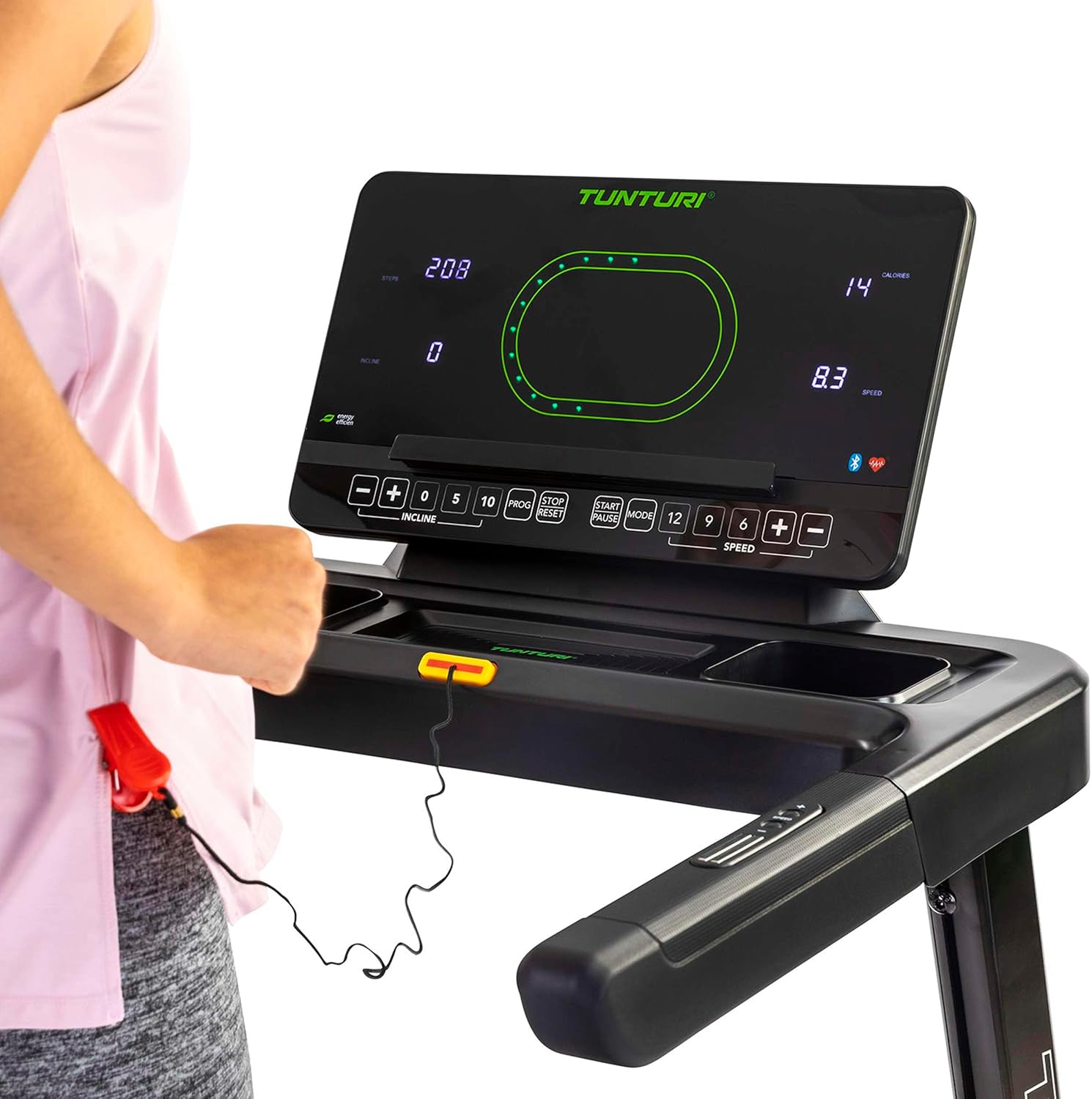
Сүрөт: Close-up of the Tunturi T20 console, showing the red safety key attached. The safety key is a crucial safety feature that must be engaged for the treadmill to operate.
3.4 Машыгууну баштоо
- Ensure the safety key is properly inserted and clipped to your clothing.
- Чуркоо жолунда капталдагы рельстерге чык.
- 'БАШТОО' баскычын басыңыз. Кур жай ылдамдыкта кыймылдай баштайт.
- Carefully step onto the moving belt and adjust your speed using the '+' and '-' buttons or quick speed buttons (e.g., 5, 10 km/h).
3.5 Ылдамдыкты жана жантайыңкылыкты жөндөө
- Ылдамдыгы: Use the 'SPEED +' and '-' buttons to increase or decrease the belt speed. Quick speed buttons (e.g., 5, 10, 12 km/h) allow for rapid adjustments. The maximum speed is 16 km/h.
- Жантайма: Use the 'INCLINE +' and '-' buttons to adjust the electronic incline level. The treadmill offers 12 incline options. Quick incline buttons (e.g., 0, 5, 10) are also available.
3.6 Окуу программалары
The Tunturi T20 offers 47 pre-set training programs. To select a program, press the 'PROG' button repeatedly until your desired program number is displayed. Follow the on-screen prompts to start the program. Each program automatically adjusts speed and incline according to its profile.
3.7 Bluetooth байланышы жана колдонмолору
The treadmill features Bluetooth connectivity, allowing you to connect to various fitness applications for an enhanced training experience.
- Тунтури маршруттары: Connect to the Tunturi Routes app to experience virtual routes from around the world. The treadmill automatically adjusts incline to match the terrain of the chosen route.
- AnyRun & Kinomap: The treadmill is also compatible with AnyRun and Kinomap applications, offering additional training videos and interactive experiences.

Сүрөт: A tablet displaying the Tunturi Routes application on the treadmill console. This illustrates the integration of smart fitness apps with the Tunturi T20 for interactive workouts.

Сүрөт: A user interacting with the Tunturi Routes app on a tablet mounted on the treadmill console. This demonstrates the ease of controlling and monitoring virtual routes during a workout.
3.8 Жүрөктүн кагышын көзөмөлдөө
The Tunturi T20 treadmill supports heart rate monitoring, typically via a compatible chest strap (not always included, check product contents). Connect your chest strap via Bluetooth to the treadmill console to display your heart rate during your workout.
3.9 Машыгууну токтотуу
To stop the treadmill, press the 'STOP' button. The belt will gradually slow down and come to a complete stop. Alternatively, pull the safety key to immediately stop the treadmill in an emergency.
4. Техникалык тейлөө
Regular maintenance ensures the longevity and safe operation of your Tunturi T20 Treadmill.
- Тазалоо: Жарнак менен ар бир колдонуудан кийин чуркоо тилкесин сүртүңүзamp терди жана чаңды тазалоо үчүн кездеме. Абразивдүү тазалагычтарды колдонбоңуз.
- Майлоо: The running belt requires periodic lubrication. Refer to the separate lubrication instructions provided with the included lubrication tool. Frequency depends on usage.
- Белди жөндөө: Over time, the running belt may become misaligned or loose. Consult the assembly guide for instructions on how to adjust the belt tension and centering.
- Текшерүү: Бардык болтторду, гайкаларды жана кыймылдуу бөлүктөрүнүн бекемдигин жана эскиргендигин үзгүлтүксүз текшерип туруңуз. Бош бекиткичтерди бекемдеңиз.
5. Кыйынчылыктарды
If you encounter issues with your Tunturi T20 Treadmill, refer to the following common solutions:
- Чуркоо жолу башталбай жатат:
- Электр шнурунун жерге туташтырылган розеткага бекем сайылганын текшериңиз.
- Негизги кубат которгучу "КҮЙҮК" абалында экенин текшериңиз.
- Коопсуздук ачкычы консолго туура киргизилгенин текшериңиз.
- Курдун тайгаланып кетиши же тартынышы:
- The running belt may require tension adjustment. Refer to the maintenance section or assembly guide.
- The belt may need lubrication. Follow the lubrication instructions.
- адаттан тыш үндөр:
- Кошулбаган компоненттерди текшерип, керек болсо бекемдеңиз.
- Чуркоо жолу тегиз жерде экенине ынаныңыз.
- Lubricate the running belt if a squeaking noise is heard from the belt area.
- Console Display Not Working:
- Бардык кубат туташуулары коопсуз экенин текшериңиз.
- Эгер көйгөй чечилбесе, кардарларды колдоо менен байланышыңыз.
For issues not covered here, please contact Tunturi customer support.
6. Продукттун спецификациялары
| Өзгөчөлүк | Спецификация |
|---|---|
| Модел | T20 (22TRN20000) |
| Бренд | Тунтури |
| Мотор кубаты | 1.5 HP |
| Ылдамдык диапазону | 1 - 16 км/саат |
| Эңкейүү параметрлери | 12 (Electronic Adjustment) |
| Окутуу программалары | 47 |
| Running Surface | 125 x 45 см |
| Колдонуучунун максималдуу салмагы | 120 кг |
| Чогултулган өлчөмдөр (L x W x Y) | 155 x 74 x 137 см |
| Бүктөлгөн өлчөмдөрү (L x W x Y) | 87 x 74 x 139 см |
| Продукт Салмагы | 62 кг |
| Frame Material | Эритме болот |
| Дисплей түрү | LED же LCD |
| Байланыш | Bluetooth (Tunturi Routes, AnyRun, Kinomap compatible) |
| Камтылган компоненттер | Treadmill base, Motor housing, Safety key, Power cord, User manual, Assembly hardware, Lubrication tool, Remote control, Warranty documentation |
7. Кепилдик жана колдоо
Your Tunturi T20 Treadmill comes with a manufacturer's warranty. Please refer to the separate warranty documentation included with your product for details on coverage, terms, and conditions.
For technical support, spare parts, or any questions regarding your treadmill, please contact Tunturi customer service. Contact information can typically be found on the warranty documentation or the official Tunturi webсайт.