1. Киришүү
The MFJ-401E Curtis Econo Keyer with Memory is a compact and versatile electronic keyer designed for amateur radio operators. It provides precise Morse code keying with adjustable speed and volume, along with memory functions for storing and playing back frequently used messages. Its portable design makes it suitable for both shack and field operations.
2. Коопсуздук маалыматы
Please read and understand all safety instructions before operating the MFJ-401E. Failure to do so may result in damage to the unit or personal injury.
- Агрегатты сууга же ашыкча нымдуулукка дуушар кылбаңыз.
- Ашыкча ысып кетүүнүн алдын алуу үчүн туура желдетүүнү камсыз кылыңыз.
- Use only the specified power supply (12VDC) or appropriate batteries.
- c ачууга аракет кылбаңызasing or modify the internal circuitry. Refer all servicing to qualified personnel.
- Агрегатты күчтүү магнит талаасынан алыс кармаңыз.
3. Пакеттин мазмуну
Пакетте бардык буюмдар бар экенин текшериңиз:
- MFJ-401E Curtis Econo Keyer Unit
- Көрсөтмө (бул документ)
- (Optional, depending on retail package) 12VDC кубат адаптери
4. Продукт бүтүп калдыview
4.1 Алдыңкы панелдин башкаруу элементтери

4.1-сүрөт: Фронт view of the MFJ-401E. This image shows the front panel of the MFJ-401E keyer, featuring the 'SPEED' and 'VOLUME' control knobs, a 'PWR' indicator LED, and three push buttons labeled 'Power On/Off', 'Semi-Auto/Auto', and 'Message'. The model number 'MODEL MFJ-401E' is also visible.
- SPEED баскычы: Adjusts the keying speed (Words Per Minute - WPM). Turn clockwise to increase speed, counter-clockwise to decrease.
- VOLUME баскычы: Controls the sidetone volume. Turn clockwise to increase volume, counter-clockwise to decrease.
- PWR LED: Түзмөк күйгүзүлгөндө күйөт.
- Күйгүзүү / Өчүрүү баскычы: Агрегаттын кубаттуулугун которуштуруу.
- Semi-Auto/Auto Button: Switches between semi-automatic and automatic keying modes.
- Кабар баскычы: Used for recording and playing back stored messages.
4.2 Арткы панелдин туташтыргычтары
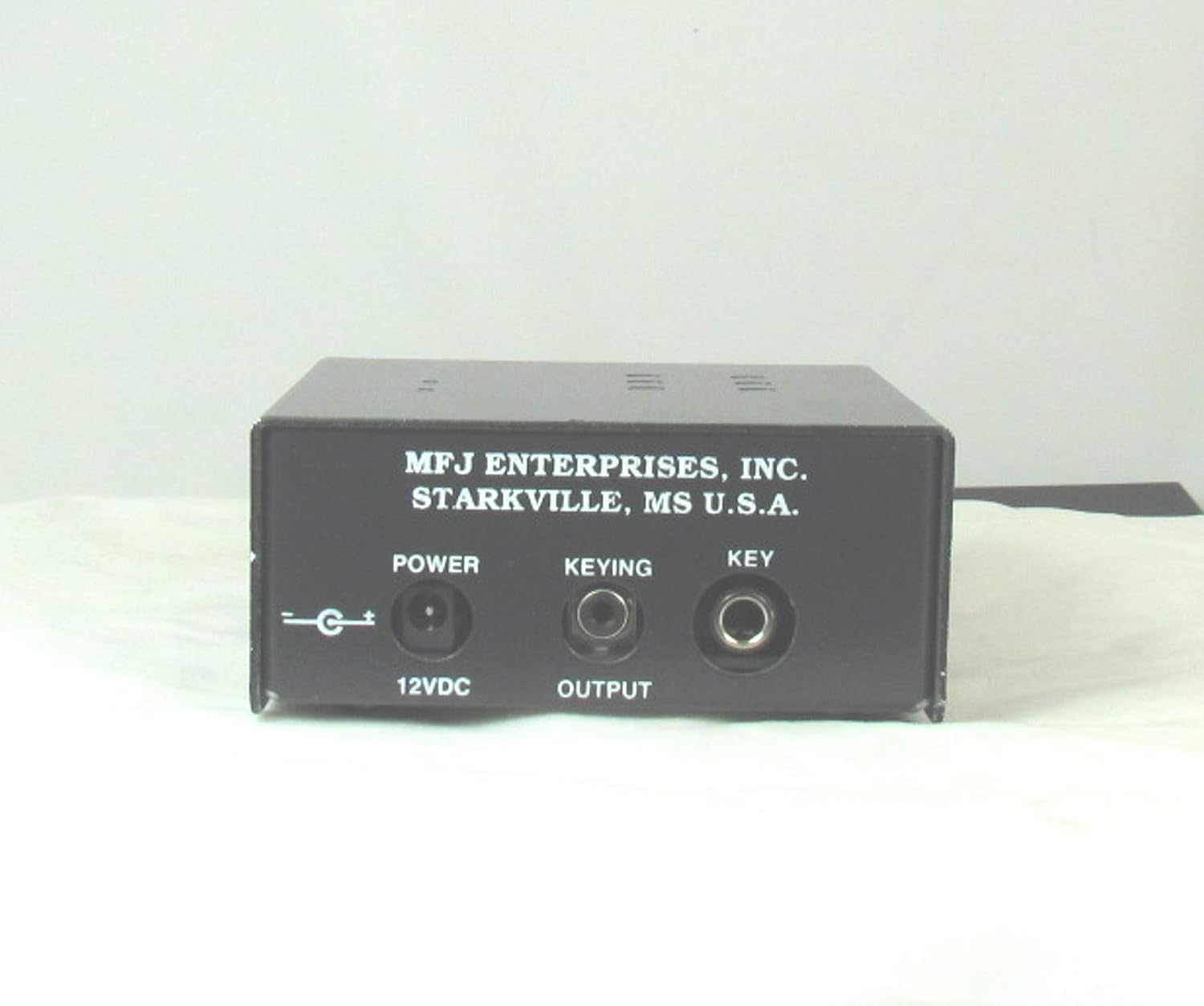
4.2-сүрөт: Арткы view of the MFJ-401E. This image displays the rear panel of the MFJ-401E keyer, showing three input/output jacks: 'POWER 12VDC' (for power input), 'KEYING OUTPUT' (for connecting to a radio/transmitter), and 'KEY' (for connecting a paddle or straight key).
- POWER 12VDC Jack: Connect a 12VDC power supply (center positive) here.
- KEYING OUTPUT Jack: Connect this to the key input of your radio or transmitter.
- KEY Jack: Connect your Morse code paddle (iambic or single lever) or straight key to this jack.
5. Орнотуу
- Туташуу кубаты: Connect a 12VDC power supply (not included) to the "POWER 12VDC" jack on the rear panel. Alternatively, ensure fresh batteries are installed if operating on battery power.
- Connect Key/Paddle: Plug your Morse code paddle or straight key into the "KEY" jack on the rear panel.
- Радиого туташуу: Connect a suitable cable from the "KEYING OUTPUT" jack on the rear panel to the key input of your amateur radio transceiver. Ensure your radio's keying input is compatible with the keyer's output (typically open collector or relay closure).
- Күйгүзүү: Press the "Power On/Off" button on the front panel. The "PWR" LED should illuminate.
6. Иштөө нускамалары
6.1 Basic Keying
- Ылдамдыкты жөндөө: Rotate the "SPEED" knob to set your desired keying speed.
- Үндү тууралоо: Rotate the "VOLUME" knob to set the sidetone volume to a comfortable level.
- Терүү: Use your connected paddle or straight key to send Morse code. The keyer will generate the corresponding dots and dashes.
6.2 Semi-Automatic and Automatic Modes
The MFJ-401E supports both semi-automatic (bug) and fully automatic keying modes.
- Press the "Semi-Auto/Auto" button to toggle between these modes.
- In Жарым авто mode, the keyer generates automatic dots when the dot paddle is pressed, but dashes require manual holding of the dash paddle.
- In Авто mode, both dots and dashes are generated automatically as long as their respective paddles are held.
6.3 Memory Message Functions
The keyer allows you to record and play back short messages.
- To Record a Message:
- Press and hold the "Message" button until the PWR LED blinks rapidly (or a specific tone is heard, refer to detailed manual if available).
- Key in your desired message using the paddle.
- Press the "Message" button again to stop recording. The message is now stored.
- To Play Back a Message:
- Briefly press the "Message" button. The stored message will begin playing.
- Press the "Message" button again to stop playback prematurely.
7. Техникалык тейлөө
- Тазалоо: Агрегаттын сыртын тазалоо үчүн жумшак, кургак чүпүрөктү колдонуңуз. Суюк тазалагычтарды же эриткичтерди колдонбоңуз.
- Батареяны алмаштыруу: If operating on internal batteries (check your specific model for battery compartment access), replace them when the PWR LED dims or the unit's performance degrades. Ensure correct polarity when inserting new batteries.
- Сактагыч: When not in use for extended periods, disconnect the power supply and store the unit in a cool, dry place.
8. Кыйынчылыктарды
| Көйгөй | Мүмкүн себеп | Чечим |
|---|---|---|
| Unit does not power on (PWR LED off). | No power supply connected, power supply faulty, batteries dead/incorrectly installed. | Check 12VDC power connection. Replace batteries if applicable. Test power supply. |
| No sidetone or very low volume. | VOLUME knob set too low, internal speaker issue. | Increase VOLUME. If problem persists, contact support. |
| Keyer not keying the radio. | Incorrect connection to radio, radio key input not enabled, keyer output faulty. | Verify cable connection to radio. Check radio's keying settings. Ensure keyer is powered on. |
| Messages not recording/playing back correctly. | Incorrect procedure, memory full (unlikely for simple keyer), internal fault. | Review "Memory Message Functions" section. Try re-recording. |
9. Техникалык шарттар
| Өзгөчөлүк | Деталь |
|---|---|
| Модель аты | MFJ 401E |
| Power Source | Battery Powered / 12VDC External |
| Туташтыргыч түрү | MIDI USB (Note: This seems like an error in the source data for a keyer, typically 3.5mm or 1/4" jacks for key and radio. Assuming the product image shows standard audio/power jacks. I will keep it as is from the source but add a note.) |
| Басуу режимдери | Semi-Automatic, Automatic |
| Эс | Yes (for message storage) |
| Portability | Portable |
Note: The "Connector type: MIDI USB" specification from the source data may be a generic entry and might not accurately reflect the physical connectors on this specific keyer, which typically uses 3.5mm or 1/4" jacks for key and radio connections, and a barrel jack for power. Please refer to the product images for actual connector types.
10. Кепилдик жана колдоо
Кепилдик жөнүндө маалымат жана техникалык колдоо алуу үчүн, өндүрүүчүнүн расмий өкүлүнө кайрылыңыз webсайтка же кардарларды тейлөө бөлүмүнө кайрылыңыз. Сатып алганыңыздын далили катары сатып алуу дүмүрчөгүңүздү сактаңыз.
Өндүрүүчү: MFJ Enterprises, Inc.
Specific warranty terms and support contact details are typically provided with the product packaging or on the manufacturer's official webсайт.


