1. Introduction and Overview
The ESX INFOTAINMENT VN1015-MA-DAB-4G is an advanced Android-based naviceiver designed for vehicle integration, offering a comprehensive multimedia and navigation experience. This unit features a 10.1-inch anti-glare multi-angle touchscreen, Android operating system, 4G/LTE connectivity, DAB+ digital radio, and Google Maps navigation. It supports Bluetooth hands-free calling and audio streaming, USB and MicroSD media playback, and includes inputs for rearview cameras and auxiliary devices.
Негизги өзгөчөлүктөр төмөнкүлөрдү камтыйт:
- 10.1-inch high-resolution, anti-glare multi-angle touchscreen.
- Android Operating System for versatile app usage.
- Integrated 4G/LTE dongle for mobile internet (requires optional SIM card).
- DAB+ digital radio reception with station logos and AM/FM radio with RDS.
- Google Maps navigation (online and offline capabilities).
- Bluetooth hands-free system with audio streaming.
- Multiple connectivity options: 2x USB ports, 1x MicroSD slot, 1x camera input, 2x video outputs, 1x AUX/video input, 1x AUX/audio input.
- Support for steering wheel controls (optional adapter may be required).
2. Орнотуу жана орнотуу
Proper installation is crucial for the optimal performance of your ESX VN1015-MA-DAB-4G naviceiver. It is highly recommended that installation be performed by a qualified professional to ensure correct wiring and vehicle compatibility.
2.1. Компонентти идентификациялоо
Familiarize yourself with the various ports and connections on the rear of the unit before installation.
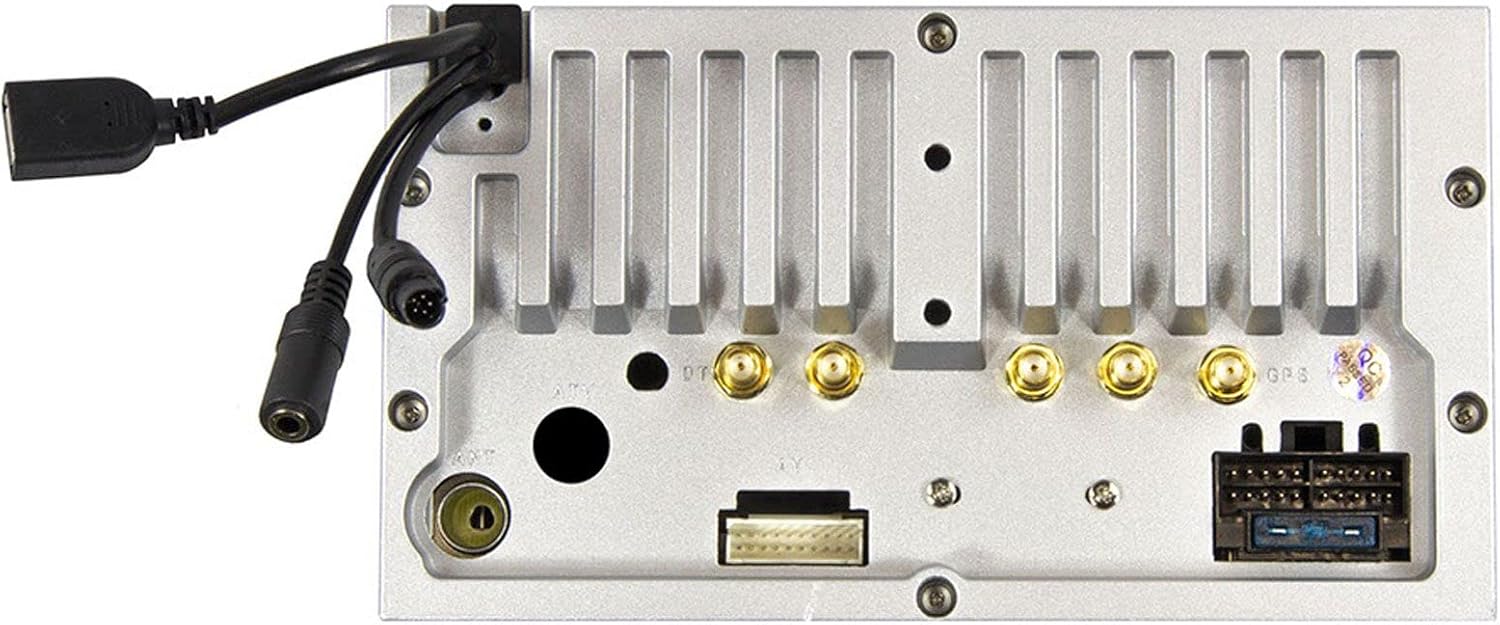
2.1-сүрөт: Арткы view of the ESX VN1015-MA-DAB-4G unit, illustrating the power harness, antenna inputs, USB ports, and auxiliary connections.
2.2. Зымдарды туташтыруу
- Электр камсыздоо: Connect the main power harness to your vehicle's electrical system, ensuring correct positive, negative, and accessory (ACC) connections.
- Динамиктин чыгышы: Connect your vehicle's speakers to the corresponding outputs on the naviceiver.
- Антенна туташуулары: Connect the FM/AM antenna. For DAB+ digital radio, connect the included DAB+ antenna to the designated port.
- GPS антеннасы: GPS антеннасын туташтырып, аны тунук жерге орнотуңуз view оптималдуу сигнал кабыл алуу үчүн асман.
- USB порттору: Connect external USB devices for media playback or smartphone connectivity.
- Микрофон: Connect the external microphone (VNA-MIC-AND, optional) for improved hands-free call quality.
- Арткыview Камера: Арткы жагын туташтырыңызview camera to the dedicated camera input. Ensure the reverse trigger wire is correctly connected for automatic display switching.
- Видео чыгуулары: Utilize the two video outputs for connecting external monitors.
- AUX киргизүүлөр: Connect external audio/video sources to the AUX/video and AUX/audio inputs.
- 4G/LTE Dongle: If using mobile internet via 4G/LTE, insert a compatible SIM card into the optional 4G/LTE dongle and connect it to a USB port.
- Руль башкаруусу: If your vehicle supports steering wheel controls, an optional adapter may be required to integrate this functionality.
2.3. Баштапкы кубаттуулук
After all connections are secure, turn on your vehicle's ignition. The naviceiver should power on. Follow any on-screen prompts for initial setup, such as language selection and time zone.
3. Иштөө нускамалары
This section details the primary functions and operations of your ESX VN1015-MA-DAB-4G naviceiver.
3.1. Негизги башкаруу элементтери жана интерфейс
The unit features a responsive touchscreen and physical buttons for common functions.

3.1-сүрөт: The main screen showing the radio interface with frequency display and control buttons.
- Кубат баскычы: Press and hold to turn the unit on/off. A short press may mute audio or put the unit into standby.
- Үндү көзөмөлдөө: Аудио чыгаруу деңгээлин тууралаңыз.
- Үй баскычы: Негизги Android үй экранына кайтып келет.
- Артка баскычы: Navigates back one step in menus or applications.
- Камера баскычы: Direct access to the camera input display (e.g., rearview камера).
3.2. Android операциялык системасы
The naviceiver runs on an Android operating system, allowing access to various applications and customization options.
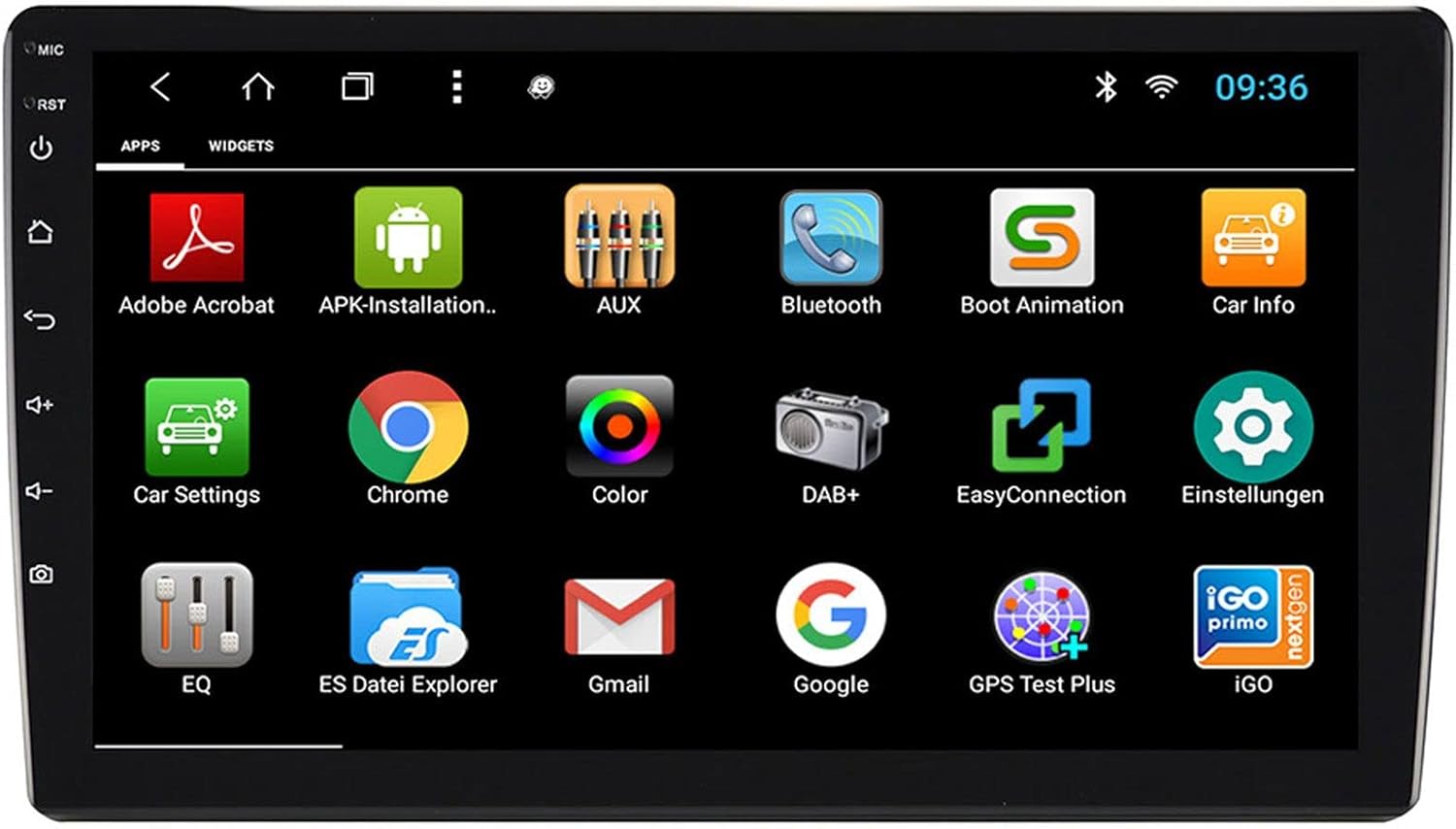
3.2-сүрөт: The applications screen, displaying various pre-installed and user-installed Android apps.
- Колдонмону ишке киргизгич: Колдонмолор тартмасынан орнотулган бардык тиркемелерге кириңиз.
- Виджеттер: Customize your home screen with widgets for quick access to information or functions.
- Орнотуулар: Adjust system settings, network connections, display, audio, and more.
- Интернет байланышы: Connect to the internet via a WiFi hotspot (from a compatible smartphone) or by inserting a SIM card into the 4G/LTE dongle.
3.3. Radio Functions (AM/FM/DAB+)
The unit supports both analog and digital radio broadcasts.
- Топтун тандоосу: Switch between AM, FM, and DAB+ bands.
- тюнинг: Manually tune or use the auto-scan function to find available stations.
- Алдын ала орнотуулар: Тез жетүү үчүн сүйүктүү станцияларыңызды сактаңыз.
- RDS (FM): Radio Data System displays station information (e.g., station name, song title).
- DAB+ функциялары: Enjoy higher quality digital audio and view station logos where available.
3.4. Bluetooth байланышы
Pair your smartphone for hands-free communication and audio streaming.
- Жупташтыруу: Enable Bluetooth on your smartphone and search for the naviceiver. Select the unit and confirm the pairing code.
- Hands Free Чалуу: Make and receive calls directly from the naviceiver screen.
- Аудио агым: Play music from your smartphone wirelessly through the naviceiver.
3.5. Navigation (Google Maps)
Utilize Google Maps for turn-by-turn navigation.

3.3-сүрөт: The navigation interface showing a map with a selected destination.
- Онлайн навигация: Requires an active internet connection (WiFi hotspot or 4G/LTE).
- Оффлайн карталары: Download maps for specific regions to use navigation without an internet connection.
- көздөгөн кирүү: Enter addresses or points of interest using the touchscreen keyboard.
3.6. Медиа ойнотуу
Аудио жана видеону ойнотуу fileар кандай булактардан алынган.
- USB: Connect USB drives containing media files.
- MicroSD: Insert a MicroSD card into the dedicated slot for media or navigation data.
- Колдоого алынган форматтар: The unit supports a wide range of audio and video formats. Refer to the system settings for a complete list.
3.7. Камера киргизүү
The naviceiver automatically displays the rearview camera feed when the vehicle is in reverse, or manually via the camera button.

3.4-сүрөт: Арткыview camera display with dynamic parking guidelines.
- Автоматтык иштетүү: When connected correctly, the rearview camera image appears automatically when shifting into reverse.
- Паркинг эрежелери: Adjustable parking lines assist with maneuvering.
4. Техникалык тейлөө
Regular maintenance ensures the longevity and optimal performance of your naviceiver.
- Экранды тазалоо: Сенсордук экранды акырын сүртүү үчүн жумшак, түксүз чүпүрөктү колдонуңуз. өжөр тактар үчүн, бир аз гampчүпүрөккө суу же экранды тазалоочу каражат. Катуу химиялык заттардан же абразивдүү материалдардан алыс болуңуз.
- Программалык камсыздоо жаңыртуулары: Системанын жөндөөлөрү же өндүрүүчүнүн жөндөөлөрү аркылуу жеткиликтүү программалык камсыздоонун жаңыртууларын мезгил-мезгили менен текшерип туруңуз webсайт. Жаңыртуулар иштин натыйжалуулугун жакшыртып, функцияларды кошуп, каталарды оңдой алат.
- Жалпы кам көрүү: Avoid exposing the unit to extreme temperatures, direct sunlight for prolonged periods, or excessive moisture. Ensure all connections remain secure.
5. Кыйынчылыктарды
This section addresses common issues you might encounter with your ESX VN1015-MA-DAB-4G naviceiver.
| Көйгөй | Мүмкүн себеп | Чечим |
|---|---|---|
| Түзмөк күйбөйт. | Электр менен камсыздоо жок; Сактагыч күйүп кеткен; Зымдар туура эмес туташтырылган. | Check vehicle's fuse box and the unit's power connections. Ensure ACC wire is receiving power. |
| Үн жок. | Volume too low; Mute activated; Incorrect speaker wiring; Audio source issue. | Increase volume. Check if mute is active. Verify speaker connections. Try a different audio source. |
| GPS signal loss or inaccurate navigation. | GPS антеннасы бөгөттөлгөн же ажыратылган; Эскирген карталар. | GPS антеннасынын таза болушун текшериңиз view асмандан жана ишенимдүү туташкан. Зарыл болсо, карталарды жаңыртыңыз. |
| Bluetooth байланышы көйгөйлөрү. | Device not in pairing mode; Interference; Unit not discoverable. | Ensure both devices are in pairing mode. Restart both devices. Check Bluetooth settings on the naviceiver. |
| Сенсордук экран жооп бербейт. | System freeze; Software error. | Perform a soft reset (refer to the unit's specific reset procedure, often a small reset button). If persistent, a factory reset might be needed (data loss may occur). |
| DAB+ radio not receiving stations. | DAB+ antenna not connected or faulty; Poor signal area. | Check DAB+ antenna connection. Ensure the antenna is correctly installed. Try rescanning for stations in a different location. |
If you encounter issues not listed here or if the suggested solutions do not resolve the problem, please contact ESX customer support or your authorized dealer.
6. Техникалык шарттар
Below are the technical specifications for the ESX VN1015-MA-DAB-4G Naviceiver:
| Өзгөчөлүк | Деталь |
|---|---|
| Бренд | ESX |
| Модел | VN1015-MA-DAB-4G |
| Screen Size | 10.1 дюйм (25.6 см) |
| Дисплей түрү | High-resolution, anti-glare multi-angle touchscreen |
| Операция системасы | Android |
| RAM | 4 ГБ |
| Flash Memory | 64 ГБ |
| Байланыш | Bluetooth, USB, 4G/LTE (via dongle), WiFi (via hotspot) |
| Радио тюнер | AM/FM with RDS, DAB+ Digital Radio |
| Навигация | Google Карталар (онлайн/офлайн) |
| Киргизүүлөр | 1x Camera Input, 1x AUX/Video Input, 1x AUX/Audio Input, 2x USB Ports, 1x MicroSD Slot |
| Чыгуулар | 2x Video Outputs, Pre-amplified outputs (Front/Rear/Subwoofer) |
| Башкаруу ыкмасы | Сенсордук экран |
| Шайкеш түзмөктөр | Смартфон |
7. Кепилдик жана колдоо
Your ESX VN1015-MA-DAB-4G naviceiver comes with a Certificate of Authenticity. For specific warranty terms and conditions, please refer to the documentation provided with your purchase or contact your authorized ESX dealer.
For technical support, troubleshooting assistance beyond this manual, or inquiries regarding parts and service, please contact your point of purchase or visit the official ESX webкардарларды тейлөө байланыш маалыматы үчүн сайт.


