1. Киришүү
This manual provides detailed instructions for the installation, operation, and maintenance of your PLZ Wireless Double Din 7" Car Stereo. Please read this manual thoroughly before using the product to ensure proper functionality and safety. This car stereo features wireless Apple CarPlay and Android Auto, a QLED touch screen, Bluetooth 5.3, and support for a backup camera, enhancing your in-car entertainment and navigation experience.

Figure 1.1: PLZ Wireless Double Din 7" Car Stereo
2. Продукциянын өзгөчөлүктөрү
- Зымсыз Apple CarPlay & Android Auto: Seamlessly integrate your smartphone for navigation, music, calls, and more, all wirelessly.
- Upgraded QLED Touch Screen: Experience unparalleled color accuracy, brightness, and contrast with a 1280 x 720 pixel resolution, supporting up to 1920 x 1080P content.
- Enhanced Bluetooth 5.3 & Dual Microphone: Enjoy stable, high-quality hands-free calling and audio streaming with improved transmission efficiency and reduced static noise.
- 4.2 каналдык чыгаруу: Supports front, rear, and two high RMS power subwoofer outputs for outstanding sound quality and powerful bass.
- Рулду башкаруу (SWC) колдоосу: Control various functions directly from your steering wheel for enhanced convenience and safety.
- 1080P Backup Camera Included: ачык-айкын камсыз кылат view for safe reversing, with support for an optional front camera.
2.1 Зымсыз байланыш
The stereo supports wireless Apple CarPlay and Android Auto, allowing for automatic phone connection upon vehicle startup. This enables access to navigation apps, music streaming, and voice assistants like Siri or Google Assistant.

2.1-сүрөт: Wireless CarPlay жана Android Auto Interface
2.2 QLED Display Technology
The QLED display offers superior visual clarity and vibrant colors compared to standard screens, with a resolution of 1280x720 pixels for sharp imagery.

Figure 2.2: HD QLED Touch Screen Visuals
2.3 Аудио системасы
Equipped with a built-in DSP, 4.2 channel pre-amplifier, and support for two high-power subwoofers, this unit delivers rich and customizable audio. A 10-band EQ allows for fine-tuning of sound preferences.

Figure 2.3: Built-in DSP and Audio Outputs
2.4 Камераны колдоо
The included 1080P backup camera provides a wide 170-degree viewing angle, high definition, and night vision capabilities, making parking and reversing safer. It is also waterproof for durability.

Figure 2.4: Backup Camera Functionality
3. Пакеттин мазмуну
Пакетти ачкандан кийин, төмөндө көрсөтүлгөн нерселердин бардыгы бар экенин жана жакшы абалда экендигин текшериңиз:

3.1-сүрөт: Пакеттердин тизмеси
- Head Unit (Car Stereo)
- Frame (x2, various sizes for fitment)
- Арткы View Камера
- Камера кабели
- Harness (Wiring)
- Алыстан башкаруу
- кашаалар
- Демонтаждоо куралы
- Screws (various)
- User Manual
4. Орнотуу жана орнотуу
Proper installation is crucial for optimal performance. It is highly recommended to have the unit installed by a professional car audio shop. Ensure your dashboard opening size fits the stereo. Additional accessories such as a suitable dash kit, wire harness adapter, and radio antenna adapter may be required for your specific car model.
4.1 Өлчөмдөрү жана орнотуулары
The stereo unit has specific dimensions. Please refer to the diagram below to ensure compatibility with your vehicle's dashboard opening.

Figure 4.1: Versatile Frame Fitment
4.2 Зымдарды туташтыруу
Follow the wiring diagram carefully for correct connections. Incorrect wiring can damage the unit or vehicle's electrical system.

Figure 4.2: Instruction for Connection to Dashboard
Маанилүү зымдар боюнча эскертүүлөр:
- The Red wire of the harness receives switched 12V power (car key must be turned on).
- Жабдуунун сары зымы туруктуу 12 В кубаттуулукту алат.
- The Black ground wire of the harness must be properly connected.
- If the ACC line (Red wire) and the B+ line (Yellow wire) are reversed, the product will lose its memory function after power is turned off.
- The car stereo is not designed for vehicles with voltage exceeding 14V. Use a step-down conversion wire if necessary.
4.3 Камдык камеранын туташуусу
Connect the backup camera to the designated input. Ensure the camera's trigger wire is connected to your vehicle's reverse light circuit for automatic activation when shifting into reverse.

Figure 4.3: AHD Backup Camera Wiring
5. Иштөө нускамалары
5.1 Wireless CarPlay жана Android Auto
Once connected, your phone will automatically link to the stereo when the car starts. You can access navigation, music, and communication features directly from the stereo's touch screen.
5.2 Voice Control and Navigation
Utilize voice commands through Siri or Google Assistant for hands-free operation of navigation, calls, and music playback, allowing you to stay focused on the road.

Figure 5.1: Voice Control & Live Navigation Interface
5.3 Рулдун башкаруу каражаттары (SWC)
If your vehicle supports SWC, you can program the stereo to respond to your steering wheel buttons. This requires an additional interface (not included) for some car models.

Figure 5.2: Supporting Steering Wheel Controls
5.4 Медиа ойнотуу
The stereo supports FM/AM radio, Bluetooth audio streaming, and media playback via TF card and USB. Adjust audio settings using the built-in equalizer.

Figure 5.3: Media Source Selection
5.5 MirrorLink функциясы
The unit supports wired MirrorLink for both iOS and Android devices, allowing you to mirror your phone's screen onto the stereo display. Note that MirrorLink may not support Apple iOS 18.0 or above yet.

Figure 5.4: Wired MirrorLink
5.6 Disabling Automatic Connection
If you wish to prevent automatic connection for CarPlay or Android Auto, follow these steps:
CarPlay үчүн:
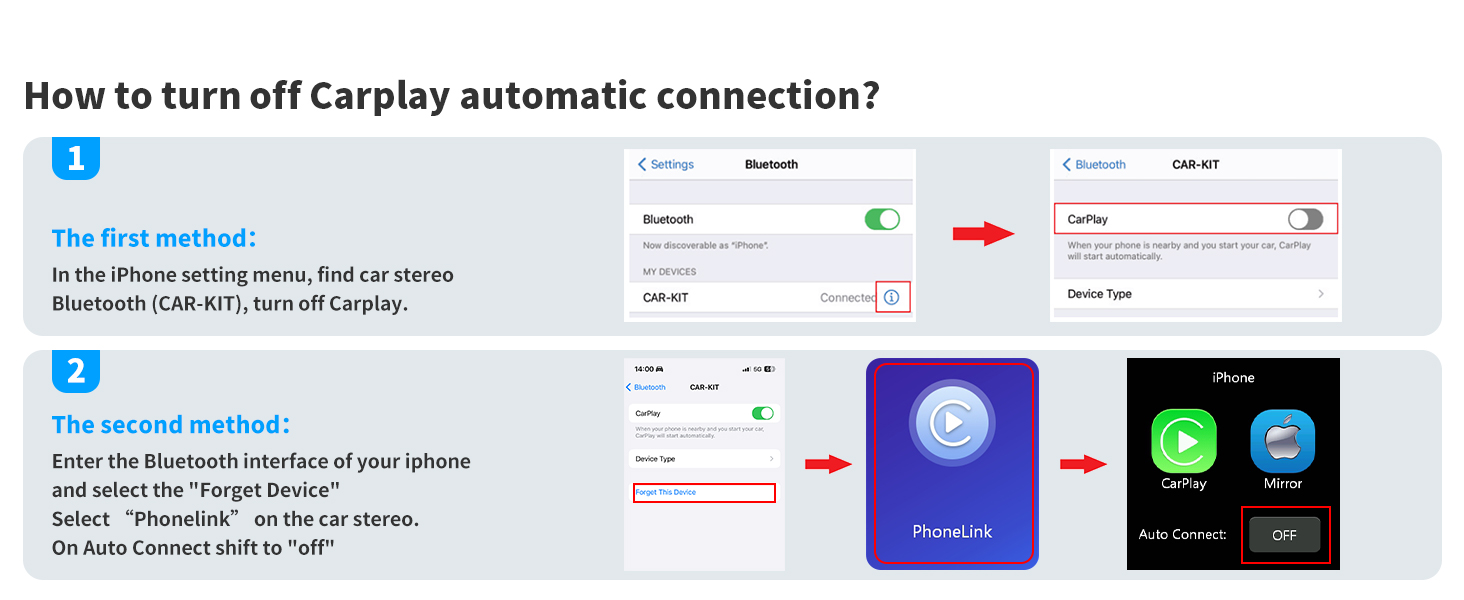
Figure 5.5: Turning Off CarPlay Auto-Connect
- In your iPhone settings, navigate to Bluetooth and find your car stereo's Bluetooth name (e.g., CAR-KIT). Turn off CarPlay.
- Alternatively, enter the Bluetooth interface on your iPhone, select "Forget Device" for the car stereo. On the car stereo, select "Phonelink" and shift "Auto Connect" to "OFF".
Android Auto үчүн:
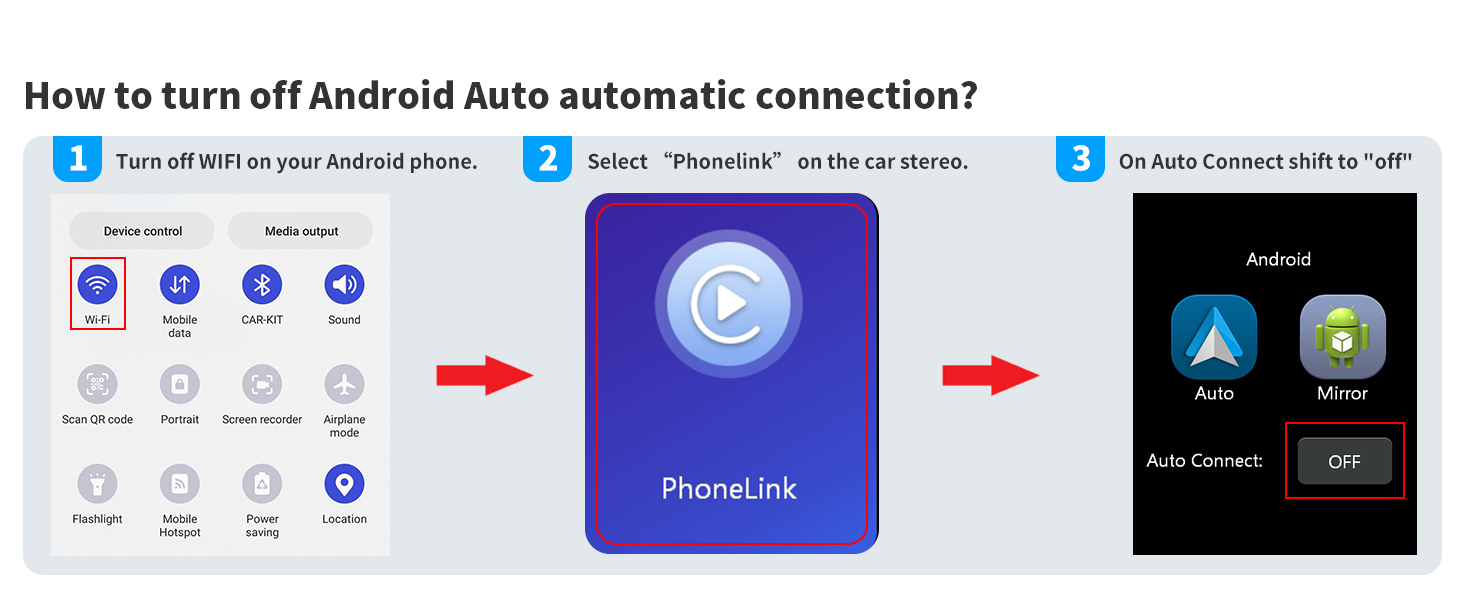
Figure 5.6: Turning Off Android Auto Auto-Connect
- Turn off Wi-Fi on your Android phone.
- Select "Phonelink" on the car stereo.
- Shift "Auto Connect" to "OFF".
6. Техникалык тейлөө
- Тазалоо: Экранды жана аппаратты тазалоо үчүн жумшак, кургак чүпүрөктү колдонуңуз. Абразивдүү тазалагычтардан же эриткичтерден качыңыз.
- Температура: Аппаратты экстремалдык температурага же түз күн нуруна узак убакытка калтырбаңыз.
- Нымдуулук: Аппаратты кургак кармаңыз. Суу же башка суюктуктар менен байланыштырбаңыз.
7. Кыйынчылыктарды
Төмөнкү жалпы маселелерди жана аларды чечүү жолдорун караңыз:

7.1-сүрөт: Кыйынчылыктарды чечүү боюнча колдонмо
7.1 Head Unit Powers On for a Few Seconds and Then Shuts Down Automatically
Some cars have ACC wires controlled by Canbus or feature a "delayed shut off" for radios and other components. In such cases, the car may not output stable 12V power to your radio. You may need to purchase an appropriate harness adapter that provides accessory power or supports "Retained Accessory Power" for your specific car model. Alternatively, if you prefer not to buy the adapter, you can find ACC power elsewhere in your vehicle and connect your red wire there.
Necessary conditions for powering on the unit are:
- The Red wire of our harness receives switched 12V power (Car key must be turned on).
- The Yellow wire of our harness receives 12V power.
- The Black ground wire of our harness is properly connected.
If you have an electric pen, you can test these three wires. If the ACC line (Red wire) and the B+ line (Yellow wire) are reversed during installation, the product will lose its memory function after the power is turned off.
If you encounter any installation or usage confusion, rest assured we're here to promptly assist you with resolving the issue.
8. Техникалык шарттар
| Спецификация | Нарк |
|---|---|
| Бренд | PLZ |
| Модель номери | МП-800 |
| Продукциянын өлчөмдөрү | 7.01 x 3.94 x 2.52 дюйм |
| Элемент Салмагы | 2 фунт |
| Дисплей өлчөмү | 7 дюйм / 18 см |
| Display Resolution | 1280 x 720 пиксель |
| Bluetooth версиясы | 5.3 |
| Аудио чыгаруу режими | Стерео (4.2 канал) |
| Чыгуу күчү | 240 Ватт |
| Байланыш технологиясы | Bluetooth, USB, RCA |
| Шайкеш түзмөктөр | Смартфон (Apple CarPlay, Android Auto) |
| Батареялар | 1 CR2 батарейкасы талап кылынат (кошулган) |
9. Кепилдик жана колдоо
For detailed warranty information and further assistance, please refer to the official User Guide PDF available for download or contact PLZ customer support. The User Guide PDF can be accessed via this link: PLZ Car Stereo User Guide (PDF).


