Introduction
This user manual provides comprehensive instructions for the Maxxter Web Cam ACT-BCAM-01 USB. This compact and versatile camera is designed for various recording needs, offering high-definition video capture and ease of use. Please read this manual thoroughly before operating the device to ensure proper functionality and safety.
Коопсуздук маалыматы
- Аппаратты экстремалдык температурага, нымдуулукка же түз күн нуруна калтырбаңыз.
- Аппаратты түшүрүүдөн же катуу таасирлерден сактаныңыз.
- Keep the device away from water and other liquids. It is not waterproof.
- Аппаратты ажыратууга же өзгөртүүгө аракет кылбаңыз. Бул кепилдикти жокко чыгарат.
- Кубаттоо жана маалыматтарды өткөрүү үчүн берилген USB кабелин гана колдонуңуз.
Пакеттин мазмуну
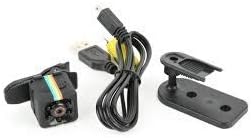
Image: Maxxter Web Cam ACT-BCAM-01 USB, USB cable, and mounting accessories.
Please check the package contents upon unboxing. The standard package should include:
- Макстер Web Cam ACT-BCAM-01 USB Unit
- USB кабели
- Колдонуучунун Колдонмосу (бул документ)
- Mounting Bracket/Clip
Продукт бүттүview

Сүрөт: алдыңкы жана каптал view of the Maxxter Web Cam ACT-BCAM-01 USB, showing the lens and control buttons.

Сүрөт: жогорудан төмөнгө view of the Maxxter Web Cam ACT-BCAM-01 USB, highlighting the button layout.

Image: Diagram illustrating key features such as 140-degree wide viewing angle, night vision, motion detection, support for storage cards, and the 360-degree adjustable bracket. Dimensions are also shown.
Негизги компоненттер:
- Объектив: High-definition camera lens for video recording.
- USB порт: Заряддоо жана маалыматтарды өткөрүү үчүн.
- MicroSD картасынын уячасы: For expandable storage (card not included).
- Кубат / режим баскычы: To turn the device on/off and switch between modes.
- Жазуу баскычы: To start and stop recording.
- Индикатор жарыктары: Provide status feedback (e.g., power, recording, charging).
Жайгашуу
1. Аппаратты заряддоо:
- USB кабелинин кичинекей учун камеранын USB портуна туташтырыңыз.
- USB кабелинин экинчи учун USB кубат адаптерине (кошумча эмес) же компьютердин USB портуна туташтырыңыз.
- Индикатордун жарыгы заряддоонун абалын көрсөтөт (мисалы, заряддоо учурунда кызыл түстө күйөт, толук заряддалганда өчөт).
2. Inserting a MicroSD Card:
- Камера өчүрүлгөнүн текшериңиз.
- Камераңыздын капталынан MicroSD карта уячасын табыңыз.
- Gently insert a MicroSD card (Class 10 or higher, up to 32GB recommended) into the slot until it clicks into place.
- Чыгаруу үчүн картаны сыртка чыкканга чейин бир аз түртүңүз.
Иштөө нускамалары
Күйгүзүү/өчүрүү:
- Күйгүзүү үчүн: Press and hold the Power/Mode button for 2-3 seconds. The indicator light will illuminate.
- Өчүрүү үчүн: Press and hold the Power/Mode button for 5-6 seconds until the indicator light turns off.
Видео жаздыруу:
- Камеранын күйгүзүлгөнүн жана MicroSD картасы салынганын текшериңиз.
- Press the Record button once to start video recording. The indicator light will flash.
- Press the Record button again to stop recording. The indicator light will stop flashing and return to standby mode.
Кыймылды аныктоо жазуусу:
This feature allows the camera to record only when motion is detected, conserving battery and storage space.
- While in standby mode, press the Power/Mode button twice quickly to enter motion detection mode. The indicator light will change (refer to device specific light pattern).
- The camera will automatically start recording when motion is detected and stop when motion ceases.
- To exit motion detection mode, press the Power/Mode button once.
Компьютерге туташуу:
Жазылган кирүү үчүн files, connect the camera to your computer using the provided USB cable. The camera will appear as a removable disk drive.
Техникалык тейлөө
- Тазалоо: Use a soft, dry cloth to clean the camera body. For the lens, use a specialized lens cleaning cloth. Do not use liquid cleaners or solvents.
- Сактагыч: Камераны колдонбогон учурда салкын, кургак жерде, күн нуру түз тийбеген жана өтө жогорку температурадан алыс сактаңыз.
- Батареяга кам көрүү: Батареянын оптималдуу иштөө мөөнөтү үчүн, бат-баттан батареяны толук зарядсыздандырбаңыз. Аппаратты узак убакыт бою колдонбосо дагы, үзгүлтүксүз заряддаңыз.
Проблемаларды чечүү
| Көйгөй | Мүмкүн себеп | Чечим |
|---|---|---|
| Камера күйбөйт. | Батареянын заряды аз; Түзмөктүн иштебей калышы. | Charge the camera for at least 2 hours. If still unresponsive, contact support. |
| Видео жаздыруу мүмкүн эмес. | No MicroSD card; Card full or corrupted; Incorrect card format. | Insert a MicroSD card. Check card capacity. Format the card (FAT32) on a computer. Try a different card. |
| Компьютер камераны тааныбайт. | Faulty USB cable; Driver issue; Incorrect connection mode. | Try a different USB port or cable. Restart your computer. Ensure the camera is powered on when connected. |
| Видеонун сапаты начар. | Low light conditions; Dirty lens; Incorrect settings. | Ensure adequate lighting. Clean the camera lens. |
Техникалык шарттар
| Өзгөчөлүк | Деталь |
|---|---|
| Модел | Макстер Web Cam ACT-BCAM-01 USB |
| Бренд | Макстер |
| Байланыш технологиясы | USB |
| Video Resolution | 720p же 1080p |
| Макс фокус узундугу | 22 миллиметр |
| Өзгөчөлүктөр | Low light capability, Motion detection |
| Өлчөмдөрү (L x W x Y) | 20 x 30 x 20 см |
| Салмагы | 40 грамм |
| Колдоого алынган сактагыч | MicroSD (SDHC) |
| Видео тартуу форматы | MP4 |
| Аудио формат | PCM, AAC |
| Фокус түрү | Manual Focus |
| Суу каршылык | Суу өткөрбөйт |
Кепилдик жана колдоо
For warranty information and technical support, please refer to the official Maxxter webсайтына кириңиз же жергиликтүү сатуучуңузга кайрылыңыз. Сатып алуунун далили катары сатып алуу дүмүрчөгүңүздү сактап коюңуз.
Эскертүү: Запастык бөлүктөрдүн бар экендиги жана программалык камсыздоонун жаңыртуулары тууралуу маалымат азыр жеткиликтүү эмес.


