Introduction
Thank you for choosing PowerLocus Kids Bluetooth Headphones. These headphones are designed with children in mind, offering a safe and enjoyable audio experience with features like volume limitation, comfortable fit, and versatile connectivity. This manual provides detailed instructions for setup, operation, maintenance, and troubleshooting to ensure optimal performance and longevity of your headphones.
Кутуда эмне бар

Image: Contents of the PowerLocus Kids Bluetooth Headphones box. This includes the pink headphones, a micro USB charging cable, an Aux audio cable with microphone, and a carrying pouch.
- PowerLocus Kids Bluetooth Headphones
- Микро USB заряддоо кабели
- Aux Audio Cable with Microphone
- Ташуу баштыгы
Продукт өзгөчөлүктөрү
- Bluetooth 5.3 туташуусу: Ensures a stable wireless connection with a range of up to 39 feet (12 meters).
- 85dB Volume Limitation: Designed to protect children's hearing by limiting the maximum volume output.
- Көп режимдүү иштөө: Supports wireless Bluetooth, wired (via Aux cable), and Micro SD card playback.
- Батареянын узак иштөө мөөнөтү: Provides over 10 hours of continuous playback on a single charge.
- Камтылган микрофон: Allows for crystal clear calls in both wireless and wired modes.
- Бүктөлүүчү жана кеңейтилүүчү дизайн: Offers portability and adjustable fit for various head sizes.
- LED жарыктары: Integrated LED lights on the earcups can be turned on or off.
- Ыңгайлуу дизайн: Features super soft protein foam leatherette earmuffs and a padded headband for extended comfort.
- Жалпы шайкештик: Works with smartphones, tablets, laptops, MP3 players, PCs, and TVs.

Сүрөт: Жакын план view of the headphones, emphasizing the soft memory foam earmuffs, padded headband, and adjustable sizing for comfort.

Image: The headphones folded compactly, illustrating their portability and ease of storage in a backpack.
Жайгашуу
Bluetooth Жупташтыруу
- Наушниктердин заряддалганын текшериңиз.
- Press and hold the Power button (usually the multi-function button) on the headphones until the LED indicator flashes, indicating pairing mode.
- Түзмөгүңүздө (смартфон, планшет, ноутбук) Bluetooth жөндөөлөрүнө өтүп, Bluetooth'ду күйгүзүңүз.
- Издөө "PowerLocus Buddy" or a similar name in the list of available devices.
- Select the headphones to connect. Once connected, the LED indicator will typically show a solid blue light.
Зымдуу туташуу
- Locate the 3.5mm AUX port on the headphones.
- Insert one end of the provided Aux audio cable into the headphone's AUX port.
- Insert the other end of the Aux cable into the 3.5mm audio jack of your device.
- Наушник автоматтык түрдө зымдуу режимге өтөт.
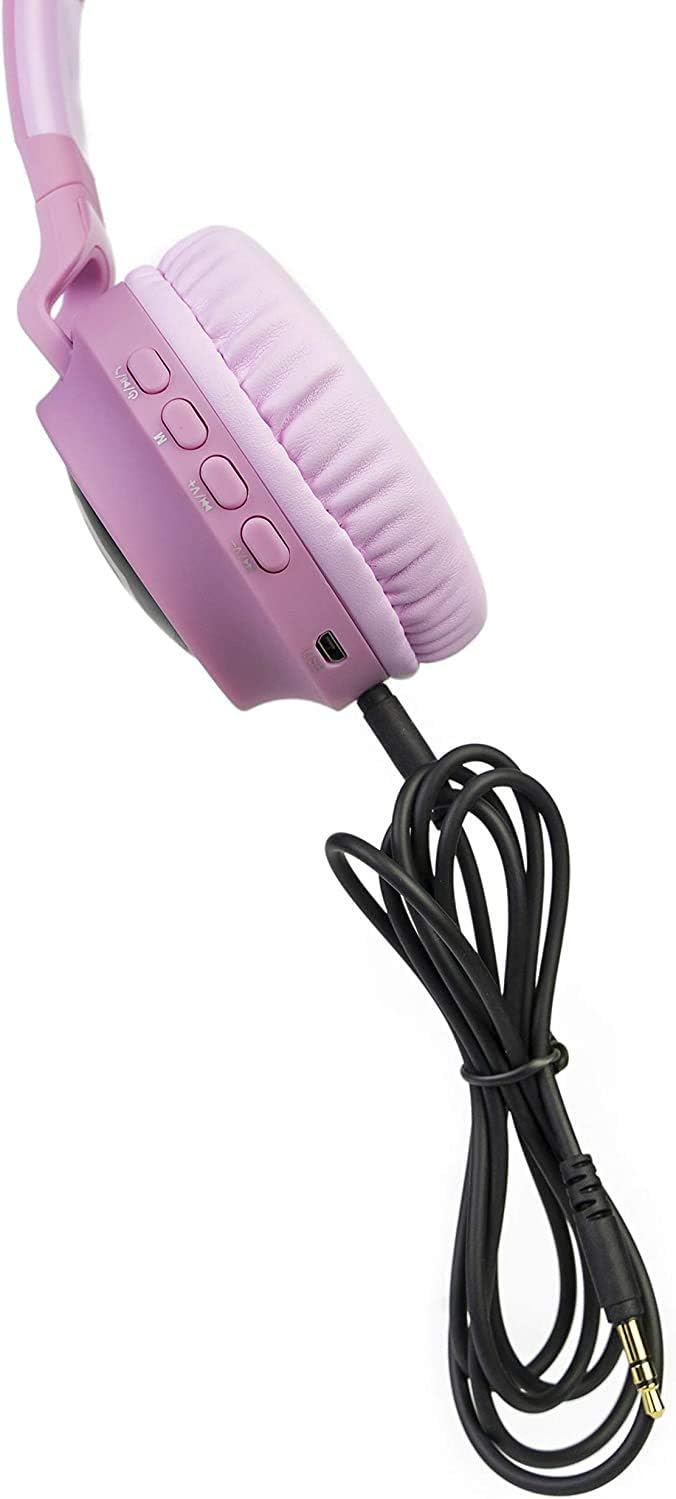
Image: The headphones connected using the auxiliary cable, demonstrating the wired listening option.
Иштөө нускамалары
Controls Overview

Image: A close-up of the headphone earcup, labeling all control buttons and ports for easy identification and use.
- Күйгүзүү/өчүрүү: Көп функциялуу баскычты басып, кармап туруңуз.
- Ойнотуу/тындыруу: Көп функциялуу баскычты кыска басыңыз.
- Үндү жогорулатуу/Кийинки трек: Short press '+' for volume up, long press '+' for next track.
- Үнүн азайтуу/Мурунку трек: Short press '-' for volume down, long press '-' for previous track.
- Чалууга жооп берүү/аяктоо: Short press the multi-function button during an incoming call.
- Чакырууну четке кагуу: Кирүүчү чалуу учурунда көп функциялуу баскычты көпкө басыңыз.
- LED Lights Control: Press the dedicated LED light button to cycle through modes or turn off the lights.
- Микро SD карта режими: Insert a Micro SD card (up to 32GB) into the designated slot. The headphones will automatically switch to Micro SD playback.
Батареяны заряддоо
Connect the Micro USB charging cable to the USB charging port on the headphones and to a USB power source. The LED indicator will show charging status (e.g., red while charging, off when fully charged). Charging time is approximately 2.5 hours.
Video: A demonstration of the PowerLocus Kids Headphones, highlighting the 85dB volume limit and various features. This video shows the product's design and functionality, including the charging port and LED lights.
Техникалык тейлөө
- Тазалоо: Наушниктерди тазалоо үчүн жумшак, кургак чүпүрөктү колдонуңуз. Абразивдүү тазалагычтарды же эриткичтерди колдонбоңуз.
- Сактагыч: When not in use, store the headphones in the provided carrying pouch to protect them from dust and damage. Store in a cool, dry place.
- Батареяга кам көрүү: Батареянын иштөө мөөнөтүн узартуу үчүн, кулакчындарды бат-баттан толук кубаттап турбаңыз. Аларды дайыма колдонууда болбосо да, үзгүлтүксүз заряддаңыз.
- Суудан качуу: These headphones are not water resistant. Avoid exposure to water or excessive moisture.
Проблемаларды чечүү
| Көйгөй | Чечим |
|---|---|
| Кулакчындар күйбөйт. | Наушниктердин толук заряддалганын текшериңиз. Кубат булагына туташып, кайра аракет кылыңыз. |
| Bluetooth түзмөгү менен жупташтыруу мүмкүн эмес. |
|
| Үн жок же үнү төмөн. |
|
| LED жарыктары иштебейт. | Press the dedicated LED light button to activate them. Ensure the headphones have sufficient battery. |
Техникалык шарттар
| Өзгөчөлүк | Деталь |
|---|---|
| Бренд | PowerLocus |
| Модел | B086WP3HBD |
| Байланыш технологиясы | Зымсыз (Bluetooth), Зымдуу (3.5 мм уяча) |
| Зымсыз байланыш технологиясы | Bluetooth 5.3 |
| Bluetooth диапазону | 98 Фут (болжол менен 30 метр) |
| Кулак жайгаштыруу | Кулак үстүндө |
| Материал | Protein Foam Leatherette |
| Батареянын иштөө мөөнөтү | 10 саат |
| Заряддоо убактысы | 2.5 саат |
| Элемент Салмагы | 5.8 унция (болжол менен 164 грамм) |
| Жыштык диапазону | 20 Гц - 20 000 Гц |
| Noise Control | Үн изоляциясы |
| Сууга туруктуулук деңгээли | Сууга чыдамдуу эмес |
Кепилдик жана колдоо
PowerLocus stands behind the quality of their headphones, offering a 24 айлык кыйынчылыксыз кепилдик. For any inquiries or support, please contact PowerLocus customer service. They provide 24/7 customer support and guarantee to repair or replace products within 24 hours if you are not satisfied with the performance.
For further assistance, you may also contact the seller, Sampell, through the platform where the purchase was made.


