1. Киришүү
The PeakTech 4095 is a newly developed, high-precision digital bench multimeter designed for professional use. It features a graphical TFT display for high-resolution visualization of measured values, trend curves, function graphs, and more. Capable of up to 150 measurements per second, this device incorporates advanced technical standards and a wide array of special functions, making it an indispensable tool for accurate electrical measurements and data analysis.
This manual provides comprehensive instructions for the safe and efficient operation, setup, maintenance, and troubleshooting of your PeakTech 4095 Digital Bench Multimeter. Please read it thoroughly before using the device.
2. Пакеттин мазмуну
Бардык буюмдардын бар экенин жана бузулбаганын текшерүү үчүн таңгагыңыздын ичиндегисин текшериңиз:
- PeakTech 4095 Digital Bench Multimeter
- Электр кабели
- Interface Cable (USB/RS-232)
- CD-ROM (with software and manual)
- Сыноо Лидер
- Температура сенсору
- User Manual (on CD-ROM)
Эгерде кандайдыр бир буюмдар жок болсо же бузулуп калса, дароо жеткирүүчүңүзгө кайрылыңыз.
3. Коопсуздук маалыматы
Always adhere to the following safety precautions to prevent personal injury or damage to the device:
- This device complies with safety standards EN 61010-1; CAT I 1000V / CAT II 600 V.
- Кандайдыр бир өлчөө диапазону үчүн максималдуу киргизүү маанилеринен ашпаңыз.
- Ensure the device is properly grounded before operation.
- Эгерде аппарат бузулгандай көрүнсө же изоляциясы бузулган болсо, аны иштетпеңиз.
- Use only the specified test leads and accessories.
- Ток чынжырлары менен байланышуудан сактаңыз.
- Аппаратты нымдуу жерде колдонбоңуз же damp чөйрөлөр.
- Аппаратты тазалоодон же тейлөөдөн мурун электр энергиясын өчүрүңүз.
4. Продукциянын өзгөчөлүктөрү
The PeakTech 4095 offers a comprehensive set of features for precise and versatile measurements:
- Graphical TFT Display: 4 1/2 digit (60,000 counts) 4-inch display (480x320 pixels) for high-resolution data visualization.
- High Measurement Speed: Up to 150 measured values per second.
- Чыныгы RMS өлчөө: Accurate True RMS measurements up to 100 kHz, depending on the measurement function.
- Маалыматтарды каттоочу: Internal memory for up to 1 million points or external logging to a USB stick for up to 100 million points, with a 5 ms interval.
- Dual Measurement Function: Simultaneously measure two different functions.
- Advanced Display Modes: Histogram, Barometer, Trend display, Pass/Fail function.
- Өлчөө функциялары: DCV, ACV, DCA, ACA, Resistance, Frequency, Capacitance, Diode Test, Continuity Test, Temperature.
- Температураны өлчөө: Supports 2- or 3-wire resistance/thermocouple measurements via types B/E/J/K/N/R/S/T or PT100/PT385.
- Байланыш: RS-232, LAN network connection, and USB interfaces for PC control and data retrieval via SCPI protocol.
- Аралыкты тандоо: Автоматтык жана кол менен диапазонду тандоо.
- Кошумча функциялар: AVG, MIN/MAX, and relative value measurement.
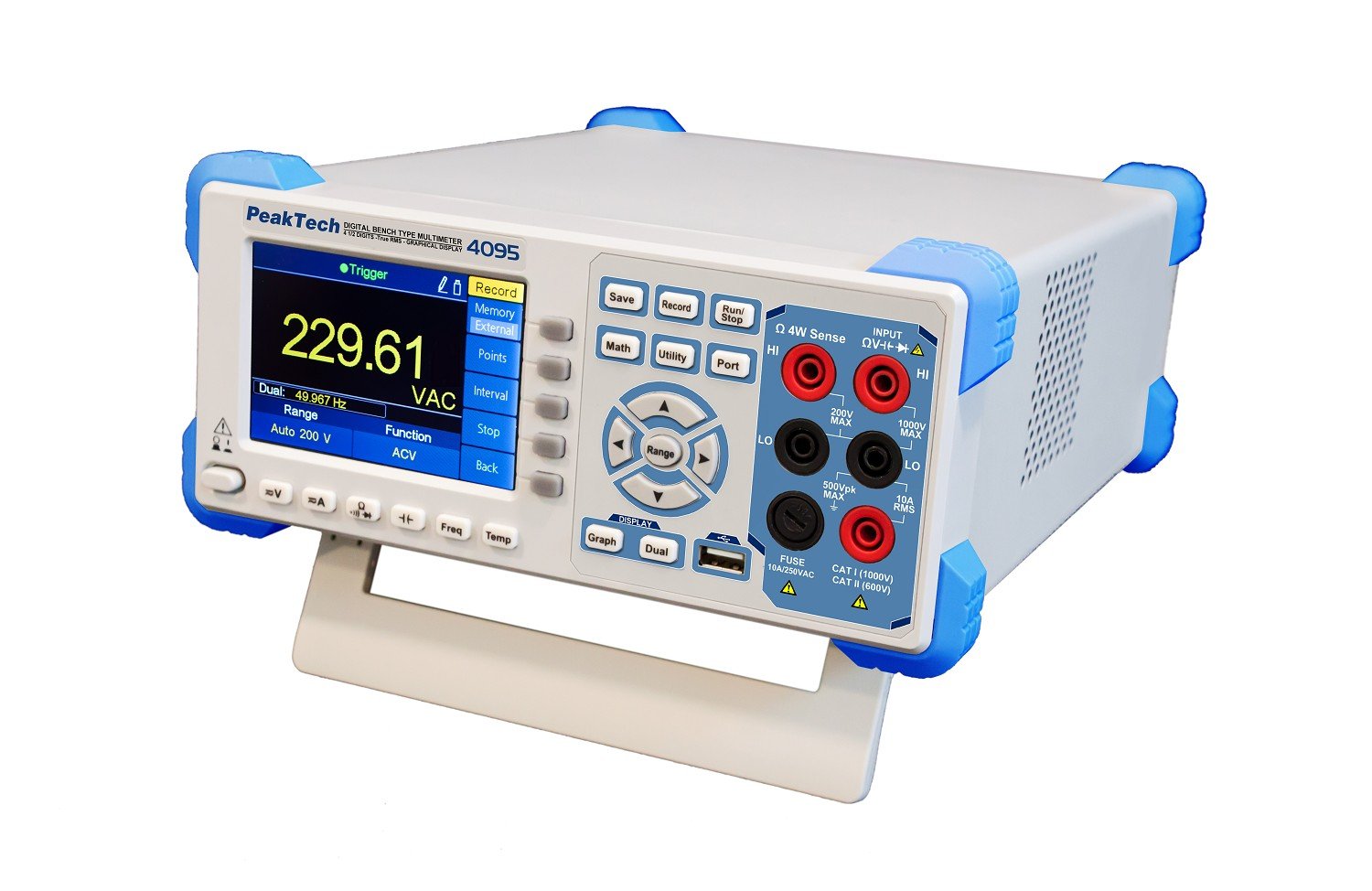 Сүрөт 1: Алдыңкы view of the PeakTech 4095 Digital Bench Multimeter.
 Figure 2: Close-up of the PeakTech 4095 front panel showing the graphical TFT display in trend mode.
 Figure 3: Rear panel of the PeakTech 4095, displaying the power input, LAN, USB, RS-232, and auxiliary ports.
 Figure 4: The PeakTech 4095 Digital Bench Multimeter in a typical laboratory or workshop environment, connected for measurement.
5. Орнотуу
Follow these steps to set up your PeakTech 4095 Multimeter:
- Пакеттен чыгаруу: Carefully remove the multimeter and all accessories from the packaging. Retain the packaging for future storage or transport.
- Кубат туташуу: Locate the power input on the rear panel. Ensure the voltage selector switch (110V/240V) matches your local power supply. Connect the provided power cable to the multimeter and then to a suitable AC outlet.
- Баштапкы күйгүзүү: Press the power button on the front panel. The TFT display should illuminate, and the device will perform a self-test.
- Сыноо өткөргүчтөрүн туташтыруу: Insert the red test lead into the 'HI' input terminal and the black test lead into the 'LO' input terminal for most voltage, resistance, and frequency measurements. For current measurements, refer to the specific input terminals (e.g., 10A, mA/µA).
- Interface Connection (Optional):
- USB: Connect the USB cable from the multimeter's rear USB port to your computer.
- RS-232: Connect the RS-232 cable from the multimeter's rear RS-232 port to your computer's serial port (or a USB-to-serial adapter).
- LAN: Connect an Ethernet cable from the multimeter's LAN port to your network router or switch.
Install the provided software from the CD-ROM on your computer to enable remote control and data logging via these interfaces.
6. Иштөө нускамалары
This section outlines the basic operation and various measurement functions of the PeakTech 4095.
6.1 Негизги өлчөөлөр
- Тtage (DCV/ACV): Каалаган томду тандаңызtage function (DCV or ACV) using the function buttons. Connect the test leads in parallel to the circuit under test. The display will show the measured voltage.
- Current (DCA/ACA): Select the desired current function (DCA or ACA). Ensure the test leads are connected to the appropriate current input terminals (e.g., 10A, mA/µA). Connect the multimeter in series with the circuit.
- Resistance (Ohm): Select the Ohm function. Connect the test leads across the component to measure its resistance. Ensure the circuit is de-energized before measuring resistance.
- Сыйымдуулугу: Select the Capacitance function. Connect the test leads across the capacitor. Ensure the capacitor is discharged before measurement.
- Жыштыгы: Select the Frequency function. Connect the test leads to the signal source.
- Температура: Connect the provided temperature sensor or a compatible thermocouple/RTD to the appropriate input terminals. Select the Temperature function and choose the correct sensor type (e.g., Type K, PT100).
6.2 Атайын функциялар
- Аралыкты тандоо: Use the 'Range' button to switch between auto-ranging and manual ranging. In manual mode, press 'Range' repeatedly to cycle through available ranges.
- MIN/MAX/AVG: Press the 'Math' button and navigate to MIN/MAX/AVG to display the minimum, maximum, or average values recorded during a measurement session.
- Relative Measurement: Use the 'Math' button to activate the relative measurement function, which displays the difference between the current reading and a stored reference value.
- Маалыматтарды каттоо: Press the 'Record' button to start/stop data logging. Configure logging parameters (interval, internal/external memory) via the 'Record' menu. Data can be saved to internal memory or an external USB stick.
- Graphical Display Modes: Use the 'Graph' and 'Dual' buttons to switch between numerical display, trend graphs, histograms, and dual measurement displays.
7. Техникалык тейлөө
Proper maintenance ensures the longevity and accuracy of your PeakTech 4095 Multimeter.
7.1 Тазалоо
Аппараттын сыртын дайыма жумшак, гamp кездеме. Абразивдүү тазалоочу каражаттарды же эриткичтерди колдонбоңуз. Түзмөккө ным кирбегенин текшериңиз.
7.2 Сактагычты алмаштыруу
If the current measurement function fails, the fuse may need replacement. Refer to the specifications for the correct fuse type and rating. Disconnect the power cable and all test leads before attempting to replace the fuse. Fuse access is typically on the rear panel or under a designated cover.
7.3 Калибрлөө
For continued accuracy, periodic calibration by a qualified service center is recommended. Refer to the PeakTech webсайтка же калибрлөө кызматтары үчүн кардарларды тейлөөгө кайрылыңыз.
8. Кыйынчылыктарды
If you encounter issues with your PeakTech 4095, refer to the following common problems and solutions:
| Көйгөй | Мүмкүн себеп | Чечим |
|---|---|---|
| Түзмөк күйбөйт. | No power supply; power cable loose; incorrect voltage selector; blown fuse. | Check power cable connection; verify voltage selector setting; check and replace power fuse if necessary. |
| Incorrect or no readings. | Incorrect function selected; test leads not properly connected; circuit issue; out of range. | Select correct measurement function; ensure test leads are securely connected; verify circuit integrity; switch to auto-ranging or a higher manual range. |
| Токту өлчөө иштебей жатат. | Blown current fuse; incorrect input terminal. | Check and replace the internal current fuse; ensure test leads are connected to the correct current input (e.g., 10A, mA/µA). |
| PC software cannot connect. | Incorrect interface cable; driver not installed; wrong COM port selected; firewall blocking connection. | Ensure correct USB/RS-232/LAN cable is used; install drivers from CD-ROM; verify COM port settings in software; check firewall settings. |
If the problem persists after attempting these solutions, please contact PeakTech customer support.
9. Техникалык шарттар
Detailed technical specifications for the PeakTech 4095 Digital Bench Multimeter:
| Параметр | Спецификация |
|---|---|
| Дисплей | 4 1/2 digits (60,000 counts) TFT graphical display, 4" (480x320 pixels) |
| Өлчөө ылдамдыгы | Up to 150 values/second |
| DC Voltage (DCV) | 600mV / 6/60/600/1000 V; ± 0.02% + 0.01 |
| AC Voltage (ACV) | 600 mV / 6/60/600/750 V; ± 0.2% + 0.06 (TRMS Frequency: 20 Hz - 100 kHz) |
| Туруктуу ток (DCA) | 600µA / 6/60/600 mA / 6/10 A; ± 0.06% + 0.02 |
| AC ток (ACA) | 60 / 600mA / 6/10 A; ± 0.5% + 0.10 (TRMS Frequency: 20 Hz - 10 kHz) |
| Каршылык (Ом) | 600 Ω / 6/60/600 kΩ / 6/60/100 MΩ; ± 0.03% + 0.01 |
| Жыштык | 20 Hz… 1 MHz ± 0.01% + 0.003 |
| Сыйымдуулук | 2/20/200 nF / 2/200 / 10000 µF; ± 1% + 0.5 |
| Temperature (RTD) | -200 °C… +660 °C; ± 0.08% + 0.002 |
| Температура (К түрү) | -200 °C… +1372 °C; ± 0.5 °C |
| Data Logger Memory | Internal: 1 million points; External (USB): 100 million points |
| Operating Voltage | 110 V / 240 V; 50/60 Hz (switchable) |
| Өлчөмдөрү (LxHxD) | 235 x 110 x 295 мм |
| Салмагы | 3 кг |
| Коопсуздук рейтинги | EN 61010-1; CAT I 1000V / CAT II 600 V |
| Келип чыккан өлкө | Кытай |
10. Кепилдик жана колдоо
PeakTech products are manufactured with high quality standards and are subject to strict quality control. This device is covered by a standard manufacturer's warranty against defects in materials and workmanship.
For warranty claims, technical support, or service inquiries, please contact PeakTech customer service or your local distributor. Please have your model number (P 4095) and purchase information ready when contacting support.
For the most up-to-date information, drivers, and software, please visit the official PeakTech webсайт.


