1. Киришүү
This manual provides essential information for the proper use and maintenance of your Xiaomi Redmi AirDots S TWSEJ05LS Bluetooth Earbuds. Please read these instructions carefully before using the product to ensure optimal performance and longevity.
2. Пакеттин мазмуну
Продукцияңыздын таңгагында бардык элементтер бар экенин текшериңиз:
- 1 х заряддоо кутусу
- 2 x Earbuds (Left and Right)
- 2 x Pairs of Eartips (Sizes S/M/L, with M pre-installed)
- 1 x User Manual
3. Продукт бүтүп калдыview
The Xiaomi Redmi AirDots S are compact, wireless in-ear earbuds designed for daily use, hands-free communication, and music playback. They feature Bluetooth 5.0 connectivity for stable audio transmission.

Figure 3.1: Redmi AirDots S Earbuds and Charging Case
This image displays the black charging case with its lid open, revealing the slots for the earbuds. One earbud is shown outside the case, highlighting its compact design.
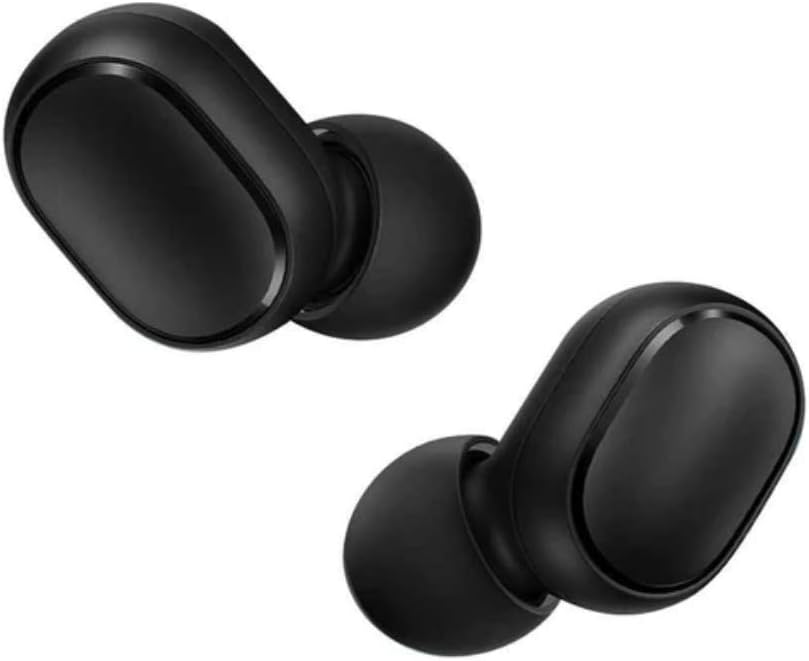
Figure 3.2: Individual Earbuds
А деталдуу view of the left and right earbuds, showcasing their smooth, black finish and the in-ear design.

Figure 3.3: Earbud in Use
This image illustrates how the earbud fits comfortably within the ear canal, providing a secure and discreet listening experience.
4. Орнотуу
4.1 Кулакчындарды жана кутучаны заряддоо
Биринчи колдонуудан мурун, кулакчындар менен кубаттоочу кутучанын толук кубатталганын текшериңиз.
- Кулакчындарды заряддоо кутусуна салыңыз. Алардын тиешелүү уячаларына туура отурганын текшериңиз.
- Connect the charging case to a power source using a compatible USB cable (not included).
- The indicator light on the case will show charging status. A full charge typically takes approximately 2 hours.
4.2 Биринчи жолу жупташтыруу
Follow these steps to pair your Redmi AirDots S with a new device:
- Кубаттоочу кутудан эки кулакчынды тең алып салыңыз. Алар автоматтык түрдө күйөт.
- Мобилдик түзмөгүңүздө (смартфон, планшет ж.б.) Bluetooth жөндөөлөрүнө өтүңүз.
- Refresh the list of available Bluetooth devices.
- Select "Redmi Airdots S" from the list to initiate the connection.
- Once connected, you will hear an audible confirmation, and the earbud indicator lights will turn off or flash slowly.
Эскертүү: When you place the earbuds back into the charging case, they will show a red light and automatically disconnect from your device. When removed, a white light will appear, and they will automatically attempt to reconnect to the last paired device.
4.3 Бир кулакчын режими
You can use either the left or right earbud independently. Simply remove one earbud from the case, and it will connect to your device. The other earbud can remain in the case or be powered off.
5. Иштөө нускамалары
The Redmi AirDots S feature a multi-function touch control button on each earbud.
| Акция | Функция |
|---|---|
| Single Press (either earbud) | Музыканы ойнотуу/тындыруу, Чалууга жооп берүү/Аяктоо |
| Double Press (either earbud) | Activate voice assistant (e.g., Siri, Google Assistant) |
| Press and Hold (during call) | Кирүүчү чалууну четке кагуу |
Эскертүү: Volume control and track skipping typically need to be managed directly from your connected device.
6. Техникалык тейлөө
6.1 Тазалоо
- Кулакчындарды жана заряддоо кутусун жумшак, кургак, түксүз чүпүрөк менен дайыма тазалап туруңуз.
- Абразивдүү тазалагычтарды, спиртти же химиялык эриткичтерди колдонбоңуз.
- Кичинекей, жумшак щетка же кебез таякча менен кулакчындын торчосунан жана кулактын учунан кулак кирин же калдыктарды акырын кетириңиз.
6.2 Сактоо
- Колдонулбай турганда, кулакчындарды коргоо жана кубаттоо үчүн аларды кубаттоо кутучасында сактаңыз.
- Store the product in a cool, dry place, away from direct sunlight, extreme temperatures, and humidity.
7. Кыйынчылыктарды
7.1 Кулакчындарды баштапкы абалга келтирүү
If you experience pairing issues or other functional problems, resetting the earbuds may resolve the issue:
- Press and hold the multi-function button on both earbuds for approximately 15 seconds.
- Release the button when the red and white indicator lights flash alternately 3 times and then turn off. This indicates a successful reset.
- On your phone's Bluetooth settings, forget or unpair "Redmi AirDots S" from the device list.
- Place the earbuds back into the charging case, then remove them to initiate a new pairing process as described in Section 4.2.
7.2 Жалпы маселелер жана чечимдер
- Кулакчындар бири-бири менен жупташпайт: Ensure both earbuds are removed from the case simultaneously and are fully charged. Perform a reset if necessary.
- Бир гана кулакчын иштейт: Try placing both earbuds back in the case, then removing them again. Check if the single earbud mode is active. Perform a reset if the issue persists.
- Үн жок же үнү төмөн: Check the volume level on your connected device. Ensure the earbuds are properly seated in your ears. Clean any debris from the earbud mesh.
- Байланыш тез-тез үзүлөт: Ensure there are no significant obstacles between the earbuds and your device. Keep the device within the effective Bluetooth range (typically 10 meters).
8. Техникалык шарттар
| Өзгөчөлүк | Деталь |
|---|---|
| Модель аты | TWSEJ05LS |
| Бренд | XIAOMI |
| Байланыш технологиясы | Зымсыз (Bluetooth 5.0) |
| Кулак жайгаштыруу | In-Ear |
| Форма фактору | In-Ear |
| Өзгөчөлүктөр | Камтылган микрофон |
| Башкаруу ыкмасы | Touch Control |
| Ызы-чуу изоляциясы | Passive (In-ear design provides some noise reduction) |
| Заряддоо убактысы | Болжол менен 2 саат |
| Батареянын курамы | Литий-полимер |
| Элемент Салмагы | 60 грамм |
| Материал | Пластик |
| Шайкеш түзмөктөр | Smartphones, tablets, laptops, desktop computers, smart speakers |
| Сунушталган Колдонуулар | Calling, Exercising, Video Gaming |
9. Кепилдик жана колдоо
Information regarding product warranty is typically provided with your purchase documentation or can be found on the official Xiaomi website. For technical support, troubleshooting assistance beyond this manual, or warranty claims, please refer to the official Xiaomi support channels or contact your retailer.
Note: Spare parts availability and software update guarantees are not explicitly provided in the product information.
10. Видео ресурстар
No official product videos from the seller were found in the provided data. For additional visual guides, please check the manufacturer's official webсайт же ыйгарым укуктуу колдоо каналдары.


