Introduction
This manual provides detailed instructions for the installation, operation, and maintenance of your Night Owl DP2 Series 1080p HD Wired Security System. This system is designed to provide reliable surveillance for your home or business with advanced features such as Human Detection Technology, Motion-Activated Spotlights, and secure wired connectivity. Please read this manual thoroughly before installation and use to ensure proper functionality and safety.

Figure 1: Night Owl DP2 Series 1080p HD Wired Security System components, including the Digital Video Recorder (DVR) and four wired cameras.
Орнотуу жана орнотуу
Пакеттин мазмуну
Сиздин пакетте бардык компоненттер бар экенин текшериңиз:
- Digital Video Recorder (DVR) with pre-installed 1TB Hard Drive
- 4 x 1080p HD Wired Indoor/Outdoor Cameras
- Power Adapters for DVR and Cameras
- Video/Power Cables (60 ft. per camera)
- USB чычкан
- Ethernet Cable (for network connection, optional for local viewing)
- Монтаждоочу жабдык
Системаны туташтыруу
Follow these steps to connect your security system:
- Камераларды DVRга туташтыруу: Attach each camera's video/power cable to the corresponding BNC input on the back of the DVR. Ensure a secure connection.
- Connect DVR to Power: Plug the DVR's power adapter into the DVR and then into a power outlet.
- Мониторго DVR туташтыруу: Use an HDMI or VGA cable (not included) to connect the DVR to a monitor or TV.
- USB чычканды туташтыруу: Plug the included USB mouse into a USB port on the DVR for navigation.
- Тармактык туташуу (алыстан башкаруу үчүн милдеттүү эмес Viewing): Алыскы үчүн viewing via the mobile app, connect an Ethernet cable from the DVR's LAN port to your router.
- Күйгүзүү: The DVR will automatically power on once connected.

Figure 2: Connection diagram illustrating how to connect the cameras, power, and monitor to the DVR. A surge protector is recommended but not included.

Figure 3: Rear panel of the DVR, highlighting the 16 BNC inputs for cameras, HDMI output, USB ports, LAN port, and power input. This system supports up to 16 wired cameras.
Camera Placement and Mounting
Strategically place cameras to cover critical areas. The cameras are designed for both indoor and outdoor use and feature 100 ft. night vision.
- Mount cameras securely using the provided hardware.
- Ensure a clear line of sight for optimal coverage.
- Avoid pointing cameras directly at strong light sources to prevent glare.
- Consider the range of the motion-activated spotlight when positioning.

4-сүрөт: Детальдуу view of a Night Owl 1080p HD wired camera, showcasing its key features for effective surveillance.
Системанын иштеши
Initial Configuration and DVR Interface
Upon first power-up, the DVR will guide you through an initial setup wizard. This includes setting the date/time, creating a password, and configuring network settings if connected. Navigate the DVR interface using the USB mouse.
Негизги өзгөчөлүктөрү
- Human Detection Technology: This feature reduces false alerts by distinguishing human motion from other movements, such as pets or swaying branches. When human motion is detected, the system can send real-time alerts to your smart device and activate the spotlight.
- Motion-Activated Spotlight: Cameras are equipped with bright spotlights that activate upon detecting human motion, serving as a deterrent to potential intruders.
- Түнкү көрүнүш: Cameras provide full-color video in low-light conditions and automatically switch to traditional night vision (up to 100 ft.) only when necessary.
- Өркүндөтүлгөн коопсуздук функциялары:
- 2-Step Verification and Single Sign-On: Prevents unauthorized access to your system.
- Anti-Theft Technology: Sends real-time alerts if the DVR is moved.

Figure 5: Human Detection Technology in action, showing a smart device alert and facial capture of a person.
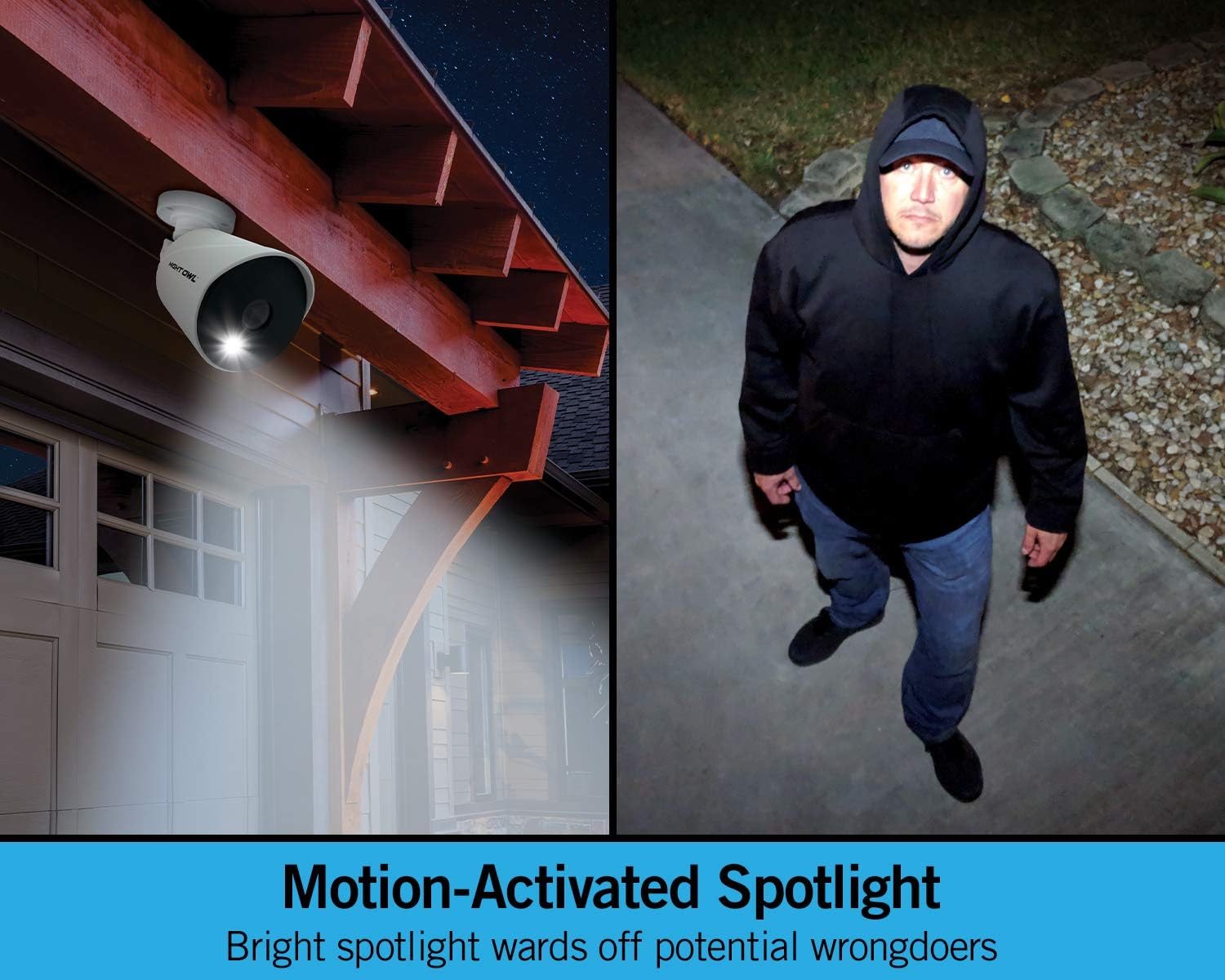
Figure 6: A Night Owl camera with its motion-activated spotlight illuminated, deterring an individual.

Figure 7: Illustration of the enhanced security features, including 2-Step Verification for account access and multi-view monitoring on a display.
Алыстан Viewing жана Ойнотуу
The Night Owl Protect app allows you to view live feeds, access recordings, and receive alerts from anywhere in the world.
- Download the "Night Owl Protect" app from the iOS App Store or Google Play Store.
- Create an account and link your DVR using the app's instructions.
- Ensure your DVR is connected to the internet for remote access.

Figure 8: The Night Owl Protect mobile application interface, demonstrating remote viewing and playback capabilities.
Техникалык тейлөө
Hard Drive Management
Your DVR comes with a pre-installed 1TB hard disk drive (HDD) for local storage. There are no monthly fees for storage, and you own all your recordings. The system typically records continuously, overwriting the oldest footage once the HDD is full. You can configure recording schedules and motion-triggered recording settings via the DVR interface.
Камераны тазалоо
Камера линзаларын мезгил-мезгили менен жумшак, d чүпүрөк менен тазалап туруңузamp ачык сүрөт сапатын камсыз кылуу үчүн кездеме. Абразивдүү тазалагычтардан алыс болуңуз.
Орнотулган программаны жаңыртуу
Check the Night Owl support website periodically for firmware updates for your DVR. Keeping your system updated ensures optimal performance and security.
Проблемаларды чечүү
- Видео сигнал жок:
- Ensure all camera cables are securely connected to the DVR.
- Verify cameras are receiving power.
- Монитордун DVR (HDMI/VGA) менен байланышын текшериңиз.
- No Remote Viewing:
- Confirm the DVR is connected to your router via an Ethernet cable.
- Verify your internet connection is active.
- Ensure the "Night Owl Protect" app is installed and your account is properly linked to the DVR.
- Note: Internet is required for remote viewing on a Smartphone, Tablet, PC, or Mac. Local viewing on a TV or monitor does not require internet.
- Ашыкча жалган эскертүүлөр:
- Adjust the sensitivity settings for Human Detection in the DVR's menu.
- Ensure cameras are not pointing at areas with frequent non-human motion (e.g., busy roads, trees swaying in strong wind).
- DVR Anti-Theft Alert:
- If you receive an alert that your DVR has been moved, verify its physical location. This feature is designed to notify you of unauthorized movement.
Техникалык шарттар
| Өзгөчөлүк | Деталь |
|---|---|
| Бренд | Night Owl |
| Модел | DP2 Series (ASIN: B087QPR8KH) |
| Байланыш технологиясы | Wired (CCTV) |
| Видео тартуунун резолюциясы | 1080p HD |
| Өзгөчөлүктөр | Night Vision, Human Detection, Motion-Activated Spotlight, Color Night Vision, 2-Step Verification, Anti-Theft Technology |
| Каналдардын саны | 16 (DVR supports up to 16 cameras) |
| Эстутум сактоо сыйымдуулугу | 1 TB (pre-installed HDD) |
| Түс | Black (DVR), White (Cameras) |
| Power Source | Электр зымдары |
| Элементтин өлчөмдөрү (L x W x Y) | 11.73 x 10.74 x 8.4 дюйм |
| Сунушталган Колдонуулар | Surveillance (Home, Business) |
| Түнкү көрүү диапазону | 100 футка чейин. |
| Frame Rate | 30 кадр/сек |
| Жазуу режими | Continuous Video (configurable) |
| Линзанын түрү | Wide Angle |
| Видео киргизүү | BNC |
| UPC | 816522022761 |
Колдоо жана кепилдик
For technical assistance, product registration, or warranty information, please visit the official Night Owl support webсайтка же кардарларды тейлөөгө кайрылыңыз.
Маанилүү эскертүү: The cameras and DVR included in this system are specific to the DP2 series and are not backward compatible with other Night Owl wired products.
For the most up-to-date support resources, please refer to the Night Owl official webсайт.


