Introduction
Thank you for choosing the Mi Dual Mode Wireless Mouse Silent Edition. This manual provides essential information for setting up, operating, and maintaining your new wireless mouse. Please read it thoroughly before use to ensure optimal performance and longevity of the product.
Продукт өзгөчөлүктөрү
- Кош режимдеги туташуу: Seamlessly switch between 2.4GHz wireless (via USB receiver) and Bluetooth connectivity.
- Унчукпай чыкылдатуулар: Designed for quiet operation, reducing click noise for a more peaceful working environment.
- Эргономикалык дизайн: Узак колдонуу үчүн ыңгайлуу кармагыч.
- Жөнгө салынуучу DPI: Customize cursor sensitivity to suit your needs.
- Батареянын узак иштөө мөөнөтү: Efficient power consumption for prolonged use.
Пакеттин мазмуну
- Mi Dual Mode Wireless Mouse Silent Edition
- USB кабыл алгыч (чычкандын ичинде сакталат)
- User Manual
- AA Battery (may or may not be included depending on region)
Орнотуу колдонмосу
1. Батареяны орнотуу
The mouse requires one AA battery. To install:
- Gently lift the top cover of the mouse from the rear to reveal the battery compartment.
- Оң (+) жана терс (-) терминалдары бөлүмдүн ичиндеги белгилер менен туура дал келишин камсыз кылып, бир AA батарейкасын салыңыз.
- Locate the USB receiver inside the battery compartment. Remove it for 2.4GHz wireless connection.
- Үстүнкү капкакты ордуна коюңуз, анын ордуна бекем чыкылдатыңыз.

1-сүрөт: Төмөнкү view of the mouse showing the battery compartment and USB receiver.

Figure 2: The Mi Dual Mode Wireless Mouse Silent Edition.
2. Чычканды туташтыруу
The mouse supports two connection modes: 2.4GHz Wireless and Bluetooth.
2.1. 2.4 ГГц зымсыз туташуу (USB кабыл алуучу)
- USB ресиверди компьютериңиздеги жеткиликтүү USB портуна сайыңыз.
- Төмөндө жайгашкан кубат которгучу менен чычканды күйгүзүңүз.
- The mouse should automatically connect to your computer. If not, press the mode switch button on top of the mouse until the indicator light turns green, indicating 2.4GHz mode.
2.2. Bluetooth туташуусу
- Төмөндөгү кубат которгучу менен чычканды күйгүзүңүз.
- Press the mode switch button on top of the mouse until the indicator light turns blue, indicating Bluetooth mode.
- Компьютериңизден Bluetooth жөндөөлөрүнө өтүңүз.
- Издөө new devices and select "Mi Mouse" or similar from the list.
- Жупташтыруу процессин аяктоо үчүн экрандагы көрсөтмөлөрдү аткарыңыз.
Иштөө нускамалары
Mode Switching
The small button located above the scroll wheel allows you to switch between 2.4GHz wireless mode and Bluetooth mode. The indicator light will change color to confirm the active mode:
- Жашыл жарык: 2.4 ГГц зымсыз режим
- Көк жарык: Bluetooth режими

3-сүрөт: Жогорку view of the mouse showing the mode switch button.
Негизги функциялар
- Сол чыкылдатуу: Негизги аракет, тандоо.
- Оң чыкылдатуу: Контексттик меню.
- Жылдыруу дөңгөлөгү: Scroll up/down. Pressing the wheel often acts as a middle click.
- Каптал баскычтары: (If present) Typically for forward/backward navigation in web браузерлер.
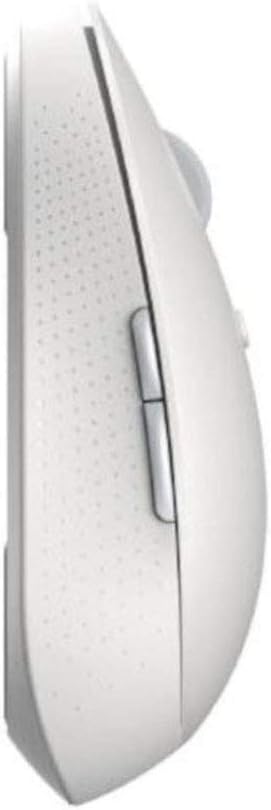
4-сүрөт: Каптал view of the mouse with side buttons.

Figure 5: Mouse in use, demonstrating ergonomic design.
Техникалык тейлөө
- Тазалоо: Чычканды тазалоо үчүн жумшак, кургак чүпүрөктү колдонуңуз. өжөр кир үчүн, бир аз гamp кездемени колдонсо болот, бирок нымдуулуктун ички бөлүктөргө кирбешин камсыз кылыңыз.
- Батареяны алмаштыруу: Replace the AA battery when the mouse performance degrades or the indicator light signals low battery (if applicable).
- Сактагыч: When not in use for extended periods, turn off the mouse to conserve battery life. Store the USB receiver inside the mouse to prevent loss.
Проблемаларды чечүү
| Көйгөй | Мүмкүн чечим |
|---|---|
| Чычкан жооп бербей жатат |
|
| Курсор туруксуз же жылмакай кыймылдабайт |
|
| Режимдерди которуу кыйынчылыгы |
|
Техникалык шарттар
| Өзгөчөлүк | Деталь |
|---|---|
| Продукциянын өлчөмдөрү | 4.41 x 2.47 x 1.45 дюйм |
| Элемент Салмагы | 2.47 унция |
| Модель номери | XM800009 |
| Батареялар талап кылынат | 1 Lithium Polymer battery (AA size) |
| Байланыш технологиясы | Wireless (2.4GHz USB, Bluetooth) |
| Өзгөчөлүктөр | Soundless, Wireless |
| Кыймылды аныктоо | Optical or Laser |
| Түс | Ак |
Кепилдик жана колдоо
This product comes with a standard manufacturer's warranty. For detailed warranty information, please refer to the warranty card included in your package or visit the official Xiaomi webсайт. Техникалык колдоо же тейлөө боюнча суроолоруңуз болсо, Xiaomi кардарларды тейлөө кызматына кайрылыңыз.
Кепилдик дооматтары үчүн сатып алганыңыздын далилин сактап коюңуз.


