Introduction
This manual provides essential information for the safe and efficient use of your Grundig 24 GCH 5900B HD Ready TV. Please read these instructions carefully before operating the device and retain them for future reference. This television features HDR technology for enhanced contrast, Dolby Digital sound for clear audio, and a built-in satellite receiver for convenience.
Коопсуздук маалыматы
- Ensure the television is placed on a stable surface to prevent tipping.
- Do not expose the TV to rain or moisture to avoid electric shock.
- Ашыкча ысып кетүүнүн алдын алуу үчүн желдетүү тешиктерин ачык кармаңыз.
- Чагылган түшкөн учурда же көп убакытка колдонулбаган учурда телевизорду розеткадан сууруп коюңуз.
- Бардык тейлөөлөрдү квалификациялуу тейлөө кызматкерлерине тапшырыңыз.
Жайгашуу
1. таңгактан чыгаруу
Carefully remove the TV and all accessories from the packaging. Check for any damage during transit. Keep packaging materials for future transport or storage.
2. Стенд орнотуу
If you are not wall-mounting the TV, attach the stand according to the diagrams provided in the separate assembly guide. Ensure all screws are securely tightened.

Сүрөт: алдыңкы view of the Grundig 24 GCH 5900B HD Ready TV with its stand attached. The screen displays a vibrant image of cherries on a plate.
3. Туташтыруучу кабельдер
- Кубат кабели: Кубат кабелин телевизордун кубат киресине, андан кийин розеткага туташтырыңыз.
- Антенна/Спутник: Connect your antenna or satellite cable to the appropriate input on the TV. This model includes a built-in satellite receiver.
- Тышкы түзмөктөр: Use HDMI or other available ports to connect devices like DVD players, game consoles, or sound systems.
4. Биринчи жолу орнотуу устасы
Upon first power-on, the TV will guide you through an initial setup process. This includes language selection, country, and channel scanning. Follow the on-screen prompts to complete the setup.
Иштеп жатат
1. Remote Control Overview
The remote control allows you to access all TV functions. Familiarize yourself with the button layout.
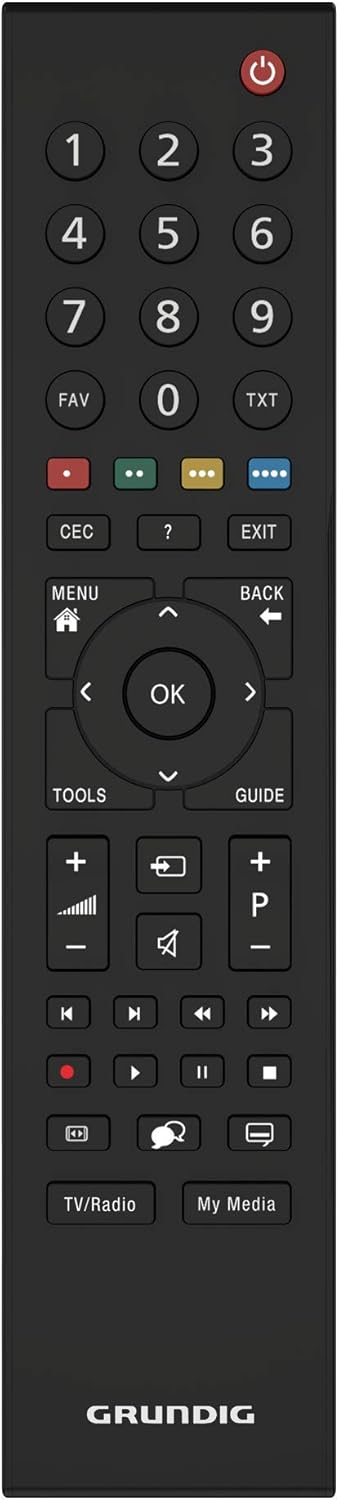
Сүрөт: жогорудан ылдыйга view of the black Grundig TV remote control. Key buttons include Power, Number Pad, Volume Up/Down, Channel Up/Down, Menu, OK, and navigation arrows.
2. Негизги функциялар
- Күч: басыңыз кызыл кубат баскычы to turn the TV on or off.
- Көлөмү: колдонуу VOL +/- үн деңгээлин тууралоо үчүн баскычтар.
- Канал: колдонуу CH +/- каналдарды өзгөртүү үчүн баскычтар.
- Киргизүүнү тандоо: басыңыз БУЛАК button (if available, or similar icon) to select between different input sources (HDMI, AV, TV, Satellite).
3. Меню навигациясы
басыңыз МЕНЮ button to access the main menu. Use the arrow buttons (Өйдө, ылдый, сол, оң) параметрлерди карап чыгуу үчүн жана OK button to confirm selections. The КАЙТ or ЧЫГУУ button will return you to the previous screen or exit the menu.
4. Өркүндөтүлгөн функциялар
- HDR технологиясы: Your Grundig TV utilizes HDR (High Dynamic Range) technology to enhance contrast and deliver more realistic images. This technology increases the contrast between bright whites and deep blacks, providing a more immersive viewтажрыйбасы.
- Dolby Digital Sound: The integrated Dolby Digital sound technology ensures natural and clear audio, even at high volumes.
- Built-in Satellite Receiver: The TV includes a built-in satellite receiver, eliminating the need for an external set-top box and reducing cable clutter. This allows for easy and seamless viewing of satellite channels.
Техникалык тейлөө
1. Экранды тазалоо
Экранды жумшак, кургак, түксүз чүпүрөк менен акырын сүртүңүз. өжөр белгилери үчүн, бир аз гampчүпүрөккө суу же атайын экран тазалоочу каражат. Суюктукту экранга түз чачпаңыз.
2. Телевизордун корпусун тазалоо
Use a soft, dry cloth to wipe the exterior of the TV. Avoid using abrasive cleaners or solvents.
Проблемаларды чечүү
Телевизоруңузда көйгөйлөргө туш болсоңуз, төмөнкү жалпы көйгөйлөрдү жана аларды чечүү жолдорун караңыз:
- Кубат жок: Ensure the power cable is securely connected to both the TV and the wall outlet. Check if the outlet is functioning by plugging in another device.
- Сүрөт жок, бирок үн: Check the input source selection. Ensure the connected device (e.g., DVD player) is powered on and functioning correctly.
- Үн жок, бирок сүрөт: Check the volume level and ensure the TV is not muted. If using external audio, verify connections and settings.
- Алыстан башкаруу иштебейт: Check the batteries and replace them if necessary. Ensure there are no obstructions between the remote and the TV's IR sensor.
- Сүрөттүн сапаты начар: Check antenna/cable connections. If using an external device, try a different HDMI cable or input port.
For persistent issues, please contact Grundig customer support.
Техникалык шарттар
| Бренд | Grundig |
| Модел | 24 GCH 5900B |
| Модель жылы | 2019 |
| Screen Size | 24 дюйм (59 см) |
| Дисплей технологиясы | LED |
| Резолюция | 720p HD Ready (Max. Vertical Resolution: 768 Pixels) |
| Жаңыртуу ылдамдыгы | 60 Гц |
| Байланыш түрү | Кабель |
| Монтаж түрү | Дубалга орнотуу |
| Продукциянын өлчөмдөрү | 12.3 x 55.2 x 34.3 см |
| Продукт Салмагы | 2.4 килограмм |
Кепилдик жана колдоо
Your Grundig 24 GCH 5900B HD Ready TV comes with a manufacturer's warranty. Please refer to the warranty card included in your product packaging for specific terms and conditions. For technical support, service, or warranty claims, please contact your local Grundig service center or authorized dealer. Keep your purchase receipt as proof of purchase.


