1. Киришүү
The AOC Gaming C27G2Z is a 27-inch curved frameless ultra-fast gaming monitor designed to provide an immersive and responsive gaming experience. Featuring a Full HD 1080p resolution, an incredibly fast 0.5ms (MPRT) response time, and a 240Hz refresh rate, this monitor ensures smooth and fluid visuals. It supports AMD FreeSync technology to eliminate screen tearing and stuttering, offering a competitive edge. The 1500R super curved design wraps around your vision, placing you at the center of the action. The monitor also boasts a wide color gamut for vibrant imagery and an ergonomic stand for optimal viewсооронуч.

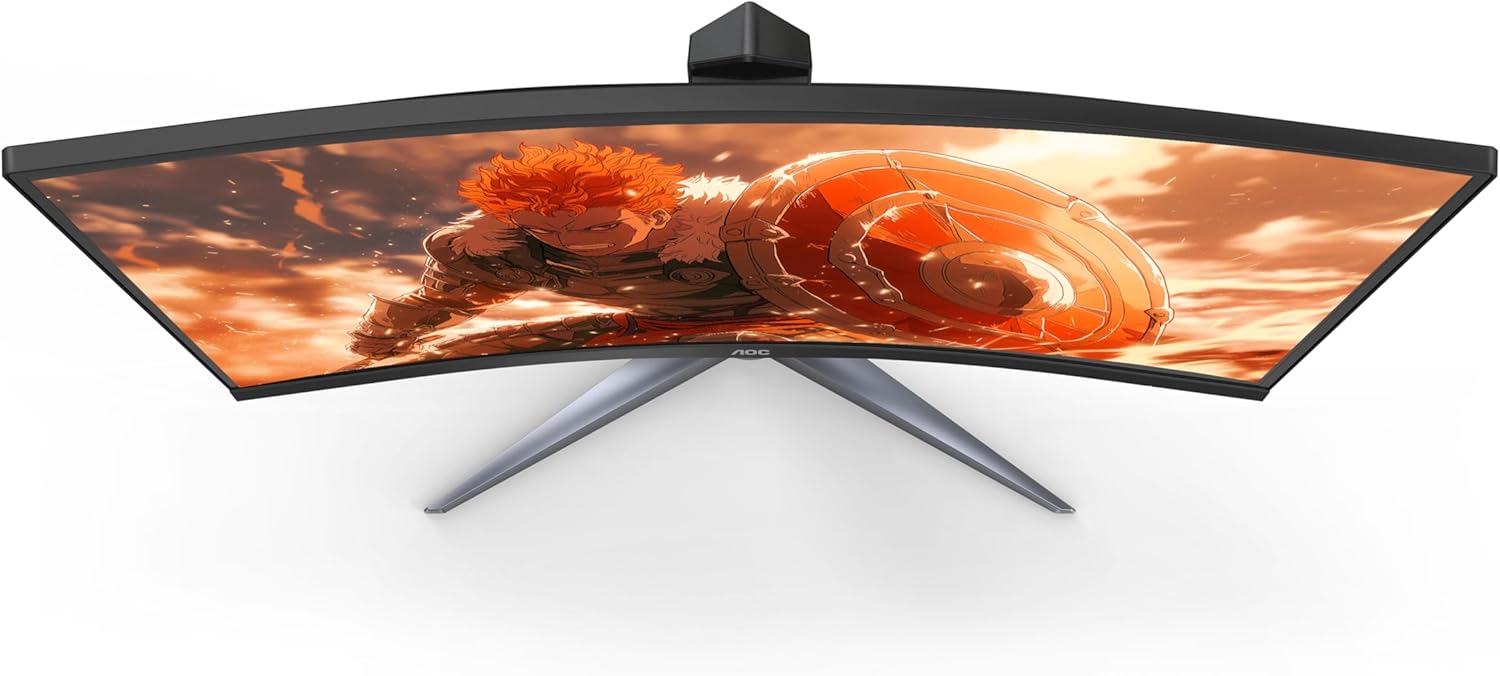
Фронт view of the AOC C27G2Z 27-inch Curved Gaming Monitor.
2. Кутуда эмне бар
Please check the contents of your product package for the following items:
- Монитор
- HDMI кабели
- Электр кабели
- Колдонуучунун колдонмосу (Ыкчам баштоо колдонмосу)
3. Орнотуу
3.1 Пакеттен чыгаруу
Carefully remove the monitor and all accessories from the packaging. Due to the curved nature of the screen, handle the monitor with care to avoid damage.
3.2 Стендди чогултуу
Assemble the monitor stand by following these steps:
- Attach the stand base to the stand column. Ensure it clicks securely into place or is fastened with screws as indicated in the quick start guide.
- Carefully attach the assembled stand to the back of the monitor. Align the mounting points and push until it locks into position.

Арткы view тиркелген стенд менен монитордун.
3.3 Туташтыруучу кабельдер
Мониторуңузга жана компьютериңизге керектүү кабелдерди туташтырыңыз:
- Кубат шнурын монитордун кубат киресине, андан кийин розеткага туташтырыңыз.
- For optimal performance, connect the DisplayPort cable from your computer's graphics card to the DisplayPort input on the monitor. This enables the 240Hz refresh rate.
- Alternatively, connect an HDMI cable from your computer or console (Xbox, PS5, Switch) to one of the HDMI 2.0 inputs on the monitor.
Close-up of the monitor's input ports, including HDMI and DisplayPort.
4. Мониторуңузду иштетүү
4.1 Күйгүзүү/өчүрүү
Press the power button located on the bottom right side of the monitor to turn it on or off. The power LED will indicate the monitor's status.
4.2 Экрандагы дисплей (OSD) навигациясы
The monitor features an intuitive OSD menu for adjusting various settings. Use the joystick or buttons (depending on your model's specific design) located on the bottom or rear of the monitor to navigate the menu. Press the joystick/button to enter the menu, move it up/down/left/right to select options, and press again to confirm.
4.3 Дисплей орнотуулары
Оптималдуу үчүн дисплей орнотууларын тууралаңыз viewing and gaming:
- Жарыктык жана контраст: Adjust these to suit your lighting environment and personal preference.
- Түс орнотуусу: Fine-tune color temperature, gamma, and other color-related settings.
- Оюн жөндөөсү: Access specific gaming features like Game Mode (FPS, RTS, Racing), Shadow Control, and Low Input Lag.
- Эко режими: Select from various eco modes to optimize power consumption.
5. Негизги өзгөчөлүктөрү
- 27" Full HD (1080P) Curved VA Panel: Experience crisp and clear visuals with a 1920x1080 resolution on a 27-inch curved VA panel, offering a wide viewing angle of 170 degrees and an aspect ratio of 16:9.
- 240Hz Refresh Rate & 0.5ms MPRT Response Time: Achieve unprecedented smoothness and fluidity in your games with a 240Hz refresh rate (via DP1.4) and a rapid 0.5ms MPRT response time, ensuring virtually instantaneous response to your actions and precise targeting of moving opponents.
- 1500R Super Curved Design: The aggressive 1500R curvature of the monitor wraps around your vision, creating a deeply immersive gaming experience that pulls you into the action.
- AMD FreeSync Premium технологиясы: Synchronizes the display and AMD GPU to eliminate screen tearing, stuttering, and input lag, providing the smoothest, fastest, and most visually stunning gaming experience possible.
- Wide Color Gamut (119.9% sRGB, 89.8% DCI-P3): Enjoy vibrant and lifelike colors that bring characters and environments to life, creating stunning imagery with rich details and diverse contrast.
- Sleek 3-Sided Frameless Design: The monitor's design minimizes bezel distraction, making it ideal for seamless multi-monitor setups and providing a sleek aesthetic.
- Эргономикалык стенд: The included stand is height-adjustable, allowing you to find the optimal viewing angle for comfortable long gaming and computing sessions. The monitor is also VESA compatible for alternative mounting solutions.
- Киргизүүнүн кечигүүсүнүн төмөн режими: AOC's Low Input Lag mode bypasses extra image processing, delivering lag-free display from video signals and giving players a crucial advantage over opponents.

Side view illustrating the curvature of the monitor.
6. Техникалык шарттар
| Спецификация | Нарк |
|---|---|
| Туруктуу экранды көрсөтүү өлчөмү | 27 дюйм |
| Screen Resolution | 1920x1080 (FHD 1080p) |
| Max Screen Resolution | 1920 x 1080 |
| Бренд | AOC |
| Сериялар | Gaming Monitor Curved |
| Элементтин моделинин номери | C27G2Z |
| Элемент Салмагы | 9.02 фунт |
| Продукциянын өлчөмдөрү | 8.96 x 24.1 x 20.81 дюйм |
| Түс | Кара |
| Тtage | 100-240 Вольт |
| Өндүрүүчү | AOC |
| Келип чыккан өлкө | Кытай |
| Аспект катышы | 16:9 |
| Screen Surface Description | Жылтырак |
7. Техникалык тейлөө жана кам көрүү
To ensure the longevity and optimal performance of your AOC C27G2Z monitor, follow these maintenance guidelines:
- Экранды тазалоо: Жумшак, түксүз кездемени жеңил колдонуңуз dampened with a non-ammonia, non-alcohol based glass cleaner. Spray the cleaner onto the cloth, not directly onto the screen.
- Тазалоо Casing: Мониторду сүртүү үчүн жумшак, кургак чүпүрөктү колдонуңуз casinг. Абразивдүү тазалагычтарды же эриткичтерди колдонуудан алыс болуңуз.
- Колдонуу: Always lift the monitor by its base or edges. Avoid applying pressure directly to the screen, especially the curved surface.
- Вентиляция: Монитордогу желдетүү тешиктери жабылбагандыгын текшериңиз. Мониторду тийиштүү аба агымы жок жабык жайга койбоңуз.
- Өчүрүү: When not in use for extended periods, turn off the monitor and unplug it from the power outlet.
8. Кыйынчылыктарды
Мониторуңузда көйгөйлөргө туш болсоңуз, төмөнкү жалпы көйгөйлөрдү жана чечимдерди караңыз:
- Кубат жок:
- Кубат шнуру мониторго да, розеткага да бекем туташтырылганын текшериңиз.
- Башка аспапка сайып, розетка иштеп жатканын текшериңиз.
- Дисплей жок/Кара экран:
- Verify that the video cable (HDMI or DisplayPort) is securely connected to both the monitor and your computer's graphics card.
- Монитордун OSD менюсунда туура киргизүү булагы тандалганын текшериңиз.
- Компьютериңизди өчүрүп күйгүзүңүз.
- Жаркылдаган экран:
- Check the video cable for damage or loose connections. Try a different cable if possible.
- Графикалык картаңыздын драйверлери жаңыртылганын текшериңиз.
- Disable or enable AMD FreeSync in the monitor's OSD or graphics card settings to see if it resolves the issue.
- No Sound (if using monitor speakers/audio out):
- Check the audio settings on your computer and ensure the monitor is selected as the output device.
- Adjust the volume on the monitor's OSD menu.
- Ensure the HDMI or DisplayPort cable is capable of transmitting audio.
9. Кепилдик жана колдоо
AOC offers comprehensive support for its products, including a robust warranty program:
- Zero Bright Dot Coverage: For all AOC Gaming monitors, if a bright dot or dead pixel develops within 3 years of purchase, AOC will replace it for free.
- Алдын ала алмаштыруу: If your monitor needs to be replaced, AOC ships a replacement monitor as soon as the Return Merchandise Authorization (RMA) is authorized, even before you ship the damaged monitor back. This minimizes downtime and gets you back to gaming quickly.
- Accidental Damage Coverage: Within the first year of purchase, AOC will replace any accidentally damaged units covered under the Re-Spawned program. (One replacement per product.)
For further assistance or detailed warranty information, please refer to the full User Manual PDF or visit the official AOC support webсайт.
10. Кошумча ресурстар
For a complete and detailed guide, including advanced settings and comprehensive troubleshooting, please download the full User Manual (PDF):


