Introduction
The ThiEYE CarView 3 Mirror Dash Cam is an advanced vehicle recording system designed to enhance driving safety and provide comprehensive video evidence. This manual provides detailed instructions for installation, operation, and maintenance to ensure optimal performance of your device.

Figure 1: ThiEYE CarView 3 Mirror Dash Cam. This image displays the main unit of the dash cam, designed to replace or clip over your existing rearview mirror, along with its compact front camera.
Пакеттин мазмуну
Төмөндө тизмеленген нерселердин баары пакетиңизге камтылганын текшериңиз:
- Mirror Dash Cam (Main Unit)
- Арткы камера
- 8м арткы камера кабели
- 20cm Rear Camera Cable
- Mounting Strap (x4)
- Car Charger with Additional USB
- 32 ГБ микро SD карта
- SD Card Reader
- Pry куралы
- User Manual

Figure 2: All components included in the ThiEYE CarView 3 package. This image shows the main mirror dash cam unit, rear camera, various cables, mounting straps, car charger, 32GB Micro SD card, SD card reader, pry tool, and user manual.
Продукт бүттүview
Негизги өзгөчөлүктөрү
- 2.5K Ultra HD Front and Rear Recording: Features a 2.5K (2560*1440) front camera with Sony IMX335 Starvis sensor and Hisilicon Hi3556 processor, plus a 6G cam lens. The rear camera records in 1080P.
- Enhanced Night Vision & Wide Dynamic Range: Captures more details in low-light conditions.
- 10" IPS Full Touch Screen: Provides a sensitive and enjoyable visual experience, also functions as an original mirror when the display is off.
- Dual 170° Wide Angle Lenses: Both front and rear cameras offer a broad field of view to reduce blind spots.
- Versatile Rear Camera Installation: Can be installed on the rear car window or used as an inside car camera with included 8-meter and 20cm cables.
- IP68 суу өткөрбөй турган арткы камера: Ensures clear views in various weather conditions.
Video Quality & Wide Angle View

Figure 3: Comparison of 2.5K Quad HD video resolution for front and 1080P for rear cameras. This image illustrates the superior clarity and detail captured by the ThiEYE CarView 3 compared to standard resolutions.

Figure 4: Enhanced Super Night Mode for improved low-light recording. This image demonstrates the dash cam's ability to capture clearer and more detailed footage in dark conditions.

Figure 5: Both front and rear cameras offer a 170-degree wide-angle view. This image visually compares the extensive field of view provided by the ThiEYE CarView 3's dual 170° wide-angle lenses against a narrower view.
Расмий продукт Video
Video 1: ThiEYE Carview 3 2.5K 10" Touch Screen Mirror Dash Cam. This official video provides a comprehensive overview of the product's features, design, and capabilities, including demonstrations of its high-resolution recording and touch screen interface.
Жайгашуу
1. Күзгүлүү видеорегистраторду орнотуу
- Attach the mounting straps to the back of the mirror dash cam.
- Carefully place the dash cam over your vehicle's existing rearview күзгү.
- Secure the dash cam by stretching the mounting straps around your rearview mirror and hooking them onto the designated points on the dash cam. Ensure it is firmly attached and does not obstruct your view.
2. Арткы камераны орнотуу
The rear camera offers flexible installation options:
- Rear Window Installation: Mount the rear camera on the inside of your rear car window for a clear view артыңыздагы жол кыймылы.
- In-Car Recording: Utilize the 20cm cable to install the rear camera on the front windshield for in-car recording, valuable for rideshare drivers or family monitoring.

Figure 6: The rear camera can be installed on the rear window for external view or on the front windshield for internal cabin recording. This image illustrates the two primary installation methods for the rear camera, highlighting its versatility.
3. Зымдар жана электр туташтыруу
- Connect the main unit to the car charger.
- Унааңыздын кубаттагычын унааңыздын 12 В кубаттоочу розеткасына (тамеки күйгүзгүчтүн розеткасы) сайыңыз.
- Connect the rear camera cable to the main unit. Route the cable neatly along the vehicle's interior trim to avoid obstruction. The included pry tool can assist in tucking the cable.
4. Эстутум картасын салуу
Insert the provided 32GB Micro SD Card into the designated slot on the side of the main unit. Ensure it clicks into place. The device supports up to 128GB SD cards.
Иштөө нускамалары
1. Күйгүзүү/өчүрүү
Унааңыздын от алдыруу системасы күйгүзүлгөндө, видеорегистратор автоматтык түрдө күйүп, жаздыра баштайт. Ал от алдыруу системасы өчүрүлгөндө автоматтык түрдө өчөт.
2. Сенсордук экрандын иштеши
The 10-inch IPS full touch screen allows for intuitive control:
- Солго/Оңго сүрүү: Алдыңкы камеранын ортосунда которулуу view, арткы камера viewже бөлүнгөн экран режиминде көрсөтүү.
- Өйдө/ылдый сүрүү: Adjust the display brightness or the view angle (for the rear camera).
- Тийме сүрөтчөлөрү: Access various settings and functions directly from the screen interface.
3. Жазуу режимдери
- Цикл жаздыруу: The dash cam continuously records video in segments. When the memory card is full, it automatically overwrites the oldest footagжаңы жазуулар үчүн орун бошотуп.
- G-сенсор (шашылыш жазуу): The built-in G-sensor detects sudden shakes or collisions. In such events, it automatically locks the current video segment, preventing it from being overwritten by loop recording.
- Унаа токтотуучу жай: When enabled, the dash cam will automatically start recording if it detects a collision or impact while the vehicle is parked.
4. Reversing Aid System
When you shift your vehicle into reverse, the dash cam display will automatically switch to the rear camera view, providing guidelines to assist with parking and reversing maneuvers.
5. Optional GPS Functionality
The ThiEYE CarView 3 supports an optional GPS antenna (sold separately, search for B088TCNN13). When connected, the GPS antenna allows the dash cam to record your driving route, location, and speed in real-time. This information can be viewed using dedicated GPS player software on a computer.
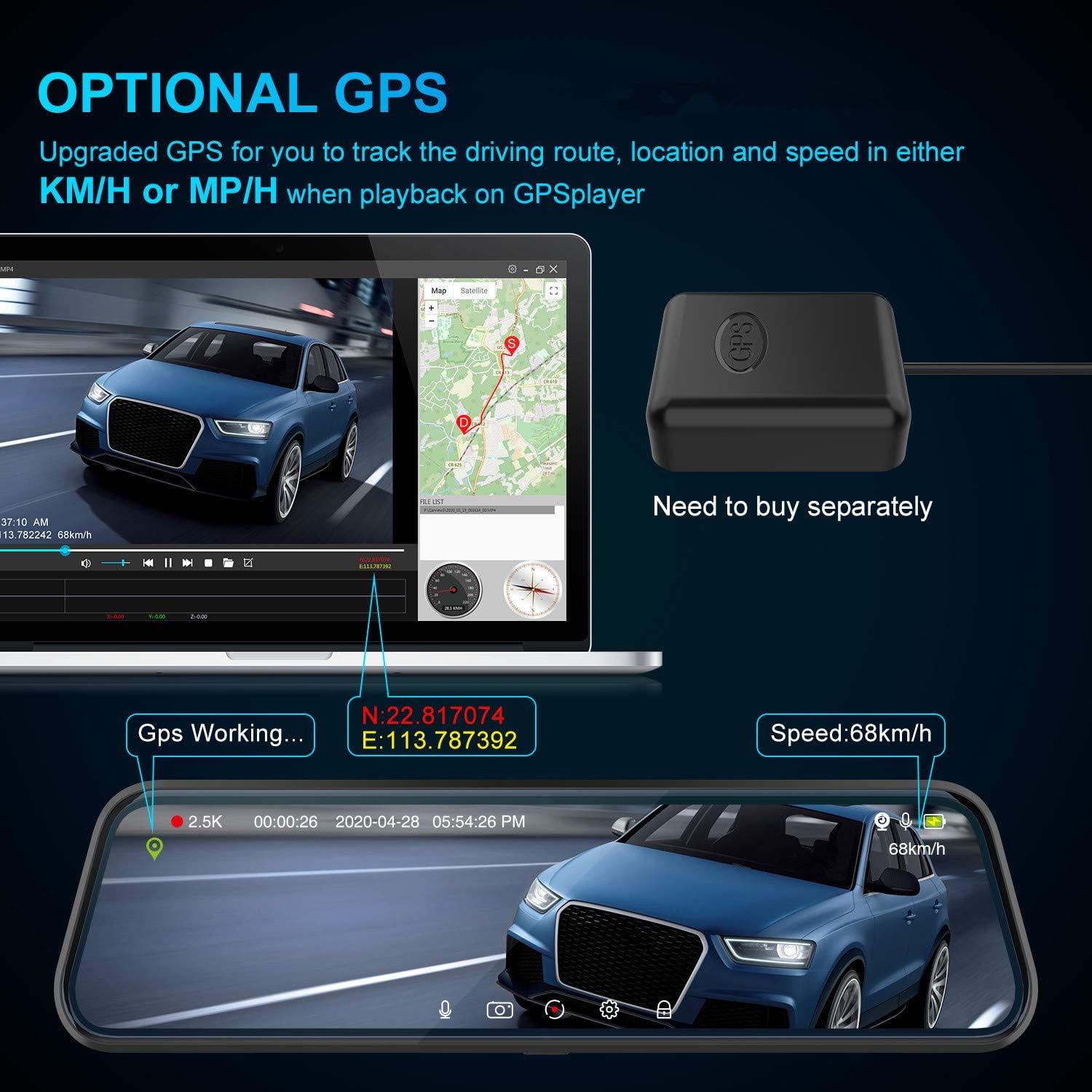
Figure 7: The dash cam supports an optional GPS antenna for tracking driving data. This image shows the dash cam displaying GPS information like coordinates and speed, along with the separate GPS antenna unit.
Техникалык тейлөө
1. Эстутум картасын башкаруу
- Оптималдуу иштөөнү камсыз кылуу жана маалыматтардын бузулушунун алдын алуу үчүн Micro SD картаңызды үзгүлтүксүз форматтап туруңуз (айына жок дегенде бир жолу).
- Ensure the memory card is a high-speed Class 10 or higher for reliable recording. The included 32GB card meets this requirement.
2. Тазалоо
- Use a soft, dry cloth to clean the dash cam screen and lenses. Avoid abrasive materials or chemical cleaners.
- Keep the camera lenses free from dust and smudges to ensure clear video quality.
Проблемаларды чечүү
If you encounter issues with your ThiEYE CarView 3, төмөнкү кеңири таралган көйгөйлөрдү жана чечимдерди караңыз:
- Video Overwriting Issues: Ensure loop recording is enabled and the G-sensor sensitivity is set appropriately. If important files are being overwritten, manually lock them or transfer them to another device regularly.
- Видеонун сапаты начар: Check that the lenses are clean and free from obstructions. Ensure the resolution settings are at their highest (2.5K front, 1080P rear). Verify that the memory card is a high-speed Class 10 or higher.
- Түзмөк күйбөй жатат: Унаа кубаттагычынын туташуусун текшерип, унаанын 12 В кубат розеткасы иштеп жатканын текшериңиз.
- Туруксуз орнотуу: Ensure the mounting straps are securely fastened and adjusted tightly around your rearview күзгү.
For further assistance, please contact ThiEYE customer service.
Техникалык шарттар
| Бренд | ThiEYE |
| Модель аты | Машинаview 3 |
| Элемент моделинин номери | emareg-292 |
| Пакеттин өлчөмдөрү | 12.68 x 5.71 x 2.99 дюйм |
| Элемент Салмагы | 1.9 фунт |
| Батареялар | 1 литий-иондук батарейкалар талап кылынат (кошулган) |
| Байланыш технологиясы | USB |
| Видео тартуунун резолюциясы | 1080p (Rear), 2.5K (Front) |
| Монтаж түрү | Жабыштыруучу тоо |
| Field Of View | 170 градус |
| Башкаруу ыкмасы | тийүү |
Кепилдик жана колдоо
ThiEYE CarView 3 Mirror Dash Cam includes a 30-Days return policy and a 365-Days product period. For any inquiries or support, please contact ThiEYE customer service within 24 hours.