1. Продукт бүтүп калдыview
The Anet ET5X is a DIY 3D printer designed for enthusiasts and professionals, featuring auto-leveling, resume printing functionality, and a large build volume. Its robust metal frame ensures stable and precise printing.

Figure 1.1: Anet ET5X 3D Printer with exampбасылмалар.
Негизги өзгөчөлүктөрү:
- Auto Leveling with Resume Printing Function
- 3.5 Inch LCD Color Touch Screen
- Upgraded Over-Current Protection Mainboard
- Large Build Size: 11.8 x 11.8 x 15.7 inches (300x300x400mm)
- Metal Frame & Quick Assembly
Video 1.1: Anet ET5X 3D printer overview, showcasing анын өзгөчөлүктөрү жана мүмкүнчүлүктөрү.
Video 1.2: Anet ET5X DIY 3D Printer features, including auto-leveling and filament assignment.
2. Коопсуздук нускамалары
Please read and understand all safety instructions before operating the Anet ET5X 3D printer. Failure to follow these instructions may result in injury, property damage, or poor print quality.
- Ысык беттер: The print nozzle and heated bed can reach high temperatures. Avoid touching these components during operation or immediately after printing. Allow them to cool completely before handling.
- Кыймылдуу бөлүктөр: The printer contains moving parts that can cause injury. Keep hands, hair, and loose clothing clear of the print head, bed, and gantry during operation.
- Вентиляция: Operate the printer in a well-ventilated area. Some filaments may produce fumes during printing.
- Электр коопсуздугу: Ensure the printer is connected to a properly grounded power outlet. Do not operate with damaged power cords or plugs.
- Filament иштетүү: Use appropriate filament types for your printer. Store filament in a dry environment to prevent moisture absorption.
- Көзөмөл: Принтерди иштеп жатканда, айрыкча узун басып чыгаруу учурунда, кароосуз калтырбаңыз.
3. Орнотуу
3.1 Кутудан чыгаруу жана алгачкы текшерүү
Carefully remove all components from the packaging. Inspect for any visible damage that may have occurred during transit. The packaging includes foam inserts to protect the printer components.
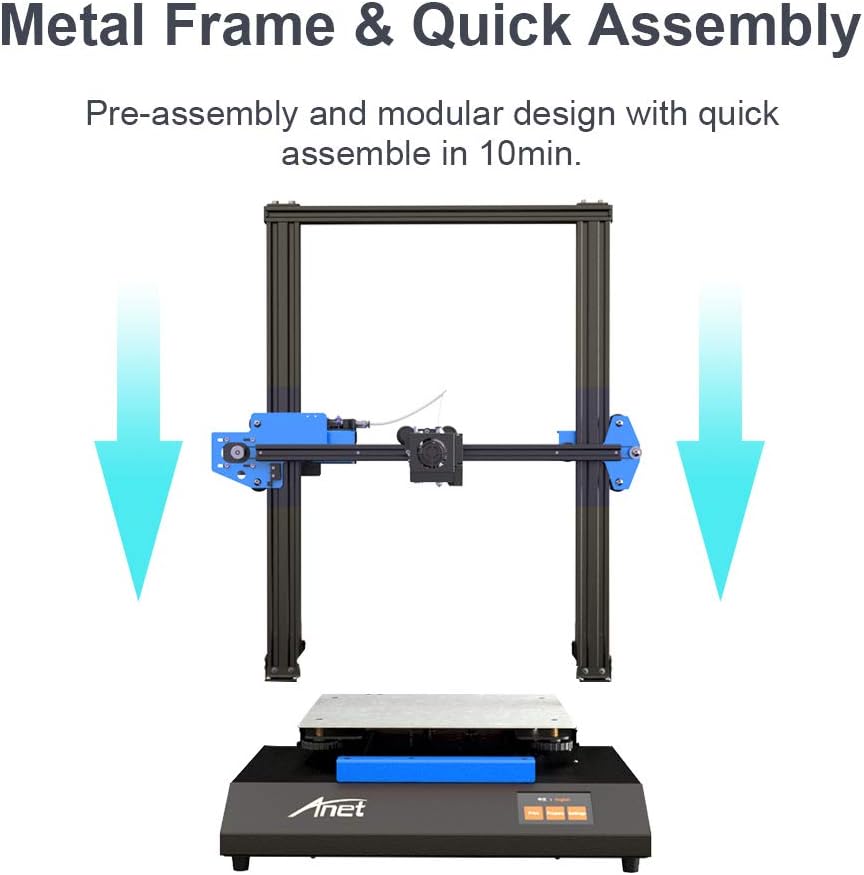
Figure 3.1: Anet ET5X components as packaged, showing the main frame and base.
3.2 Ассамблея
The Anet ET5X is designed for quick assembly. The main gantry comes pre-assembled and simply needs to be attached to the base unit. Follow these general steps:
- Негизги блокту туруктуу, тегиз жерге коюңуз.
- Carefully align the gantry with the designated mounting points on the base.
- Secure the gantry to the base using the provided screws and tools.
- Connect the motor cables and other necessary wiring as indicated in the manual.
- Жипчелүү катушка кармагычты порталдын үстүнкү бөлүгүнө бекитиңиз.
3.3 Initial Power On and Touchscreen Interface
Connect the power cable and turn on the printer. The 3.5-inch LCD color touchscreen provides an intuitive user interface for controlling the printer's functions.

Figure 3.2: The intuitive touchscreen interface of the Anet ET5X.
3.4 Автоматтык түрдө төшөктү тегиздөө
The ET5X features matrix automatic leveling, which measures 25 points across the print platform to ensure a perfectly level print surface. This significantly simplifies the setup process and improves print adhesion.

Figure 3.3: Matrix automatic leveling system in action.
3.5 Filament Loading
The printer supports automatic filament assignment, allowing for easy loading and unloading of filament with just a click. Ensure the filament is properly fed into the extruder mechanism.

Figure 3.4: Automatic filament loading mechanism.
4. Иштөө
4.1 Басып чыгаруу процесси
Once the printer is assembled, leveled, and filament is loaded, you can begin printing. Prepare your 3D models using compatible slicing software (not included) and transfer the G-code files to the printer via SD card or USB connection.

Figure 4.1: The Anet ET5X printing a large model.
4.2 Резюме басып чыгаруу функциясы
The Anet ET5X is equipped with a resume printing function, allowing it to recover and continue printing from the exact point it left off in case of an unexpected power outage. This feature helps prevent failed prints and saves material.

4.2-сүрөт: Power Outage Recovery feature.
4.3 Ultra Large Print Volume
The printer boasts an ultra-large print volume of 300x300x400mm (11.8x11.8x15.7 inches), enabling the creation of significantly larger models compared to standard desktop 3D printers.
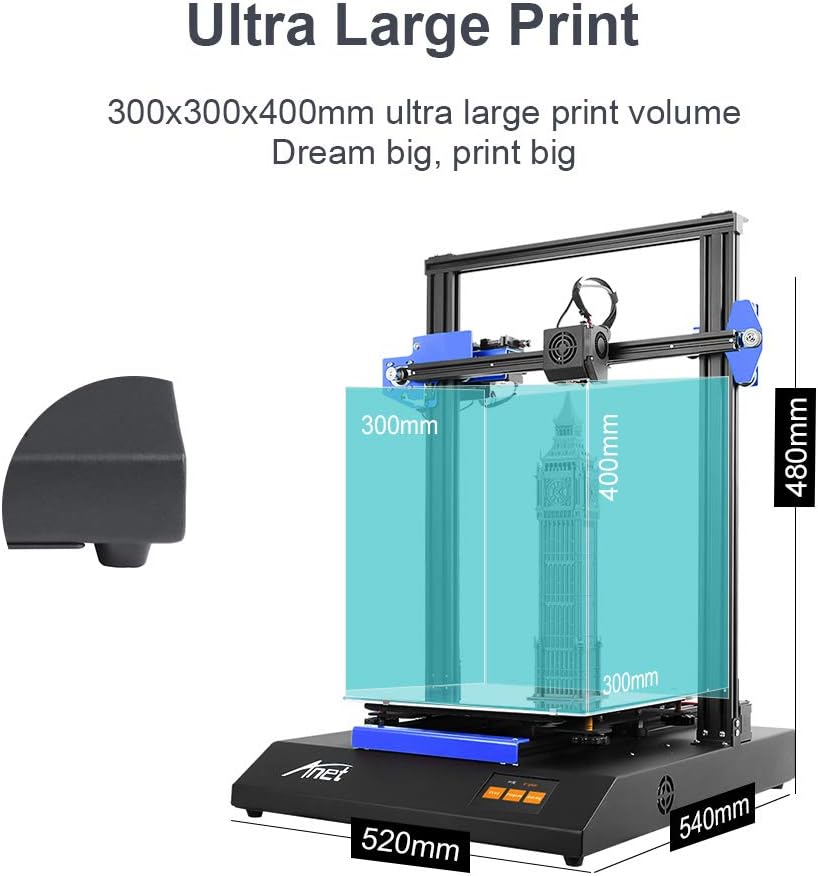
Figure 4.3: Ultra Large Print Volume capabilities.
5. Техникалык тейлөө
Regular maintenance ensures optimal performance and longevity of your Anet ET5X 3D printer.
- Тазалоо: Regularly clean the print bed, nozzle, and gantry rails to prevent debris buildup. Use a soft cloth and appropriate cleaning solutions.
- Соплолорду тейлөө: Periodically check the nozzle for wear or clogs. Replace the nozzle if print quality degrades significantly. The printer comes with an extra 0.4mm nozzle.
- Кур чыңалуу: Ensure the X and Y axis belts are properly tensioned. Overly loose or tight belts can affect print accuracy. Adjust using the eccentric nuts if necessary.
- Майлоо: Apply a small amount of lubricant to the Z-axis lead screws periodically to ensure smooth movement.
6. Кыйынчылыктарды
This section addresses common issues you might encounter with your Anet ET5X 3D printer.
6.1 Басып чыгаруудагы кеңири таралган көйгөйлөр
- Төшөктүн начар адгезияланышы: Ensure the print bed is clean and level. Adjust Z-offset if the first layer is not sticking or is too squished. Consider using an adhesive like glue stick or hairspray.
- Жипчелердин бүтөлүшү: This can be caused by heat creep, incorrect temperature settings, or dirty nozzles. Ensure proper cooling of the hotend and try a cold pull to clear clogs.
- Катмарды которуу: Often caused by loose belts, motor issues, or physical obstructions. Check belt tension and ensure smooth movement of all axes.
6.2 Z-Axis Homing Issues
Some users have reported Z-axis homing issues where the printer does not home correctly. This can sometimes be related to firmware bugs or sensor calibration. Anet has indicated plans to release open-source firmware to address such issues.
6.3 Микропрограмма жаңыртуулары
Anet is actively working on firmware updates to improve functionality and address known bugs. Check the official Anet website or support channels for the latest firmware versions and installation instructions.
7. Техникалык шарттар
| Атрибут | Нарк |
|---|---|
| Бренд | Anet |
| Продукциянын өлчөмдөрү | 11.8"D x 11.8"W x 15.7"H |
| Элемент Салмагы | 21.3 фунт (9.7 килограмм) |
| Түс | Кара |
| Шайкеш түзмөктөр | Ноутбук, смартфон |
| Дата биринчи жеткиликтүү | 20-апрель, 2020-жыл |

Figure 7.1: Anet ET5X 3D Printer dimensions.
8. Кепилдик жана колдоо
For warranty details, please refer to your purchase documentation or contact the retailer where you purchased the Anet ET5X 3D Printer.
For additional support, including troubleshooting tips, FAQs, and firmware updates, please visit the official Anet webсайт же алардын Amazon дүкөн бети:
- Anet Official Store on Amazon
- Сиз ошондой эле кайрыла аласыз Колдонуучунун колдонмосу (PDF) or Колдонуучунун колдонмосу (PDF) продукт менен камсыз кылынат.


