1. Киришүү
Thank you for choosing the STRONG SRT 24HC3023 24-inch TV. This television is designed for versatile use, offering a triple tuner for DVB-T2 HD, DVB-C, and DVB-S2 reception, making it suitable for both home entertainment and mobile applications such as motorhomes, caravans, or boats, thanks to its 12 Volt compatibility. This manual provides essential information for setting up, operating, and maintaining your new television. Please read it thoroughly before use to ensure proper functionality and safety.

Figure 1.1: STRONG SRT 24HC3023 24-inch TV
2. Коопсуздук маалыматы
Коопсуз эксплуатацияны камсыз кылуу жана зыян келтирбөө үчүн төмөнкү коопсуздук чараларын сактаңыз:
- Өрт же электр тогуна урунбоо үчүн сыналгыга жамгырга же нымдуулукка жол бербеңиз.
- Вентиляция тешиктерин жаап албаңыз. Тийиштүү аба агымы үчүн сыналгынын айланасында жетиштүү мейкиндикти камсыз кылыңыз.
- Use only the power adapter supplied with the TV. For 12V operation, ensure the power source is stable and within the specified voltage диапазону.
- Электр шнурунун басылып кетүүсүнөн же кысып калуудан сактаңыз, өзгөчө сайгычтарда, розеткаларда жана алар аппараттан чыга турган жеринде.
- Бул продуктту өзүңүз тейлөөгө аракет кылбаңыз. Бардык тейлөөнү квалификациялуу тейлөө кызматкерлерине тапшырыңыз.
- Clean the TV only with a dry cloth. Do not use liquid cleaners or aerosol cleaners.
- Keep batteries for the remote control out of reach of children.
3. Пакеттин мазмуну
Carefully unpack your TV and check that all items listed below are included and undamaged. If any items are missing or damaged, contact your retailer.
- STRONG SRT 24HC3023 LED сыналгы
- Remote Control (including 2x AAA Batteries)
- Stand (Base and Screws)
- Power Adapter (Standard Euro; 12V power cable not included)
- User Manual

3.1-сүрөт: Продукцияны таңгактоо

3.2-сүрөт: Алыстан башкаруу
4. Орнотуу
4.1 Стендди бекитүү
- Place the TV face down on a soft, clean surface to prevent scratching the screen.
- Стендди телевизордун астындагы монтаждоо тешиктери менен тууралаңыз.
- Берилген бурамалар менен стендди бекитиңиз. Ашыкча кысып албаңыз.
4.2 Перифериялык түзүлүштөрдү туташтыруу
Your TV offers a variety of connection ports for different devices.
- Антенна/Спутник: Connect your DVB-T/T2 antenna to the "ANT In" port or your satellite dish to the "SAT In" port.
- HDMI: For high-definition devices like Blu-ray players, game consoles, or streaming sticks.
- SCART: For older devices like DVD players or VCRs.
- USB: USB дисктерден медиа ойнотуу үчүн.
- AV In / Mini YPbPr: Аналогдук видео жана аудио булактары үчүн.
- Наушник: Жеке угуу үчүн.
- S/PDIF: Тышкы үн системаларына санариптик аудио чыгаруу үчүн.
- CI Slot: For CI+ modules (e.g., for freenet-TV).
- 12V кубаттуулугу: This TV is 12V compatible, ideal for mobile use. A 12V power cable is not included and must be purchased separately.

4.1-сүрөт: Телевизордун өлчөмдөрү
4.3 Баштапкы күйгүзүү жана каналды сканерлөө
- Connect the TV to a power source (either the supplied AC adapter or a compatible 12V source).
- Телевизордогу же пульттагы кубат баскычын басыңыз.
- Follow the on-screen instructions for initial setup, including language selection and channel scanning. The triple tuner allows you to scan for DVB-T/T2, DVB-C, and DVB-S2 channels.
5. Иштөө нускамалары
5.1 Негизги функциялар
- Күйгүзүү/өчүрүү: басыңыз Күч алыстан башкаруудагы баскыч.
- Канал тандоо: колдонуу CH +/- buttons to change channels sequentially, or enter channel numbers directly using the numeric keypad.
- Үндү көзөмөлдөө: колдонуу VOL +/- үнүн тууралоо үчүн баскычтар.
- Булак тандоо: басыңыз БУЛАК button to switch between input sources (HDMI, SCART, TV, etc.).
5.2 Triple Tuner Operation
The integrated triple tuner supports DVB-T/T2 (terrestrial), DVB-C (cable), and DVB-S2 (satellite) reception. During the initial setup, you will be prompted to select your preferred reception type and perform a channel scan. You can switch between these modes via the input source menu.
5.3 Электрондук программалык колдонмо (EPG)
басыңыз EPG button on the remote control to access the Electronic Program Guide. This displays program schedules for upcoming broadcasts and allows you to set timers for recording or viewing.
5.4 USB ойнотуу
Insert a USB storage device into the USB port. The TV will typically detect the device and prompt you to access its media content (photos, music, videos). Navigate through the files алыстан башкаруу пультун колдонуп жатат.
5.5 CI+ Slot
The CI+ slot allows you to insert a Conditional Access Module (CAM) and a smart card (e.g., for freenet-TV in Germany) to decrypt encrypted channels. Follow the instructions provided with your CI+ module for installation and activation.
Видео 5.1: Расмий продукт көргөзмөсүasing the STRONG 24HC3023 TV's features, including its 12V compatibility for mobile use in settings like camping or motorhomes.

Figure 5.1: STRONG TV in a mobile setting, highlighting 12V compatibility.
6. Техникалык тейлөө
Proper maintenance helps extend the life of your TV.
- Экранды тазалоо: Экранды жумшак, түксүз чүпүрөк менен акырын сүртүңүз. Кежир тактар үчүн, экранга түздөн-түз эмес, кездемеге колдонулган экранга тиешелүү тазалоочу эритмени колдонуңуз.
- Кабинетти тазалоо: Телевизордун шкафын сүртүү үчүн жумшак, кургак чүпүрөктү колдонуңуз. Абразивдүү тазалагычтарды же эриткичтерди колдонбоңуз.
- Вентиляция: Ensure the ventilation openings are clear of dust and debris. Do not place the TV in an enclosed space without adequate airflow.
- Өчүрүү: Always unplug the TV from the power outlet before cleaning or when not in use for extended periods.
7. Кыйынчылыктарды
If you encounter problems with your TV, refer to the following common issues and solutions.
| Көйгөй | Мүмкүн себеп | Чечим |
|---|---|---|
| Күч жок | Power cord not connected; no power from outlet. | Электр шнурунун туташуусун текшериңиз. Башка түзмөк менен розетка сынагы. |
| Сүрөт жок, бирок үн бар | Туура эмес киргизүү булагы тандалды; видео кабель бошоп калды. | Press SOURCE button to select correct input. Check video cable connections. |
| Үн жок, бирок сүрөт бар | Volume too low or muted; incorrect audio output setting. | Increase volume or unmute. Check audio settings in the menu. |
| Сүрөттүн сапаты начар | Weak signal; antenna/cable issue; picture settings. | Check antenna/cable connection. Adjust picture settings (brightness, contrast). |
| Пульт иштебей жатат | Batteries are dead or incorrectly inserted; obstruction. | Батареяларды алмаштырыңыз. Пульт менен сыналгынын ортосунда эч кандай тоскоолдук болбошу керек. |
Бул чечимдерди колдонуп көргөндөн кийин көйгөй чечилбесе, квалификациялуу тейлөө кызматкерлерине кайрылыңыз.
8. Техникалык шарттар
| Өзгөчөлүк | Деталь |
|---|---|
| Модель номери | SRT24HC3023 |
| Screen Size | 24 дюйм (61 см) |
| Дисплей технологиясы | LED |
| Резолюция | 720p (1366 x 768 пиксел) |
| Жаңыртуу ылдамдыгы | 60 Гц |
| Түнерлер | DVB-T2 HD, DVB-C, DVB-S2 (Triple Tuner) |
| Байланыш | HDMI, SCART, USB, AV In, Mini YPbPr, Headphone, S/PDIF, PC Audio In, ANT In, SAT In, CI Slot |
| Электр камсыздоо | AC 220-240V, 50/60Hz; 12V DC compatible |
| Энергияны керектөө (күйгүзүлгөн режимде) | 25 ватт |
| Энергия эффективдүүлүгү классы | F |
| Өлчөмдөрү (W x D x H) | 55.07 x 16.1 x 36.73 см (стенд менен) |
| Салмагы | 2.66 кг |
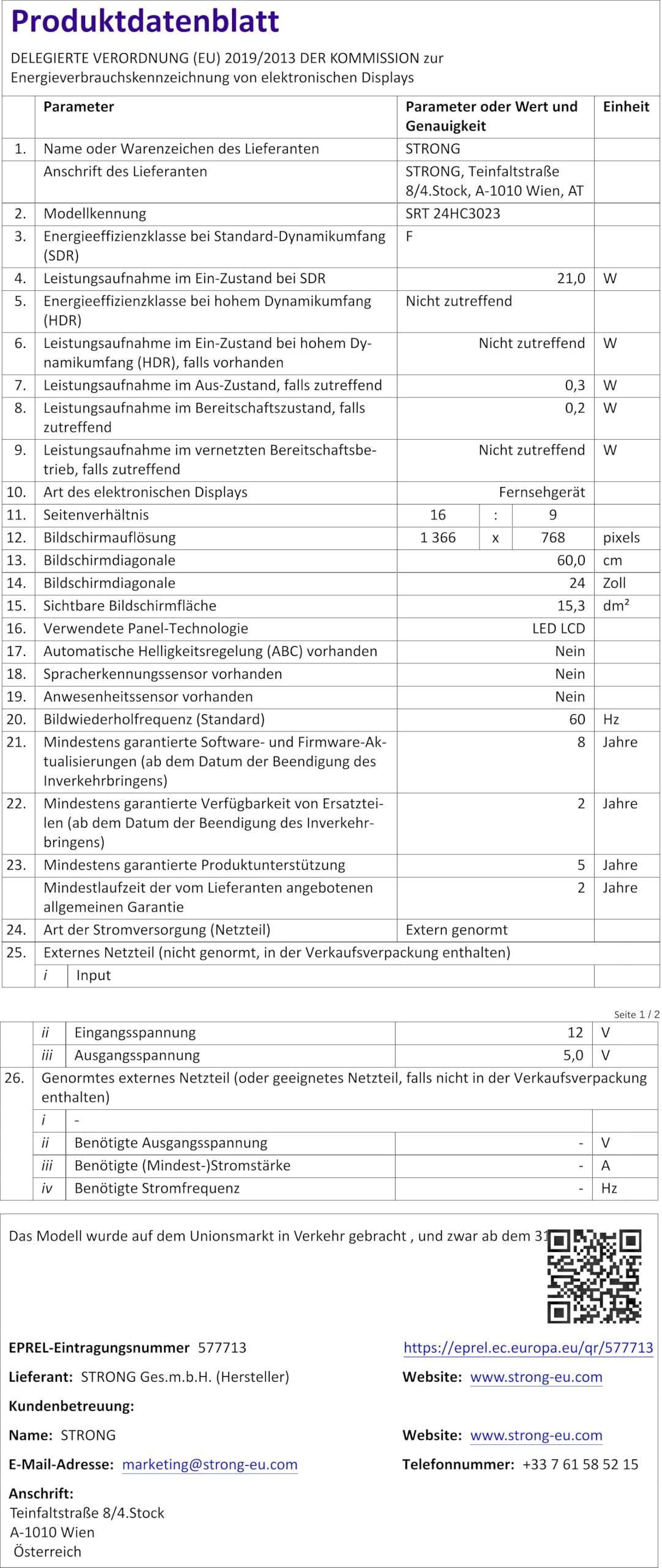
Figure 8.1: Product Fiche (Energy Label Information)
Энергия жөнүндө кененирээк маалымат алуу үчүн, сураныч, караңыз EPREL database (QR code link).

8.2-сүрөт: Энергия натыйжалуулугунун белгиси
9. Кепилдик жана колдоо
Your STRONG SRT 24HC3023 TV comes with a standard manufacturer's warranty. Please refer to the warranty card included in your package for specific terms and conditions. For technical support, troubleshooting assistance beyond this manual, or warranty claims, please contact STRONG customer service or your local retailer.
You can find more information and support on the official STRONG webсайт: www.strong.tv


