1. Продукт бүтүп калдыview
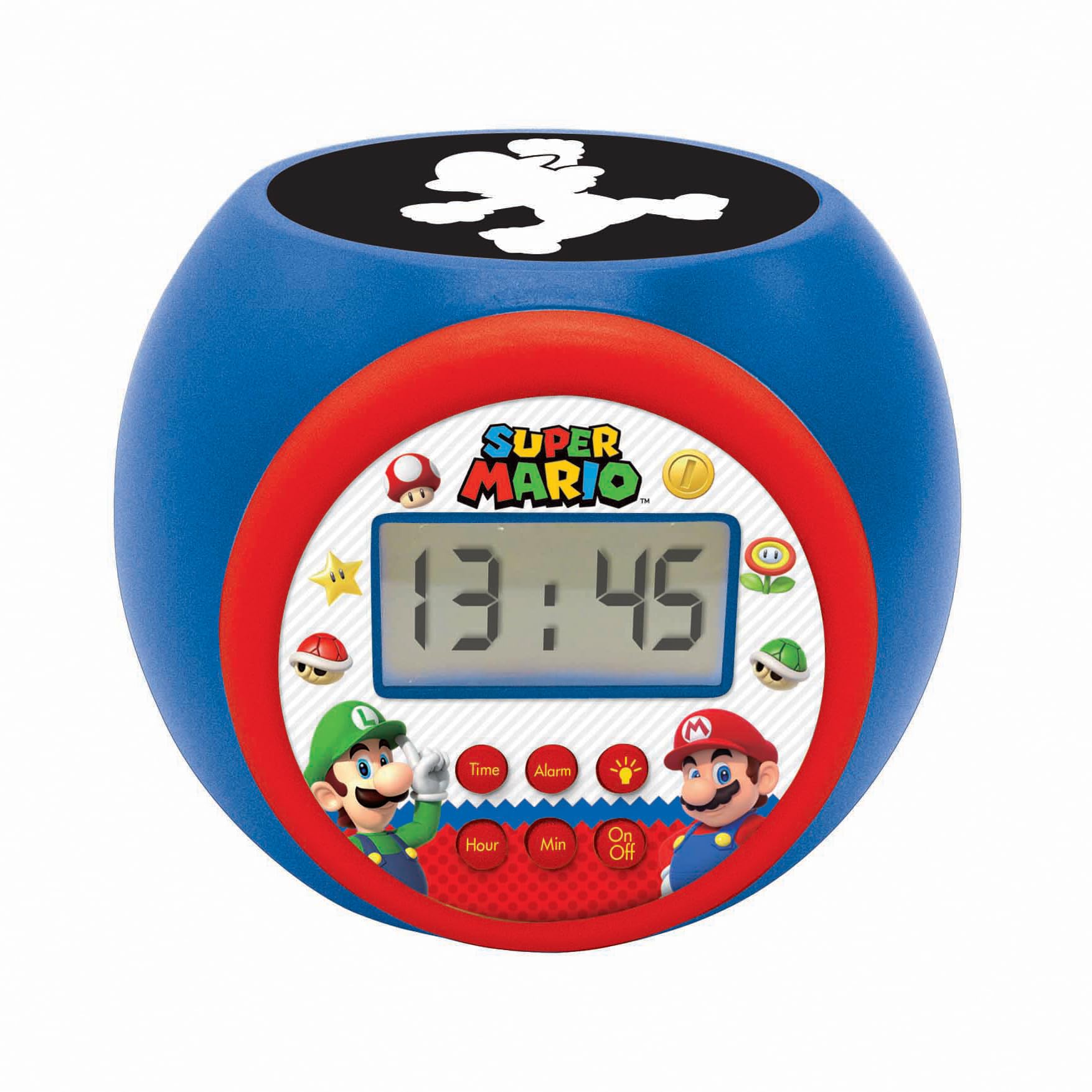
The LEXIBOOK Super Mario Projector Alarm Clock RL977NI is a digital alarm clock designed with a Super Mario theme. It features a backlit LCD screen, a projection function that displays Super Mario symbols onto the ceiling in three different colors, and a night light with integrated timers. This device includes an alarm with a snooze function and operates on batteries.
Негизги өзгөчөлүктөрү:
- Round shaped alarm clock with backlit LCD screen.
- 3 integrated night light timers (5, 10, or 15 minutes).
- Super Mario symbol projection in 3 colors.
- Time display in 12/24 hour format.
- Тындырма функциясы бар ойготкуч.
2. Орнотуу
2.1 Батареяны орнотуу
The alarm clock requires 3 AAA batteries (not included) for operation. Follow these steps to install the batteries:
- Ойготкуч сааттын астыңкы бетинен батарея бөлүмүн табыңыз.
- Кичинекей бурагычты колдонуп, батарейка бөлүгүнүн капкагын кылдаттык менен ачыңыз.
- Бөлүмдүн ичинде көрсөтүлгөндөй туура полярдуулукту (+ жана -) камсыз кылып, 3 жаңы AAA батарейкасын салыңыз.
- Батарея уясынын капкагын ордуна коюңуз жана аны бурама менен бекитиңиз.
Эскертүү: Always use fresh batteries and dispose of old batteries responsibly. Do not mix old and new batteries or different types of batteries.

3. Иштөө нускамалары
3.1 Баскыч функциялары
The alarm clock features several buttons for control:
- Убакыт баскычы: Убакытты орнотуу режимине кирүү үчүн колдонулат.
- Ойготкуч баскычы: Ойготкучту орнотуу режимине кирүү үчүн колдонулат.
- Саат баскычы: Adjusts the hour during time or alarm setting.
- Min Button: Adjusts the minute during time or alarm setting.
- Күйгүзүү/өчүрүү баскычы: Activates or deactivates the night light/projector.
3.2 Убакытты коюу
- басып, кармап туруңуз Убакыт button until the hour display starts flashing.
- колдонуу Саат саатты жөндөө үчүн баскыч.
- басыңыз Убакыт button again, and the minute display will flash.
- колдонуу Мин мүнөттөрдү жөндөө үчүн баскычты басыңыз.
- басыңыз Убакыт ырастоо жана убакыт орнотуу режиминен чыгуу үчүн дагы бир жолу басыңыз.
- 12 сааттык жана 24 сааттык форматтын ортосунда которулуу үчүн, басыңыз Саат button while the time is displayed normally (not in setting mode).
3.3 Сигналды коюу
- басып, кармап туруңуз Ойготкуч button until the alarm hour display starts flashing.
- колдонуу Саат каалаган ойготкуч саатын коюу үчүн баскыч.
- басыңыз Ойготкуч button again, and the alarm minute display will flash.
- колдонуу Мин каалаган ойготкуч мүнөттөрдү коюу үчүн баскыч.
- басыңыз Ойготкуч button one more time to confirm and activate the alarm. An alarm icon will appear on the LCD screen.
- Ойготкучту өчүрүү үчүн, баскычын басыңыз Ойготкуч button once when the time is displayed normally. The alarm icon will disappear.
3.4 Тындыруу функциясы
When the alarm sounds, press any button (except the Ойготкуч button to turn it off completely) to activate the snooze function. The alarm will temporarily stop and sound again after a few minutes.
3.5 Using the Projector and Night Light
The alarm clock features a projector that displays Super Mario symbols and also functions as a night light with a timer.
- басыңыз On/Off button to activate the projector and night light.
- The projector will display Super Mario symbols onto the ceiling in one of three colors.
- To cycle through the projection colors or turn off the projection, press the On/Off баскычын кайра-кайра.
- The night light has integrated timers of 5, 10, or 15 minutes. The timer setting is usually cycled by pressing the On/Off button or a dedicated light button (if present, not explicitly mentioned but implied by "3 integrated timers"). Refer to the icons on the clock face for specific light control.


4. Техникалык тейлөө
4.1 Тазалоо
To clean the alarm clock, use a soft, dry cloth. Do not use abrasive cleaners, solvents, or chemical sprays, as these can damage the surface and internal components. Avoid getting moisture into any openings.
4.2 Батареяны алмаштыруу
When the display dims or the functions become unreliable, it is time to replace the batteries. Follow the battery installation steps outlined in Section 2.1. Ensure the device is turned off before replacing batteries.
5. Кыйынчылыктарды
| Көйгөй | Мүмкүн себеп | Чечим |
|---|---|---|
| Сааттын дисплейи күңүрт же бош. | Төмөн же түгөнгөн батарейкалар. | Жаңы AAA батарейкалары менен алмаштырыңыз. Туура полярдуулукту текшериңиз. |
| Projection light is not working. | Projector is off or batteries are low. | басыңыз On/Off button to activate. Check and replace batteries if necessary. |
| Ойготкуч угулбайт. | Ойготкуч коюлган эмес же өчүрүлгөн. | Ensure the alarm is set correctly and the alarm icon is visible on the display. Check battery level. |
| Баскычтар жооп бербейт. | Low batteries or temporary software glitch. | Replace batteries. If issue persists, remove batteries for a few minutes and reinsert to reset the device. |
| Time or alarm settings reset unexpectedly. | Batteries removed or completely depleted. | Replace batteries and reset the time and alarm. |
6. Техникалык шарттар
- Модель номери: RL977NI
- Бренд: LEXiBOOK
- Дисплей түрү: Санарип LCD
- Кубат булагы: Батарея менен иштейт (3 x AAA батарейкалары, кошулган эмес)
- Продукциянын өлчөмдөрү: Approximately 4.65" W x 3.58" H (11.8 cm x 9.1 cm)
- Элемент Салмагы: Болжол менен 7.4 унция (210 грамм)
- Материал: Пластик
- Өзгөчөлүктөр: Alarm, Snooze, Night Light Timer, Projector
- Сунушталган жаш: 3 жаш жана андан жогору
- Чыккан датасы: 27-май, 2020-жыл
7. Кепилдик маалыматы
This LEXIBOOK product is covered by a 2 жылдык кепилдик сатып алынган күндөн тартып. Бул кепилдик кадимки колдонуудагы өндүрүш кемчиликтерин жана материалдык кемчиликтерди камтыйт. Кепилдик дооматтары үчүн сатып алганыңызды тастыктаган документти сактап коюңуз.
The warranty does not cover damage caused by misuse, accidents, unauthorized modifications, or normal wear and tear. For detailed warranty terms and conditions, please refer to the official LEXiBOOK webсайтка же кардарларды колдоо менен байланышыңыз.
8. Колдоо
For further assistance, technical support, or inquiries regarding your LEXIBOOK Super Mario Projector Alarm Clock RL977NI, please visit the official LEXiBOOK webсайтка же кардарларды тейлөө бөлүмүнө кайрылыңыз.
Көбүрөөк маалымат жана колдоо булактарын таба аласыз Amazon'догу LEXiBOOK дүкөнү.


