Introduction
The BIOBUDDI Pixel & Create Starter Pack BB-2001 offers an innovative way to engage in creative design without the need for traditional embroidery or ironing. This set utilizes eco-friendly pixel blocks that easily connect to base plates, allowing for the creation of both 2D and 3D images and designs. Designed for children aged 3 years and up, it also provides an enjoyable activity for adults.
Бул продуктунун негизги өзгөчөлүктөрү төмөнкүлөрдү камтыйт:
- Made from plant-based bioplastic, ensuring an environmentally friendly product.
- The starter set contains over 1500 pixel blocks, a remover tool, 8 different example cards, 4 building plates, and 4 connecting pieces.
- The production process and materials are entirely eco-friendly, utilizing sugar cane plants as a sustainable resource.
- Manufactured in the Netherlands, ensuring high quality and ethical production standards.
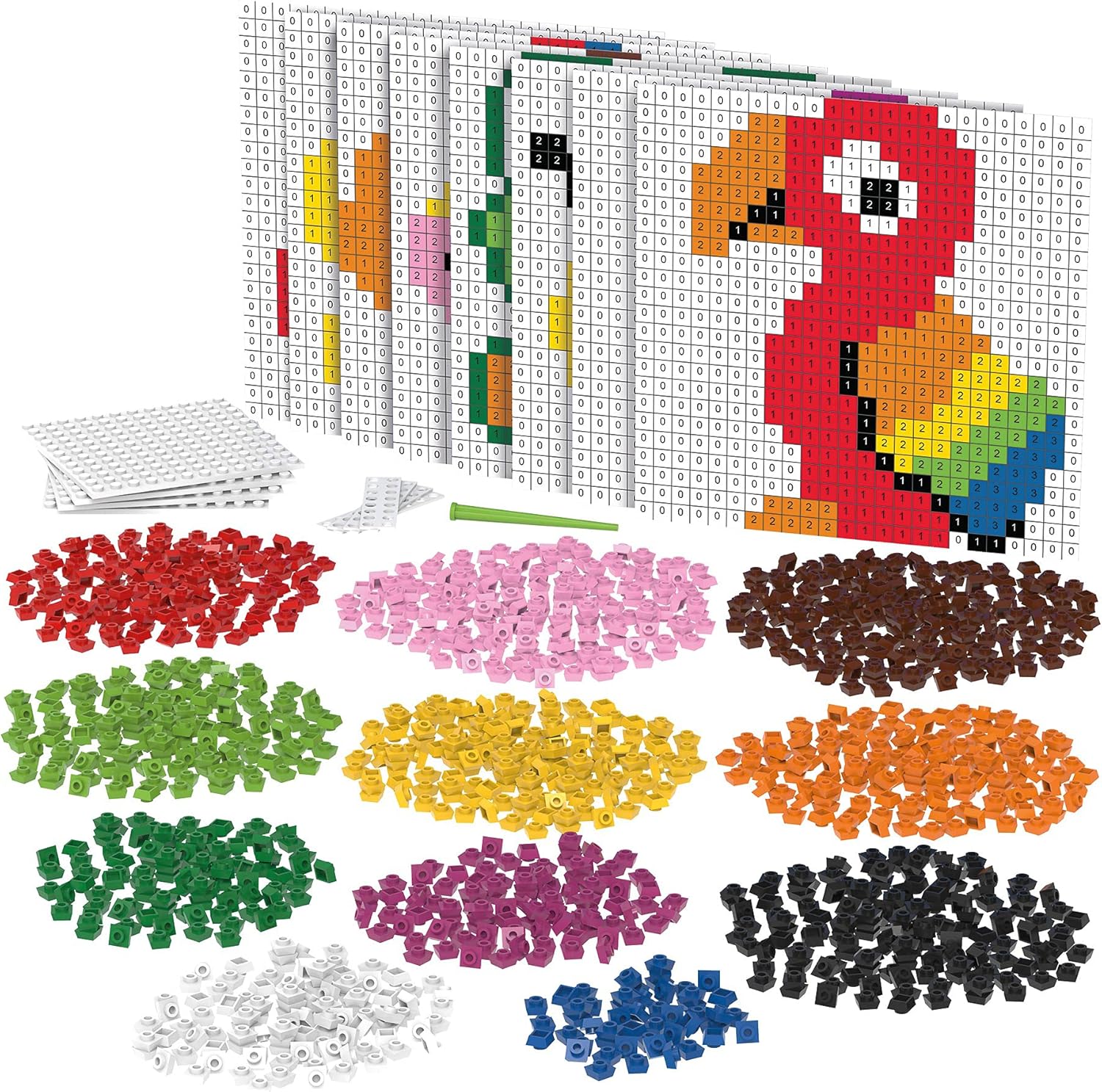
Figure 1: ашыкview of the Pixel & Create Starter Pack components and a completed design example.
Эмне камтылган
Your Pixel & Create Starter Pack BB-2001 includes the following items:
- Approximately 1517 Pixel Blocks (various colors)
- 4 Base Plates
- 4 Connecting Pieces
- 1 Remover Tool
- 8 Чыгample Design Cards

Figure 2: Contents of the Pixel & Create Starter Pack, as packaged.
Орнотуу жана чогултуу
The Pixel & Create system is designed for easy assembly. No complex tools or adhesives are required.
- Жумуш мейкиндигиңизди даярдаңыз: Choose a clean, flat surface for building.
- Select a Base Plate: Take one or more base plates. If your design requires a larger area, connect multiple base plates using the provided connecting pieces. Align the edges of the base plates and slide the connecting pieces into the designated slots to secure them.
- Choose Your Design: Refer to the included example design cards for inspiration, or create your own unique pattern.
- Sort Pixel Blocks: Organize your pixel blocks by color to make building easier.

Figure 3: Pixel blocks and base plates ready for assembly.
Operating Instructions: Creating Your Designs
Creating with Pixel & Create is intuitive and fun. The pixel blocks have a hole on the bottom and a bump on the top, allowing them to interlock securely.
- Placing Pixel Blocks: Take a pixel block and align the hole on its bottom with a peg on the base plate. Gently press down until it clicks into place.
- Following Design Cards: Мурунку колдонуучу болсоample card, match the colors and positions of the blocks to the pattern shown. The cards often provide a grid or numbered guide for precise placement.
- Building 2D Designs: Continue placing blocks side-by-side on the base plate to form flat images.
- Building 3D Designs: To create 3D structures, stack pixel blocks on top of each other. The bump on top of one block fits into the hole of another.
- Каталарды оңдоо: If you need to remove a pixel block, use the provided remover tool. Insert the tool under the edge of the block and gently pry it upwards. This prevents damage to the blocks or your fingernails.
- Эксперимент: Feel free to experiment with different colors and arrangements to create unique patterns and shapes. The design can be easily changed or started over at any time.

4-сүрөт: Мисamples of designs that can be created with the Pixel & Create Starter Pack.
Кароо жана тейлөө
To ensure the longevity of your Pixel & Create set, follow these simple care instructions:
- Тазалоо: The pixel blocks and base plates can be cleaned with a damp cloth and mild soap if necessary. Rinse thoroughly and allow to air dry completely before storage. Avoid harsh chemicals or abrasive cleaners.
- Сактагыч: Store all components in a clean, dry place away from direct sunlight and extreme temperatures. The original packaging can be used for convenient storage.
- Колдонуу: While durable, avoid excessive force when attaching or removing blocks to prevent damage to the pegs or holes.
Проблемаларды чечүү
Most issues with the Pixel & Create set are minor and easily resolved. Here are some common scenarios:
- Pixel Block Not Fitting: Ensure the pixel block is correctly oriented with the hole facing down and aligned with the peg on the base plate or another block. Apply gentle, even pressure. Do not force blocks.
- Difficulty Removing Blocks: Always use the provided remover tool. If a block is stubborn, try wiggling it slightly while applying upward pressure with the tool.
- Base Plates Not Connecting: Ensure the connecting pieces are fully inserted into the slots on both base plates. Check for any debris obstructing the connection points.
- Жоголгон бөлүктөр: While unlikely, if you believe you are missing components, please refer to the "Support and Contact" section for assistance.
Техникалык шарттар
| Бренд | БИОБУДДИ |
| Модель аты | BiOBUDDi Pixels - Starter Kit |
| Модель номери | BB-2001 |
| Даана саны | 1517 |
| Материал | PE. Biobased (Made from sugarcane) |
| Түс | Көп түстүү |
| Продукциянын өлчөмдөрү (L x W x Y) | 12.99 x 9.45 x 1.97 дюйм |
| Элемент Салмагы | 1.14 фунт (516 грамм) |
| Сунушталган Жаш | 3 years and up (Manufacturer recommended) |
| Камтылган компоненттер | Biobased building blocks, base plates, connecting pieces, remover tool, example cards. |
| Өндүрүүчү | BiOBUDDi |
| Чыгарылган күнү | 27-май, 2020-жыл |
Коопсуздук маалыматы
ЭСКЕРТҮҮ: Not suitable for children under 1.5 years due to small parts which may present a choking hazard. Adult supervision is recommended for all ages, especially for younger children.
Ensure all packaging materials are removed before giving the toy to a child. Regularly inspect components for any damage or wear that could pose a safety risk.
Кепилдик жана колдоо
Specific warranty information for the BIOBUDDI Pixel & Create Starter Pack BB-2001 is not provided in this manual. For details regarding warranty coverage, product support, or to report any issues, please refer to the manufacturer's official webсайтка же түздөн-түз кардарларды тейлөөгө кайрылыңыз.
You can typically find contact information on the product packaging or by visiting the BIOBUDDI official webсайт.
Расмий продукт Videos
There are no official product videos from the seller available for embedding in this manual at this time. Please check the product's official listing page or the manufacturer's webбардык жеткиликтүү видео мазмун үчүн сайт.


