1. Киришүү
The FoxAlien LE-4040 Desktop Laser Engraver is designed to provide a cost-effective and user-friendly solution for engraving and cutting various materials. This machine is suitable for hobbyists, amateurs, and beginners, enabling them to explore creative projects with ease. Its design emphasizes fast assembly and simple operation, making it an accessible tool for DIY enthusiasts.
This manual provides essential information regarding the assembly, operation, maintenance, and safety precautions for your LE-4040 laser engraver. Please read it thoroughly before operating the machine to ensure safe and efficient use.

Figure 1: FoxAlien LE-4040 Desktop Laser Engraver
The image displays the LE-4040 laser engraver, a black-framed machine with a laser module actively engraving a logo onto a light brown material. The laser beam is visible, indicating operation. The machine features a sturdy frame, a control board with a fan, and cable management.
2. Коопсуздук маалыматы
ЭСКЕРТҮҮ: The laser unit of the LE-4040 belongs to 4-класс. This class of laser is hazardous and can cause severe eye and skin damage from direct or scattered exposure. Strict adherence to safety guidelines is mandatory.
- Көздү коргоо: Always wear the provided protective eyewear (goggles) or equivalent certified laser safety glasses while the machine is in operation. Never look directly at the laser beam or its reflection.
- Терини коргоо: Avoid direct skin exposure to the laser beam.
- Вентиляция: Гравировка жана кесүү учурунда пайда болгон түтүндү жана түтүнү жок кылуу үчүн машинаны жакшы желдетилген жерде иштетиңиз.
- Өрт коркунучу: Laser engraving can ignite flammable materials. Keep a fire extinguisher nearby and never leave the machine unattended during operation.
- Материалдык шайкештик: Лазердик иштетүү үчүн коопсуз деп белгилүү болгон материалдарды гана оюп же кесиңиз. Уулуу түтүн чыгаруучу же жогорку деңгээлде чагылдыруучу материалдардан алыс болуңуз.
- Балдар жана үй жаныбарлары: Балдарды жана үй жаныбарларын операциядан алыс кармаңыз.
- Шашылыш токтотуу: Familiarize yourself with the location of the power switch for immediate shutdown in case of an emergency.
3. Пакеттин мазмуну
Таңгактан чыгарганда, төмөнкү компоненттердин бардыгы бар экенин жана бузулбаганын текшериңиз:
- 1x LE-4040 Engraving Machine (Main Parts Pre-installed)
- 1x Power Supply
- 3x Hex ачкыч
- 1x USB кабели
- 1x U Disk (containing software and drivers)
- 1x Goggle (Protective Eyewear)
- 1x Колдонуучунун колдонмосу (бул документ)
- Packs x Screws

Figure 2: LE-4040 Package Contents
This image displays all the individual components that come with the LE-4040 laser engraving machine. It includes the pre-assembled frame parts, the laser module, control board, power supply, USB cable, hex wrenches, protective goggles, a U disk, and a user manual, all neatly arranged.
4. Орнотуу
The LE-4040 is designed for quick assembly, with most main parts pre-installed. Typical assembly time is 10-20 minutes.
- Компоненттерди таңгактан чыгаруу: Carefully remove all items from the packaging and place them on a clean, flat surface. Refer to the "Package Contents" section to ensure all parts are present.
- Рамканы чогултуу: Follow the instructions in the included quick start guide (if separate from this manual) to connect the pre-assembled frame sections. Ensure all screws are tightened securely using the provided hex wrenches.
- Зымдарды туташтыруу: All wires are clearly labeled and bundled. Connect the motor cables, limit switch cables, and laser module cable to the corresponding ports on the control board. The wiring is designed for easy connection.
- Лазердик модулду орнотуу: Mount the laser module onto the gantry. The laser module position is adjustable by knobs, allowing for easy height adjustment.
- Кубат туташуу: Connect the power supply to the machine and then plug it into a suitable power outlet.
- USB туташуу: Берилген USB кабелин колдонуп, машинаны компьютериңизге туташтырыңыз.
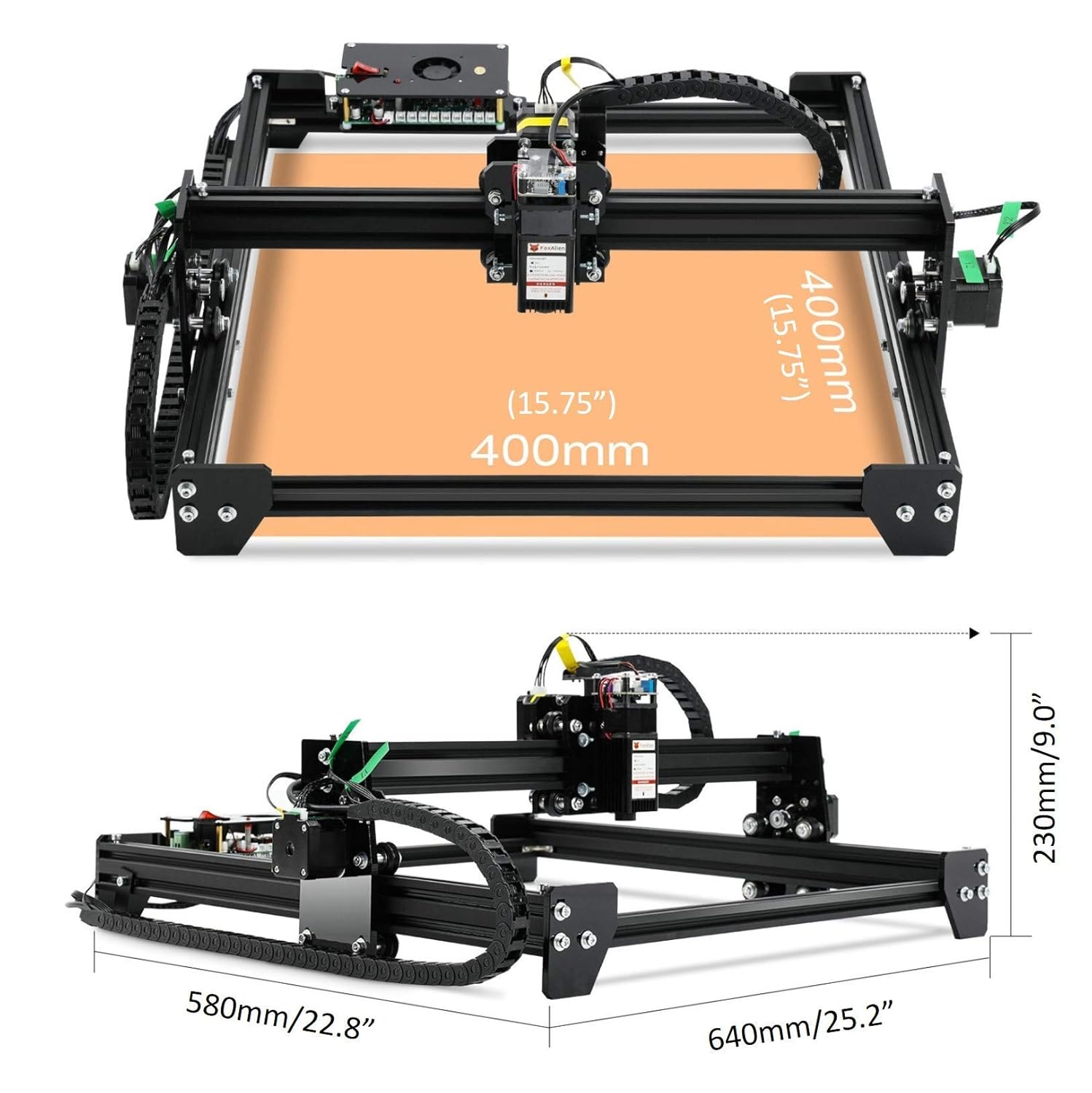
Figure 3: LE-4040 Product Dimensions
Бул сүрөт жогорудан ылдый жана капталдан көрсөтүлгөнview diagram of the LE-4040 laser engraver, detailing its dimensions. The engraving area is shown as 400mm x 400mm (15.75" x 15.75"). Overall product dimensions are 640mm (25.2") in length, 580mm (22.8") in width, and 230mm (9.0") in height.

Figure 4: Key Machine Features
This composite image highlights four key features: the adjustable laser module position with up/down arrows, silent wheels for smooth movement, the Grbl control board with a cooling fan, and a smooth drag chain for cable management.
5. Иштөө нускамалары
The LE-4040 is compatible with various GRBL-based software, including LaserGRBL, Candle (Grblcontrol), and LightBurn. The U Disk provided contains necessary drivers and potentially basic software.
- Программалык камсыздоону орнотуу: Install the preferred GRBL control software on your computer. Drivers for the USB connection may also need to be installed from the U Disk.
- Туташуу жана күйгүзүү: Ensure the machine is connected to your computer via USB and the power supply is plugged in. Turn on the machine's power switch.
- Программалык камсыздоо туташуусу: Open your chosen software (e.g., LaserGRBL). Select the correct COM port for the engraver and connect.
- Материалды жүктөө: Place the material to be engraved or cut onto the working area. Ensure it is flat and secured if necessary.
- Adjust Laser Focus: The LE-4040 features an adjustable laser module and an upgraded fixed-lens with a focusing distance of 30mm. Adjust the laser module height using the knobs until the laser spot is at its smallest point on the material surface.
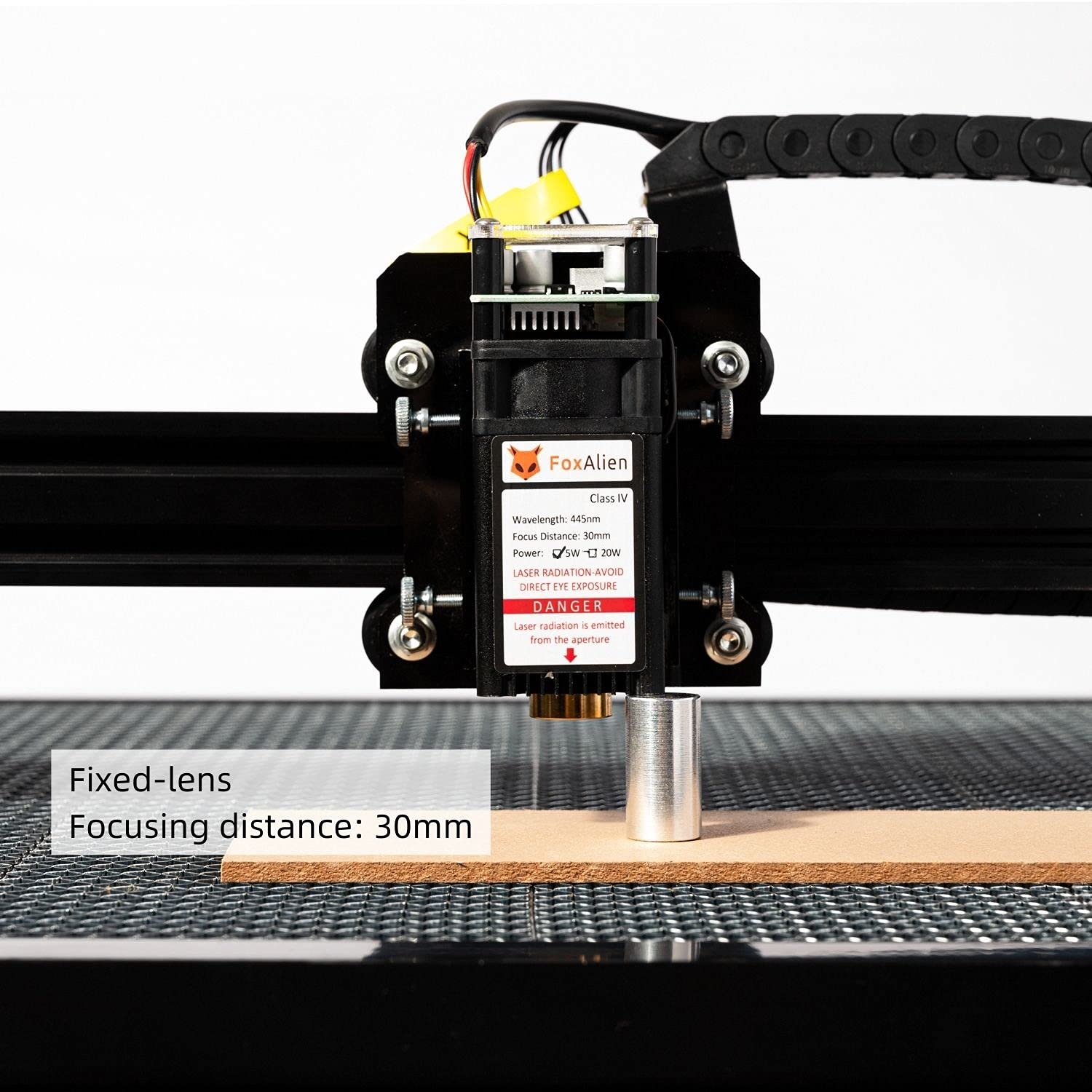
Figure 5: Fixed-Lens Focusing Distance
This image shows a close-up of the laser module with a metal cylinder placed beneath it, illustrating the optimal focusing distance of 30mm from the laser's aperture to the material surface.

Figure 6: Upgraded Fixed-Lens Laser Module
А деталдуу view of the laser module, highlighting its upgraded fixed-lens design for improved stability and durability. The label indicates Wavelength: 445nm, Focus Distance: 30mm, Power: 5W (5000mW), and Class IV laser radiation warning.
- Дизайн даярдоо: Import or create your design in the software. Set engraving parameters such as power (S0-S1000 range), speed (max 3000mm/min), and number of passes.
- Гравюра баштоо: Ensure all safety precautions are in place, especially wearing protective eyewear. Initiate the engraving process from the software. Monitor the machine during operation.
Колдонулуучу материалдар
The LE-4040 is capable of engraving and cutting a wide range of materials. Always test on a scrap piece of material first to determine optimal settings.

Figure 7: Applicable Materials for Carving/Cutting
This image displays examples of materials suitable for the LE-4040, including Wood, Cardboard, Bamboo, MDF, Leather, Fabric, Acrylic, and Lacquered metal. Each material is shown with an example of an engraved or cut design.
6. Техникалык тейлөө
Regular maintenance ensures the longevity and optimal performance of your LE-4040 laser engraver.
- Тазалоо: Regularly clean the machine, especially the laser lens and the working area, to remove dust, debris, and residue from engraving. Use a soft, lint-free cloth.
- Майлоо: Periodically check and lubricate the moving parts, such as the guide rails and lead screws, if applicable, to ensure smooth operation.
- Кур чыңалуу: Inspect the tension of the X and Y axis belts. They should be taut but not overly tight. Adjust if necessary.
- Кабелдик текшерүү: Check all cables for any signs of wear or damage. Ensure connections are secure.
- Сактагыч: Колдонулбай турган учурда, машинаны таза, кургак жерде, күн нуру түз тийген жерден жана өтө жогорку температурадан алыс сактаңыз.
7. Кыйынчылыктарды
This section addresses common issues you might encounter. For more complex problems, refer to online resources or contact support.
| Көйгөй | Мүмкүн себеп | Чечим |
|---|---|---|
| Машина иштебей жатат. | Power cable loose; power supply faulty; power outlet issue. | Check power cable connections. Test power supply with another device. Try a different power outlet. |
| Лазер жаркырабайт же алсыз. | Incorrect focus; laser module cable loose; laser module faulty; software power setting too low. | Adjust laser focus. Check laser module cable connection. Increase laser power setting in software. |
| Машина компьютерге туташпай жатат. | Incorrect COM port selected; missing/corrupt drivers; USB cable faulty. | Verify COM port in device manager and software. Reinstall drivers from U Disk. Try a different USB cable. |
| Engraving quality is poor/inconsistent. | Improper focus; material not flat; incorrect speed/power settings; dirty lens. | Re-focus the laser. Ensure material is flat. Adjust speed and power settings. Clean the laser lens. |
| Машина адаттан тыш үндөрдү чыгарат. | Loose components; debris in moving parts; motor issue. | Check for loose screws. Clean rails and belts. If noise persists, contact support. |
8. Техникалык шарттар
| Өзгөчөлүк | Деталь |
|---|---|
| Модель номери | LE-4040 |
| Лазердик чыгаруу күчү | 5000мВт (5Вт) |
| Лазердик класс | 4-класс |
| Гравюра аянты | 40 x 40 см (15.75 x 15.75 дюйм) |
| Продукциянын көлөмү (LxWxH) | 64 x 58 x 23 см (25.2 x 22.9 x 9.06 дюйм) |
| Step Motor | 42 step motor (Dual Y-axis motors) |
| Тактык | 0.1мм |
| Электр камсыздоо | 12V/5A |
| Колдоо программасы | LaserGRBL, Candle (Grblcontrol), LightBurn, Compatible with all GRBL software |
| Колдоо OS | Windows XP, Windows 7, Windows 8, Windows 10 |
| Элемент Салмагы | 5 кг 810 г |
9. Кепилдик жана колдоо
For information regarding warranty coverage, technical support, or service, please refer to the official FoxAlien website or contact their customer service directly. Details are typically provided with your purchase documentation or on the manufacturer's webсайт.
When contacting support, please have your product model number (LE-4040) and purchase details readily available.


