Introduction
Welcome to the world of robotics with your new Silverlit YCOO Program A Bot X! This gigantic programmable robot stands at an impressive 40cm tall and offers a dynamic play experience with multiple control methods and interactive features. Please read this manual carefully to ensure proper setup, operation, and maintenance of your robot.

Figure 1: The Program A Bot X robot alongside its retail packaging.
Кутуда эмне бар
Your Program A Bot X package should contain the following items:
- 1 x Program A Bot X Robot
- 1 x Full-Function Remote Control
- Көрсөтмө (бул документ)
Жайгашуу
Батарея орнотуу
The Program A Bot X requires batteries for both the robot and the remote control. Batteries are not included.
- Робот: Locate the battery compartment on the back of the robot. Use a screwdriver to open the compartment. Insert 4 x AA batteries, ensuring correct polarity (+/-). Close the compartment and secure with the screw.
- Алыстан башкаруу: Locate the battery compartment on the back of the remote control. Use a screwdriver to open the compartment. Insert 2 x AAA batteries, ensuring correct polarity (+/-). Close the compartment and secure with the screw.
Note: Always use new batteries of the same type. Do not mix old and new batteries, or different types of batteries.
Баштапкы күйгүзүү
Once batteries are installed:
- Turn on the robot using the power switch, usually located on its back or chest.
- Алыстан башкаруу пультун анын кубат баскычын колдонуп күйгүзүңүз.
- The robot and remote should automatically pair. If not, refer to the troubleshooting section.
Роботту иштетүү
The Program A Bot X offers three primary modes of interaction: direct remote control, motion control, and programmable actions.
Алыстан башкаруу операциясы
Use the included remote control for full-function direct command over the robot's movements and actions.
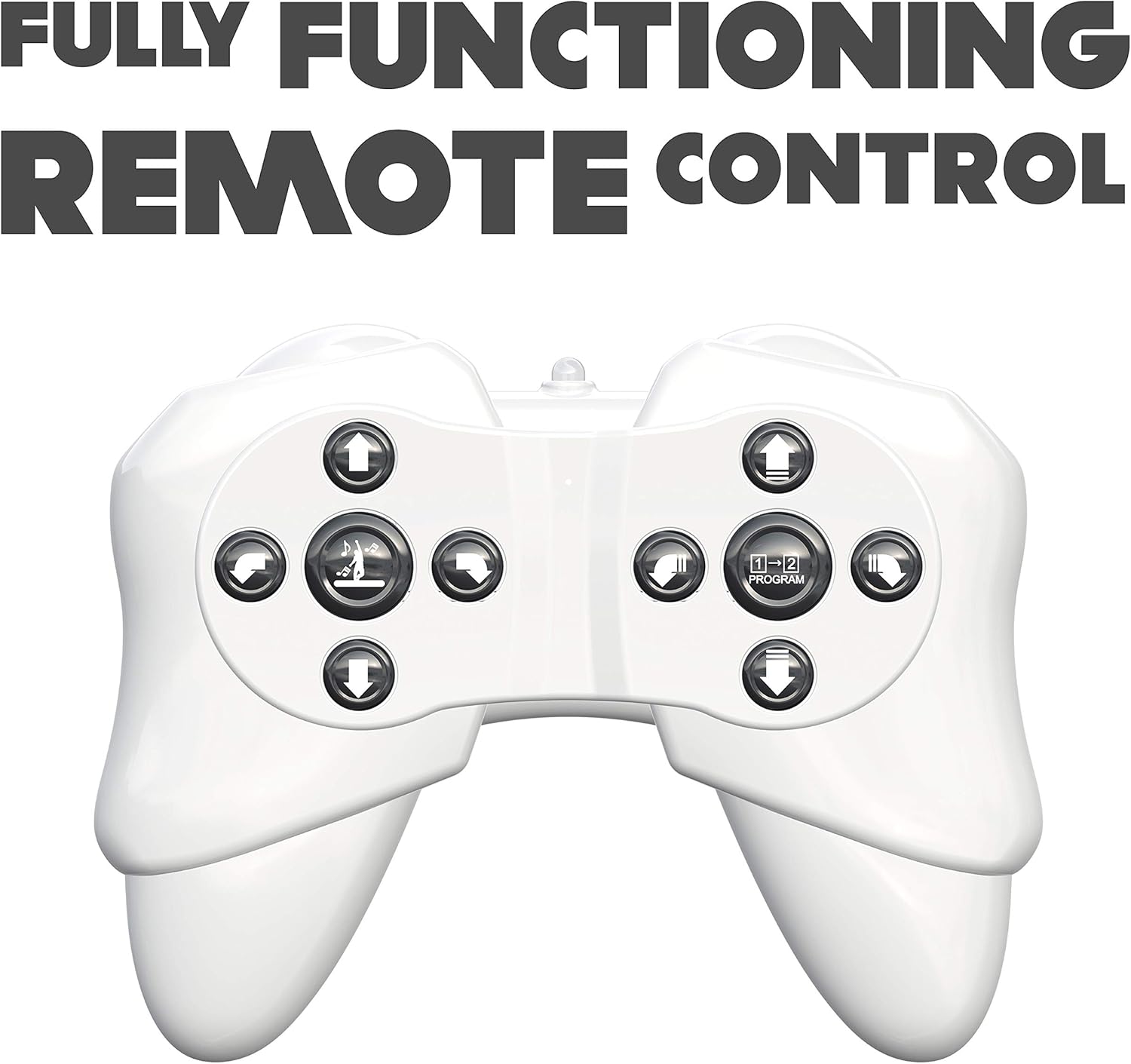
Figure 2: The robot's remote control, featuring various directional and action buttons.
- Багыт баскычтары: Control forward, backward, left, and right movements.
- Walk/Glide Button: Toggle between walking and gliding modes.
- Бий баскычы: Activate pre-programmed dance routines. The robot features swinging arms during dance.
- Программа баскычы: Enter programming mode (see below).
Motion Control
Interact with the robot using simple hand gestures. The robot is equipped with sensors to detect specific hand movements.

Figure 3: Demonstrating the gesture control feature of the robot.
- Refer to the quick start guide for specific gesture commands.
- Ensure adequate lighting and clear space for optimal gesture recognition.
Программалануучу аракеттер
The Program A Bot X can store and execute a sequence of up to 48 commands.

Figure 4: The robot is programmable, allowing for sequences of up to 48 actions.
- басыңыз Программа button on the remote control to enter programming mode.
- Input your desired sequence of movements and actions using the remote control buttons. Each button press will be recorded as one command.
- басыңыз Программа button again to exit programming mode and save the sequence.
- басыңыз Play button (or equivalent, refer to remote diagram) to execute the programmed sequence.
Interactive Features
- Robotic Sound Effects: The robot produces various sound effects to enhance interaction.
- LED көздөрү: The robot's eyes display different LED expressions, adding to its personality.

Figure 5: The robot features integrated robotic sound effects.

Figure 6: The robot's eyes illuminate with various LED patterns.
Техникалык тейлөө
- Тазалоо: Wipe the robot and remote control with a soft, dry cloth. Do not use harsh chemicals or abrasive cleaners.
- Батареяны алмаштыруу: Replace batteries when the robot's performance diminishes or it stops responding. Always replace all batteries at once.
- Сактагыч: When not in use for extended periods, remove all batteries from both the robot and the remote control to prevent leakage. Store in a cool, dry place away from direct sunlight.
Проблемаларды чечүү
| Көйгөй | Мүмкүн себеп | Чечим |
|---|---|---|
| Робот күйбөйт. | Батареялар өлүп калган же туура эмес орнотулган. | Батареянын полярдуулугун текшериңиз. Жаңы батареялар менен алмаштырыңыз. |
| Робот алыстан башкарууга жооп бербейт. | Remote control batteries are low/dead; robot and remote are not paired; out of range. | Replace remote control batteries. Ensure robot and remote are turned on and within operating range. Re-pair if necessary (refer to initial power on steps). |
| Robot falls over frequently. | Uneven surface; complex programmed movements. | Operate on a flat, smooth surface. Simplify programmed sequences if they cause instability. |
| Жаңсоо менен башкаруу иштебей жатат. | Insufficient lighting; incorrect gesture; obstruction of sensors. | Ensure adequate lighting. Perform gestures clearly as instructed. Check for any obstructions blocking the robot's sensors. |
Техникалык шарттар
| Модель номери | 88071 |
| Продукциянын өлчөмдөрү | 15.24 x 45.72 x 25.4 см; 1.22 кг |
| Материалдын түрү | Пластик |
| Батареялар талап кылынат | Yes (4 x AA for robot, 2 x AAA for remote) |
| Алыстан башкаруу камтылган | Ооба |
| Өндүрүүчүнүн сунуш кылган курагы | 15 жаш жана андан жогору |
| Тил | English, Italian, French, German, Spanish |
| Түс | Ак |
Кепилдик жана колдоо
Кепилдик жөнүндө маалымат жана кардарларды колдоо кызматы үчүн, продукттун таңгагында көрсөтүлгөн байланыш маалыматтарын караңыз же Silverlitтин расмий веб-сайтына кириңиз. webсайт. Сатып алуу квитанциясын кепилдик дооматтары үчүн сатып алуунун далили катары сактаңыз.


