1. Киришүү
This instruction manual provides comprehensive information for the YOSUN Universal Replacement Remote Control, model RMT-TX100U. Designed for seamless compatibility with a wide range of Sony Bravia LCD LED HDTV Smart TVs, this remote offers a direct replacement solution without requiring complex programming. It aims to restore full control over your television with reliable performance and an intuitive layout.
2. Продукциянын өзгөчөлүктөрү
- Кеңири шайкештик: Fully compatible with all Sony Bravia LCD LED HDTV Smart TVs.
- Программалоо талап кылынбайт: Ready to use straight out of the box, eliminating the need for manual setup.
- Туруктуу аткаруу: Equipped with an upgraded smart chip for consistent and reliable operation.
- Кеңейтилген диапазон: Transmits signals effectively over long distances, up to 10 meters (33 feet).
- Тез жооп берүү убактысы: Features a rapid transmission response time of approximately 0.2 seconds for immediate command execution.
- Туруктуу курулуш: Made from high-quality ABS and silicone materials for a sturdy, non-slip shell and comfortable, sensitive buttons.
- Identical Layout: Designed to be visually and functionally identical to the original Sony remote control.
- Netflix Shortcut: Includes a dedicated Netflix button for quick access to the streaming service.
3. Орнотуу колдонмосу
3.1 Батареяны орнотуу
Алыстан башкаруу пультун иштеши үчүн эки (2) AAA батарейкасы (кошулмага кирбейт) керек. Батарейкаларды орнотуу үчүн төмөнкү кадамдарды аткарыңыз:
- Пульттун артындагы батарея бөлүкчөсүнүн капкагын табыңыз.
- Бөлүмдү ачуу үчүн капкакты ылдый карай жылдырыңыз.
- Оң (+) жана терс (-) терминалдары бөлүмдүн ичиндеги көрсөткүчтөр менен туура дал келишин камсыз кылып, эки AAA батарейкасын салыңыз.
- Батареянын капкагын бекем чыккыча ордуна жылдырыңыз.

Figure 3.1: Battery installation and remote dimensions. The remote is 7.8 inches long, 1.8 inches wide, and 0.7 inches thick. The diagram shows sliding the battery cover and inserting two AAA batteries.
3.2 Initial Use (No Programming Required)
This YOSUN replacement remote control is designed to work immediately with compatible Sony TVs without any programming or pairing. Once batteries are installed, point the remote towards your TV and begin using it.
Video 3.2: Demonstration of the remote control's simple operation, highlighting that no pairing is required for use with Sony TVs.
4. Иштөө нускамалары
The remote control features a standard layout with clearly labeled buttons for easy navigation and control of your Sony TV. Refer to the diagram below for button identification and their primary functions.
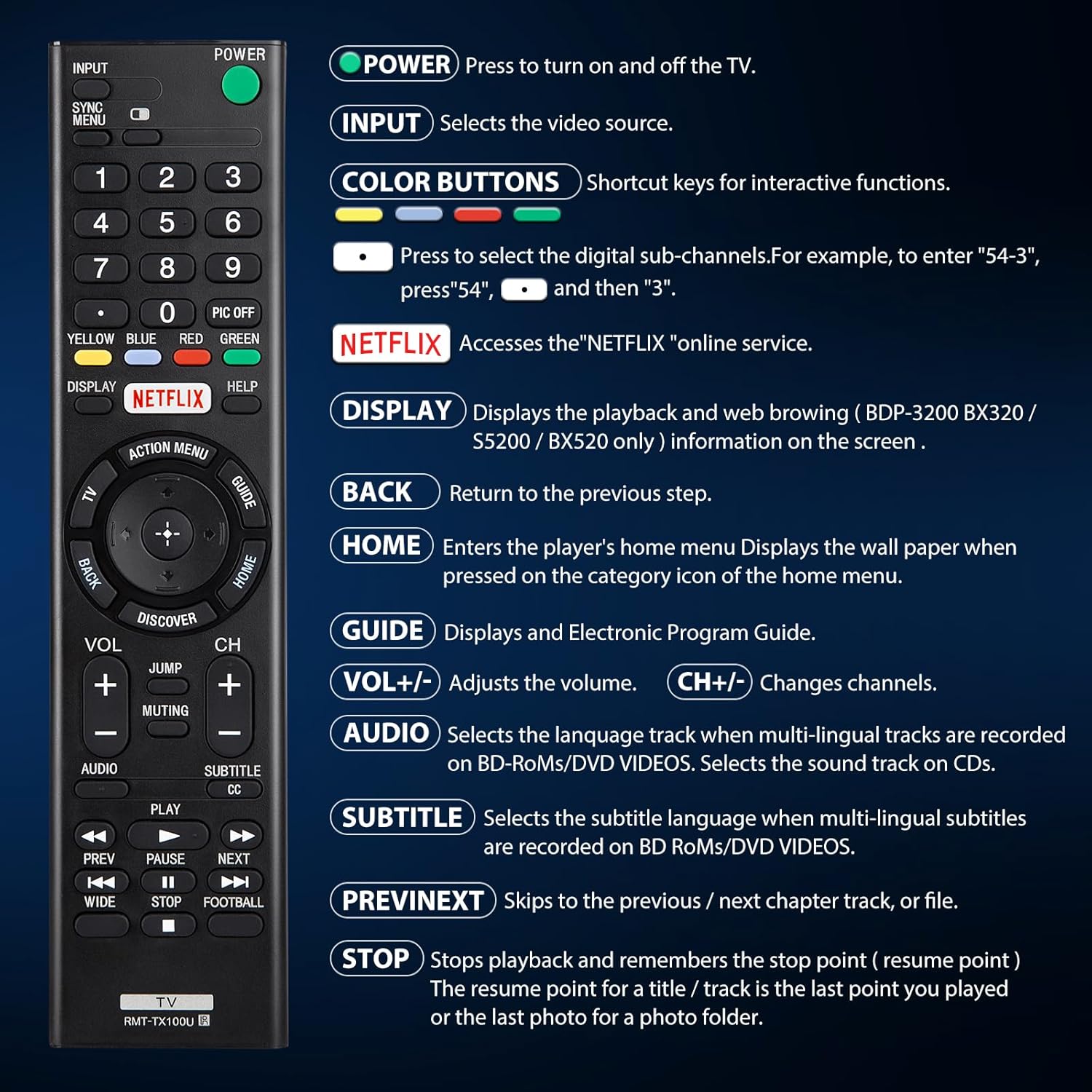
Figure 4.1: ашыкview of remote control buttons and their functions.
| баскыч | Функция |
|---|---|
| КҮЧ | Press to turn the TV on and off. |
| INPUT | Selects the video source (e.g., HDMI 1, AV). |
| COLOR BUTTONS (Yellow, Blue, Red, Green) | Shortcut keys for interactive functions or digital sub-channels (e.g., to enter "5-4", press "5", then "4"). |
| NETFLIX | Directly accesses the Netflix online streaming service. |
| ДИСПЛЕЙ | Displays playback and web browsing information on the screen (for compatible models like BDP-3200 BX320 / S5200 / BX520 only). |
| КАЙТ | Мурунку кадамга же менюга кайтарат. |
| ҮЙ | Enters the player's home menu or displays the wallpaper when pressed on the category icon of the home menu. |
| GUIDE | Электрондук программалык көрсөтмөнү (EPG) көрсөтөт. |
| VOL +/- | Үн деңгээлин тууралайт. |
| CH +/- | Телеканалдарды өзгөртөт. |
| АУДИО | Selects the language track when multi-lingual tracks are recorded on BD-ROMs/DVD VIDEOS. Selects the sound track on CDs. |
| SUBTITLE CC | Selects the subtitle language when multi-lingual subtitles are recorded on BD ROMs/DVD VIDEOS. |
| АЛГА/КИЙИНКИ | Skips to the previous or next chapter, track, or file медиа ойнотуу учурунда. |
| ТОКТОТ | Stops playback and remembers the stop point (resume point) for a title/track, or the last photo for a photo folder. |
5. Шайкештик
5.1 Шайкеш түзмөктөр
This remote control is specifically designed for and compatible with the following:
- All Sony Bravia LCD LED HDTV Smart TVs.

Figure 5.1: The remote is compatible with Sony Smart TVs, Sony Bravia TVs, and Sony Google TVs.
5.2 Non-Compatible Devices
Бул алыстан башкаруу болуп саналат ЖОК төмөнкү түзмөктөр менен шайкеш келет:
- Blu-ray Disc Players
- DVD ойноткучтар
- AV ресиверлери
- Сабвуферлер
- Үн тилкелери
- Үй кинотеатрынын системалары

Figure 5.2: The remote is not compatible with Blu-ray players, DVD players, AV receivers, subwoofers, sound bars, or home theater systems.
6. Кыйынчылыктарды
If you experience issues with your remote control, please consider the following common troubleshooting steps:
- Батареяларды текшерүү: Ensure that the batteries are correctly installed with the proper polarity and are not depleted. Replace with fresh AAA batteries if necessary.
- Көрүү сызыгы: Make sure there are no obstructions between the remote control and the TV's infrared receiver. The remote operates using an infrared signal, which requires a clear line of sight.
- Алыстан шайкештик: Verify that your TV model is a compatible Sony Bravia LCD LED HDTV Smart TV. Refer to Section 5 for detailed compatibility information.
- Remote Reset: Remove the batteries, press and hold any button on the remote for 5 seconds to discharge any residual power, then reinsert the batteries.
- TV Power Cycle: Unplug your TV from the power outlet for 60 seconds, then plug it back in. This can sometimes resolve minor communication issues.
7. Техникалык тейлөө
Алыстан башкаруу пультуңуздун узак мөөнөттүү жана оптималдуу иштешин камсыз кылуу үчүн, төмөнкү техникалык тейлөө көрсөтмөлөрүн аткарыңыз:
- Тазалоо: Пультту жумшак, кургак чүпүрөк менен дайыма сүртүп туруңуз. өжөр кир үчүн, бир аз гampкездемени суу же жумшак, абразивдүү эмес тазалоочу каражат менен сүртүңүз. Катуу химиялык заттарды же абразивдүү материалдарды колдонуудан алыс болуңуз.
- Батареяны алмаштыруу: Replace batteries promptly when the remote's performance degrades or it stops responding. Remove batteries if the remote will not be used for an extended period to prevent leakage.
- Сактагыч: Пультту салкын, кургак жерде, күндүн түз тийген нурунан, өтө жогорку температурадан жана жогорку нымдуулуктан алыс сактаңыз.
- Тамчылардан качуу: Бышык болгону менен, кайра-кайра түшүп кетүү ички компоненттерге зыян келтириши мүмкүн. Пультту этияттык менен колдонуңуз.
8. Техникалык шарттар
| Атрибут | Деталь |
|---|---|
| Продукциянын өлчөмдөрү | 7.87 x 1.89 x 0.78 дюйм |
| Элемент Салмагы | 3.17 унция |
| Модель номери | RMT-TX100U |
| Батареялар талап кылынат | 2 AAA батарейка (киргизилген эмес) |
| Өзгөчө өзгөчөлүк | Программалоо талап кылынбайт |
| Түс | Кара |
| Колдоого алынган түзмөктөрдүн максималдуу саны | 18 (Refers to the range of Sony TV models it can control) |
| Шайкеш түзмөктөр | Television (Sony Bravia LCD LED HDTV Smart TVs) |
| Өндүрүүчү | YOSUN |
9. Кепилдик жана колдоо
YOSUN offers an unlimited return and refund service for this remote control within 30 days of purchase. If you have any questions, concerns, or require assistance with your order or the product, please do not hesitate to contact YOSUN customer service directly. Our team is committed to providing support and will respond to your inquiries within 12 hours during the work week.
For further assistance, please refer to the contact information provided with your purchase or visit the official YOSUN webсайт.


