1. Киришүү
This manual provides detailed instructions for the installation, setup, operation, and maintenance of your Dioche DW80 Fingerprint Smart Lock. Please read this manual thoroughly before installation and use to ensure proper function and security. Keep this manual for future reference.
Негизги өзгөчөлүктөрү
- Бир нече кулпусун ачуу ыкмалары: Fingerprint, IC Card, Password, Mechanical Key, and Mobile App (Wi-Fi).
- High-Performance Fingerprint Sensor: 550 DPI biometric sensor for accurate and fast recognition.
- Wi-Fi алыстан башкаруу: Unlock remotely and view unlock history via the mobile application.
- Virtual Password Function: Enhance security by entering random digits before or after the correct password.
- Батареянын аздыгы жөнүндө эскертүү: Visual and audible alerts for timely battery replacement.
- Emergency Power & Key Access: Micro USB port for emergency power and mechanical keys for backup access.
2. Пакеттин мазмуну
Орнотууну улантуудан мурун, бардык компоненттердин пакетте бар экенин текшериңиз.

Image: Dioche DW80 Smart Lock package contents. Includes the main lock unit (front and rear panels), mortise, two mechanical keys, two IC cards, and various screws and pins for installation.
- Front Panel Assembly (with handle and keypad)
- Rear Panel Assembly (with handle and battery compartment)
- Мортиза кулпу корпусу
- Strike Plate жана Strike Box
- Механикалык ачкычтар (2)
- IC карталары (2)
- Mounting Hardware (screws, spindles, etc.)
- Орнотуу шаблону
- User Manual
3. Техникалык шарттар
| Өзгөчөлүк | Деталь |
|---|---|
| Бренд | Диох |
| Модель аты | DW80 |
| Кулпу түрү | Биометрикалык |
| Материал | Цинк эритмеси |
| Түс | Кара |
| Өзгөчөлүктөр | Fingerprint, Smart Lock, Touchscreen, Wi-Fi |
| Connectivity Protocol | Wi-Fi |
| Башкаруу ыкмасы | Remote, Voice (via compatible smart home systems) |
| Power Source | 4 x AAA Dry Batteries (not included) |
| Батареянын иштөө мөөнөтү | Approximately 9+ months under normal use |
| Эшиктин калыңдыгынын шайкештиги | 38mm - 55mm (1-3/8" to 2") |
| Иштөө температурасы | Approximately -4°F to 140°F (-20°C to 60°C) |
| Элемент Салмагы | 4.14 фунт |
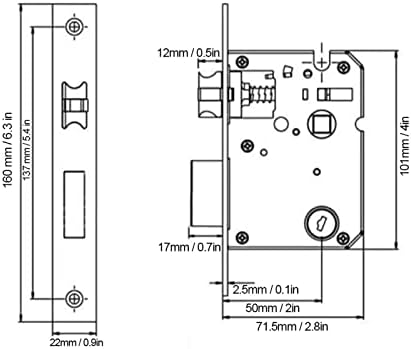
Image: Technical diagram illustrating the dimensions of the lock's mortise and faceplate, with measurements in millimeters and inches.
4. Орнотуу боюнча колдонмо
Before installation, ensure your door meets the compatibility requirements (door thickness 38mm-55mm). Professional installation is recommended for optimal performance and security.
Даярдоо
- Check Door Compatibility: Confirm door thickness and backset (distance from door edge to center of door hole: 60mm or 70mm).
- Куралдар чогултуу: You will need a screwdriver, drill, measuring tape, and pencil.
- Review Үлгү: Use the provided installation template to mark drilling points accurately.
Орнотуу кадамдары
- Мортиз кулпусун орнотуу: Эшиктин четине оюкту салып, бурама менен бекитиңиз.
- Алдыңкы панелди орнотуу: Route the cable through the door hole and attach the front panel, ensuring the spindle is correctly aligned.
- Арткы панелди орнотуу: Connect the cable from the front panel to the rear panel. Secure the rear panel to the door using the provided screws.
- Батареяны орнотуу: Open the battery compartment on the rear panel and insert 4 AAA batteries (ensure correct polarity).
- Сыноо операциясы: After installation, test the mechanical key and ensure the handles operate smoothly.

Image: The Dioche DW80 Smart Lock, showcasing its sleek black design with a keypad on the front panel and a fingerprint sensor integrated into the handle.
5. Initial Setup and User Management
After installation, you need to set up the lock and register users for various unlocking methods.
5.1 Mobile App Connection (Tuya Smart)
The Dioche DW80 Smart Lock supports Wi-Fi connectivity via the Tuya Smart app for remote control and monitoring.
- Колдонмону жүктөп алуу: Scan the QR code or search for "Tuya Smart" in your app store. Tuya Smart колдонмосун жүктөп алыңыз
- Катталуу/Кирүү: Create an account or log in to the Tuya Smart app.
- Түзмөк кошуу: Follow the in-app instructions to add your smart lock. Ensure your phone is connected to a 2.4GHz Wi-Fi network during pairing.

Image: QR code for quick download of the Tuya Smart mobile application, essential for Wi-Fi features.
5.2 Манжа издерин каттоо
- Access the lock's programming mode (refer to the specific instructions in your app or the lock's voice prompts).
- Place your finger on the fingerprint sensor multiple times as prompted, slightly shifting its position each time for comprehensive registration.
- Confirm successful registration via voice prompt or app notification.
5.3 Сырсөздөрдү орнотуу
- Программалоо режимине кирүү.
- Input your desired password (typically 6-8 digits) and confirm.
- To use the virtual password feature, you can enter random digits before or after your actual password, then press '#' to confirm. This prevents others from guessing your code by observing finger movements.

Image: Demonstration of the virtual password feature, where a correct 6-digit password is embedded within a longer sequence of random numbers to deter observation.
5.4 Registering IC Cards
- Программалоо режимине кирүү.
- Present the IC card to the designated sensing area on the lock.
- The lock will confirm successful registration.
6. Operating the Smart Lock
The Dioche DW80 offers multiple convenient ways to unlock your door.
6.1 Манжа изи менен кулпусун ачуу
- Place your registered finger on the fingerprint sensor located on the handle.
- The lock will emit a confirmation sound/light, and the handle will engage.
- Push down the handle to open the door.
6.2 Unlocking with Password
- Аны иштетүү үчүн баскычтопту басыңыз.
- Enter your registered password (or virtual password sequence).
- Press '#' to confirm. The lock will unlock if the password is correct.
6.3 Unlocking with IC Card
- Present the registered IC card to the card reader area on the lock.
- The lock will confirm and unlock.
6.4 Unlocking with Mechanical Key
- Insert the mechanical key into the keyhole located on the front panel.
- Эшикти ачуу үчүн ачкычты буруңуз.
6.5 Remote Unlocking via Mobile App
- Смартфонуңуздан Tuya Smart тиркемесин ачыңыз.
- Select your Dioche DW80 Smart Lock from the device list.
- Tap the unlock button within the app. Confirm the remote opening when prompted.

Image: A smartphone screen showing the Tuya Smart app, indicating a successful remote unlock command sent to the smart handle lock via Wi-Fi.

Image: An infographic highlighting the five primary unlocking methods: fingerprint, IC card, password, mechanical key, and mobile app, with Wi-Fi and Tuya integration.
7. Техникалык тейлөө
Үзгүлтүксүз тейлөө акылдуу кулпууңуздун узак мөөнөттүү жана оптималдуу иштешин камсыз кылат.
7.1 Батареяны алмаштыруу
The lock will provide a low battery warning (red light flashing, audible beep) when the batteries are running low. Replace all four AAA batteries promptly.
- Арткы панелдеги батарея бөлүкчөсүнүн капкагын ачыңыз.
- Эски батарейкаларды алып салыңыз.
- Insert four new AAA batteries, ensuring correct polarity (+/-).
- Батарея уясынын капкагын жабыңыз.
Note: If you miss all low battery warnings, the lock can be temporarily powered via the Micro USB port for emergency access, or unlocked with a mechanical key.
7.2 Тазалоо
- Кулпунун бетин жумшак, кургак чүпүрөк менен сүртүңүз.
- Абразивдүү тазалагычтарды, эриткичтерди же катуу химиялык заттарды колдонуудан алыс болуңуз, анткени алар финишке жана электрондук компоненттерге зыян келтириши мүмкүн.
- Keep the fingerprint sensor and keypad clean and free of debris for accurate recognition.
8. Кыйынчылыктарды
Жалпы маселелерди чечүү үчүн бул бөлүмдү караңыз.
| Көйгөй | Мүмкүн себеп | Чечим |
|---|---|---|
| Кулпу жооп бербейт. | Өлгөн батареялар. | Replace batteries. Use emergency Micro USB power or mechanical key. |
| Манжа изи таанылган жок. | Манжа туура эмес коюлган; сенсор кир; манжа изи катталган эмес. | Ensure finger covers the sensor completely. Clean the sensor. Re-register fingerprint, ensuring slight shifts during registration. |
| Сырсөз иштебей жатат. | Туура эмес сырсөз киргизилди; баскычтоп иштебей турат. | Ensure correct password is entered. Touch keypad to activate. Try virtual password method. |
| IC Card not recognized. | Card not registered; card damaged. | Register the IC card. Try a different registered card. |
| Wi-Fi/Колдонмого туташуу мүмкүн эмес. | Incorrect Wi-Fi password; 5GHz Wi-Fi network; poor signal; lock not in pairing mode. | Ensure 2.4GHz Wi-Fi. Check Wi-Fi password. Move closer to router. Re-enter pairing mode on the lock. |
9. Кепилдик жана колдоо
Dioche products are designed for reliability and performance. For warranty information, technical support, or service inquiries, please refer to the contact information provided with your purchase documentation or visit the official Dioche website. Please have your model number (DW80) and purchase date ready when contacting support.