Introduction
Thank you for choosing the Trevi RC 85D8 DAB Digital Alarm Clock Radio. This compact device offers DAB/DAB+ and FM RDS radio reception, a large LED display, dual alarms, snooze, sleep functions, and a unique time projection feature. This manual provides detailed instructions to help you set up and operate your new alarm clock radio effectively.
Пакеттин мазмуну
- Trevi RC 85D8 DAB Digital Alarm Clock Radio
- Кубаттуу адаптер
- Колдонуучунун Колдонмосу (бул документ)
Коопсуздук маалыматы
Please read all safety instructions before using the device. Keep this manual for future reference.
- Аппаратты жамгырга же нымга тийгизбеңиз.
- Түзмөктү бөлүктөргө бөлбөңүз. Бардык тейлөө иштерин квалификациялуу адистерге тапшырыңыз.
- Берилген кубат адаптерин гана колдонуңуз.
- Аппараттын айланасында туура желдетүүнү камсыз кылыңыз.
- Батарейкаларды жоопкерчиликтүү түрдө жок кылыңыз.
Продукт бүттүview
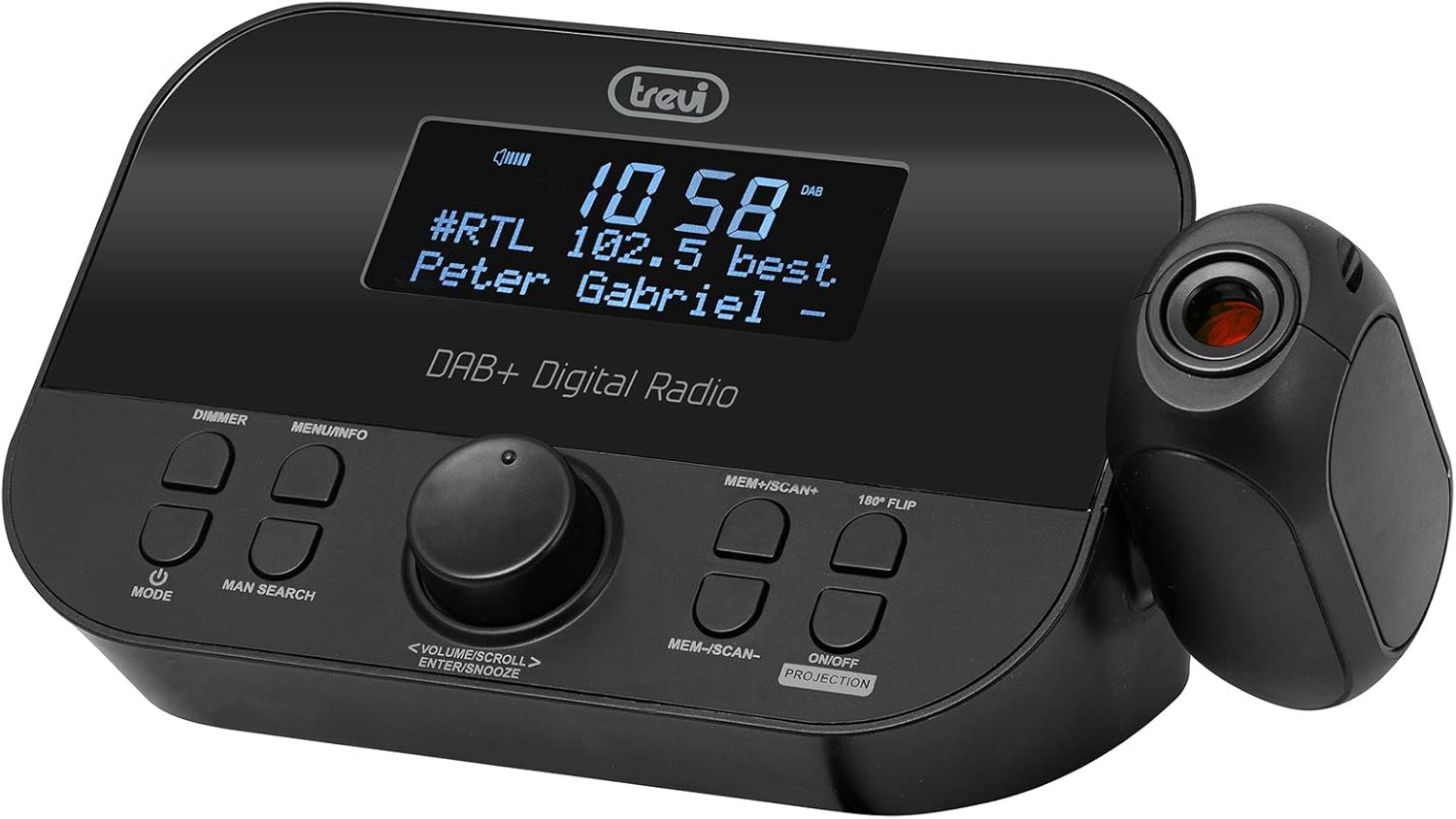
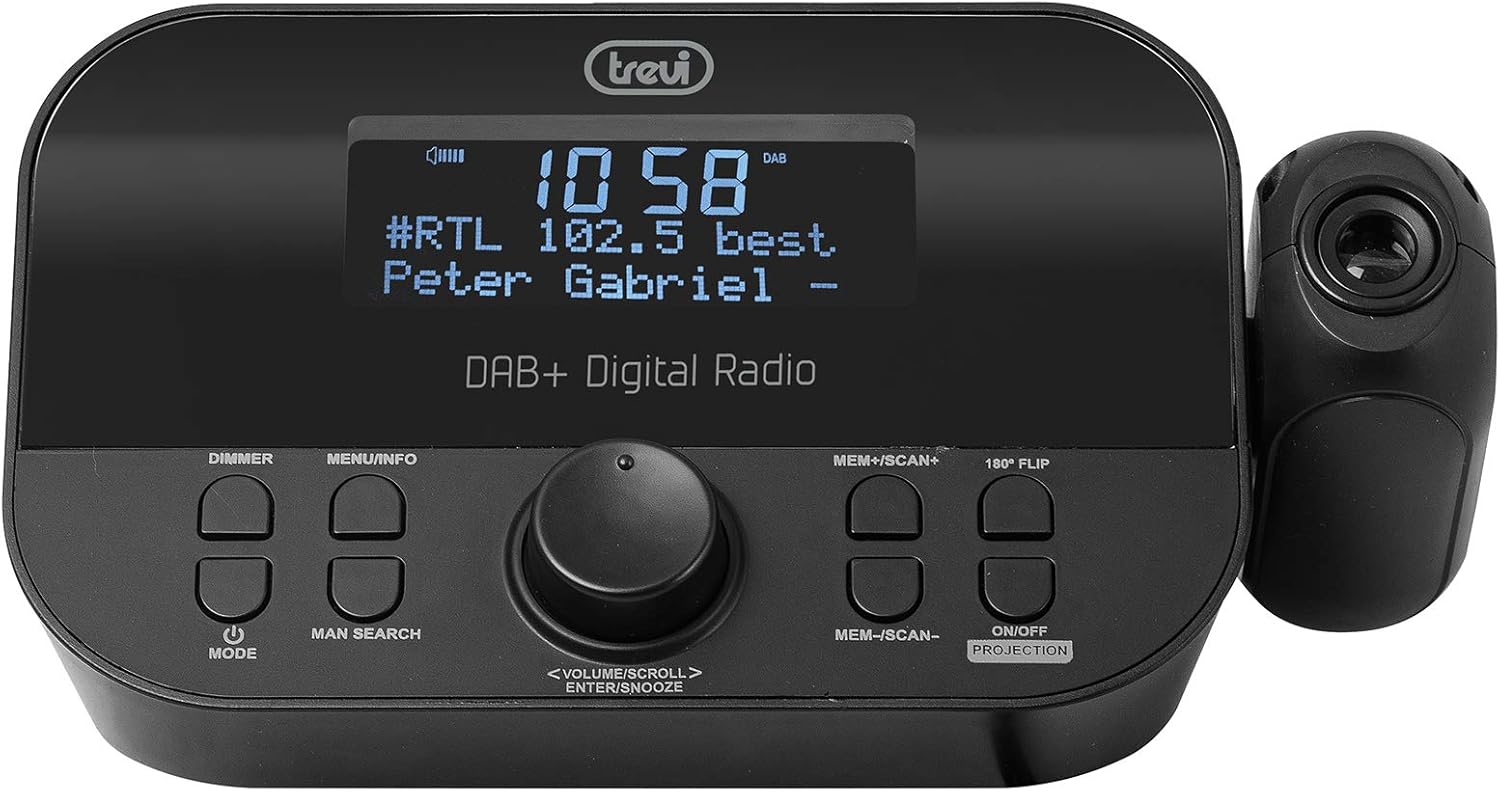
Фронт view of the Trevi RC 85D8 DAB Digital Alarm Clock Radio, showing the LED display, control buttons, and the time projector.
Башкаруу жана дисплей:
- LED дисплей: Shows time, radio station, song title/artist, volume, and other information.
- DIMMER баскычы: Дисплей жарыктыгын тууралайт.
- MENU/INFO баскычы: Accesses menu options and displays radio information.
- MODE баскычы: Switches between DAB, FM, and other modes.
- MAN SEARCH Button: Initiates manual station search.
- VOLUME/SCROLL/ENTER/SNOOZE Knob: Multi-function knob for volume control, menu navigation, selection, and snooze activation.
- MEM+/SCAN+ Button: Stores/recalls presets, scans forward.
- MEM-/SCAN- Button: Stores/recalls presets, scans backward.
- 180° FLIP Button: Rotates projected time display.
- ON/OFF PROJECTION Button: Turns the time projection on or off.
- Проекциялык линза: Убакытты бетке проекциялайт.
Жайгашуу
1. Power Connection
- Connect the provided power adapter to the DC IN port on the back of the alarm clock radio.
- Адаптерди кадимки эле розеткага сайыңыз.
- The device will power on and the display will illuminate.
2. Батареянын камдык көчүрмөсүн орнотуу (милдеттүү эмес)
The device has a battery compartment for anti-failure backup (2 AAA batteries, not included). This ensures time and alarm settings are retained during a power outage.
- Аппараттын астындагы батарея бөлүкчөсүнүн капкагын ачыңыз.
- Туура полярдуулукту (+/-) сактоо менен 2 AAA батарейкасын салыңыз.
- Батарея уясынын капкагын бекем жабыңыз.
3. Антеннаны орнотуу
Extend the telescopic antenna fully for optimal DAB/DAB+ and FM radio reception. Adjust its position for the best signal.

Side view of the Trevi RC 85D8 DAB Digital Alarm Clock Radio, showing the extended telescopic antenna for improved reception.
4. Баштапкы убакытты жана күндү коюу
Upon first power-on, the device will attempt to synchronize time and date automatically via DAB or FM RDS signal. If automatic synchronization fails or you wish to set it manually:
- басыңыз МЕНЮ/ИНФО менюга кирүү үчүн баскычты басыңыз.
- айлантыңыз VOLUME/SCROLL knob to navigate to "Time/Date" or "Settings".
- басыңыз ENTER (push the knob) to select.
- Follow the on-screen prompts to set the time, date, and 12/24-hour format using the VOLUME/SCROLL баскыч жана ENTER баскычы.
Иштөө нускамалары
1. Күйгүзүү/өчүрүү
- Күйгүзүү үчүн, басыңыз РЕЖИМ баскычы.
- Өчүрүү үчүн, баскычын басып кармап туруңуз РЕЖИМ баскычы.
2. Radio Mode Selection (DAB/DAB+ / FM RDS)
- басыңыз РЕЖИМ button repeatedly to cycle between DAB/DAB+ and FM radio modes.
3. Tuning and Scanning
DAB/DAB+ радиосу:
- DAB режиминде, басыңыз MEM+/SCAN+ or MEM-/SCAN- жеткиликтүү станцияларды автоматтык түрдө издөө үчүн.
- Же болбосо, басыңыз MAN SEARCH to manually tune. Rotate the VOLUME/SCROLL knob to select a station, then press ENTER.
FM RDS Radio:
- FM режиминде, басыңыз MEM+/SCAN+ or MEM-/SCAN- кийинки жеткиликтүү станцияны автоматтык түрдө издөө үчүн.
- Басыңыз MAN SEARCH to manually tune. Rotate the VOLUME/SCROLL knob to adjust the frequency, then press ENTER.
4. Storing and Recalling Presets
- Каалаган станцияңызга которуңуз.
- Басып кармап туруңуз MEM+/SCAN+ or MEM-/SCAN- until the display shows "Preset Store".
- айлантыңыз VOLUME/SCROLL knob to select a preset number (e.g., P01, P02).
- Басыңыз ENTER станцияны ырастоо жана сактоо үчүн.
- To recall a preset, briefly press MEM+/SCAN+ or MEM-/SCAN- to cycle through stored stations.
5. Үндү башкаруу
- айлантыңыз VOLUME/SCROLL угуу үнүнүн катуулугун жөндөө үчүн баскычты басыңыз.
6. Ойготкучтарды орнотуу (Кош ойготкучтар)
The Trevi RC 85D8 supports two independent alarms (Alarm 1 and Alarm 2).
- басыңыз МЕНЮ/ИНФО менюга кирүү үчүн баскычты басыңыз.
- айлантыңыз VOLUME/SCROLL knob to navigate to "Alarm 1 Setup" or "Alarm 2 Setup".
- Басыңыз ENTER тандоо үчүн.
- Орнотуу үчүн экрандагы көрсөтмөлөрдү аткарыңыз:
- Ойготкуч убактысы: Set the desired wake-up time.
- Ойготкуч булагы: Choose between "Buzzer" or "Radio" (DAB or FM).
- Ойготкучтун үнү: Каалаган ойготкучтун үнүн коюу.
- Ойготкучтун жыштыгы: "Күн сайын", "Дем алыш күндөрү", "Дем алыш күндөрү" же "Бир жолу" тандаңыз.
- Ойготкучтун абалы: Turn the alarm "On" or "Off".
- Басыңыз ENTER ар бир жөндөөнү ырастоо үчүн.
7. Тындырма функциясы
- Ойготкуч чыкканда, басыңыз VOLUME/SCROLL/ENTER/SNOOZE knob to activate snooze. The alarm will pause for a set period (usually 9 minutes) and sound again.
- To cancel snooze and turn off the alarm, press the РЕЖИМ баскычы.
8. Sleep Timer Function
Уйку таймери радионун автоматтык түрдө өчүшүнөн мурун белгиленген убакытка чейин ойнотулушуна мүмкүндүк берет.
- басыңыз МЕНЮ/ИНФО менюга кирүү үчүн баскычты басыңыз.
- айлантыңыз VOLUME/SCROLL knob to navigate to "Sleep Timer".
- Басыңыз ENTER тандоо үчүн.
- айлантыңыз VOLUME/SCROLL knob to choose the desired sleep duration (e.g., 15, 30, 60, 90 minutes, or Off).
- Басыңыз ENTER ырастоо үчүн.
9. Time Projection Feature
The Trevi RC 85D8 DAB Digital Alarm Clock Radio projecting the time onto a surface, demonstrating the adjustable projection lens.
- Turn Projection On/Off: басыңыз ON/OFF PROJECTION баскычы.
- Проекциялык бурчту тууралоо: Manually adjust the projection lens on the side of the unit to direct the time display onto your ceiling or wall.
- Rotate Projected Time: If the projected time is upside down or sideways, press the 180 ° FLIP button to rotate it for correct viewing.
- Фокусту тууралоо: Rotate the ring around the projection lens to sharpen the projected image.
10. Диммерди көрсөтүү
- басыңыз DIMMER button repeatedly to cycle through different brightness levels for the main LED display (e.g., High, Medium, Low, Off).
Техникалык тейлөө
- Тазалоо: Аппараттын бетин тазалоо үчүн жумшак, кургак чүпүрөктү колдонуңуз. Абразивдүү тазалагычтарды же эриткичтерди колдонбоңуз.
- Антеннага кам көрүү: Handle the telescopic antenna gently to avoid damage.
- Батареяны алмаштыруу: If using battery backup, replace AAA batteries annually or when the low battery indicator appears.
Проблемаларды чечүү
| Көйгөй | Мүмкүн себеп | Чечим |
|---|---|---|
| Кубат жок/Дисплей өчүк | Power adapter not connected; Power outlet faulty; DIMMER set to Off. | Ensure power adapter is securely connected and outlet is functional. Press DIMMER дисплейдин жарыктыгын тууралоо үчүн баскыч. |
| Радио кабыл алуу начар (DAB/FM) | Антенна узартылган эмес; Сигнал аймагы алсыз; Башка электроникадан келген тоскоолдуктар. | Fully extend and adjust the telescopic antenna. Try repositioning the unit. Move away from other electronic devices. Perform a full scan for DAB stations. |
| Ойготкуч угулбайт | Alarm not activated; Alarm volume too low; Incorrect alarm time/frequency. | Check alarm settings (Alarm 1/2 Setup) to ensure it is "On", time is correct, frequency is set, and volume is audible. |
| Projected time is blurry or unclear | Focus not adjusted; Projection distance too far/close. | Rotate the ring around the projection lens to adjust focus. Ensure the projection surface is within an optimal distance. |
| Projected time is upside down/sideways | Projection orientation incorrect. | басыңыз 180 ° FLIP button to rotate the projected image. |
| Display is too bright at night | Dimmer setting too high. | басыңыз DIMMER button repeatedly to select a lower brightness level or turn the display off. |
Техникалык шарттар
| Өзгөчөлүк | Деталь |
|---|---|
| Бренд | Trevi |
| Модель номери | RC 85D8 (0RC85D800) |
| Түс | Кара |
| Тюнинг технологиясы | DAB, FM RDS |
| Радио топтору колдоого алынат | DAB/DAB+, FM |
| Өзгөчөлүктөр | Alarm, Snooze, Sleep Timer, Time Projection, Dual Alarms |
| Байланыш технологиясы | 3.5 mm Jack (for headphones) |
| Power Source | AC Power Adapter (included), Battery backup (2x AAA, not included) |
| Продукциянын өлчөмдөрү | 23L x 13W x 14H centimeters (approx.) |
| Дисплей | LED Display with Dimmer |
Кепилдик жана колдоо
For warranty information and technical support, please refer to the documentation provided with your purchase or visit the official Trevi webсайт. Кепилдик дооматтар үчүн сатып алганыңыздын далилин сактаңыз.
Өндүрүүчү: Trevi SpA
Келип чыккан өлкө: Кытай


