1. Продукт бүтүп калдыview
The WiMiUS K3 is a high-definition 1080P WiFi projector designed for versatile home theater and presentation use. It features wireless connectivity for smartphones and tablets, a high brightness output, and a robust sound system.
- Түпкү резолюция: 1920x1080P (supports 4K input)
- Жарыктык: 7500 Люкс (1500 ANSI люмен)
- Контраст катышы: 10000:1
- Проекциянын өлчөмү: 50-300 дюйм
- Байланыш: WiFi, 2x HDMI, 2x USB, VGA, AV, 3.5mm Audio Out
- Баяндамачылар: Кош 10 Вт стерео динамиктер
- Lamp Жашоо: 100,000 саатка чейин
2. Пакеттин мазмуну
Сураныч, кутудан чыгарганда пакеттин мазмунун текшерип, бардык буюмдар бар экенин текшериңиз:
- WiMiUS K3 проектору
- Электр кабели
- HDMI кабели
- AV Cable
- Алыстан башкаруу (батареялар камтылган эмес)
- User Manual
- Объективдин капкагы
3. Орнотуу колдонмосу
3.1 Проекторду жайгаштыруу
Position the projector on a stable, flat surface or mount it to the ceiling. Ensure there is adequate ventilation around the unit.

Image: The WiMiUS K3 projector can be ceiling-mounted for optimal viewүн жана үн проекциясы.
3.2 Кубат туташтыруу
- Электр кабелин проектордун кубат киргизүү портуна туташтырыңыз.
- Электр кабелинин экинчи учун розеткага сайыңыз.
- Аны күйгүзүү үчүн проектордун же пульттун кубат баскычын басыңыз.
3.3 Фокустоо жана Keystone коррекциясы
Adjust the focus ring on the projector lens until the image is clear. Use the digital keystone correction feature (accessible via the remote or on-screen menu) to correct any trapezoidal distortion, ensuring a rectangular image.
3.4 Түзмөктөрдү туташтыруу
The K3 projector offers multiple connectivity options:

Сүрөт: бүттүview of the projector's input ports and compatible multimedia devices.
- HDMI: Connect PCs, laptops, gaming consoles (PS3/PS4), Fire TV Sticks, or DVD players using an HDMI cable.
- USB: Медиа ойнотуу үчүн USB дискти салыңыз fileтүздөн-түз с.
- VGA: Эски компьютерлерди же түзмөктөрдү VGA кабели аркылуу туташтырыңыз.
- OF: Use the provided AV cable for devices with composite video output.
- WiFi (Wireless Screen Mirroring): Connect your smartphone or iPad wirelessly.
4. Иштөө нускамалары
4.1 Күйгүзүү/өчүрүү
Проекторду күйгүзүү же өчүрүү үчүн проектордогу же пульттагы кубат баскычын басыңыз. Проектор ысып же муздашы үчүн бир нече секунд күтө туруңуз.
4.2 Киргизүү булагын тандоо
Use the 'Source' button on the remote control or the projector's control panel to select the desired input source (HDMI1, HDMI2, USB1, USB2, VGA, AV, Screen Mirroring).
4.3 Зымсыз экранды чагылдыруу (iOS/Android)
The WiMiUS K3 supports wireless screen mirroring for both iOS and Android devices.
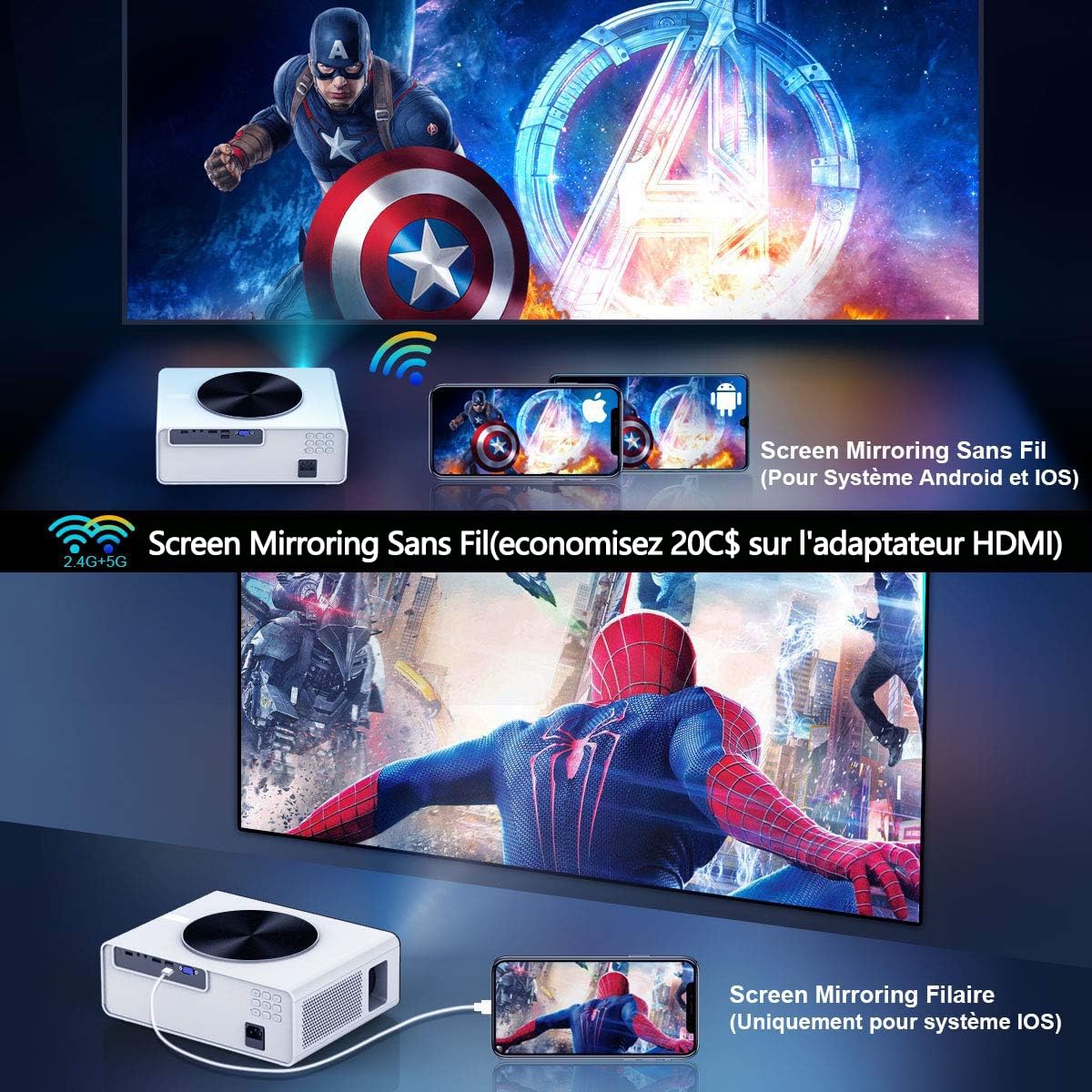
Image: Wireless screen mirroring setup for smartphones and tablets.
- Select 'Screen Mirroring' as the input source.
- Follow the on-screen instructions provided by the projector to connect your specific device (iOS or Android). This typically involves connecting your phone to the projector's WiFi network and then activating the screen mirroring function on your phone.
4.4 Adjusting Projection Size and Distance
The projector supports a flexible projection size from 50 to 300 inches. Adjust the distance between the projector and the screen to achieve the desired image size. The zoom function (100-75%) can be used to fine-tune the image size without moving the projector.

Image: Flexible projection size and distance guide.
4.5 Image and Audio Settings
Access the projector's menu to adjust image settings such as brightness, contrast, color, and aspect ratio (16:9 or 4:3). For audio, you can use the built-in dual 10W stereo speakers or connect external speakers via the 3.5mm audio output jack.

Image: Visual comparison of brightness and contrast performance.

Image: Projector performance in low light conditions.
5. Техникалык тейлөө
5.1 Линзаны тазалоо
Проектордун линзасын акырын сүртүү үчүн оптикалык линзалар үчүн атайын иштелип чыккан жумшак, мамыксыз чүпүрөктү колдонуңуз. Абразивдүү тазалоочу каражаттарды же ашыкча күч колдонуудан алыс болуңуз.
5.2 Чаң чыпкасын тазалоо
The projector features a removable dust filter. Regularly clean the filter to prevent dust buildup, which can affect performance and cooling. Refer to the projector's physical design for the filter location and removal instructions.
5.3 Сактоо
Проекторду узак убакыт бою колдонбогон учурда, аны салкын, кургак жерде, күндүн түз нурунан жана өтө жогорку температурадан алыс сактаңыз. Линзаны чаңдан жана чийиктен коргоо үчүн линза капкагын колдонуңуз.
6. Кыйынчылыктарды
If you encounter issues with your WiMiUS K3 projector, please refer to the following common problems and solutions:
- Сүрөт жок:
- Проектордун кубат булагы күйүп турганын жана кубат кабелинин бекем туташтырылганын текшериңиз.
- Туура киргизүү булагынын тандалганын текшериңиз (мисалы, HDMI1, USB).
- Check the connection cables (HDMI, VGA) for damage or loose connections.
- бүдөмүк сүрөт:
- Сүрөт курч болгонго чейин линзадагы фокус шакекчесин тууралаңыз.
- Use keystone correction to ensure the image is rectangular.
- Проекциялык беттин тегиз жана жылмакай экенине ынаныңыз.
- Үн жок:
- Increase the volume on both the projector and the connected device.
- Check if external speakers are connected and properly functioning.
- Ensure the audio output settings on your connected device are correct.
- WiFi туташуу маселелери:
- Ensure your smartphone/tablet is connected to the projector's WiFi network as per on-screen instructions.
- Проекторду да, мобилдик түзмөгүңүздү да өчүрүп күйгүзүңүз.
- Башка зымсыз түзмөктөрдөн кандайдыр бир тоскоолдук бар экенин текшериңиз.
- Washed Out Colors:
- Adjust the brightness, contrast, and color settings in the projector's image menu.
- Бөлмөнүн жетиштүү караңгы экенине ынаныңыз, ал оптималдуу болушу керек viewing, as ambient light can significantly impact image quality.
7. Техникалык шарттар
| Өзгөчөлүк | Спецификация |
|---|---|
| Бренд | WiMiUS |
| Модел | K3 |
| Native Resolution | 1920 x 1080 (Full HD) |
| Колдоого алынган резолюция | 4K чейин |
| Жарыктык | 7500 Люкс (1500 ANSI люмен) |
| Контраст катышы | 10000:1 |
| Аспект катышы | 16:9, 4:3 |
| Проекциянын өлчөмү | 50 - 300 дюйм |
| Lamp Жашоо | 100,000 саат |
| Байланыш | WiFi, 2x HDMI, 2x USB 2.0, VGA, AV, 3.5mm Audio Out |
| Баяндамачылар | Dual 10W Stereo |
| Продукциянын өлчөмдөрү | 31 x 11 x 23 см |
| Элемент Салмагы | 3.53 кг |
| Ватtage | 140 Ватт |
8. Кепилдик жана колдоо
8.1 Кепилдик маалыматы
WiMiUS K3 проектору төмөнкүлөр менен келет: 3 жылдык кепилдик. This warranty covers manufacturing defects and ensures free repair for the first year. Please retain your proof of purchase for warranty claims.
8.2 Кардарларды колдоо
For any technical assistance, troubleshooting beyond this manual, or warranty inquiries, please contact WiMiUS customer support through their official webпродукт сатылып алынган сайт же сатуучу.


