Snom M18 KLE SIP DECT 4-Line Desk Office Phone User Manual
Model: M18 KLE
This manual provides comprehensive instructions for the setup, operation, and maintenance of your Snom M18 KLE SIP DECT 4-Line Desk Office Phone.
Орнотуу колдонмосу
Пакеттин мазмуну
- Snom M18 KLE Desk Phone Unit
- Телефон
- Телефон шнур
- Ethernet кабели
- AC кубат адаптери
Физикалык орнотуу
Телефонду туташтыруу: Оролгон трубканын шнурунун бир учун трубкага, экинчи учун телефондун түбүнүн капталында трубканын сүрөтчөсү бар портко сайыңыз.
Тармакка туташуу: Connect one end of the Ethernet cable to the LAN port on the back of the phone and the other end to your network router or switch.
Туташуу кубаты: Plug the AC power adapter into the power port on the back of the phone, then plug the adapter into a standard electrical outlet. The phone will power on automatically.
Баштапкы конфигурация
Upon first power-on, the phone may display a setup wizard or attempt to obtain network settings via DHCP. Follow the on-screen prompts to configure basic settings such as language, time zone, and network parameters if not automatically assigned.
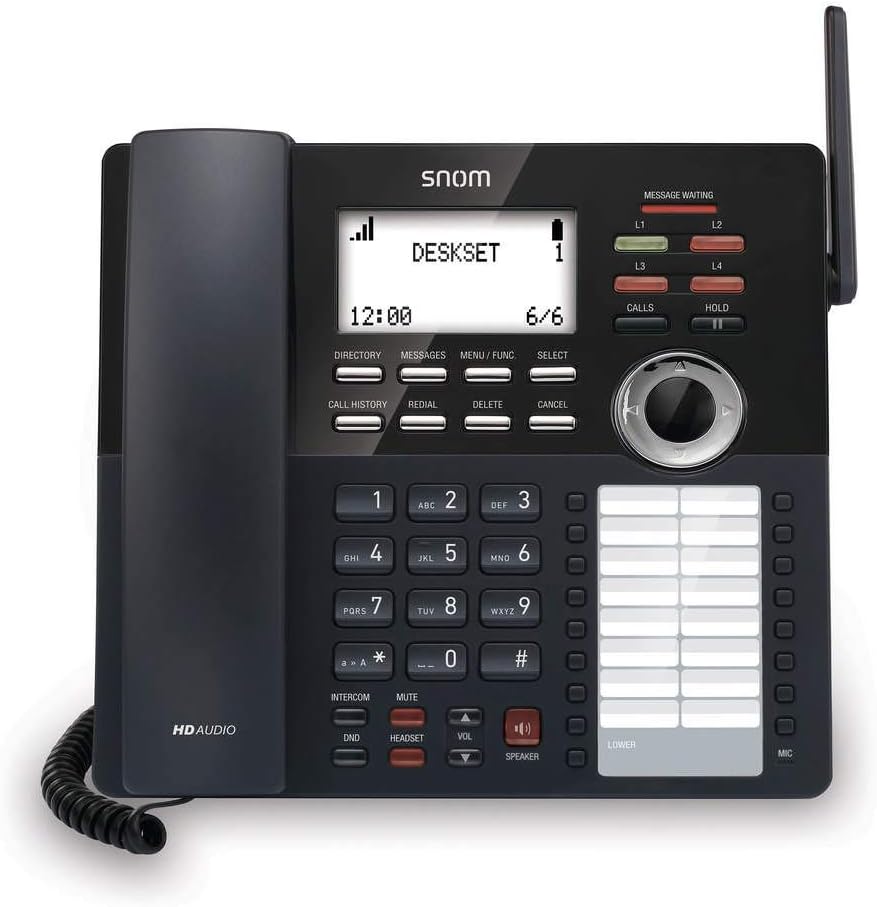
Сүрөт: алдыңкы view of the Snom M18 KLE Desk Office Phone, showing the display, keypad, and function buttons. The handset is cradled on the left side, and a DECT antenna is visible on the right.
Иштөө нускамалары
Негизги чалуу функциялары
Чакыруу:
Телефонду алыңыз же баскычты басыңыз СПИКЕР баскычы.
Ариптакта аркылуу каалаган телефон номерин териңиз.
басыңыз ЧАЛУУЛАР button or wait a few seconds for the call to connect automatically.
Чалууга жооп берүү:
Телефон шыңгыраганда, телефонду алыңыз же басыңыз СПИКЕР жооп берүү үчүн баскыч.
Чалууну аяктоо:
Телефонду кайра бешикке салыңыз же басыңыз СПИКЕР кайра баскычын.
Өркүндөтүлгөн чалуу өзгөчөлүктөрү
Кармап туруу: Активдүү чалуу учурунда, басыңыз БЕРҮҮ Чалууну күтүү режимине коюу үчүн баскычын басыңыз. БЕРҮҮ кайра чалууну улантуу үчүн.
өткөрүүсү:
Активдүү чалуу учурунда, басыңыз Трансфер soft key (may be labeled differently on screen).
Чакырууну өткөргүңүз келген номерди териңиз.
Аткаруу үчүн сокур которуу, басыңыз Трансфер soft key again before the recipient answers. To perform an attended transfer, wait for the recipient to answer, announce the call, then press Трансфер.
Конференция: The phone supports 3-way local conferencing. During an active call:
басыңыз CONF soft key (or similar). The first call is placed on hold.
Үчүнчү тараптын номерин териңиз.
Үчүнчү тарап жооп бергенден кийин, баскычын басыңыз CONF бардык тараптарга кошулуу үчүн кайрадан жумшак баскычты басыңыз.
Үнсүз: басыңыз БАСУУ Чалуу учурунда микрофонуңуздун үнүн басуу үчүн баскычты басыңыз. Үнүн чыгаруу үчүн аны кайра басыңыз.
Тынчымды алба (DND): басыңыз DND button to activate or deactivate Do Not Disturb mode. When active, incoming calls will be redirected or sent to voicemail without ringing the phone.
Меню Багыттоо
Use the 4-way navigational pad and the ТАНДОО soft key to navigate through the phone's menus. Soft keys below the display change functionality based on the current screen.
Phonebook and Call History
Каталог: басыңыз ДИРЕКТОР soft key to access your local phonebook. You can add, edit, and delete contacts.
Чалуу тарыхы: басыңыз ЧАЛУУ ТАРЫХЫ баскычына view a list of dialed, received, and missed calls.
Техникалык тейлөө жана кам көрүү
Аппаратты тазалоо
Телефонду тазалоо үчүн жумшак,amp cloth. Avoid using abrasive cleaners or solvents, as these can damage the phone's surface. Ensure the phone is unplugged before cleaning.
Батареяны алмаштыруу
The deskset contains a 2.4V/750 mAh Ni-MH battery. If battery performance degrades significantly over time, contact Snom support or a qualified technician for replacement. Do not attempt to replace the battery yourself unless specifically instructed by Snom.
Орнотулган программаны жаңыртуу
Periodically, Snom may release firmware updates to improve performance and add new features. Consult your system administrator or the Snom website for instructions on how to update your phone's firmware.
Проблемаларды чечүү
| Көйгөй | Мүмкүн себеп | Чечим |
|---|---|---|
| Терүү үнү жок | Phone not powered, network cable disconnected, or SIP registration failure. | Check power connection. Ensure Ethernet cable is securely connected. Verify SIP account registration status on the display. Restart the phone. |
| Чалууларды жасоо/кабыл алуу мүмкүн эмес | SIP registration issue, DND active, or network problem. | Check SIP registration. Deactivate DND. Verify network connectivity. Contact your IT administrator. |
| Дисплей бош же тоңуп калган | Power issue or software error. | Unplug the power adapter, wait 10 seconds, then plug it back in. If the issue persists, contact support. |
| Аудио сапаты начар | Network congestion, faulty cable, or handset issue. | Check network connection and bandwidth. Try a different handset or headset. |
Техникалык мүнөздөмөлөр
- Дисплей: 3.5-inch 102 x 66 pixels (w x h) mono LCD with blue/white backlighting
- Сап баскычтары: 4 programmable LED backlit line keys
- Функция ачкычтары: 17 dedicated feature keys
- Навигация: 4-way navigational pad
- Тез терүү: 32 speed dial keys (2 pages x 16)
- Voice Quality: HD voice for receiver and speakerphone, Full-duplex speakerphone
- Гарнитураны колдоо: HAC receiver, 2.5mm corded headset jack
- Чалууларды башкаруу: 4-line call handling (active and held), 3-way local conference, N-way network conference, Intercom, Call transfer (blind/attended), Call hold, Call forwarding, Mute, Redial, Caller ID
- Телефондук китеп: Local up to 1,000 entries, XML/LDAP remote phonebook
- Чалуу тарыхы: 200гө чейин жазуу
- Батарея: Deskset battery: 2.4v/750 mAh Ni-MH
- Кубат булагы: Corded Electric (Included AC Adapter)
- Standby/Talk Time: 36 hours standby / 7 hours talk time
Кепилдик маалымат
The Snom M18 KLE SIP DECT 4-Line Desk Office Phone comes with a 3-year limited warranty from the date of purchase. This warranty covers defects in materials and workmanship under normal use. For full terms and conditions, please refer to the official Snom warranty policy available on their webсайтка же кардарларды колдоо менен байланышыңыз.
Кардарларды колдоо
For technical assistance, warranty claims, or further information, please visit the official Snom website or contact their customer support department. Keep your product model number (M18 KLE) and purchase details ready when contacting support.


