1. Киришүү
This manual provides instructions for the Lexmark CS331dw Color Single-Function Laser Printer. It covers setup, operation, maintenance, and troubleshooting to ensure optimal performance and longevity of your device. The Lexmark CS331dw is designed for efficient color printing in office environments, offering a print speed of up to 24 pages per minute.
2. Коопсуздук маалыматы
Read all safety information before using the printer to prevent injury and damage to the product. Keep this guide for future reference.
- Электр коопсуздугу: Connect the printer to a properly grounded electrical outlet. Do not use damaged power cords.
- Жылуулук: Certain internal and external parts of the printer can become hot during operation. Avoid touching these areas.
- Тонер картридждери: Handle toner cartridges carefully. If toner gets on your skin or clothing, wash it off immediately with soap and cold water. Do not incinerate toner cartridges.
- Вентиляция: Ensure adequate ventilation around the printer to prevent overheating.
- Жайгашкан жери: Place the printer on a stable, level surface. Avoid placing it near water or in excessively humid environments.
3. Кутуда эмне бар
Таңгактан чыгарууда бардык компоненттер бар экенин текшериңиз:
- Lexmark CS331dw Color Printer
- Starter Toner Cartridges (Black, Cyan, Magenta, Yellow)
- Электр кабели
- Орнотуу боюнча колдонмо жана документтер
4. Продукт бүтүп калдыview
Familiarize yourself with the main components of your Lexmark CS331dw printer.
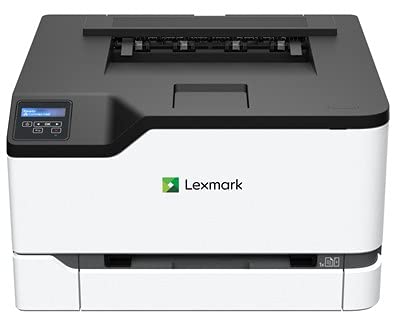
Сүрөт 1: Алдыңкы view of the Lexmark CS331dw Color Printer, showing the paper tray and output bin.
- Башкаруу панели: Features push buttons for navigation and status indicators.
- Стандарттык киргизүү лоток: Located at the bottom front, holds up to 250 sheets.
- Manual Feed Slot: For single-sheet printing of special media.
- Чыгуу кутусу: Located at the top, where printed pages are collected.
- Арткы порттор: Includes Ethernet port for network connectivity and power input.
5. Орнотуу
5.1 Пакеттен чыгаруу жана жайгаштыруу
- Принтерди таңгагынан алып салыңыз.
- Remove all protective tapes and packing materials from the exterior and interior of the printer. Refer to the setup guide for specific locations.
- Place the printer on a sturdy, level surface with adequate space for ventilation and access to power and network connections.
5.2 Кагазды жүктөө
- Pull out the standard input tray.
- Жүктөлүп жаткан кагаздын өлчөмүнө дал келүү үчүн кагаз жетектерин тууралаңыз.
- Load paper with the print side facing up. Do not overfill the tray.
- Лотокту акырын принтердин ичине кайра түртүңүз.
5.3 Кубат менен тармакты туташтыруу
- Электр шнурду принтерге, анан жерге туташтырылган электр розеткасына туташтырыңыз.
- Тармакты басып чыгаруу үчүн тармак роутериңизден Ethernet кабелин туташтырыңыз же принтердин артындагы Ethernet портуна которуңуз.
- Принтерди иштетүү үчүн кубат баскычын басыңыз.
5.4 Драйверди орнотуу
Install the latest printer drivers from the official Lexmark support website. Follow the on-screen instructions for installation. For mobile printing, download the Lexmark Mobile Print app on your smartphone.
6. Иштөө нускамалары
6.1 Негизги басып чыгаруу
- Принтер күйгүзүлүп, компьютериңизге же тармагыңызга туташып турганын текшериңиз.
- Компьютериңизде басып чыгаргыңыз келген документти же сүрөттү ачыңыз.
- Тандоо Басып чыгаруу колдонмонун менюсунан (мисалы, File > Басып чыгаруу).
- Choose the Lexmark CS331dw from the list of available printers.
- Adjust print settings such as paper size, orientation, color/monochrome, and number of copies.
- Click Басып чыгаруу.
6.2 Мобилдик басып чыгаруу
Use the Lexmark Mobile Print app to print directly from your smartphone or tablet. Ensure your mobile device is connected to the same network as the printer.
6.3 Loading Envelopes and Special Media
For envelopes or other special media, use the manual feed slot. Load one sheet at a time, following the on-screen prompts or printer control panel instructions for media type and size selection.
7. Техникалык тейлөө
7.1 Тонер картридждерин алмаштыруу
When a toner cartridge is low or empty, the printer's control panel will display a message. Replace cartridges as follows:
- Принтердин алдыңкы капкагын ачыңыз.
- Locate the empty toner cartridge (Black, Cyan, Magenta, or Yellow).
- Grasp the handle of the cartridge and pull it straight out.
- Unpack the new Lexmark genuine toner cartridge and gently shake it to distribute the toner.
- Жаңы картриджди тиешелүү уячага ал ордуна чыкылдаган үн чыкканга чейин салыңыз.
- алдыңкы капкакты жабыңыз.
7.2 Принтерди тазалоо
Үзгүлтүксүз тазалоо басып чыгаруунун сапатын сактоого жана принтердин иштөө мөөнөтүн узартууга жардам берет.
- Сырткы: сыртын жумшак менен сүртүңүз, гamp, түксүз кездеме. Абразивдүү тазалагычтарды колдонбоңуз.
- Ички иштер: Periodically open the front cover and gently remove any loose toner or paper dust with a dry, lint-free cloth. Avoid touching sensitive components.
7.3 Кагаз тыгындарын тазалоо
If a paper jam occurs, the printer will display an error message. Follow the on-screen instructions or these general steps:
- Принтерди өчүрүп, электр шнурын сууруп алыңыз.
- Open the covers and trays as indicated by the error message or as necessary to access the jammed paper.
- Carefully pull the jammed paper in the direction of the paper path. Avoid tearing the paper.
- Бардык кагаз сыныктары алынып салынганын текшериңиз.
- Бардык капкактарды жана лотокторду жаап, кубат шнурун сайып, принтерди күйгүзүңүз.
8. Кыйынчылыктарды
Бул бөлүм сиз кабылышы мүмкүн болгон жалпы көйгөйлөрдү карайт.
- Принтер жооп бербей жатат:
- Электр байланыштарын текшерип, принтер күйгүзүлгөнүн текшериңиз.
- Verify network cable connection (Ethernet).
- Принтерди жана компьютериңизди өчүрүп күйгүзүңүз.
- Принтер драйверлери туура орнотулганын жана жаңыртылганын текшериңиз.
- Начар басып чыгаруу сапаты:
- Check toner levels for all colors (Black, Cyan, Magenta, Yellow).
- Ensure you are using genuine Lexmark toner cartridges.
- Perform a print quality calibration from the printer's control panel or driver settings.
- Clean the printer's interior as described in the Maintenance section.
- Кагаз тыгылыштары:
- Кагаз тыгындарын тазалоо боюнча кеңири нускамаларды 7.3-бөлүмдөн караңыз.
- Кагаз туура жүктөлгөндүгүн жана ашыкча толтурулбаганын текшериңиз.
- Сунушталган кагаз түрлөрүн жана калыңдыктарын колдонуңуз.
9. Техникалык шарттар
| Өзгөчөлүк | Спецификация |
|---|---|
| Модель номери | 40N9120 |
| Басма технологиясы | Лазер |
| Принтердин чыгышы | Түс |
| Макс басып чыгаруу ылдамдыгы (түстүү) | 24 промилле |
| Макс басып чыгаруу ылдамдыгы (монохромдуу) | 24 промилле |
| Максималдуу түстүү басып чыгаруу чечими | 600 x 600 dpi |
| Максималдуу кара жана ак басып чыгаруу чечими | 600 dpi |
| Байланыш технологиясы | Ethernet |
| Башкаруу ыкмасы | Колдонмо, баскыч |
| Сыя түсү | Кара, көгүш, кызгылт, сары |
| Принтердин сыя түрү | Тонер |
| Максималдуу киргизүү барагынын сыйымдуулугу | 251 |
| Output Sheet Capacity | 251 |
| Эки тараптуу басып чыгаруу | Ооба |
| Продукциянын өлчөмдөрү (LxWxH) | 15.52 x 16.19 x 9.59 дюйм |
| Элемент Салмагы | 35.5 фунт (16.1 кг) |
| Ватtage | 395 ватт |
10. Кепилдик жана колдоо
Lexmark provides a standard warranty for this product. For detailed warranty information, please refer to the warranty card included with your printer or visit the official Lexmark webсайт. Техникалык колдоо, драйверди жүктөп алуу жана кошумча ресурстар үчүн, кириңиз www.lexmark.com/support.


