1. Продукт бүтүп калдыview
The Sami Sami-LD1117P is a vertical wireless weather station designed to provide accurate indoor and outdoor temperature and humidity readings. It features a large touch screen display with LED backlighting, offering clear visibility of various meteorological data including lunar phase, current time, and date. This device also includes a barometer for weather forecasting, helping you plan your day effectively. Its multi-language support and low power consumption make it a versatile and convenient addition to any home or office.

Figure 1: Sami Sami-LD1117P Wireless Weather Station and Remote Sensor.
2. Пакеттин мазмуну
Кутучаны ачканда бардык компоненттердин бар экенине ынануу үчүн таңгактын ичиндегисин кылдаттык менен текшериңиз:
- Негизги метеорологиялык станциянын блогу
- Remote Sensor
- Колдонуучунун Колдонмосу (бул документ)
Note: 2 AAA batteries for the main unit and 2 AAA batteries for the remote sensor are required but not included in the package.
3. Негизги өзгөчөлүктөрү
- Indoor/Outdoor Temperature and Humidity Display: Accurately monitors environmental conditions both inside and outside your home.
- Barometer and Weather Forecast: Provides updated weather forecasts based on barometric pressure trends.
- Large LCD Touch Screen with LED Backlight: Кеңири сунуштайт view and easy interaction with the display.
- Lunar Phase Display: Айдын учурдагы фазасын көрсөтөт.
- Calendar and Multi-language Support: Displays date and supports multiple languages for user convenience.
- Санарип ойготкуч саат: Includes an integrated alarm function.
- Зымсыз туташуу: Remote sensor connects wirelessly to the main unit.
- Төмөн энергия керектөө: Энергияны үнөмдөө үчүн иштелип чыккан.
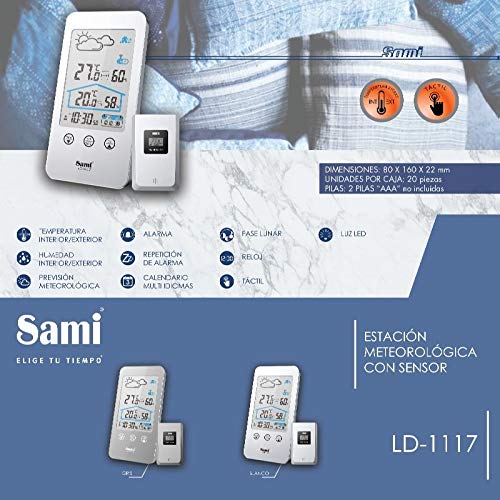
Figure 2: Visual representation of key features and dimensions of the Sami Sami-LD1117P.
4. Орнотуу колдонмосу
4.1. Батареяны орнотуу
- Негизги блок: Open the battery compartment cover on the back of the main weather station unit. Insert 2 AAA batteries, ensuring correct polarity (+/-). Close the cover.
- Алыстан сенсор: Open the battery compartment cover on the back of the remote sensor. Insert 2 AAA batteries, ensuring correct polarity (+/-). Close the cover.
Important: Always use new batteries of the same type. Do not mix old and new batteries.
4.2. Баштапкы синхрондоштуруу
Once batteries are installed in both units, the main unit will automatically search for the remote sensor. Place the remote sensor within range (typically up to 30 meters in open air) of the main unit. The outdoor temperature and humidity readings should appear on the main unit's display within a few minutes. If not, refer to the Troubleshooting section.
5. Иштөө нускамалары
5.1. Display Overview
Чоң LCD дисплей төмөнкү маалыматтарды көрсөтөт:
- Үйдүн ичиндеги температура жана нымдуулук
- Outdoor Temperature and Humidity (from remote sensor)
- Weather Forecast Icons (Sunny, Partly Cloudy, Cloudy, Rainy, Snowy)
- Убакыт жана дата
- Lunar Phase
- Сигнал индикатору
5.2. Сенсордук экранды башкаруу элементтери
The unit features touch-sensitive buttons on the front panel:
- MEM: чейин басыңыз view MAX/MIN temperature and humidity records. Press again to cycle through records.
- C/F SET: Press to switch between Celsius (°C) and Fahrenheit (°F). Press and hold to enter time/date/alarm setting mode.
- CH: Press to cycle through remote sensor channels (if multiple sensors are used).
- Light Icon (Top Right): Touch to activate the LED backlight for 10 seconds.
5.3. Убакыт жана дата орнотуу
- басып, кармап туруңуз C/F SET button until the hour digit starts flashing.
- колдонуу MEM or CH buttons (or corresponding touch areas) to adjust the value.
- Басыңыз C/F SET again to confirm and move to the next setting (minute, year, month, day, 12/24 hour format, language).
- Бардык орнотуулар конфигурацияланганга чейин 2 жана 3-кадамдарды кайталаңыз.
- Басыңыз C/F SET орнотуу режиминен чыгуу үчүн акыркы жолу.
5.4. Ойготкучту орнотуу
- In time setting mode (see 5.3), continue pressing C/F SET ойготкуч сааты күйүп-өчкөнгө чейин.
- Adjust the alarm hour using the MEM or CH баскычтар.
- Басыңыз C/F SET to move to alarm minute. Adjust as needed.
- Басыңыз C/F SET to activate/deactivate the alarm. An alarm icon will appear on the display when active.
- To snooze, press any button when the alarm sounds. The alarm will sound again after 5 minutes.
- To stop the alarm, press and hold any button (except snooze) or let it ring for 2 minutes.
6. Техникалык тейлөө
- Тазалоо: Wipe the unit and sensor with a soft, damp кездеме. Абразивдүү тазалагычтарды же эриткичтерди колдонбоңуз.
- Батареяны алмаштыруу: Дисплейде батареянын заряды аз калганын көрсөткөн индикатор пайда болгондо, эки блоктун тең батареяларын алмаштырыңыз. Бардык батареяларды ар дайым бир убакта алмаштырыңыз.
- Жайгашкан жери: For accurate outdoor readings, place the remote sensor in a shaded, dry location, away from direct sunlight and precipitation. Ensure it is within the wireless range of the main unit.
- Сактагыч: Эгерде түзмөктү узак убакытка сактап койсоңуз, агып кетпеши үчүн бардык батарейкаларды алып салыңыз.
7. Кыйынчылыктарды
| Көйгөй | Мүмкүн себеп | Чечим |
|---|---|---|
| Негизги блокто дисплей жок. | Батареялар өлүп калган же туура эмес салынган. | Check battery polarity and replace with new batteries. |
| Сырткы температура/нымдуулук көрсөтүлгөн эмес же так эмес. | Remote sensor out of range, low battery, or interference. | Move sensor closer to main unit. Replace sensor batteries. Avoid placing near large metal objects or electronics. Re-synchronize units. |
| Weather forecast icon does not match actual weather. | Forecast is based on barometric pressure trends, not real-time conditions. | This is normal. The forecast is a prediction based on pressure changes over time. |
| Screen backlight not working. | Batteries are low or feature is not activated. | Replace batteries. Touch the light icon on the display to activate. |
8. Техникалык шарттар
| Өзгөчөлүк | Деталь |
|---|---|
| Модель номери | LD1117P |
| Бренд | Sami |
| Power Source | Battery (2x AAA for main unit, 2x AAA for remote sensor - not included) |
| Байланыш технологиясы | Зымсыз |
| Температуранын тактыгы | ±1 °C |
| Дисплей түрү | LCD |
| Sensor Technology | Зымсыз |
| Өлчөмдөрү (Негизги бирдик) | Болжол менен. 80 x 160 x 22 мм |
9. Кепилдик жана колдоо
This product is covered by a standard manufacturer's warranty. For specific warranty terms and conditions, please refer to the warranty card included with your purchase or contact the retailer. If you encounter any issues not covered in this manual or require further assistance, please contact Sami customer support through their official website or the point of purchase.
Көбүрөөк маалымат алуу үчүн, сиз иш сапары менен болот Sami Brand Store.


