1. Киришүү
The Perixx PERIBOARD-326 is a compact, wired USB keyboard featuring low-profile keys and adjustable white backlighting. Designed for efficiency and comfort, this keyboard is suitable for various computing environments, offering a reliable and quiet typing experience. This manual provides detailed instructions for setting up, operating, maintaining, and troubleshooting your PERIBOARD-326 keyboard.

Бүттүview of the Perixx PERIBOARD-326 mini backlit USB keyboard, highlighting its compact design and wired USB connection.
2. Пакеттин мазмуну
Пакетиңизде бардык буюмдар бар экенин текшериңиз:
- Perixx PERIBOARD-326 Wired Mini Backlit USB Keyboard
- User Manual

Contents of the PERIBOARD-326 package, including the keyboard, user manual, and product box.
3. Системалык талаптар
The Perixx PERIBOARD-326 keyboard is compatible with the following operating systems:
- Windows 7
- Windows 8
- Windows 10 жана андан жогору
- Жеткиликтүү USB порту бар компьютер
4. Орнотуу нускамалары
The PERIBOARD-326 is designed for simple plug-and-play functionality.
- USB кабелин туташтыруу: Locate an available USB port on your computer. Insert the USB-A connector of the keyboard's cable into the USB port. The keyboard features a 1.5-meter (4'9 ft) long USB cable for convenient connection.
- Автоматтык драйверди орнотуу: Your operating system will automatically detect the keyboard and install the necessary drivers. This process typically takes a few seconds.
- Терүүнү баштоо: Драйверлер орнотулгандан кийин, клавиатура дароо колдонууга даяр болот.

The PERIBOARD-326 keyboard positioned on a desk, illustrating its slim and elegant design. The image also highlights the 1.5-meter USB cable for connectivity.
5. Баскычтопту иштетүү
The PERIBOARD-326 offers a comfortable and efficient typing experience with its low-profile keys and compact design.
5.1 Терүү тажрыйбасы
- Low-Profile Ачкычтар: The keys are designed for comfortable and quiet typing, suitable for extended use.
- Компакт дизайн: The mini layout without a dedicated number pad saves desk space and reduces the distance to your mouse.

A user's hands are shown typing on the PERIBOARD-326, emphasizing the comfortable typing experience and the quiet operation of the keys.
5.2 Жөнгө салынуучу бут
The keyboard is equipped with adjustable feet on the underside. These can be extended to tilt the keyboard to a more ergonomic angle, enhancing typing comfort.

жагы проfile of the PERIBOARD-326 keyboard, illustrating the adjustable feet that allow for ergonomic positioning.
6. Function Keys and Backlight Control
The PERIBOARD-326 features integrated FN hotkeys for quick access to multimedia functions and backlight control.
6.1 Жарыкты башкаруу
The keyboard's white backlighting can be adjusted to suit your preference and environment. Use the following key combination:
- Басыңыз Fn + F8 to cycle through 4 levels of brightness (100%, 75%, 50%, 25%) and turn the backlight off (0%).

The PERIBOARD-326 keyboard illuminated with white backlighting, demonstrating its visibility in low-light conditions and the availability of 4 adjustable brightness levels.
6.2 Integrated FN Hotkeys
Combine the Fn key with the designated F-keys for additional functionality:
- Fn+F9: Медиа ойнотуу/тындыруу
- Fn+F10: Медиа токтот
- Fn+F11: Мурунку трек
- Fn+F12: Кийинки трек
- Fn + PrtSc: Басып чыгаруу экраны
- Fn + Жылдыруу кулпусу: Scroll Lock
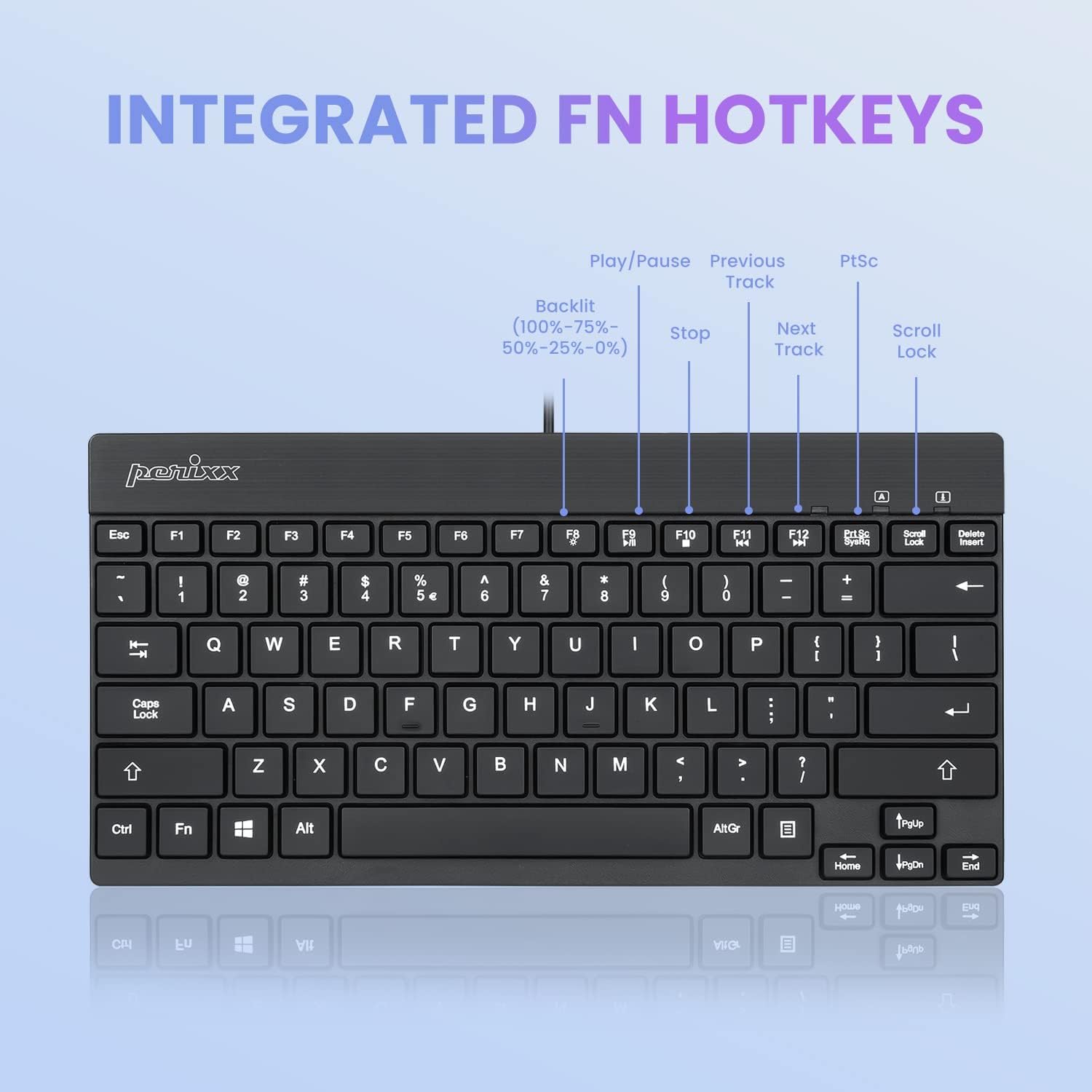
Деталдаштырылган view of the PERIBOARD-326 keyboard layout, specifically highlighting the integrated FN hotkeys for multimedia control and backlight brightness adjustment (100%-75%-50%-25%-0%).
7. Техникалык тейлөө
To ensure the longevity and optimal performance of your PERIBOARD-326 keyboard, follow these maintenance guidelines:
- Тазалоо: Бир аз жумшак, түксүз кездемени колдонуңуз dampКлавиатуранын бетин суу же жумшак тазалоочу эритме менен сүртүңүз. Катуу химиялык заттардан, абразивдүү тазалоочу каражаттардан же ашыкча нымдуулуктан алыс болуңуз.
- Чаңды тазалоо: Баскычтардын ортосундагы чаңды жана калдыктарды тазалоо үчүн кысылган абаны колдонуңуз.
- Сактагыч: Узак мөөнөткө колдонулбаганда, клавиатураны таза, кургак чөйрөдө күн нурунан жана экстремалдык температурадан алыс сактаңыз.
- Төгүлгөндөн сактаныңыз: Ички компоненттерге зыян келтирбөө үчүн суюктуктарды клавиатурадан алыс кармаңыз. Төгүлүп кеткен учурда, клавиатураны компьютериңизден дароо ажыратып, кайра туташтыруудан мурун толугу менен кургатыңыз.
8. Кыйынчылыктарды
If you encounter issues with your PERIBOARD-326 keyboard, please refer to the following common solutions:
- Баскычтоп жооп бербейт:
- USB кабели компьютериңиздеги иштеген USB портуна бекем сайылганын текшериңиз.
- Баскычтопту башка USB портуна туташтырууга аракет кылыңыз.
- Компьютериңизди өчүрүп күйгүзүңүз.
- Көйгөй клавиатурада же компьютерде экенин аныктоо үчүн баскычтопту башка компьютерде сынап көрүңүз.
- Арткы жарык иштебейт:
- Басыңыз Fn + F8 repeatedly to cycle through brightness levels and ensure the backlight is not turned off.
- Ensure the keyboard is properly connected to your computer.
- Ачкычтар туура иштебейт:
- Жабыркаган ачкычтардын астында кандайдыр бир физикалык тоскоолдуктар же таштандылар бар-жогун текшериңиз.
- Операциялык системаңыздын драйверлери жаңыртылганын текшериңиз.
9. Техникалык шарттар
| Продукциянын өлчөмдөрү | 10.87 x 5.43 x 0.55 дюйм (27.61 x 13.79 x 1.4 см) |
| Элемент Салмагы | 13.4 унция (0.38 кг) |
| Байланыш технологиясы | USB Wired |
| Keyboard Description | Компакт |
| Өзгөчө өзгөчөлүк | Backlit (White) |
| Баскычтоптун арткы жарыктандыруу түсүн колдоо | Жалгыз түс (Ак) |
| Шайкеш түзмөктөр | PC |
| Өндүрүүчү | Perixx |
| Модель номери | 11607 |
10. Кепилдик жана колдоо
Perixx products are designed and manufactured with quality in mind. For information regarding warranty coverage and customer support, please refer to the official Perixx website or contact their customer service directly. Perixx is committed to providing friendly customer support for their products.
Кошумча жардам алуу үчүн, сиз иш сапары менен болот Amazon'догу Perixx дүкөнү же алардын кызмат адамы webсайт.


