1. Киришүү
This manual provides detailed instructions for the installation, operation, and maintenance of your Imou Bullet 3 5MP/3K Outdoor Camera. Please read this manual thoroughly before using the product to ensure proper setup and functionality. Keep this manual for future reference.
2. Продукт бүтүп калдыview
The Imou Bullet 3 is a high-performance outdoor security camera designed for reliable surveillance. It features 5-megapixel (3K) resolution, color night vision, Wi-Fi 6 connectivity, and an IP67 weather-resistant rating, making it suitable for various outdoor environments.
Негизги өзгөчөлүктөрү:
- 5MP/3K Ultra HD Resolution for clear and detailed imaging.
- Color Night Vision for enhanced visibility in low-light conditions.
- Wi-Fi 6 support for stable and efficient wireless connection.
- IP67 Weatherproof rating for outdoor durability.
- Human and vehicle detection for accurate alerts.

Сүрөт 2.1: Алдыңкы view of the Imou Bullet 3 Outdoor Camera, showing the lens, two antennas, and mounting base.
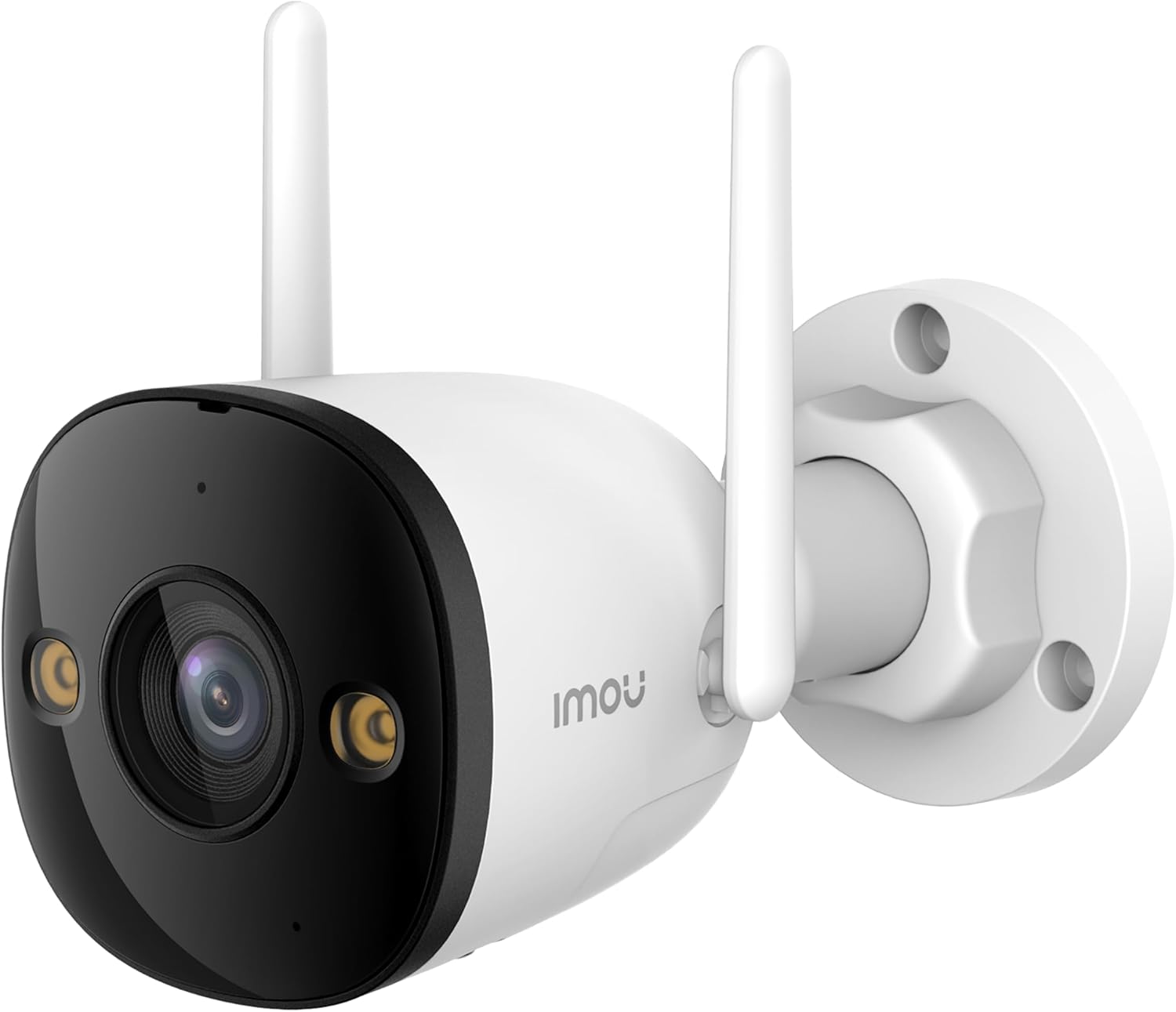
Figure 2.2: The Imou Bullet 3 camera, highlighting the Imou brand logo on its side.

Figure 2.3: Illustrates the camera's 3K UHD resolution capability, providing clear and detailed images.

Figure 2.4: Depicts the IMOU SENSE™ precision AI chip, which powers advanced features like detection.
3. Орнотуу жана орнотуу
Before installation, ensure you have all necessary components: the Imou Bullet 3 camera, power adapter, mounting screws, and a drilling template (if provided). It is recommended to test the camera's functionality and Wi-Fi signal strength at the desired installation location before permanent mounting.
3.1 Камераны орнотуу
- Ачык асман алдындагы ылайыктуу жерди тандаңыз view сиз көзөмөлдөгүңүз келген аймак.
- Use the provided drilling template to mark the screw holes on the wall or ceiling.
- Тешиктерди бургула жана зарыл болсо, дубал анкерлерин салгыла.
- Secure the camera's mounting base to the surface using the screws.
- Камера бурчун керек болсо тууралаңыз.
3.2 Күйгүзүү жана туташтыруу
Connect the camera to a power source using the provided power adapter. The camera supports both Wi-Fi and Power over Ethernet (PoE) connections for flexible installation.
- Wi-Fi туташуусу: Power on the camera and follow the instructions in the Imou Life app to connect it to your Wi-Fi network.
- PoE туташуу: If your network supports PoE, connect an Ethernet cable from your PoE-enabled router or switch directly to the camera. This provides both power and data through a single cable.
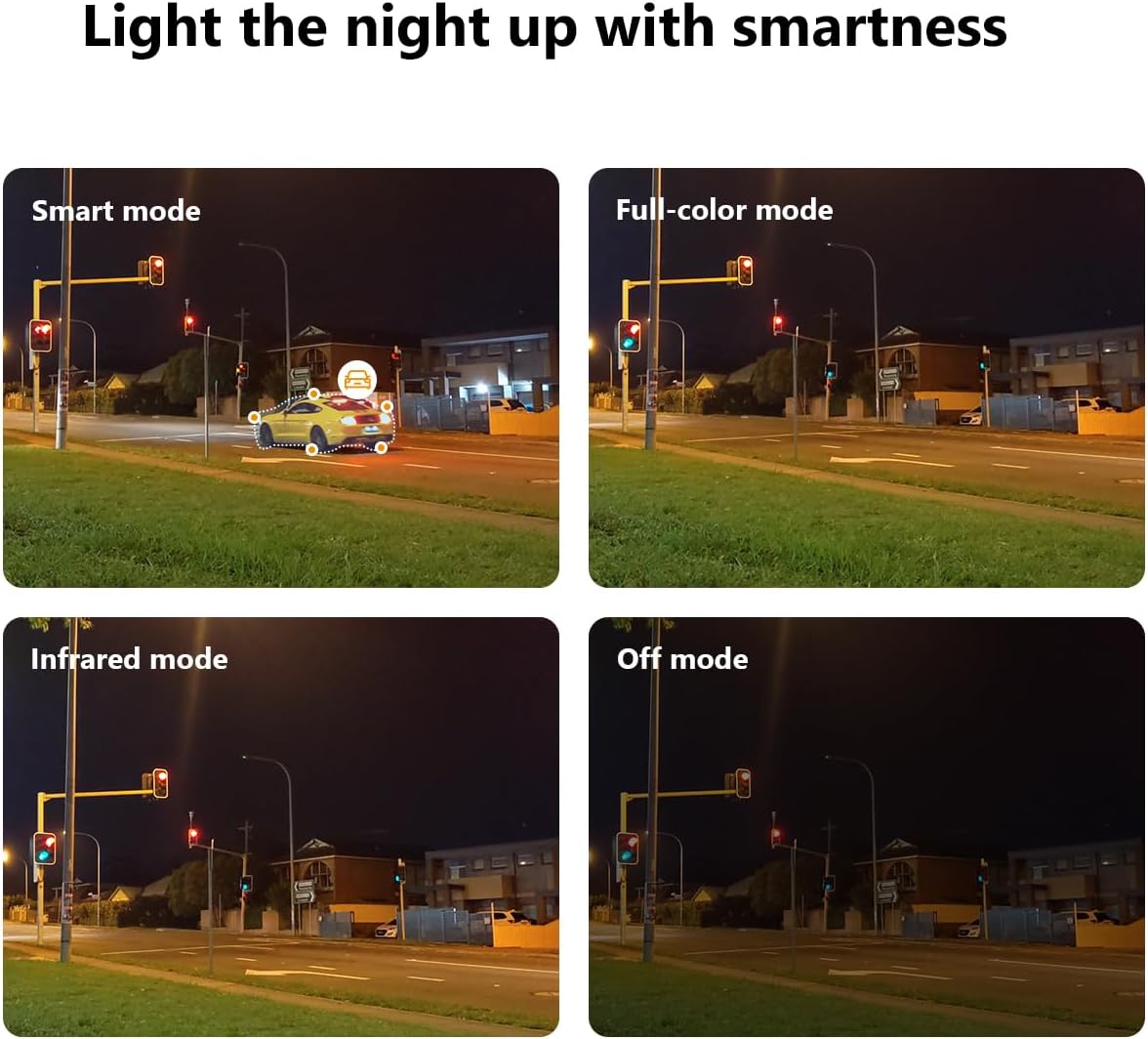
Figure 3.1: Illustrates the two primary connection methods: Wi-Fi for wireless setup and PoE for combined power and data via Ethernet cable.
4. Иштөө нускамалары
The Imou Bullet 3 camera offers various features to enhance your security monitoring. All advanced settings and live viewing are accessible through the Imou Life mobile application.
4.1 Түнкү көрүү режимдери
The camera provides multiple night vision modes to suit different lighting conditions:
- Smart Mode: Automatically switches between infrared and full-color night vision based on detected motion.
- Толук түстүү режим: Толук караңгыда да толук түстүү видео көрсөтүү үчүн орнотулган прожекторлорду колдонот.
- Infrared режими: Кара жана ак видео үчүн аз жарыкта инфракызыл LEDдерди колдонот жана кубаттуулукту үнөмдөйт.
- Өчүрүү режими: Disables night vision features.

Figure 4.1: Comparison of the camera's night vision capabilities, including Smart, Full-color, Infrared, and Off modes.
4.2 Customizable Detection Zone
You can define specific areas within the camera's field of view for motion detection. This helps reduce false alarms from irrelevant areas.
- Open the Imou Life app and select your camera.
- Navigate to the detection settings.
- Draw or select the desired detection zones on the live view.
- Жөндөөлөрүңүздү сактаңыз.

Сүрөт 4.2: Мурункуample of a customizable detection zone, highlighted over a pool area to focus surveillance on specific regions.
4.3 Deterring Unwelcome Visitors
The camera is equipped with features to actively deter intruders, such as a built-in spotlight and siren. These can be triggered automatically upon detection or manually through the app.

Figure 4.3: The Imou camera with its integrated spotlights activated, designed to deter intruders and provide clear night vision.
4.4 Пландаштыруу
You can set up schedules for when the camera's detection features are active. This allows you to customize surveillance based on your daily routine.
- In the Imou Life app, go to the camera settings.
- Find the 'Detection Schedule' option.
- Set specific times and days for motion detection and alerts to be active.

Figure 4.4: A smartphone screen displaying the detection scheduling interface within the Imou Life app, allowing users to set active surveillance times.
5. Техникалык тейлөө
Regular maintenance ensures the longevity and optimal performance of your Imou Bullet 3 camera.
5.1 Тазалоо
- Мезгил-мезгили менен камеранын линзасын жана корпусун жумшак, гamp чаңды жана кирди тазалоо үчүн кездеме.
- Do not use harsh chemicals or abrasive cleaners, as they may damage the camera's finish or lens coating.
5.2 Айлана-чөйрөнү коргоо
- Ensure the camera's power connection is secure and protected from moisture.
- While IP67 rated, avoid submerging the camera in water or exposing it to extreme pressure washing.
6. Кыйынчылыктарды
If you encounter issues with your Imou Bullet 3 camera, refer to the following common problems and solutions:
6.1 No Power/Camera Offline
- Күчтү текшерүү: Кубат адаптери камерага жана иштеп жаткан розеткага бекем туташтырылганын текшериңиз.
- Wi-Fi туташуусу: Wi-Fi тармагыңыз иштеп турганын жана камеранын байланыш аралыгында экенин текшериңиз. Зарыл болсо, роутерди өчүрүп-күйгүзүңүз.
- Кайтаруу: If the issue persists, locate the reset button (refer to the camera's physical diagram) and press it for 10 seconds to restore factory settings. Reconfigure the camera afterward.
6.2 Сүрөттүн сапаты начар
- Таза линза: Камера линзасын "Техникалык тейлөө" бөлүмүндө сүрөттөлгөндөй тазалаңыз.
- Тармактын туруктуулугу: Ensure a stable internet connection. Poor Wi-Fi signal can affect video streaming quality.
- Жарыктандыруу: Түз тийген жарыктан же жетишсиз жарыктан качуу үчүн камеранын жайгашуусун тууралаңыз.
6.3 Кыймылды аныктоо көйгөйлөрү
- аныктоо зонасы: Verify that the detection zones are correctly configured in the Imou Life app.
- Сезимталдуулук: Колдонмодогу кыймылды аныктоо сезгичтик жөндөөлөрүн тууралаңыз.
- Тоскоолдуктар: Камеранын иштешине эч кандай физикалык тоскоолдуктар жок экенин текшериңиз view.
7. Техникалык шарттар
| Спецификация | Нарк |
|---|---|
| Бренд | Imou |
| Модель номери | IPC-S3EP-5M0WE(Bullet3 5MP) |
| Байланыш технологиясы | Зымсыз (Wi-Fi) |
| Ички/тышкы колдонуу | Сыртта |
| Түс | Көп түстүү |
| Материал | Пластик |
| Тtage | 12 вольт |
| Энергияны керектөө | 5.3 Ватт |
| Элементтин өлчөмдөрү (L x W x Y) | 14.77 x 7.42 x 7.56 см |
| Элемент Салмагы | 560 г |
| Сунушталган Колдонуулар | Video sensor, human and vehicle detection |
| Өзгөчө өзгөчөлүк | Portable |
| Элементтердин саны | 1 |
| Каналдардын саны | 4 |
8. Кепилдик жана колдоо
Кепилдик жөнүндө маалымат жана техникалык колдоо алуу үчүн, расмий Imou сайтына кайрылыңыз webсайтка же кардарларды тейлөөгө кайрылыңыз. Сатып алуу квитанциясын кепилдик дооматтары үчүн сатып алуунун далили катары сактаңыз.
Кошумча жардам алуу үчүн төмөнкүгө кириңиз: www.imoulife.com


