1. Киришүү
This manual provides detailed instructions for the proper use and maintenance of your Sami LD1111B Digital Thermometer Hygrometer. Please read this manual thoroughly before operating the device to ensure optimal performance and longevity.

1-сүрөт: Sami LD1111B Digital Thermometer Hygrometer. This image displays the front view of the device, showing its digital screen with temperature (27.6°C) and humidity (56% RH) readings, along with a comfort level indicator and a C/F button at the bottom.
2. Негизги өзгөчөлүктөрү
- Digital display for temperature and humidity.
- Comfort level indicator.
- Temperature unit selection (°C/°F).
- Компакт жана портативдик дизайн.
- Suitable for tabletop placement.
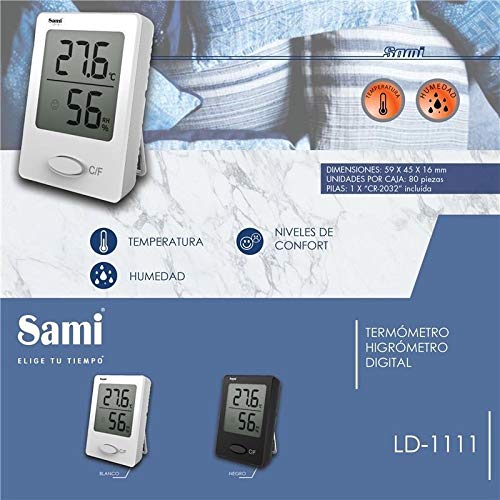
2-сүрөт: Sami LD1111B Digital Thermometer Hygrometer highlighting key features and dimensions. This image shows the device with annotations pointing to temperature, humidity, and comfort levels. It also provides dimensions (59 x 45 x 16 mm) and battery information (1 x CR-2032 included).
3. Орнотуу жана орнотуу
3.1. Батареяны орнотуу
- Аппараттын артындагы батарея бөлүкчөсүн табыңыз.
- Батарея уясынын капкагын ачыңыз.
- Insert one CR-2032 battery, ensuring the correct polarity (+/-).
- Батарея уясынын капкагын бекем жабыңыз.
3.2. Жайгаштыруу
Place the Sami LD1111B on a flat, stable surface. For accurate readings, avoid placing the device near heat sources, direct sunlight, or areas with high airflow (e.g., near air conditioning vents).
4. Иштөө нускамалары
4.1. Күйгүзүү/өчүрүү
The device automatically powers on once the battery is installed. There is no manual power on/off button. To turn off, remove the battery.
4.2. Display Readings
The large digital display shows the current temperature and relative humidity simultaneously.
- Температура: Цельсий (°C) же Фаренгейт (°F) градустарында көрсөтүлөт.
- Нымдуулук: Процент катары көрсөтүлөтtage of relative humidity (RH%).
- Комфорт деңгээлинин көрсөткүчү: A facial icon indicates the current comfort level based on temperature and humidity.
4.3. Температураны өзгөртүү бирдиги (°C/°F)
Press the "C/F" button located on the front of the device to switch between Celsius and Fahrenheit temperature units.
5. Техникалык тейлөө
5.1. Тазалоо
Аппаратты жумшак, кургак чүпүрөк менен сүртүңүз. Абразивдүү тазалагычтарды колдонбоңуз же аппаратты сууга салбаңыз.
5.2. Батареяны алмаштыруу
When the display becomes dim or inaccurate, replace the CR-2032 battery following the instructions in Section 3.1.
6. Кыйынчылыктарды
| Көйгөй | Мүмкүн себеп | Чечим |
|---|---|---|
| Дисплей жок же күңүрт дисплей | Батарея аз же түгөндү; батарея туура эмес орнотулган. | Replace the CR-2032 battery; ensure correct polarity. |
| Так эмес окуулар | Device placed in an unsuitable environment (e.g., direct sunlight, near heat source, high airflow). | Relocate the device to a stable environment away from extreme conditions. Allow time for readings to stabilize. |
| Comfort level indicator not changing | Temperature and humidity conditions are stable within a specific comfort range. | This is normal operation. The indicator will change as conditions fluctuate outside the current comfort range. |
7. Техникалык шарттар
- Модел: LD1111B
- Бренд: Sami
- Монтаж түрү: Стол үстү
- Түсү: Ак
- Кубат булагы: 1 x CR-2032 батареясы (киргизилген)
- Өлчөмдөрү: 59 x 45 x 16 мм (болжол менен 2.32 x 1.77 x 0.63 дюйм)
- Салмагы: Approximately 1 kg (package weight, device weight is significantly less)
- ASIN: B08C2JQQKG
8. Кепилдик жана колдоо
For warranty information and technical support, please refer to the documentation provided with your purchase or contact Sami customer service through their official webсайт. Кепилдик дооматтар үчүн сатып алганыңыздын далилин сактаңыз.


