Introduction
Welcome to the user manual for your Technical Pro BOOM8 Wireless TWS Portable 8" LED Party Speakers. This manual provides essential information for the safe and efficient operation of your new speakers. Please read it thoroughly before use and retain it for future reference.
The BOOM8 speakers are designed to deliver powerful audio with dynamic LED lighting, offering versatile connectivity options including Bluetooth, USB, FM radio, and AUX input. With True Wireless Stereo (TWS) functionality, you can connect two BOOM8 speakers for an immersive stereo sound experience.
Коопсуздук маалыматы
Коопсуз иштөөнү камсыз кылуу жана зыян келтирбөө үчүн төмөнкү сактык чараларын сактаңыз:
- Динамиктерди сууга, нымдуулукка же өтө жогорку температурага дуушар кылбаңыз.
- Avoid placing the speakers near heat sources such as radiators, heat registers, stoves, or other apparatus (including ampкөтөргүчтөр) жылуулукту пайда кылуучу.
- Өндүрүүчү белгилеген тиркемелерди/аксессуарларды гана колдонуңуз.
- Кургак чүпүрөк менен гана тазалаңыз. суюк тазалагычтар же аэрозолдук тазалагычтар колдонгон жок.
- Электр шнурунун басылып кетүүсүнөн же кысып калуудан сактаңыз, өзгөчө сайгычтарда, розеткаларда жана алар аппараттан чыга турган жеринде.
- Аппаратты чагылгандуу бороондо же узак убакыт бою колдонбогондо электр розеткасынан ажыратыңыз.
- Бардык тейлөөлөрдү квалификациялуу тейлөө кызматкерлерине тапшырыңыз. Аппарат кандайдыр бир зыянга учураганда, мисалы, кубат берүүчү шнур же сайгыч бузулганда, суюктук төгүлгөндө же аппараттын ичине нерселер түшкөндө, аппарат жамгырга же нымдуулукка дуушар болгондо, нормалдуу иштебей калганда тейлөө талап кылынат. , же түшүрүлгөн.
Пакеттин мазмуну
Төмөндө тизмеленген нерселердин баары пакетиңизге камтылганын текшериңиз:
- Technical Pro BOOM8 Portable Rechargeable 8" LED Speaker (x2)
- USB кубаттоо кабели (x1)
- Колдонуучунун колдонмосу (x1)

Image: Technical Pro BOOM8 User Manual and USB Charging Cable
Продукт бүттүview
Familiarize yourself with the various components and controls of your BOOM8 speaker.

Сүрөт: алдыңкы View of BOOM8 Speaker with Blue LED

Сүрөт: Жогорку View of BOOM8 Speaker Control Panel

Image: Close-up of BOOM8 Control Panel
Башкаруу панелинин өзгөчөлүктөрү:
- POWER/VOLUME баскычы: Turns the speaker on/off and adjusts the master volume.
- 5V DC IN: Charging port for the built-in battery.
- AUX киргизүү: Тышкы аудио түзүлүштөрдү туташтыруу үчүн 3.5 мм уяча.
- Ойнотуу башкаруулары: Previous Track, Play/Pause, Next Track.
- LED которуу: LED чырактарын күйгүзөт/өчүрөт.
- USB порт: MP3 ойнотуу үчүн fileUSB флэш-дискинен (64 ГБ чейин).
- MIC IN: 1/4" input for a microphone.
- LCD экран: Displays current mode and track information.
Жайгашуу
Батареяны заряддоо
Before initial use, fully charge the speaker's built-in rechargeable battery for 8-10 hours. Connect the provided USB charging cable to the 5V DC IN port on the speaker and to a compatible USB power adapter (not included). The charging indicator light will illuminate during charging.
Күйгүзүү/өчүрүү
To power on the speaker, rotate the POWER/VOLUME knob clockwise until it clicks and the display illuminates. To power off, rotate the knob counter-clockwise until it clicks.
Баштапкы жайгаштыруу
Place the speakers on a stable, flat surface. For optimal sound dispersion, ensure there are no obstructions directly in front of the speaker grille.
Иштөө нускамалары
Bluetooth жупташтыруу (бир динамик)
- Ensure the speaker is powered on and in Bluetooth mode (indicated on the LCD screen). If not, press the Mode button to cycle through modes until "Bluetooth" is displayed.
- Enable Bluetooth on your A2DP stereo Bluetooth device (e.g., smartphone, tablet).
- Издөө available Bluetooth devices. The speaker will appear as "BOOM8".
- Select "BOOM8" from the list to pair. A confirmation tone will sound upon successful pairing.
- You can now play audio from your device through the speaker. The Bluetooth range is approximately 30 feet.
Чыныгы Wireless Stereo (TWS) жупташтыруу
TWS allows you to connect two BOOM8 speakers wirelessly to a single Bluetooth device for a true stereo sound experience.

Image: Two BOOM8 Speakers in TWS Configuration
- Ensure both BOOM8 speakers are powered on and in Bluetooth mode.
- On one of the speakers (this will be your primary speaker), press and hold the Play/Pause button for a few seconds until you hear a pairing tone. The two speakers will automatically connect to each other.
- Once the speakers are paired with each other, enable Bluetooth on your A2DP stereo Bluetooth device.
- Издөө available Bluetooth devices and select "BOOM8".
- Both speakers will now play audio in stereo from your device.
USB ойнотуу
- Insert a USB flash drive (formatted with MP3 files, maximum 64GB) into the USB port on the control panel.
- The speaker will automatically switch to USB mode and begin playing the first compatible MP3 file.
- Use the Previous Track, Play/Pause, and Next Track buttons to control playback.
- The speaker supports a repeat function for USB playback.
FM радиосунун иштеши
- FM радио режимине өтүү үчүн Mode баскычын басыңыз.
- Press the Play/Pause button once to initiate an automatic station scan. The speaker will scan and save available FM stations.
- Сакталган станциялардын ортосунда багыт алуу үчүн "Мурунку трек" жана "Кийинки трек" баскычтарын колдонуңуз.
AUX киргизүү
- Тышкы аудио түзүлүштү (мисалы, смартфон, MP3 ойноткуч) AUX киргизүү портуна 3.5 мм аудио кабелин (кошумча эмес) колдонуп туташтырыңыз.
- AUX режимине өтүү үчүн Mode баскычын басыңыз.
- Туташкан түзмөгүңүздөн чыккан аудио эми динамик аркылуу ойнотулат. Тышкы түзмөгүңүздөн ойнотууну башкарыңыз.
Микрофон киргизүү
- Connect a 1/4" microphone (not included) to the MIC IN port.
- Adjust the microphone volume using the dedicated microphone volume control (if available on your microphone or speaker model).
- The microphone input can be used simultaneously with other audio sources (Bluetooth, USB, AUX).
LED жарык башкаруу
The BOOM8 speakers feature dynamic LED lights around the woofer. To toggle the LED lights on or off, press the dedicated LED switch on the control panel.
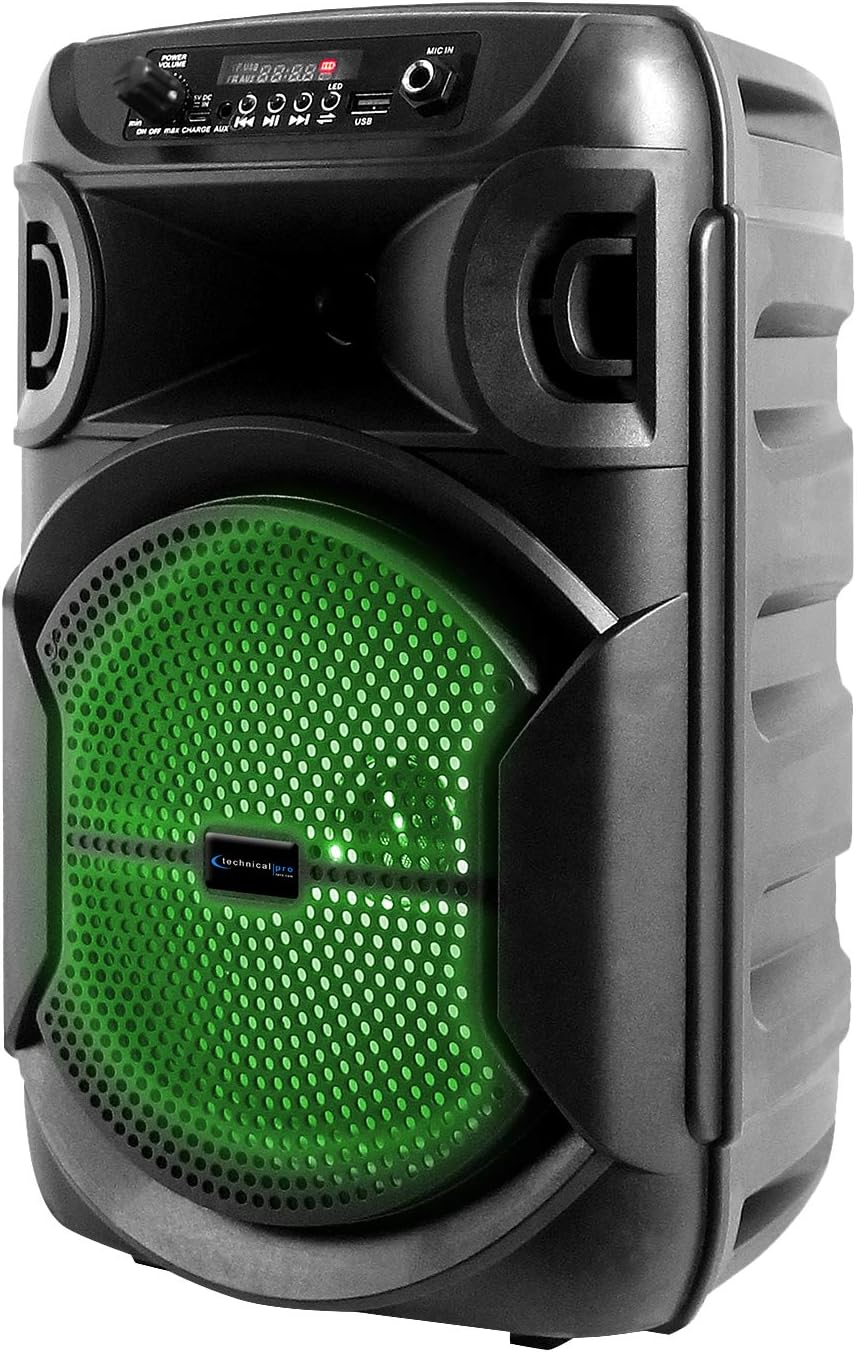
Image: BOOM8 Speaker with Green LED Illumination
Техникалык тейлөө
Тазалоо
- Тазалоодон мурун ар дайым өчүрүп, динамикти розеткадан сууруп алыңыз.
- Динамиктин сырткы беттерин сүртүү үчүн жумшак, кургак чүпүрөктү колдонуңуз.
- Абразивдүү тазалагычтарды, момдорду же эриткичтерди колдонбоңуз, анткени алар финишке зыян келтириши мүмкүн.
Сактагыч
- Динамикти түз күн нурунан жана өтө температурадан алыс салкын, кургак жерде сактаңыз.
- If storing for an extended period, ensure the battery is partially charged (around 50%) to maintain battery health. Recharge every few months if not in use.
Проблемаларды чечүү
If you encounter issues with your BOOM8 speakers, refer to the following table for common problems and solutions.
| Көйгөй | Мүмкүн себеп | Чечим |
|---|---|---|
| Динамик күйбөйт. | Батарея түгөнүп калды. | Connect the speaker to a power source using the USB charging cable and allow it to charge. |
| Динамиктен үн жок. | Volume is too low or muted. Incorrect input mode. Bluetooth not paired. | Increase the volume. Ensure the correct input mode (Bluetooth, USB, AUX, FM) is selected. Re-pair Bluetooth device. |
| Bluetooth түзмөгү динамикти таба албайт. | Speaker not in Bluetooth pairing mode. Device too far. Interference. | Динамик Bluetooth режиминде экенин текшериңиз. Түзмөктү динамикке жакындатыңыз. Күчтүү электромагниттик тоскоолдуктардан алыс болуңуз. |
| TWS жупташтыруу ишке ашпай калды. | Speakers not reset. One speaker already paired to a device. | Ensure both speakers are in Bluetooth mode and not connected to any device. Try holding the Play/Pause button on one speaker again to initiate TWS pairing. |
| USB ойнотуу иштебей жатат. | USB drive not formatted correctly. Incompatible file type. Drive size too large. | Ensure USB drive is formatted correctly and contains MP3 files. Max USB size is 64GB. |
Техникалык шарттар
| Өзгөчөлүк | Деталь |
|---|---|
| Чоку күч | 1000 Ватт |
| Вуфердин өлчөмү | 8 inches (LED woofer) |
| Киргизүүлөр | USB flash drive, FM Radio, AUX, Bluetooth, 1/4'' microphone input |
| Bluetooth версиясы | A2DP & AVRCP stereo Bluetooth device compatible |
| Bluetooth диапазону | 30 Фут |
| USB Card Maximum Size | 64 ГБ |
| Колдоого алынган Аудио Fileс (USB) | .mp3 files |
| Импеданс | 3 Ом |
| Сезимталдуулук | 80 ± 2dB (1W@1M) |
| Frequency Response | 80Гц - 18КГц |
| Материал | ABS Plastic Face & Rugged perforated grill |
| Power Source | Камтылган кайра заряддалуучу батарея |
| Battery Charge Time (Initial) | 8-10 саат |
| Элемент Салмагы | 8 фунт (бир баяндамачы үчүн) |
| Пакеттин өлчөмдөрү | 15 x 9 x 8 дюйм |
Кепилдик жана колдоо
For warranty information and technical support, please refer to the documentation provided with your purchase or contact Technical Pro directly.
Байланыш маалыматы:
Questions / Comments: Call 888-842-6277
Электрондук почта: info@tpro.com


