Introduction
Сиздин жаңы колдонуучу колдонмосуна кош келиңиз KIDdesigns LOL SURPRISE Sing Along Karaoke BoomBox for Kids. This manual provides important information on how to set up, operate, and maintain your device. Please read it thoroughly before use to ensure proper functionality and safety.
The LOL SURPRISE Sing Along Karaoke BoomBox is designed to provide hours of musical fun for children. It features built-in music, LED flashing lights, and a working microphone, allowing kids to sing along to their favorite tunes or connect an external MP3 player for more song options. Its portable and durable design makes it suitable for both indoor and outdoor use.
Коопсуздук маалыматы
Сураныч, жаракаттарды же аппаратты бузууну болтурбоо үчүн төмөнкү коопсуздук чараларын сактаңыз:
- ЭСКЕРТҮҮ: Not suitable for children under 3 years due to small parts that may present a choking hazard.
- Колдонуу учурунда жаш балдарды дайыма көзөмөлдөп туруңуз.
- Аппаратты сууга же ашыкча нымдуулукка дуушар кылбаңыз.
- Аппаратты ажыратууга же өзгөртүүгө аракет кылбаңыз.
- Use only the specified battery type (3 "AA" batteries). Ensure correct polarity when inserting batteries.
- Аппарат узак убакыт бою колдонулбай турган болсо, батарейкаларды алып салыңыз.
- Аппаратты жылуулук булактарынан жана түз күн нурунан алыс кармаңыз.
Пакеттин мазмуну
Сураныч, бардык буюмдар бар экенин текшерүү үчүн пакетти текшериңиз:
- LOL SURPRISE Sing Along Karaoke BoomBox Unit
- Микрофон
- Колдонуучунун Колдонмосу (бул документ)
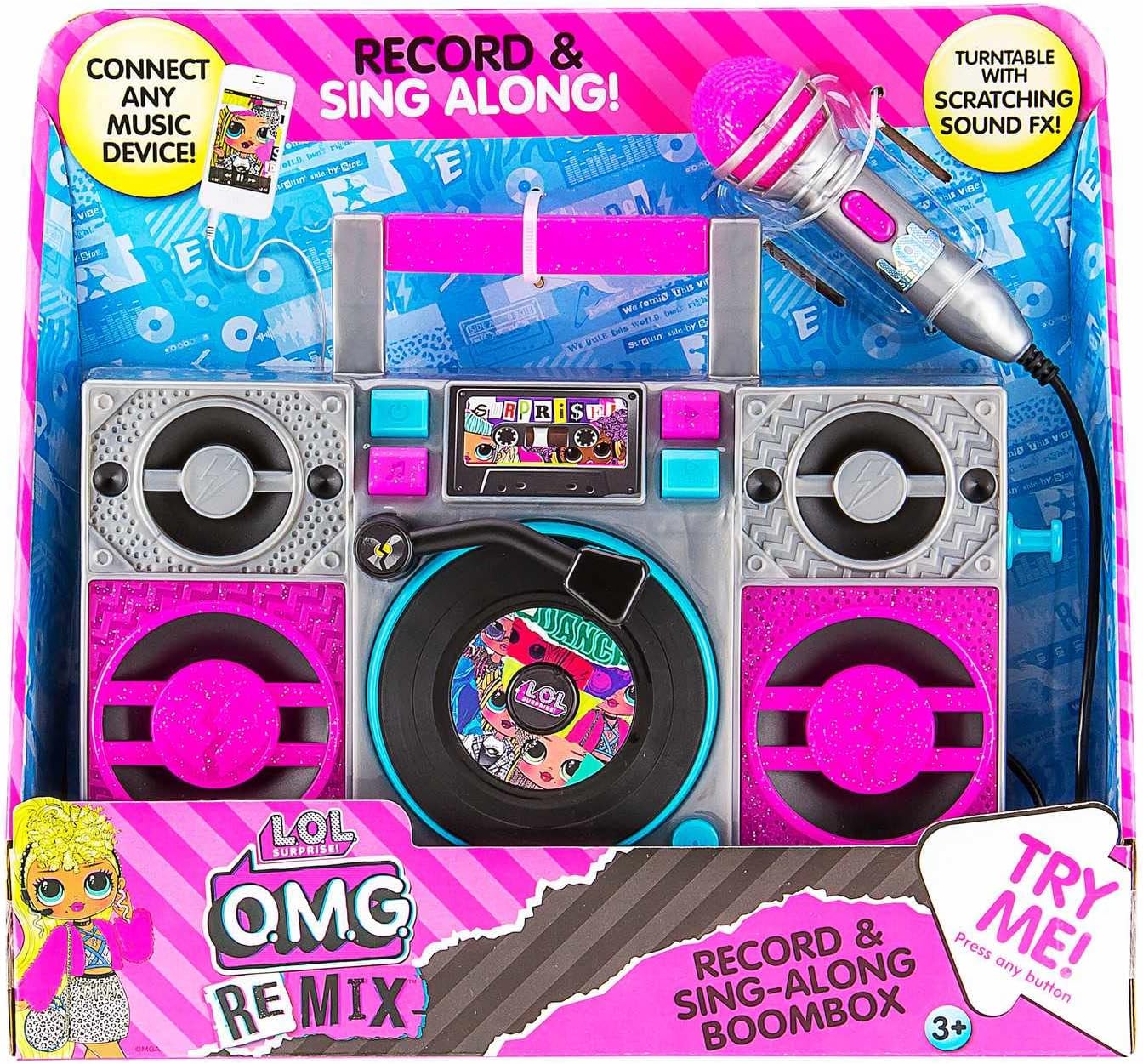
Image: The LOL SURPRISE Karaoke BoomBox as it appears in its retail packaging, highlighting its key features and included microphone.
Продукт бүттүview
Familiarize yourself with the different parts of your Karaoke BoomBox.

Сүрөт: алдыңкы view of the Karaoke BoomBox, illustrating its various components including speakers, central controls, and the attached microphone.
- туткасы: Жөнөкөй көчүрүү үчүн.
- Баяндамачылар: Output audio.
- Башкаруу панели/Дисплей: For selecting modes and viewабалы.
- Turntable (Decorative): Features scratching sound effects.
- Микрофон киргизүү: Connect the included microphone here.
- Микрофон: For singing along.
- Көмөкчү киргизүү: Connect external audio devices (e.g., MP3 player, smartphone).
- Батарея бөлүмү: Located on the back/bottom of the unit.
Жайгашуу
1. Батареяны орнотуу
The Karaoke BoomBox requires 3 "AA" batteries (not included).
- Locate the battery compartment on the back or bottom of the unit.
- Филлипс баштуу бурагычты колдонуп, батарея бөлүмүнүн капкагын бурап чыгарыңыз.
- Insert 3 "AA" batteries, ensuring the correct polarity (+/-) as indicated inside the compartment.
- Батарея уясынын капкагын ордуна коюңуз жана аны бурама менен бекитиңиз.
2. Микрофонду туташтыруу
Connect the included microphone to the microphone input jack on the unit.
Иштөө нускамалары
Күйгүзүү/өчүрүү
- To turn the unit ON, locate the Power button (usually on the front panel) and press it.
- To turn the unit OFF, press the Power button again.
Орнотулган музыканы ойнотуу
- Once powered on, the unit may automatically start playing built-in music.
- Use the control buttons (e.g., Play/Pause, Next, Previous) on the front panel to navigate through the built-in songs.
Connecting an External Audio Device (MP3 Player/Smartphone)
You can connect your own music device to sing along to your favorite songs.

Image: The Karaoke BoomBox, showing the auxiliary input for connecting external audio devices like MP3 players or smartphones.
- Ensure the Karaoke BoomBox is powered on.
- Connect one end of a 3.5mm audio cable (not included) to the Auxiliary Input jack on the BoomBox.
- Connect the other end of the audio cable to the headphone jack or audio output of your MP3 player, smartphone, or other audio device.
- Start playing music on your connected device. The audio will now play through the BoomBox speakers.
- Adjust the volume on both your connected device and the BoomBox for optimal sound.
Микрофонду колдонуу
- Once the microphone is connected, simply speak or sing into it. Your voice will be amplified through the BoomBox speakers.
- Adjust the microphone volume if available on the unit, or control the overall volume.
Жаркылдаган LED жарыктары
The unit features built-in LED flashing lights that activate during operation, adding to the karaoke experience.
Turntable Scratching Sound Effects
The decorative turntable on the front of the unit can be manually spun to produce fun scratching sound effects.
Техникалык тейлөө
- Тазалоо: Агрегатты жумшак, кургак чүпүрөк менен сүртүңүз. Абразивдүү тазалагычтарды же эриткичтерди колдонбоңуз.
- Сактагыч: Store the unit in a cool, dry place away from direct sunlight when not in use.
- Батареяга кам көрүү: Remove batteries if the unit will not be used for an extended period to prevent battery leakage.
Проблемаларды чечүү
| Көйгөй | Мүмкүн себеп | Чечим |
|---|---|---|
| Түзмөк күйбөйт. | Батареялар өлүп калган же туура эмес салынган. | Replace with new "AA" batteries, ensuring correct polarity. |
| Динамиктерден үн жок. | Volume is too low; external device not connected properly or volume too low. | Increase volume on the BoomBox and/or the connected external device. Ensure audio cable is fully inserted. |
| Микрофон иштебей жатат. | Микрофон толук сайылган эмес. | Ensure the microphone cable is securely plugged into the microphone input jack. |
| Бурмаланган үн. | Volume too high; low batteries. | Lower the volume. Replace batteries if they are low. |
Техникалык шарттар
- Модел: LOL SURPRISE Sing Along Karaoke BoomBox
- Бренд: EKIDS
- Өлчөмдөрү (L x W x Y): 30.48 x 8.74 x 27.94 см (12 x 3.44 x 11 дюйм)
- Салмагы: 750 грамм (1.65 фунт)
- Сунушталган жаш: 3 жаш жана андан жогору
- Кубат булагы: Батарея менен иштейт
- Батареялар талап кылынат: 3 x "AA" (not included)
- Байланыш: Көмөкчү киргизүү (3.5 мм)
- Баяндамачылардын саны: 1
- Тtage: 4.5 вольт
- UPC: 092298950778
- Компоненттер камтылган: Karaoke BoomBox, Microphone
Кепилдик жана колдоо
This product is manufactured by eKids. For warranty information or technical support, please refer to the contact information provided on the product packaging or visit the official eKids webсайт. Сатып алуу квитанциясын кепилдик дооматтары үчүн сатып алуунун далили катары сактаңыз.
Кошумча жардам алуу үчүн, сиз иш сапары менен болот EKIDS Brand Store on Amazon.


