Продукт бүттүview
The Xiaomi Temperature and Humidity Monitor 2 is a compact device designed to accurately detect changes in ambient temperature and humidity. It features a high-precision Swiss Sensirion sensor, capable of detecting temperature fluctuations as small as 0.1°C and relative humidity changes of up to 1%. This monitor helps users maintain a comfortable and healthy indoor environment by providing instant notifications of subtle changes. Its low-power display ensures long battery life, with a single battery lasting approximately one year.

Сүрөт: алдыңкы view of the Xiaomi Temperature and Humidity Monitor 2, showing its digital display with current temperature and humidity readings.
Пакеттин мазмуну
- Xiaomi Temperature and Humidity Monitor 2 (Model: NUN4126GL)
- CR2032 Button Cell Battery (pre-installed or included)
- Колдонуучунун Колдонмосу (бул документ)
Жайгашуу
1. Батареяны орнотуу
The device typically comes with a CR2032 button cell battery pre-installed. If not, or if replacing the battery:
- Аппараттын артындагы батарея бөлүкчөсүнүн капкагын табыңыз.
- Use a small tool (like a coin) to gently pry open the cover.
- Жаңы CR2032 батареясын оң (+) тарабын өйдө каратып салыңыз.
- Батарея бөлүгүнүн капкагын бекем жабыңыз.

Сүрөт: Арткы view of the monitor, highlighting the battery compartment and small ventilation holes.
2. Жайгаштыруу
For accurate readings, place the monitor in a location free from direct sunlight, drafts, or heat sources. It can be placed on a flat surface or mounted on a wall using the adhesive pad (if included) or a small hook.

Image: The monitor displayed on a stand, illustrating its compact size and suitability for various placements.
Иштөө нускамалары
Дисплейди окуу
The monitor features a clear LCD display that shows the current temperature and relative humidity. The temperature is typically displayed in degrees Celsius (°C), and humidity as a percentage (%).
- Температура: Located at the top of the display, showing the current temperature reading.
- Нымдуулук: Located at the bottom of the display, showing the current relative humidity percentage.
- Комфорт индикатору: A small emoji or icon may appear to indicate comfort levels based on temperature and humidity. For example, a happy face for comfortable conditions, or a sad face for uncomfortable conditions.
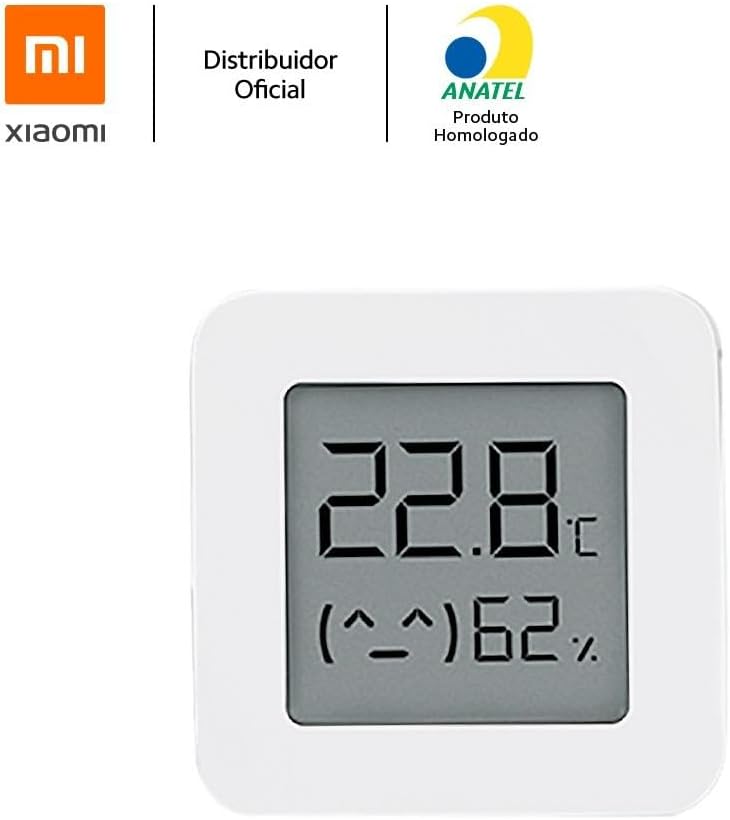
Сүрөт: деталдуу view of the monitor's screen, clearly showing temperature, humidity, and the comfort indicator.
Connectivity (Bluetooth)
The Xiaomi Temperature and Humidity Monitor 2 supports Bluetooth connectivity, allowing it to pair with the Mi Home app on your smartphone for data logging and smart home integration.
- жүктөп алыңыз Mi Home түзмөгүңүздүн колдонмолор дүкөнүнөн колдонмо.
- Open the app and log in or create a Mi account.
- Смартфонуңузда Bluetooth иштетилгенин текшериңиз.
- In the Mi Home app, tap the "+" icon to add a new device.
- Select the "Mi Temperature and Humidity Monitor 2" from the list of available devices.
- Follow the on-screen instructions to complete the pairing process. Once paired, you can view historical data, set alerts, and integrate with other Xiaomi smart devices.
Техникалык тейлөө
Тазалоо
To clean the device, gently wipe its surface with a soft, dry cloth. Do not use abrasive cleaners, solvents, or immerse the device in water.
Батареяны алмаштыруу
When the battery is low, a low battery indicator may appear on the display. Replace the CR2032 button cell battery as described in the "Setup" section. Dispose of used batteries responsibly according to local regulations.
Проблемаларды чечүү
| Көйгөй | Мүмкүн себеп | Чечим |
|---|---|---|
| Дисплей бош же күңүрт. | Батарея аз же түгөнүп калган. | Replace the CR2032 battery. Ensure it is inserted correctly with the positive (+) side up. |
| Туура эмес окуулар. | Device placed in an unsuitable location (direct sunlight, near heat/cold sources, strong drafts). | Relocate the device to a stable environment away from extreme conditions. Allow time for readings to stabilize. |
| Cannot connect to Mi Home app. | Bluetooth is off on phone; device is too far; app issue. | Ensure Bluetooth is on. Bring device closer to phone. Restart Mi Home app or phone. Check if device is already paired with another phone. |
Техникалык шарттар
- Бренд: XIAOMI
- Модель номери: NUN4126GL
- Түсү: Ак
- Продукциянын өлчөмдөрү: 4.3 x 4.3 x 1.25 см (1.69 x 1.69 x 0.49 дюйм)
- Салмагы: 40 г (1.41 унция)
- Материал: Пластик
- Батарея түрү: CR2032 Button Cell (Alkaline)
- Температураны аныктоо диапазону: -10°Cден 60°Cге чейин (14.2°Fтен 140°Fге чейин)
- Нымдуулукту аныктоо диапазону: 0% - 100% RH
- Температуранын тактыгы: ±0.1°C
- Нымдуулуктун тактыгы: ±1% RH
- Байланыш: Bluetooth аз энергия (BLE)
- Монтаж түрү: Wall mount / Tabletop
Кепилдик жана колдоо
Information regarding specific warranty terms and conditions for the Xiaomi Temperature and Humidity Monitor 2 (Model: NUN4126GL) is typically provided at the point of purchase or on the official Xiaomi website for your region. Please refer to your purchase documentation or the manufacturer's official support channels for detailed warranty information.
Техникалык колдоо, көйгөйлөрдү аныктоо боюнча жардам же кошумча суроолор үчүн Xiaomi расмий колдоо бөлүмүнө баш багыңыз website or contact their customer service. Links to official support resources can often be found on the product packaging or the Xiaomi global webсайт.
Note: This manual provides general operational guidelines. Specific features or connectivity options may vary slightly based on firmware versions or regional product variations.


