1. Киришүү
This manual provides detailed instructions for the setup, operation, maintenance, and troubleshooting of your MYPIN Infrared Remote Control. This remote is specifically designed to work with MYPIN 4K Media Players, including models B07WPY8VKL and B07PGFCPTV.
Туура иштешин камсыз кылуу жана колдонуучу тажрыйбасын максималдуу түрдө жогорулатуу үчүн алыстан башкаруу пультун колдонуудан мурун ушул колдонмону кылдаттык менен окуп чыгыңыз.
2. Пакеттин мазмуну
- 1 x MYPIN Infrared Remote Control
Эскертүү: AAA батарейкалары камтылган эмес жана өзүнчө сатып алынышы керек.
3. Орнотуу
3.1 Батареяны орнотуу
- Пульттун артындагы батарея отсегин табыңыз.
- Батарея бөлүкчөсүнүн капкагын ачуу үчүн ылдый жылдырыңыз.
- Оң (+) жана терс (-) терминалдары бөлүмдүн ичиндеги белгилер менен туура дал келишин камсыз кылып, эки (2) AAA батарейканы салыңыз.
- Батарея бөлүкчөсүнүн капкагын бекем чыккыча ордуна жылдырыңыз.
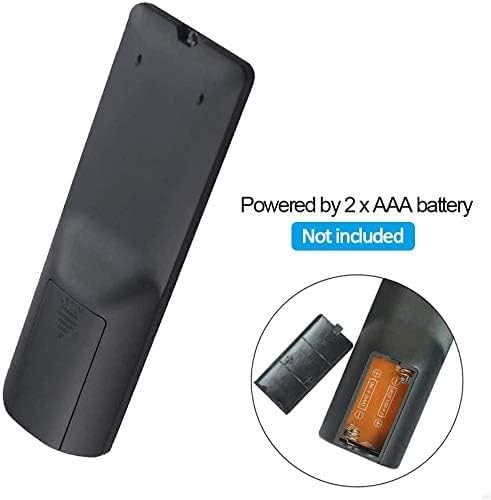
3.1-сүрөт: Battery installation for the MYPIN Infrared Remote Control. Ensure correct polarity when inserting two AAA batteries.
3.2 Шайкештик
This remote control is designed exclusively for MYPIN 4K Media Players. It is compatible with models such as B07WPY8VKL and B07PGFCPTV. It may not function correctly with other brands or models of media players.
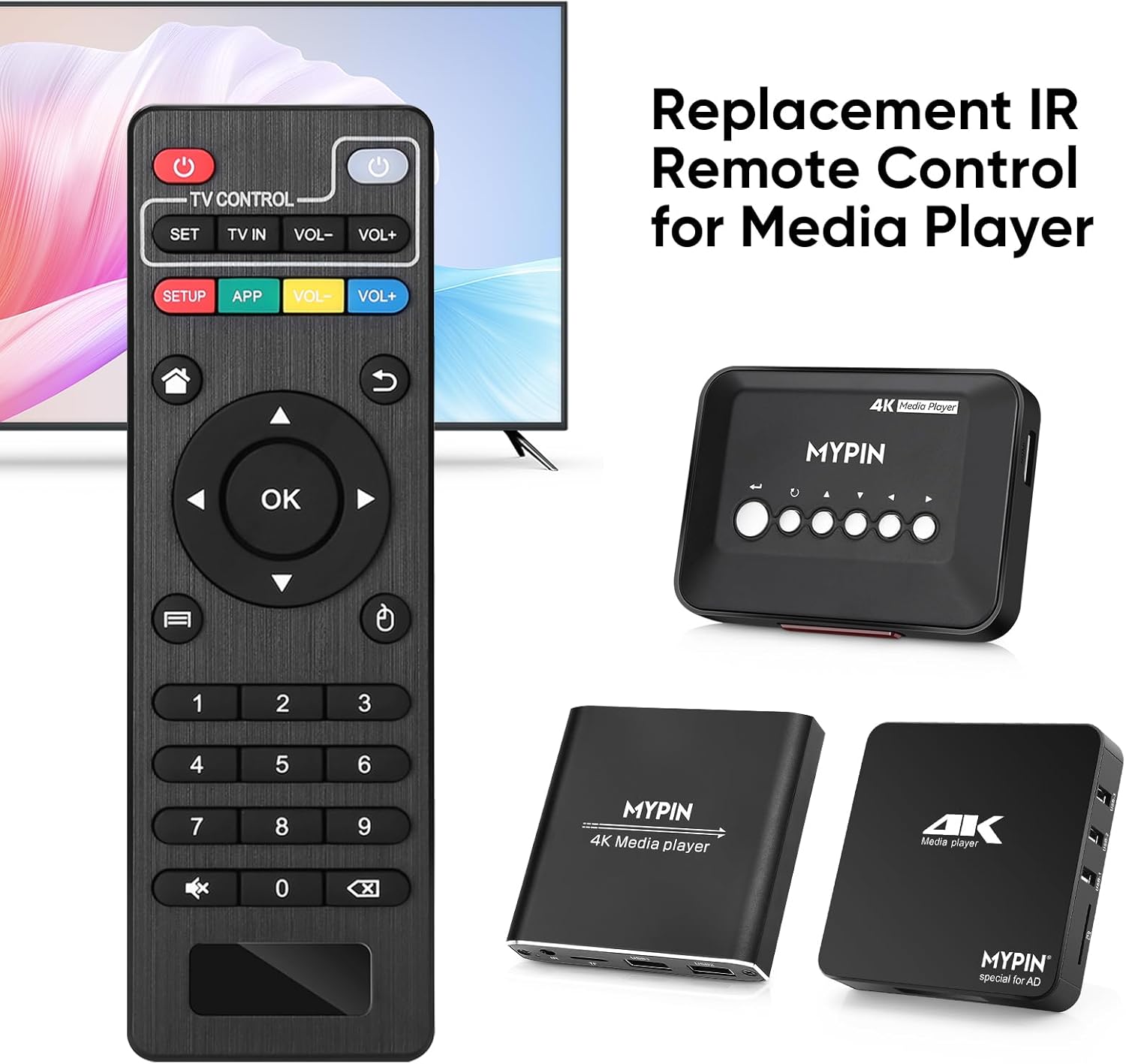
3.2-сүрөт: The MYPIN remote control shown with compatible MYPIN 4K Media Players.
3.3 Баштапкы туташуу
The MYPIN Infrared Remote Control operates via infrared (IR) signals. No pairing process is required. Simply point the remote control directly at the IR receiver of your MYPIN 4K Media Player. Ensure there are no obstructions between the remote and the media player.

3.3-сүрөт: Using the MYPIN remote control with an optional IR cable for discreet placement of the media player.
4. Иштөө нускамалары
The MYPIN Infrared Remote Control features a standard layout for intuitive control of your media player. Below is a guide to its primary functions:

4.1-сүрөт: Key functional areas of the MYPIN Remote Control.
4.1 Баскыч функциялары
- Power Button (Red, Top Left): Turns the media player on or off.
- TV Control Section (Top Row):
- TV Learning Button (1): Used to program basic TV functions (e.g., TV Power, Volume). Refer to your TV's manual for learning remote functions.
- ЖӨНДӨӨ: Used for TV learning mode.
- TV IN: Switches TV input source.
- ҮН- / ҮН+: Сыналгы үнүн тууралайт.
- SETUP / APP / VOL- / VOL+ (Colored Buttons): These buttons provide quick access to specific media player functions or applications. Their exact function may vary depending on the media player's software.
- Башкы бет баскычы (Үйдүн сүрөтчөсү): Returns to the main menu or home screen of the media player.
- Return/Back Button (Arrow Icon): Мурунку экранга же менюга кайтуу.
- Direction Keys (2 - Up, Down, Left, Right): Navigates through menus and content. When playing videos or music, Up/Down typically selects previous/next track, and Left/Right performs fast backward/forward.
- OK баскычы (борбордо): Confirms selections or plays content.
- Menu Key (3 - Three Horizontal Lines Icon): Accesses context-sensitive menus or playback options.
- Сандар тактасы (0-9): Used for direct input of numbers, such as channel selection or specific menu options.
- Mute Button (Crossed Speaker Icon): Mutes or unmutes the media player's audio.
- Context Menu Button (Box with Arrow Icon): Opens additional options or settings.

4.2-сүрөт: Accessing playback options using the Menu key on the MYPIN remote control.
5. Техникалык тейлөө
5.1 Батареяны алмаштыруу
When the remote control's performance degrades (e.g., reduced range, unresponsive buttons), it is likely time to replace the batteries. Follow the battery installation steps in Section 3.1 to replace the two AAA batteries.
5.2 Тазалоо
Пультту тазалоо үчүн анын бетин жумшак, кургак чүпүрөк менен акырын сүртүңүз. өжөр кир үчүн, бир аз гampкездемени суу же жумшак, абразивдүү эмес тазалоочу каражат менен сүртүңүз. Катуу химиялык заттарды же ашыкча нымдуулукту колдонуудан алыс болуңуз, анткени алар пульттун электроникасына зыян келтириши мүмкүн.
5.3 Сактоо
Store the remote control in a cool, dry place away from direct sunlight and extreme temperatures. If the remote will not be used for an extended period, it is recommended to remove the batteries to prevent leakage and potential damage.
6. Кыйынчылыктарды
- Пульт жооп бербей жатат:
- Ensure fresh AAA batteries are correctly installed.
- Point the remote directly at the media player's IR receiver.
- Remove any obstructions between the remote and the media player.
- Check the operating distance; the remote has an infrared range of approximately 7 meters.
- If the remote initially seems unresponsive after battery installation, allow a short period for it to initialize, as some users have reported spontaneous functionality after a delay.
- Buttons not performing expected functions:
- Verify that the remote is compatible with your specific MYPIN media player model.
- Some buttons (e.g., SETUP, APP) may have functions determined by the media player's software and may not be universally assigned.
- TV Control buttons not working:
- Ensure you have successfully programmed the TV Learning Button functions according to your TV's instructions.
7. Техникалык шарттар
| Өзгөчөлүк | Деталь |
|---|---|
| Байланыш технологиясы | Инфракызыл (IR) |
| Шайкеш түзмөктөр | MYPIN media players (e.g., B07WPY8VKL, B07PGFCPTV) |
| Колдоого алынган түзмөктөрдүн максималдуу саны | 1 (for media player control) |
| Өзгөчө өзгөчөлүк | Эргономикалык дизайн |
| Power Source | 2 x AAA батарейкалар (киргизилген эмес) |
| Infrared Расстояние | 7 метрге чейин |
| Инфракызыл бурч | 30 градус |
| Элемент Салмагы | 1.13 унция |
| Пакеттин өлчөмдөрү | 5.43 x 1.81 x 0.71 дюйм |
| Модель номери | B08CDNZMJG |
8. Кепилдик маалыматы
MYPIN products are manufactured to high-quality standards. For specific warranty details regarding your remote control, please refer to the documentation included with your MYPIN 4K Media Player or visit the official MYPIN webсайт. Сатып алуу квитанциясын кепилдик дооматтары үчүн сатып алуунун далили катары сактаңыз.
9. Колдоо
If you encounter any issues not covered in this manual or require further assistance, please contact MYPIN customer support through the retailer where you purchased the product or visit the official MYPIN support webбайланыш маалыматы үчүн сайт.


