1. Киришүү
Welcome to your new qunyiCO Y10 Android Tablet. This manual provides essential information for setting up, operating, and maintaining your device. Please read it thoroughly to ensure optimal performance and longevity.
Коопсуздук маалыматы
- Таблетканы өтө жогорку температурага же түз күн нуруна дуушар кылбаңыз.
- Планшетті түшүрүп алуудан же катуу соккуга кабылтуудан алыс болуңуз.
- Берилген заряддагычты жана аксессуарларды гана колдонуңуз.
- Планшетти суудан жана башка суюктуктардан алыс кармаңыз.
- Планшетти өз алдынча бөлүүгө же оңдоого аракет кылбаңыз.
2. Продукт бүтүп калдыview
Физикалык компоненттер
The qunyiCO Y10 tablet features a sleek design with essential ports and buttons for ease of use.
Фронт View

This image shows the front of the qunyiCO Y10 tablet, highlighting its 10.1-inch IPS HD display.
Арткы View

This image displays the back of the qunyiCO Y10 tablet, featuring the rear camera and the qunyiCO logo.
Баскычтар жана порттор
Familiarize yourself with the location of key controls and connections.
An illustrative diagram highlighting key features such as Android 10.0, Quad-core CPU, 5000mAh battery, 10.1-inch display, 2.4GHz Wi-Fi, Dual Camera, 2GB RAM + 32GB ROM, and 1280x800 IPS HD.
- Power/Volume Buttons: Located on the side for power on/off and volume control.
- Гарнитура уячасы: Стандарттык 3.5 мм аудио чыгышы.
- SD карта уячасы: 128 ГБ чейин кеңейтилүүчү сактагыч үчүн.
- Заряддоо порту: Заряддоо үчүн микро USB порту.
- Камералар: 2MP front camera and 8MP rear camera.
3. Орнотуу
Баштапкы заряддоо
Before first use, fully charge your tablet using the provided power adapter.
Күйгүзүү/өчүрүү
- Күйгүзүү: Press and hold the Power button until the qunyiCO logo appears.
- Өчүрүү: Кубат баскычын басып, кармап туруңуз, андан кийин параметрлерден "Өчүрүү" дегенди тандаңыз.
- Кайра баштоо: Кубат баскычын басып, кармап туруңуз, андан кийин параметрлерден "Кайра баштоо" тандаңыз.
Биринчи жолу орнотуу
Follow the on-screen prompts to complete the initial setup, including language selection, Wi-Fi connection, and Google account login.
4. Иштөө нускамалары
Негизги навигация
Your tablet runs on Android 11, offering an intuitive user interface.
- Тийүү жаңсоолору: Тандоо үчүн таптаңыз, сыдыруу үчүн серпиңиз, чоңойтуу үчүн чымчыңыз.
- Башкы экран: Колдонмолорго жана виджеттерге кириңиз.
- Эскертмелер: Swipe down from the top to view эскертмелер жана тез орнотуулар.
Wi-Fi туташуусу
Интернетке кирүү үчүн Wi-Fi тармагына туташыңыз.
- барыңыз Орнотуулар > Тармак жана интернет > Wi-Fi.
- Wi-Fi которуштуруу On.
- Тизмеден каалаган тармакты тандап, суралса сырсөздү киргизиңиз.
Колдонмо башкаруу
Google Play Дүкөнүнөн тиркемелерди жүктөп алып, башкарыңыз.

This image illustrates the tablet's screen with various popular application icons, demonstrating its compatibility with a wide range of apps.
- ачыңыз Play Store колдонмо.
- Издөө apps and games.
- таптаңыз Орнотуу жүктөп алуу.
Камераны колдонуу
Орнотулган камераларды колдонуп, сүрөттөрдү жана видеолорду тартыңыз.

A visual comparison demonstrating the clarity and quality of images captured by the tablet's 2MP front and 8MP rear cameras.
- ачыңыз Камера колдонмо.
- Керектүү учурда алдыңкы жана арткы камералардын ортосунда которулуңуз.
- Сүрөткө тартуу же видео жазууну баштоо/токтоо үчүн жапкычты таптаңыз.
5. Сактагычты башкаруу
Ички сактагыч
The tablet comes with 32GB of internal storage for your apps and files.
Кеңейтүүчү сактагыч
You can expand the storage up to 128GB using a microSD card.
This image visually represents the tablet's storage capabilities, indicating 32GB of internal ROM and the option to expand up to 128GB, suitable for storing various media and applications.
- microSD картаны белгиленген уячага салыңыз.
- Follow on-screen prompts to format the card if necessary.
- Note: While expandable up to 128GB, 32GB is recommended for optimal performance. Larger cards may slow down the system.
6. Батарея маалыматы
Батареянын иштөө мөөнөтү
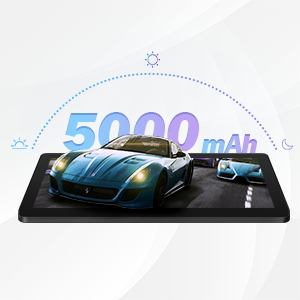
The qunyiCO Y10 is equipped with a 5000mAh battery, providing up to 8 hours of usage on a single charge, depending on usage patterns.

An image highlighting the 5000mAh battery, with icons indicating approximate usage times for video playback (6H), gaming (6H), and browsing (12H), showcasing its long-lasting capability.
Заряддоо
Use the provided charger to ensure proper charging and battery health.
- Connect the charger to the tablet's charging port and a power outlet.
- Экрандагы батареянын сөлөкөтү заряддоо абалын көрсөтөт.
7. Байланыш
Wi-Fi
Supports 2.4G Wi-Fi for stable internet connection.
Bluetooth
Connect to Bluetooth devices such as headphones or speakers.
- барыңыз Орнотуулар > Туташкан түзмөктөр > Bluetooth.
- Bluetooth которуштуруу On.
- Тизмеден жупташтыргыңыз келген түзмөктү тандаңыз.
8. Мультимедиа
Мазмундан ырахат алуу
The 1280x800 IPS HD display provides clear visuals for various media.
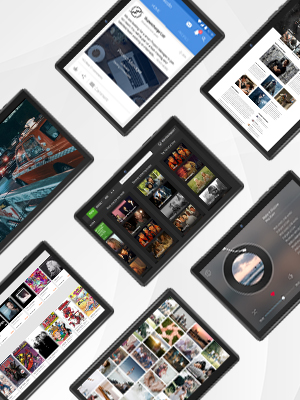
This image presents a collage of tablet screens, each showing different forms of digital content such as social media feeds, news articles, movie interfaces, and music players, emphasizing the tablet's versatility for media consumption.
You can enjoy movies, music, photos, and e-books.
Расмий продукт Video
Көрүү үчүн бул расмий видеону көрүңүзview of the qunyiCO Y10 Tablet's features and capabilities.
This video, titled "qunyiCO Y10 Tablet 10 inch Android 10.0", provides a comprehensive look at the tablet's design, performance, and user experience.
9. Кыйынчылыктарды
Жалпы маселелер жана чечимдер
| Маселе | Потенциалдуу себеп | Чечим |
|---|---|---|
| Tablet keeps shutting off / rebooting | Software glitch, low battery, faulty charger/port, overheating. | Ensure full charge. Perform a factory reset if software related. Check charger and port for damage. Avoid heavy usage in hot environments. |
| Сенсордук экран жооп бербейт | Software freeze, screen protector interference, physical damage. | Restart the tablet. Remove any screen protectors. If problem persists, contact support. |
| Won't charge | Damaged charging cable/adapter, dirty charging port, battery issue. | Try a different compatible charger. Clean the charging port gently. If still no charge, battery may need service. |
| Wi-Fi туташуу маселелери | Incorrect password, router issues, tablet software glitch. | Double-check password. Restart router and tablet. Forget and reconnect to the network. |
| Apps flip/rotate incorrectly | Auto-rotate setting, app compatibility, sensor issue. | Check auto-rotate settings in quick panel/settings. Some apps may not support all orientations. If persistent, sensor may be faulty. |
10. Техникалык шарттар
Техникалык маалыматтар
| Өзгөчөлүк | Деталь |
|---|---|
| Модел | Y10 |
| Операция системасы | Android 11 |
| Процессор | 1.6 GHz Quad-Core (Allwinner) |
| RAM | 2 ГБ DDR4 SDRAM |
| Ички сактагыч | 32 ГБ |
| Кеңейтүүчү сактагыч | 128 ГБ чейин (MicroSD) |
| Screen Size | 10.1 дюйм |
| Screen Resolution | 1280x800 IPS HD |
| Арткы камера | 8 депутат |
| Алдыңкы камера | 2 депутат |
| Батарея | 5000mAh литий-ион |
| Байланыш | Wi-Fi (2.4G), Bluetooth |
| Өлчөмдөрү (LxWxH) | 9.62 x 6.83 x 0.39 дюйм |
| Элемент Салмагы | 1.08 фунт |
11. Техникалык тейлөө
Тазалоо жана кам көрүү
- Планшеттин экранын жана корпусун тазалоо үчүн жумшак, түксүз чүпүрөктү колдонуңуз.
- Абразивдүү тазалагычтарды же эриткичтерди колдонбоңуз.
- Keep the tablet in a protective case to prevent scratches and damage.
Программалык камсыздоо жаңыртуулары
Regularly check for system updates to ensure optimal performance and security.
- барыңыз Орнотуулар > Система > Системаны жаңыртуу.
- Бардык жеткиликтүү жаңыртууларды жүктөп алуу жана орнотуу үчүн экрандагы нускамаларды аткарыңыз.
12. Кепилдик жана колдоо
Кепилдик маалымат
Your qunyiCO Y10 tablet comes with a standard manufacturer's warranty. Please refer to the warranty card included in your product packaging for specific terms and conditions.
Кардарларды колдоо
For technical assistance, troubleshooting beyond this manual, or warranty claims, please contact qunyiCO customer support through their official webсайт же продукт документациясында көрсөтүлгөн байланыш маалыматы.
You can also visit the official qunyiCO store on Amazon for more information: qunyiCO Store.


