1. Киришүү
This manual provides essential information for setting up, operating, and maintaining your Acer Predator Triton 500 PT515-52-73L3 Gaming Laptop. Please read it thoroughly to ensure optimal performance and longevity of your device.
The Acer Predator Triton 500 PT515-52-73L3 is a high-performance gaming laptop designed for demanding tasks and immersive gaming experiences. It features a 10th Generation Intel Core i7-10750H processor, NVIDIA GeForce RTX 2070 SUPER graphics, a 15.6-inch Full HD display with a 300Hz refresh rate and NVIDIA G-SYNC technology, 16GB of DDR4 RAM, and a 512GB NVMe SSD.
2. Коопсуздук маалыматы
- Ноутбукту экстремалдык температурага, түз күндүн нуруна же жогорку нымдуулукка дуушар кылбаңыз.
- Ноутбукка оор нерселерди коюудан алыс болуңуз.
- Берилген AC адаптерин жана кубат шнурун гана колдонуңуз.
- Суюктуктарды түзмөктөн алыс кармаңыз. Төгүлүп кетсе, дароо өчүрүп, адаптерди сууруп алыңыз.
- Ноутбукту өз алдынча бөлүүгө же оңдоого аракет кылбаңыз. Квалификациялуу тейлөө кызматкерлерине кайрылыңыз.
- Айрыкча, интенсивдүү колдонуу учурунда ысып кетүүнүн алдын алуу үчүн тийиштүү желдетүүнү камсыз кылыңыз.
3. Пакеттин мазмуну
Пакетте бардык буюмдар бар экенин текшериңиз:
- Acer Predator Triton 500 PT515-52-73L3 Gaming Laptop
- AC адаптер
- Электр кабели
4. Физикалык бүтүрүүview
4.1. Фронт View
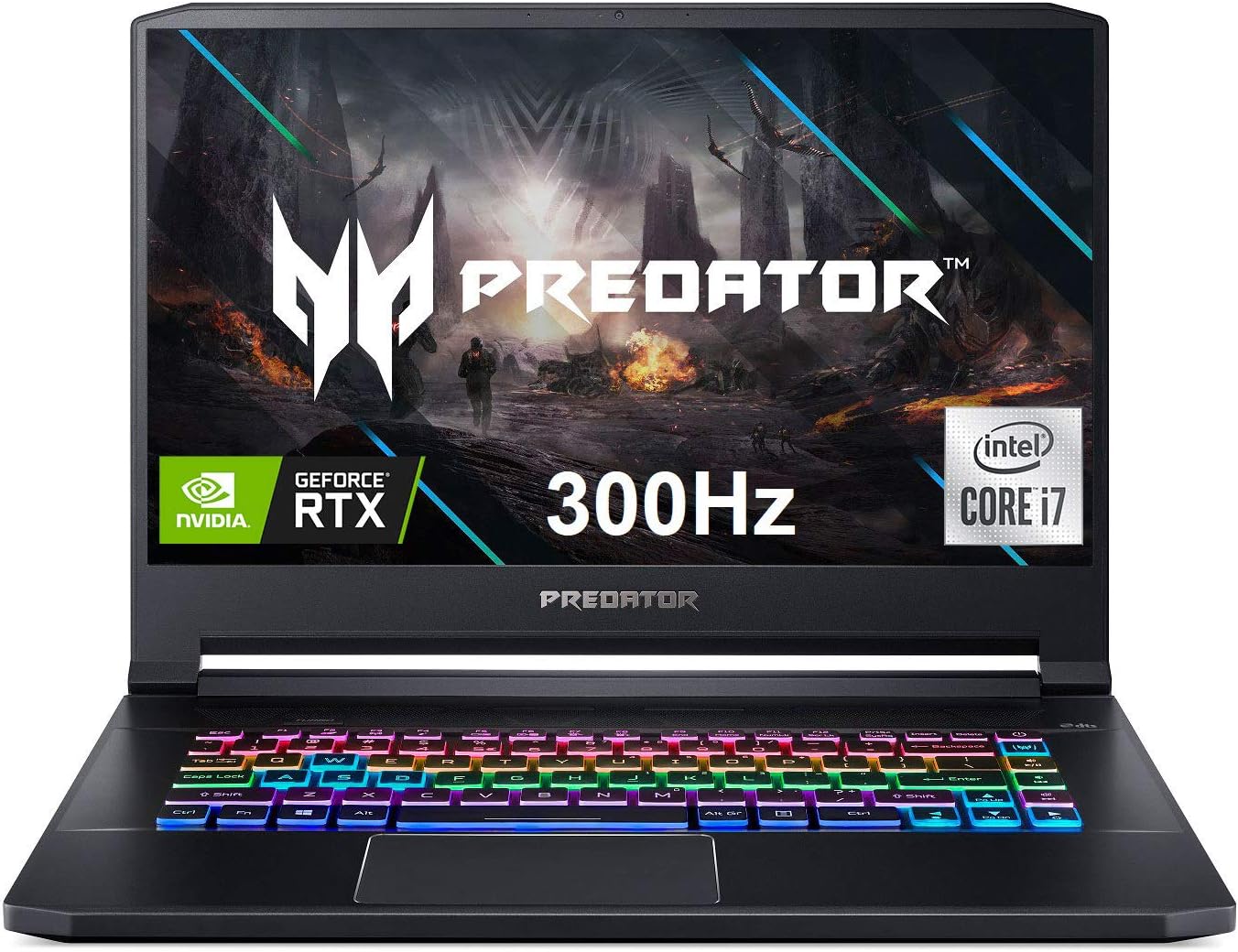
Сүрөт 4.1: Алдыңкы view of the Acer Predator Triton 500, showcasing the display with Predator branding, RGB backlit keyboard, and thin bezels.
4.2. Дисплей өзгөчөлүктөрү

Figure 4.2: The 15.6-inch Full HD (1920 x 1080) display features a 300Hz refresh rate and 3ms Overdrive Response Time, enhanced by NVIDIA G-SYNC technology for tear-free gameplay.
4.3. Баскычтоп жана сенсордук такта

Figure 4.3: The laptop features a per-key RGB backlit keyboard with customizable lighting and a dedicated 'Turbo' key for instant overclocking. The touchpad is located below the keyboard.
4.4. Порттор жана туташтыргычтар

Figure 4.4: The laptop is equipped with a comprehensive selection of ports, including Power (DC-In), Ethernet (RJ-45), multiple USB 3.2 Gen 2 ports, HDMI, Mic-in, Headset/speaker, Thunderbolt 3 / USB Type-C, Mini DisplayPort, and a Kensington lock slot.
5. Орнотуу
5.1. Баштапкы күйгүзүү
- AC адаптерин ноутбуктун кубат портуна, андан кийин розеткага туташтырыңыз.
- Ноутбуктун капкагын ачыңыз.
- Демейде клавиатуранын үстүндө же капталында жайгашкан кубат баскычын басыңыз.
- Windows 10 Home'ду баштапкы орнотууну аяктоо үчүн экрандагы нускамаларды аткарыңыз.
5.2. Перифериялык түзүлүштөрдү туташтыруу
Connect your mouse, external keyboard, or other USB devices to the available USB 3.2 Gen 2 ports. For external displays, use the HDMI or Mini DisplayPort 1.4. The Thunderbolt 3 port supports full USB 3.1 Type-C functionality.
6. Иштөө
6.1. Күйгүзүү/өчүрүү
- Күйгүзүү: Кубат баскычын басыңыз.
- Өчүрүү: Баштоо баскычын чыкылдатып, андан кийин Кубат > Өчүрүү.
- Уйку режими: Капкагын жабыңыз же "Баштоо" баскычын, андан кийин "Күчүн жана Уйку режимин" чыкылдатыңыз.
6.2. Дисплей өзгөчөлүктөрү
The 15.6-inch Full HD (1920 x 1080) IPS display offers a 300Hz refresh rate and 3ms Overdrive Response Time. NVIDIA G-SYNC technology synchronizes the display's refresh rate with the GPU, eliminating screen tearing and minimizing display stutter and input lag.
6.3. Баскычтоптун өзгөчөлүктөрү
The per-key RGB backlit keyboard allows for customizable lighting effects. Use the PredatorSense software to personalize the lighting zones and effects. The 'Turbo' key can be used for instant CPU/GPU overclocking.
6.4. Performance Management with PredatorSense

Figure 6.4: The PredatorSense software provides comprehensive control over your laptop's performance, including fan speed adjustments (Auto, Max, Custom), monitoring CPU and GPU temperatures, and managing RGB lighting.
PredatorSense allows you to monitor system performance, adjust fan speeds, customize RGB lighting, and manage overclocking settings for optimal gaming and productivity. You can switch between different performance modes (e.g., Quiet, Default, Extreme) based on your needs.
6.5. Байланыш
- Зымсыз: Killer Double Shot Pro Wireless-AX 1650i 802.11ax Wi-Fi 6 for high-speed wireless internet.
- текст: Killer Gaming Network E3100G 10/100/1000 Gigabit Ethernet LAN for stable wired connections.
- Bluetooth: Зымсыз перифериялык түзүлүштөрдү туташтыруу үчүн интеграцияланган Bluetooth.
6.6. Аудио
The laptop features DTS X: Ultra-Audio with optimized Bass, Loudness, and Speaker Protection, along with Acer True Harmony Technology and two built-in stereo speakers. Acer Purified.Voice technology with two built-in microphones enhances voice clarity for communication.
7. Техникалык тейлөө
7.1. Тазалоо
- Экранды жана сыртты тазалоо үчүн жумшак, түксүз чүпүрөктү колдонуңуз.
- өжөр тактар үчүн, бир аз гampчүпүрөккө суу же экран тазалоочу каражат.
- Клавиатура баскычтары менен желдетүү торлорунан чаңды тазалоо үчүн кысылган абаны колдонуңуз.
7.2. Программалык камсыздоону жаңыртуу
Regularly update your operating system (Windows 10 Home), graphics drivers (NVIDIA), and Acer-specific software (PredatorSense) to ensure optimal performance and security.
7.3. Сактагычты башкаруу
The laptop comes with a 512GB PCIe NVMe SSD. It includes two PCIe M.2 slots, with one slot available for easy storage upgrades. Regularly back up important data and manage disk space to maintain performance.
7.4. Батареяга кам көрүү
To prolong battery life, avoid fully discharging the battery frequently. It is recommended to keep the laptop plugged in during intensive gaming sessions to ensure consistent power delivery and prevent performance throttling.
8. Кыйынчылыктарды
- Ноутбук күйбөй жатат: AC адаптери бекем туташып турганын жана розетка иштеп турганын текшериңиз. Башка розеткадан аракет кылып көрүңүз.
- Ашыкча ысып кетүү: Ensure ventilation grilles are clear of obstructions. Use PredatorSense to increase fan speeds. Consider using a cooling pad for extended heavy use.
- Display issues (tearing/stuttering): Verify NVIDIA G-SYNC is enabled in NVIDIA Control Panel and PredatorSense. Ensure graphics drivers are up to date.
- Батареянын иштөө мөөнөтү начар: Adjust power settings in Windows to a more power-efficient mode. Reduce screen brightness. Close unnecessary background applications.
- Үн жок: Check volume levels in Windows and ensure speakers/headphones are properly connected. Update audio drivers.
9. Техникалык шарттар
| Өзгөчөлүк | Деталь |
|---|---|
| Процессор | 10th Generation Intel Core i7-10750H 6-Core (Up to 5.0GHz) |
| Графика | Overclockable NVIDIA GeForce RTX 2070 SUPER with Max-Q Design & 8GB GDDR6 VRAM |
| Дисплей | 15.6" Full HD (1920 x 1080) IPS, 300Hz Refresh Rate, 3ms Overdrive, NVIDIA G-SYNC, 300nit Brightness, 100% sRGB |
| RAM | 16 ГБ DDR4 2933 МГц |
| Сактагыч | 512GB PCIe NVMe SSD (2 x PCIe M.2 Slots, 1 Slot Available) |
| Операция системасы | Windows 10 Home |
| Баскычтоп | Per-key RGB Backlit Keyboard with Customizable Lighting |
| Зымсыз байланыш | Killer Double Shot Pro Wireless-AX 1650i 802.11ax Wi-Fi 6 |
| Зымдуу туташуу | Killer Gaming Network E3100G 10/100/1000 Gigabit Ethernet LAN |
| Порттар | 1x Thunderbolt 3 (Full USB 3.1 Type C), 3x USB 3.2 Gen 2 (1 with Power-off Charging), 1x HDMI 2.0, 1x Mini Display Port 1.4 |
| Аудио | DTS X: Ultra-Audio, Acer True Harmony Technology, Dual Stereo Speakers, Acer Purified.Voice |
| Батареянын иштөө мөөнөтү | 5.5 саатка чейин (орточо) |
| Салмагы | 4.63 фунт (2.1 кг) |
| Өлчөмдөрү (LxWxH) | 14.11 x 10.04 x 0.7 дюйм |
10. Расмий продукт Videos
10.1. Predator Triton 500 PT515-52 360 Degree View
This video provides a brief 360-degree view of the Acer Predator Triton 500 PT515-52, showcasing its design and various angles.
10.2. Full-Featured Gaming Laptop with RGB Keyboard
This video highlights the full features of the Acer Predator Triton 500, emphasizing its RGB keyboard and overall gaming capabilities.
11. Кепилдик маалыматы
Your Acer Predator Triton 500 PT515-52-73L3 Gaming Laptop is covered by a manufacturer's warranty. Please refer to the warranty card included in your package or visit the official Acer support webтолук шарттары жана шарттары үчүн сайт.
- 2 жылдык коргоо планы (кошумча)
- 4 жылдык коргоо планы (кошумча)
12. Колдоо
Кошумча жардам, техникалык колдоо же акыркы драйверлерди жана колдонмолорду жүктөп алуу үчүн Acer расмий колдоо бөлүмүнө баш багыңыз webсайт:
You can also find additional resources and contact information on the Acer brand store:


