1. Продукт бүтүп калдыview
The AWOW TH213 is a smart WiFi thermostat designed for controlling gas and water boiler heating systems. It features a large LCD display with white backlight for clear visibility and offers both manual and smart control options via a smartphone application. This thermostat is compatible with popular smart home platforms like Amazon Alexa and Google Assistant, providing convenient voice control.
Негизги өзгөчөлүктөрү:
- Compatibility with gas and water boiler systems.
- Арткы жарык менен чоң LCD дисплей.
- Тtage: 100-240V, 50/60Hz; Max Switching Power: 3A.
- Remote control via Smart Life app (requires 2.4 GHz Wi-Fi).
- Voice control compatible with Amazon Alexa and Google Assistant.
- Programmable modes: 24-hour, 5+2 day, or 7-day options.
- Temperature accuracy: 1°C, adjustable range from 5°C to 35°C.

Image 1.1: The AWOW TH213 Smart WiFi Thermostat displaying current and set temperatures, alongside a smartphone showing the thermostat's control interface in the Smart Life app.
2. Орнотуу боюнча колдонмо
Proper installation is crucial for the safe and efficient operation of your thermostat. It is recommended that installation be performed by a qualified electrician.
2.1 Коопсуздук чаралары
- Always turn off the power supply at the main circuit breaker before beginning any electrical work.
- Ensure the thermostat is compatible with your heating system (gas or water boiler).
- Do not install in locations with extreme temperatures, direct sunlight, or high humidity.
2.2 Электр өткөргүч схемасы
The thermostat requires a 100-240V AC power supply and connections to your boiler. It typically uses four wires: two for power (Live and Neutral) and two for the boiler control (dry contact switch). The thermostat is designed to fit standard European 60mm round boxes or Italian 503 boxes.
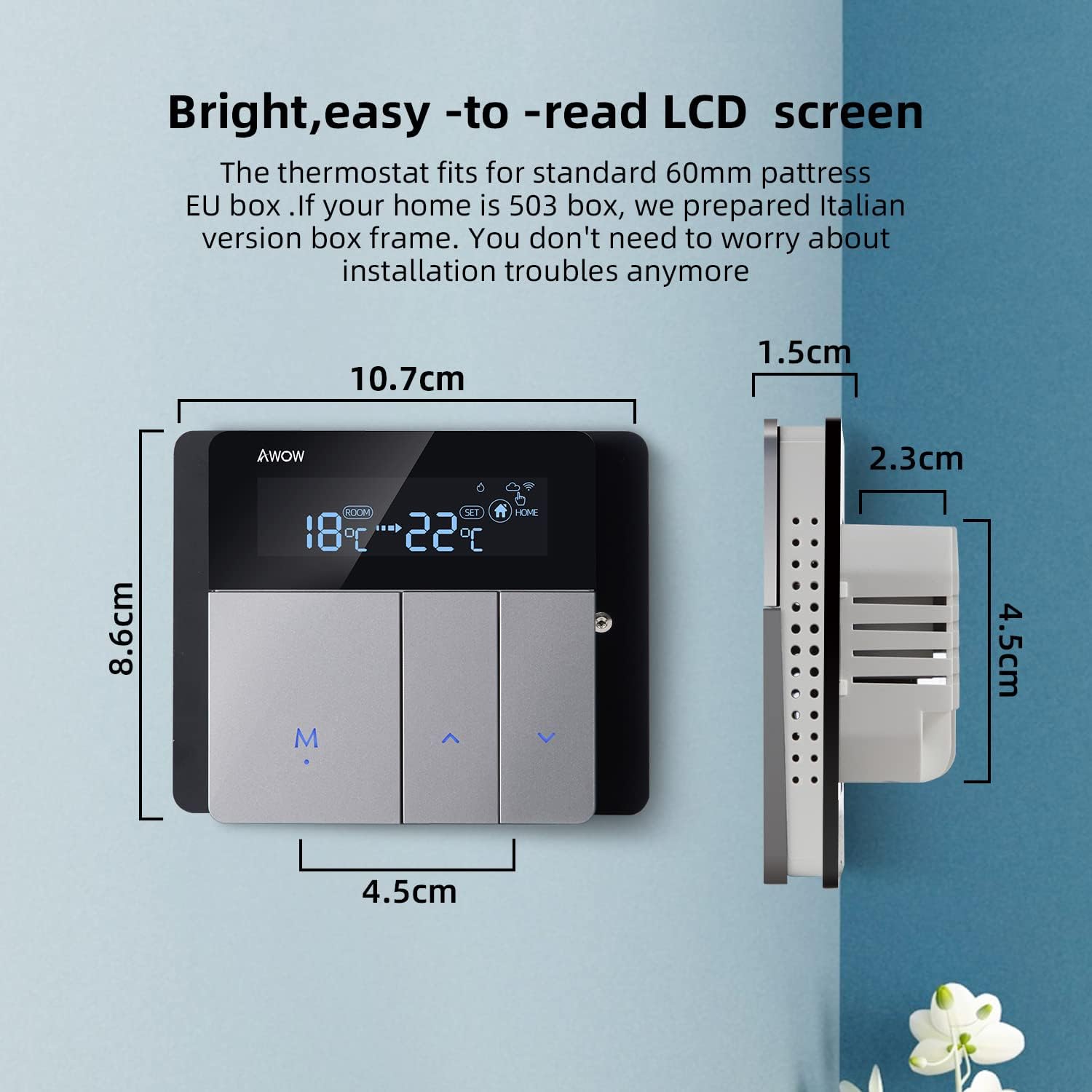
Image 2.1: Detailed wiring diagram showing connections for power supply (L, N) and boiler control (1, 2) on the back of the AWOW TH213 thermostat. The diagram also illustrates the thermostat's dimensions.
Зымдарды орнотуу кадамдары:
- Turn off the main power supply to your heating system.
- Mount the thermostat base plate to the wall box (European 60mm or Italian 503).
- Connect the Live (L) and Neutral (N) wires from your 100-240V AC power supply to the corresponding terminals on the thermostat.
- Connect the two boiler control wires (often referred to as dry contacts) to terminals 1 and 2. These wires typically come from your boiler's thermostat input.
- Carefully attach the front panel of the thermostat to the base plate.
- Жылытуу системасынын электр энергиясын калыбына келтириңиз.
- After power-up, press and hold the 'M' button to initiate the thermostat.

Image 2.2: Illustrative diagram demonstrating how the AWOW TH213 thermostat connects to a boiler, which then supplies heat to an underfloor heating system, ensuring a comfortable room temperature of 22°C.
2.3 Wi-Fi туташуусу
To enable smart features, connect your thermostat to your home Wi-Fi network using the Smart Life app.
- App Store (iOS) же Google Play дүкөнүнөн (Android) "Smart Life" колдонмосун жүктөп алыңыз.
- Smart Life аккаунтуңузга катталыңыз же кириңиз.
- Ensure your smartphone is connected to a 2.4 GHz Wi-Fi network. The thermostat does not support 5 GHz networks.
- Follow the in-app instructions to add a new device. The thermostat should enter pairing mode automatically or by following specific button presses (refer to the app for exact steps).
- Once connected, you can control and program your thermostat remotely.
3. Иштөө нускамалары
3.1 Кол менен башкаруу
You can adjust the temperature directly on the thermostat unit:
- колдонуу Up жана Төмөн каалаган температураны көбөйтүү же төмөндөтүү үчүн жебе баскычтарын басыңыз.
- басыңыз M button to cycle through different modes (e.g., Manual, Auto).
Image 3.1: The AWOW TH213 thermostat's LCD screen showing room temperature and set temperature, along with the 'M' (Mode) and arrow buttons for manual adjustments.
3.2 Smart Life тиркемесин башкаруу
The Smart Life app provides comprehensive control and programming capabilities from your smartphone, allowing you to manage your heating from anywhere.

Image 3.2: A user interacting with the Smart Life mobile application on a smartphone to control their thermostat remotely, illustrating the convenience of managing home heating from any location.
3.3 Programmable Modes
The thermostat offers three programming options to optimize energy savings and comfort:
- 24-Hour Program: Set a consistent schedule for each day of the week.
- 5+2 Day Program: Separate schedules for weekdays (Monday-Friday) and weekends (Saturday-Sunday).
- 7-Day Program: Customize the schedule for each individual day of the week.
These programs can be configured within the Smart Life app under the "Smart" mode setting. Common preset modes include "Wake," "Away," "Home," and "Sleep," allowing for quick adjustments based on your daily routine.

Image 3.3: A smartphone displaying the Smart Life app interface, highlighting the three programming options (24H, 5+2, 7 days) for the AWOW TH213 thermostat, along with examples of temperature settings for different scenarios like "Get up," "Away," "Go home," and "Sleep."
3.4 Үн менен башкаруу (Alexa жана Google жардамчысы)
Integrate your AWOW TH213 thermostat with Amazon Alexa or Google Assistant for hands-free control.
- Ensure your thermostat is connected to the Smart Life app and your Alexa/Google Home device is set up.
- Enable the "Smart Life" skill/action in your Alexa or Google Home app.
- Discover devices. Your thermostat should appear.
- Эми сиз үн буйруктарын колдоно аласыз, мисалы:
- "Alexa, set the living room to 22 degrees."
- "Эй, Google, уктоочу бөлмөдө температура канча?"
- "Алекса, жылытууну күйгүз."

Image 3.4: The AWOW TH213 thermostat mounted on a wall, with an Amazon Echo Dot nearby, illustrating its compatibility with Amazon Alexa and Google Assistant for voice-controlled temperature adjustments.
4. Техникалык тейлөө
The AWOW TH213 thermostat requires minimal maintenance to ensure optimal performance.
- Тазалоо: Экранды акырын сүртүп, casinжумшак, кургак чүпүрөк менен сүртүңүз. Абразивдүү тазалоочу каражаттарды, эриткичтерди же химиялык чачыраткычтарды колдонуудан алыс болуңуз, анткени алар дисплейге же ички компоненттерге зыян келтириши мүмкүн.
- Программалык камсыздоо жаңыртуулары: Ensure the Smart Life app is updated to the latest version to benefit from new features and performance improvements. Firmware updates for the thermostat may also be available through the app.
- Power Cycle: If the thermostat becomes unresponsive, try turning off the main power supply to the heating system for a few minutes, then restore power.
5. Кыйынчылыктарды
If you encounter issues with your AWOW TH213 thermostat, refer to the following common problems and solutions:
| Көйгөй | Мүмкүн себеп | Чечим |
|---|---|---|
| Термостат күйбөй жатат. | Электр энергиясы жок; туура эмес зымдар. | Check main circuit breaker. Verify L and N wiring connections. Ensure 'M' button is pressed after power-up. |
| Wi-Fi'га туташпай жатат. | Туура эмес Wi-Fi диапазону; алсыз сигнал; туура эмес сырсөз. | Ensure your router is broadcasting a 2.4 GHz Wi-Fi signal. Move thermostat closer to router. Double-check Wi-Fi password. Restart router and thermostat. |
| Heating not turning on/off as programmed. | Incorrect programming; manual override; wiring issue to boiler. | Review programming schedules in the Smart Life app. Check if the thermostat is in manual mode. Verify boiler control wiring (terminals 1 and 2). |
| Inaccurate temperature readings or heating behavior. | Sensor calibration needed; thermostat placed in an unsuitable location; hysteresis. | The thermostat has an NTC temperature sensor with 1°C accuracy. If readings seem off, check for drafts or direct heat sources near the thermostat. The Smart Life app may offer a temperature calibration option. Note that thermostats often have a built-in hysteresis (temperature differential) to prevent rapid cycling of the heating system. |
| Display shows "F" or is blank/faulty. | Internal error; display damage. | Perform a power cycle (turn off/on main power). If the issue persists, contact customer support. |
| Үн башкаруу иштебейт. | Smart Life skill/action not enabled; device not discovered; incorrect commands. | Ensure the Smart Life skill/action is enabled in your Alexa/Google Home app. Redo device discovery. Use correct voice commands as specified in the app. |
6. Техникалык шарттар
| Өзгөчөлүк | Деталь |
|---|---|
| Бренд | AWOW |
| Модель номери | TH213 |
| Түс | Боз, Кара |
| Өлчөмдөр | 11 x 11 x 6 см |
| Салмагы | 240 г |
| Күч | 1.5 Ватт |
| Тtage | 100-240V AC, 50/60Hz |
| Макс которуу күчү | 3A |
| Байланыш технологиясы | Wi-Fi (2.4 ГГц гана) |
| Controller Type | Amazon Alexa, Google Жардамчысы |
| Дисплей түрү | Арткы жарык менен LCD |
| Башкаруу ыкмасы | App, Voice, Manual |
| Температура сенсору | NTC |
| Температуранын тактыгы | ±1°C |
| Жөнгө салынуучу температура диапазону | 5°Cден 35°Cге чейин |


