Introduction
This manual provides detailed instructions for the operation and maintenance of your GTMEDIA Z3 Portable DAB+/FM RDS Radio. Please read this manual thoroughly before using the device to ensure proper functionality and to maximize your listening experience.
Маанилүү коопсуздук маалыматы
- Аппаратты жамгырдын, нымдуулуктун же экстремалдык температуранын таасиринде калтырбаңыз.
- Аппаратты түшүрүүдөн же катуу таасирлерден сактаныңыз.
- Агрегатты өз алдынча бөлүүгө же оңдоого аракет кылбаңыз. Бардык тейлөөлөрдү квалификациялуу кызматкерлерге тапшырыңыз.
- Белгиленген кубаттоо кабелин жана кубат адаптерин гана колдонуңуз.
- Балдар жетпеген жерде сактаңыз.
Пакеттин мазмуну
Пакетте бардык буюмдар бар экенин текшериңиз:
- 1 x GTMEDIA Z3 DAB+/FM Radio
- 1 x USB заряддоо кабели
- 1 x User Manual

Image: The GTMEDIA Z3 radio, its retail box, USB charging cable, and user manual.
Продукт бүттүview
The GTMEDIA Z3 is a portable DAB+/FM RDS radio featuring a 2.4-inch TFT-LCD screen. It supports 60 preset stations for both DAB+ and FM, and includes functions such as clock, alarm, and sleep timer. The device is powered by a rechargeable 18650 lithium battery.
Алдыңкы панелдин башкаруу элементтери жана дисплей
- Күйгүзүү/Күтүү режиминин баскычы: Turns the radio on/off or puts it in standby mode.
- Скандоо баскычы: Initiates station scanning.
- DAB/FM баскычы: Switches between DAB+ and FM modes.
- Меню баскычы: Негизги менюга кирет.
- EQ баскычы: Эквалайзер жөндөөлөрүн тууралайт.
- Алдын ала коюлган баскыч: Accesses preset stations.
- Үн/Тандоо баскычы: Adjusts volume and navigates/selects menu options.
- 2.4-inch TFT-LCD Display: Станция маалыматын, убакытты жана меню параметрлерин көрсөтөт.
Арткы панель жана порттор
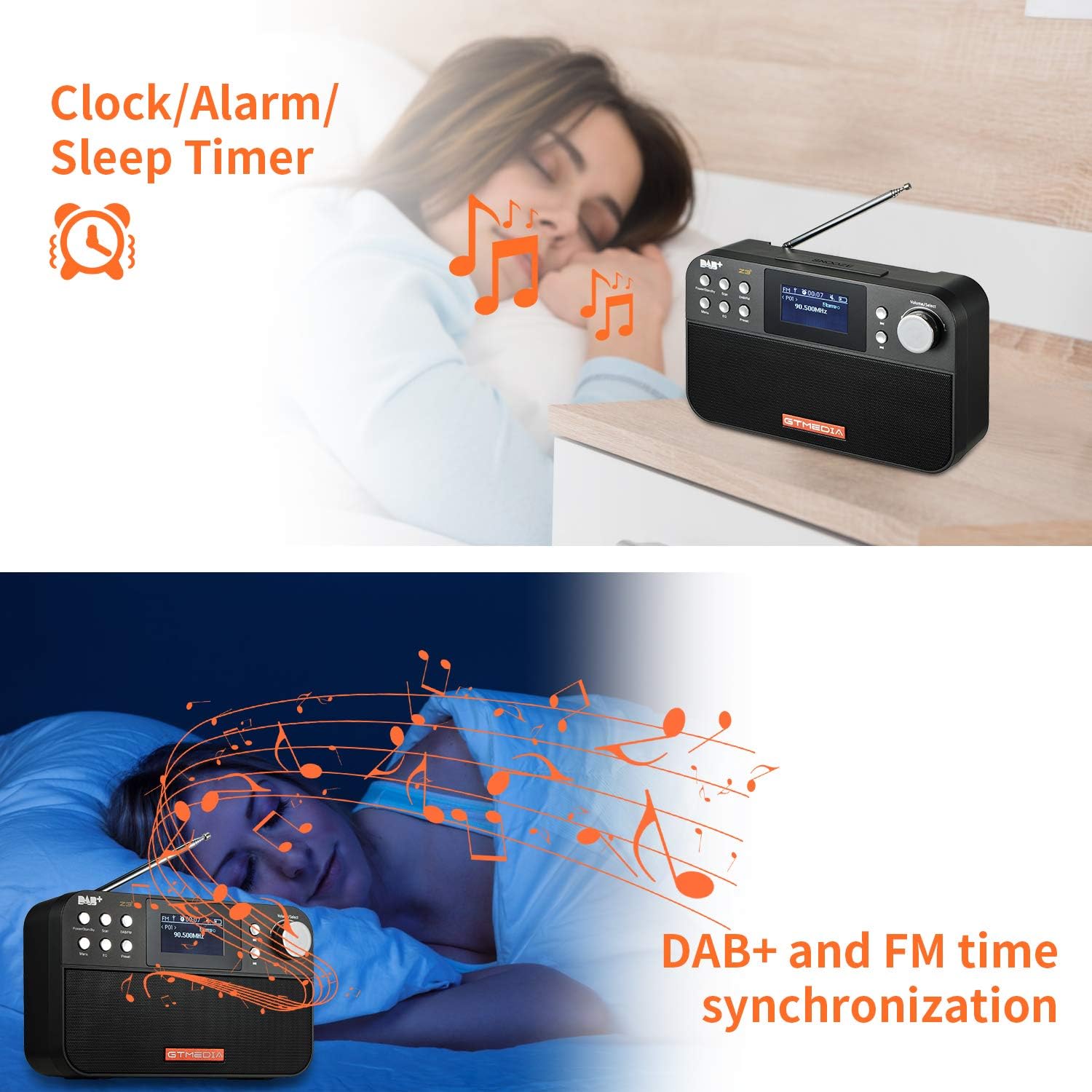
Image: The back of the GTMEDIA Z3 radio, highlighting the 18650 lithium battery compartment and the DC 5V USB charging port.
- 18650 Lithium Battery Compartment: Кайра заряддоого болгон батарейканы камтыйт.
- DC 5V USB Charging Port: Аппаратты заряддоо үчүн.
Орнотуу колдонмосу
1. Батареяны заряддоо
- Locate the USB charging port on the rear of the radio.
- Connect the provided USB charging cable to the radio and to a compatible USB power adapter (DC 5V, ≥1500mA) or a computer USB port.
- The battery indicator on the display will show charging status. A full charge typically provides 4-7 hours of operation.
Image: The GTMEDIA Z3 radio's rear panel, illustrating the USB charging port and battery specifications.
2. Баштапкы күйгүзүү жана тилди тандоо
- басып, кармап туруңуз Кубат/Күтүү радиону күйгүзүү үчүн баскыч.
- Upon first use, you may be prompted to select a language. Use the Үн/Тандоо knob to navigate and press to confirm your choice. English is the default language.
3. Убакытты синхрондоштуруу
The clock can be set manually or synchronized automatically with DAB+ or FM signals.
- Автоматтык синхрондоштуруу: When tuned to a DAB+ or FM station that broadcasts time information, the radio will automatically update its clock.
- Кол менен тууралоо: Access the system settings via the Меню button to manually set the time and date.
Иштөө нускамалары
1. Radio Modes (DAB+/FM)
Которуу режимдери:
басыңыз DAB / FM DAB+ жана FM радио режимдери ортосунда которулуу үчүн баскыч.
Станцияларды издөө:
- Auto Scan (FM): FM режиминде, басыңыз Скандоо Жеткиликтүү станцияларды автоматтык түрдө издөө жана сактоо үчүн баскычты басыңыз.
- Local Scan (DAB+): DAB+ режиминде, басыңыз Скандоо button to perform a local scan for DAB+ stations. Manual tuning is also supported.
Станцияларды алдын ала орнотуу:
The radio supports 60 preset stations for both FM and DAB+ (10 quick access presets). To save a station:
- Каалаган станцияга коюңуз.
- басып, кармап туруңуз Алдын ала коюлган баскычы.
- колдонуу Үн/Тандоо knob to choose a preset number and press to confirm.
Алдын ала коюлган станцияны кайра чакырып алуу үчүн, баскычын кыска басыңыз Алдын ала коюлган баскычын жана колдонуңуз Үн/Тандоо тандоо үчүн баскыч.
FM RDS Station Name Display:
When tuned to an FM station broadcasting RDS (Radio Data System) information, the 2.4-inch TFT-LCD screen will display the station name and other relevant data.
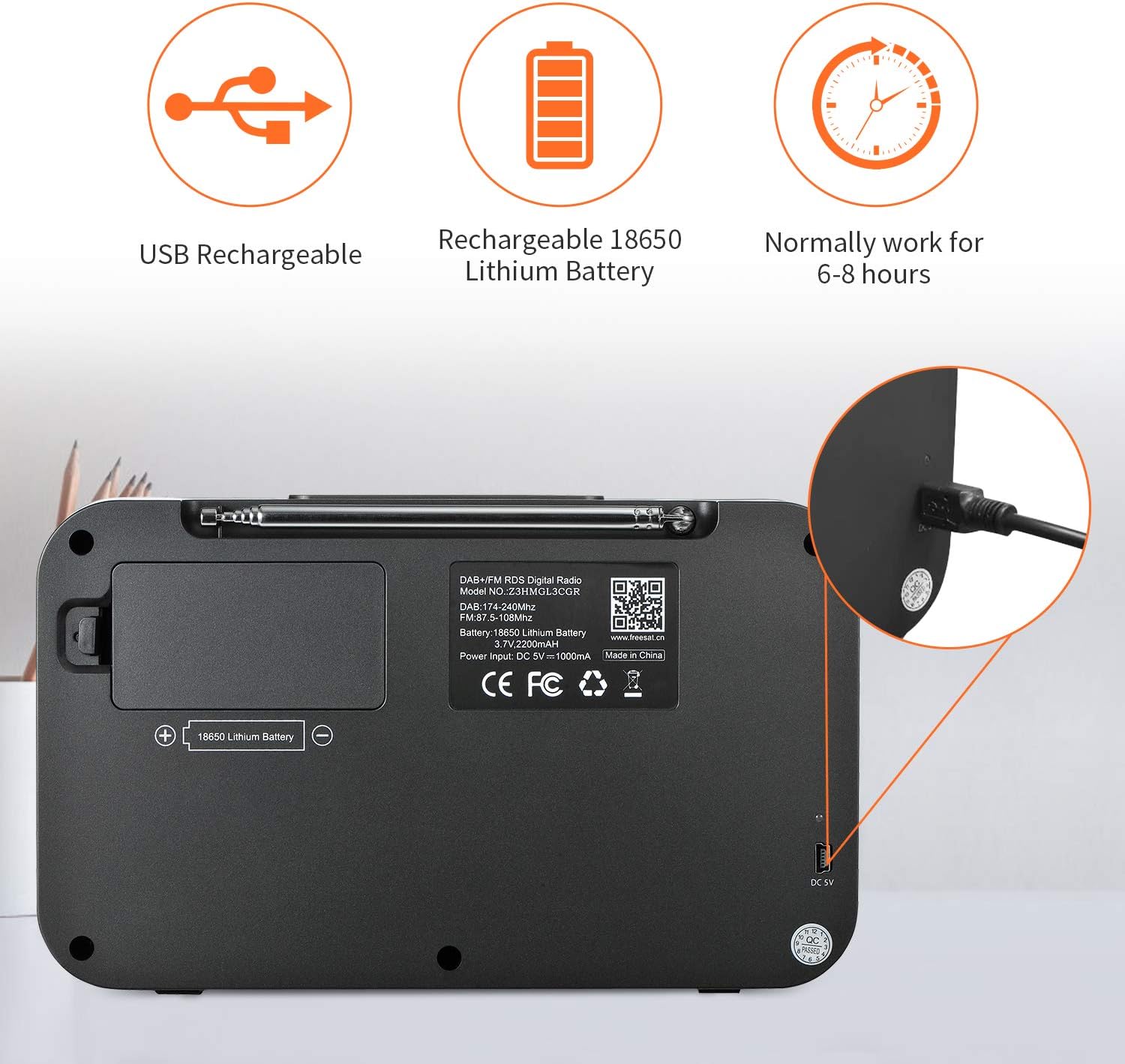
Image: The GTMEDIA Z3 radio's display showing "FM" and "90.500MHz" along with a station name, demonstrating the RDS feature.
2. Саат, ойготкуч жана уйку таймери
The GTMEDIA Z3 radio includes integrated clock, alarm, and sleep timer functions for enhanced convenience.

Image: The GTMEDIA Z3 radio with icons representing clock, alarm, and sleep timer functions, depicted in a bedroom setting.
Ойготкучту орнотуу:
- басыңыз Меню button and navigate to the "Alarm" settings.
- колдонуу Үн/Тандоо knob to set the alarm time, duration, and alarm source (e.g., buzzer, DAB+, FM).
- Орнотууларыңызды ырастаңыз.
Уйку таймерин орнотуу:
- басыңыз Меню button and navigate to the "Sleep Timer" settings.
- колдонуу Үн/Тандоо knob to choose the desired sleep duration (e.g., 15, 30, 60 minutes).
- Радио белгиленген убакыттан кийин автоматтык түрдө өчөт.
3. Музыканы ойнотуу
The GTMEDIA Z3 supports playback of various music formats including MP3, FLAC, and WAV. Playback modes include single play, repeat, and shuffle. Specific instructions for accessing and controlling music playback are typically found within the device's menu system.
Техникалык тейлөө
Тазалоо:
- Wipe the radio with a soft, dry cloth.
- Суюк тазалагычтарды же абразивдүү материалдарды колдонбоңуз.
Батареяга кам көрүү:
- Батареянын иштөө мөөнөтүн узартуу үчүн, бат-баттан батарейканы толук зарядсыздандырбаңыз.
- Радио көп колдонулбаса да, батареяны дайыма заряддап туруңуз.
- Радиону узак убакыт бою колдонбогон учурда салкын, кургак жерде сактаңыз.
Проблемаларды чечүү
| Көйгөй | Мүмкүн себеп | Чечим |
|---|---|---|
| Күч жок | Батарея заряды түгөнгөн. | Берилген USB кабели аркылуу батареяны заряддаңыз. |
| Радио кабыл алуу начар | Алсыз сигнал; антенна узартылган эмес. | Extend the telescopic antenna fully. Try repositioning the radio. Perform a new scan for stations. |
| Үн жок | Volume too low; Mute activated. | колдонуу менен үнүн жогорулатуу Үн/Тандоо knob. Check if mute is active in settings. |
| Дисплей так эмес | Brightness setting too low. | Adjust LCD brightness in the system settings. |
Техникалык шарттар
| Өзгөчөлүк | Деталь |
|---|---|
| Бренд | GTMEDIA |
| Модел | Z3 |
| Tuner Technology | DAB Plus, FM RDS |
| Колдоого алынган радио тилкелери | DAB+ (174.92-239.20 MHz), FM (87.5-108 MHz) |
| Дисплей | 2.4-inch TFT-LCD (240 x 320 pixels) |
| Алдын ала коюлган станциялар | 60 FM, 60 DAB+ |
| Power Source | Батарея менен иштейт |
| Батарея түрү | 18650 Lithium Battery (3.7V 2200mAh) |
| Иштөө сааттары | 4-7 hours (typical) |
| Заряддоо киргизүү | DC 5V, ≥1500mA (via USB) |
| Байланыш технологиясы | USB |
| Өзгөчө өзгөчөлүк | Portable, Clock, Alarm, Sleep Timer, USB Upgradeable |
| Элемент Салмагы | 620 г |
| Продукциянын өлчөмдөрү | 20 x 5 x 12 см |
| Иштөө температурасы | 0~+45°C |
| Сактоо температурасы | -10~+60°C |
| Музыка форматтары | MP3, FLAC, WAV |

Image: Dimensions of the GTMEDIA Z3 radio, showing approximate measurements of 200mm x 120mm x 50mm.
Микропрограмманы жаңыртуу
The GTMEDIA Z3 radio supports firmware upgrades via a USB connection to a PC. For the latest firmware and detailed instructions, please visit the official support webсайт.

Image: The GTMEDIA Z3 radio connected to a laptop via a USB cable, indicating its upgradeable feature.
Кепилдик жана колдоо
For technical support, warranty information, or any questions regarding your GTMEDIA Z3 radio, please visit the official GTMEDIA support webсайт:


