1. Киришүү
The Fanvil H2U Compact IP Phone is a stylish and powerful communication device designed for various scenarios, including hotels, campuses, hospitals, and retail environments. It offers essential features for efficient communication in a compact form factor.
Негизги өзгөчөлүктөр төмөнкүлөрдү камтыйт:
- 2 SIP Lines for flexible call handling.
- HD Audio with wideband codecs (G.722, Opus) for clear voice quality.
- 10 speed dial keys for quick access to frequently called numbers.
- 1 programmable DSS Key for custom functions.
- 3-way conference capability.
- Support for both desk and wall-mounted installations.
- Handset and hands-free operation modes.
- 10/100 Mbps Ethernet port.
- Power over Ethernet (PoE) or power adapter support.

Figure 1: Fanvil H2U Compact IP Phone (White)
This image displays the Fanvil H2U Compact IP Phone in white, featuring its sleek design, integrated speaker, and coiled handset cord. A small green LED indicator is visible on the phone's body.
2. Орнотуу колдонмосу
Follow these steps to set up your Fanvil H2U IP Phone:
- Коробканы ачуу: Carefully remove all components from the packaging. You should find the Fanvil H2U phone unit and a coiled handset cord. Note: A power adapter is not typically included and may need to be purchased separately if PoE is not available.
- Телефонду туташтыруу: Plug one end of the coiled handset cord into the port labeled with a handset icon on the side of the phone unit. Plug the other end into the corresponding port on the handset.
- Тармакка/кубатка туташуу:
- PoE (Power over Ethernet) колдонуу: Connect an Ethernet cable from your PoE-enabled network switch or router to the LAN port on the back of the phone. The phone will receive both power and network connectivity through this single cable.
- Using a Power Adapter (if PoE is not available): Connect an Ethernet cable from your network switch or router to the LAN port on the back of the phone. Then, connect a compatible 5V/1A DC power adapter (not included) to the power port on the back of the phone and plug it into a power outlet.
- Жайгашкан жери: The Fanvil H2U can be placed on a desk or mounted on a wall. For wall mounting, use the integrated mounting holes on the back of the phone. Ensure the phone is placed in a stable location with good ventilation.

Figure 2: Fanvil H2U Side View with Wall Mount Option
Бул сүрөттө кошумча адис көрсөтүлгөнfile of the Fanvil H2U IP Phone, highlighting the design that allows for both desk placement and wall mounting. The recessed area for wall mounting is visible.
3. Иштөө нускамалары
This section covers the basic operation of your Fanvil H2U IP Phone.
3.1 Чакыруунун негизги функциялары
- Чакыруу: Lift the handset or press the speakerphone button. Dial the desired number using the keypad and wait for the call to connect.
- Чалууга жооп берүү: Телефон шыңгыраганда, жооп берүү үчүн трубканы көтөрүңүз же динамик баскычын басыңыз.
- Чалууну аяктоо: Place the handset back on the phone unit or press the speakerphone button again.
3.2 Speed Dial Keys
The Fanvil H2U features 10 dedicated speed dial keys (0-9) located on the phone's keypad. These keys can be programmed to quickly dial frequently used numbers or services.
- Колдонуу үчүн: Simply press and hold the desired speed dial key (0-9) for a few seconds to dial the pre-programmed number.
- Программалоо: Refer to your IP PBX system's administration guide or contact your system administrator for instructions on how to program these speed dial keys.
3.3 Programmable DSS Key
The phone includes one programmable DSS (Direct Station Select) key, which can be configured for various functions such as BLF (Busy Lamp Field), intercom, or speed dial. The specific function depends on your system's configuration.
- Колдонуу үчүн: Press the programmable DSS key to activate its assigned function.
- Конфигурация: Contact your system administrator to configure the function of this key.
3.4 3 тараптуу конференция
To initiate a 3-way conference call:
- Make a call to the first party.
- While on the call, press the Конференция button (if available and configured, or follow your system's specific conference initiation method).
- Dial the number of the second party.
- Экинчи тарап жооп бергенден кийин, басыңыз Конференция button again to join all three parties into a conference call.
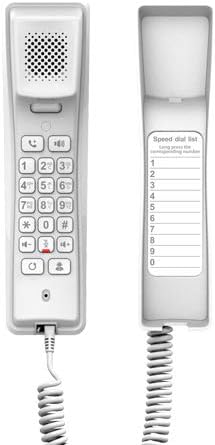
Figure 3: Fanvil H2U Keypad and Speed Dial Area
Бул сүрөт ачык-айкын камсыз кылат view of the Fanvil H2U IP Phone's keypad, including the numeric keys, function buttons, and the dedicated area for the speed dial list, which can be customized by the user.
4. Техникалык тейлөө
Proper maintenance ensures the longevity and optimal performance of your Fanvil H2U IP Phone.
- Тазалоо: Телефондун бетин тазалоо үчүн жумшак, кургак, түксүз чүпүрөктү колдонуңуз. Өжөр тактар үчүн бир аз сүртүңүзampen the cloth with water. Avoid using harsh chemicals, abrasive cleaners, or solvents, as these can damage the phone's finish.
- Курчап турган чөйрө: Keep the phone away from excessive heat, direct sunlight, and moisture. Ensure it is placed in a well-ventilated area.
- Кабелдер: Periodically check all connected cables (Ethernet, handset cord) for any signs of wear or damage. Replace damaged cables immediately.
- Сактагыч: If storing the phone for an extended period, disconnect all cables and store it in a cool, dry place, preferably in its original packaging.
5. Кыйынчылыктарды
This section addresses common issues you might encounter with your Fanvil H2U IP Phone.
| Көйгөй | Мүмкүн себеп | Чечим |
|---|---|---|
| Телефон күйбөйт. | No power supply; PoE not active; faulty power adapter/cable. | Ensure Ethernet cable is connected to a PoE-enabled port, or a compatible power adapter is securely connected and plugged into a working outlet. Verify the power source. |
| Терүү үнү жок. | Network connectivity issue; SIP registration failure; incorrect configuration. | Check Ethernet cable connection. Verify network status. Contact your system administrator to check SIP registration and phone configuration. |
| Чалуу сапаты начар (жаңырык, статикалык). | Network congestion; faulty handset cord; environmental interference. | Check your network connection and bandwidth. Try replacing the handset cord. Ensure the phone is not near devices causing electromagnetic interference. |
| Чалууларды жасоо/кабыл алуу мүмкүн эмес. | SIP account not registered; network firewall issues; incorrect dialing plan. | Confirm SIP account status with your administrator. Check firewall settings. Verify the dialing procedure. |
If the problem persists after trying these solutions, please contact your IT support or system administrator for further assistance.
6. Техникалык шарттар
| Өзгөчөлүк | Спецификация |
|---|---|
| SIP линиялары | 2 |
| Аудио кодектер | G.722, Opus (HD Audio) |
| Тез терүү баскычтары | 10 |
| Programmable DSS Key | 1 |
| Конференция чалуу мүмкүнчүлүгү | 3-жол |
| Тармак интерфейси | 10/100 Мбит/сек Ethernet |
| Power Source | PoE / Power Adaptor (5V/1A DC) |
| Түс | White (also available in Black) |
| Телефон түрү | жоон |
| Терүүчү түрү | Жалгыз баскычтоп |
| Продукциянын өлчөмдөрү (L x W x Y) | 5.91 x 5.91 x 3.15 дюйм (15 x 15 x 8 см) |
| Элемент Салмагы | 10.6 унция (0.3 килограмм) |
| Шайкеш түзмөктөр | Computer systems, VoIP services, SIP devices, and various networks |
7. Кепилдик жана колдоо
For detailed warranty information regarding your Fanvil H2U Compact IP Phone, please refer to the official Fanvil webсайтка же продуктуңузга кошулган кепилдик картасы. Кепилдиктин шарттары жана шарттары аймакка жана сатуучуга жараша өзгөрүшү мүмкүн.
For technical support, product inquiries, or assistance with advanced configurations, please contact your vendor, system administrator, or Fanvil's official customer support channels. You can typically find contact information on the Fanvil webсайтында же сатып алуу документтеринде.


