1. Киришүү
The ELECDER D19 True Wireless Earbuds are designed to provide a superior audio experience with advanced features such as Bluetooth 5.0 connectivity, noise cancellation, and IPX7 waterproofing. This manual provides comprehensive instructions for setting up, operating, and maintaining your earbuds to ensure optimal performance and longevity.
Негизги өзгөчөлүктөрү:
- Bluetooth 5.0: Fast and stable wireless transmission with CVC8.0 noise cancellation for clear calls.
- Premium Hi-Fi Stereo Audio: APTX audio for lossless transmission, delivering immersive sound with crystal clarity and deep bass.
- IPX7 Суу өткөрбөйт: Resistant to sweat, water, and rain, ideal for workouts and outdoor activities.
- Эргономикалык дизайн: Lightweight (5g per earbud) with flexible silicone ear-fins and S/M/L ear caps for a secure and comfortable fit.
- Quick Pairing Technology: Automatic power-on and pairing upon removal from the charging case.
- USB Quick Charge & Wireless Charging: Up to 4.5 hours of music on a single charge, with an additional 18 hours from the charging case, supporting both USB and wireless charging.
2. Продукт бүтүп калдыview

Figure 2.1: ELECDER D19 True Wireless Earbuds in their charging case. The earbuds are black, sleek, and designed for in-ear use, while the compact charging case is also black with a smooth finish.
Кутуда эмне бар:
- ELECDER D19 True Wireless Earbuds (Left and Right)
- Заряддоо кутусу
- USB заряддоо кабели
- Кулактын учтары (S/M/L өлчөмдөрү)
- Колдонуучунун Колдонмосу (бул документ)
3. Орнотуу колдонмосу
3.1 Кулакчындарды жана кутучаны заряддоо
Before first use, fully charge the earbuds and the charging case. The charging case supports both USB cable charging and wireless charging.
- USB заряддоо: Connect the provided USB cable to the charging port on the case and plug the other end into a USB power source (e.g., computer, wall adapter). The indicator light on the case will show charging status.
- Зымсыз кубаттоо: Place the charging case on a compatible wireless charging pad. The indicator light will flash to confirm charging.

Figure 3.1: The ELECDER D19 charging case being charged wirelessly on a charging pad, also showing the Micro USB port for wired charging. This image highlights the dual charging capabilities of the case.
A full charge for the earbuds provides approximately 4.5 hours of music playback, and the charging case provides an additional 18 hours of battery life.
3.2 Сиздин аппаратыңыз менен жупташуу
The ELECDER D19 earbuds feature quick pairing technology for seamless connection.
- 1-кадам: Open the charging case and take out both earbuds. They will automatically power on and pair with each other.
- 2-кадам: Смартфонуңузда же Bluetooth иштетилген түзмөгүңүздө Bluetooth жөндөөлөрүнө өтүңүз.
- 3-кадам: Издөө available devices and select "Elecder D19" from the list to connect.
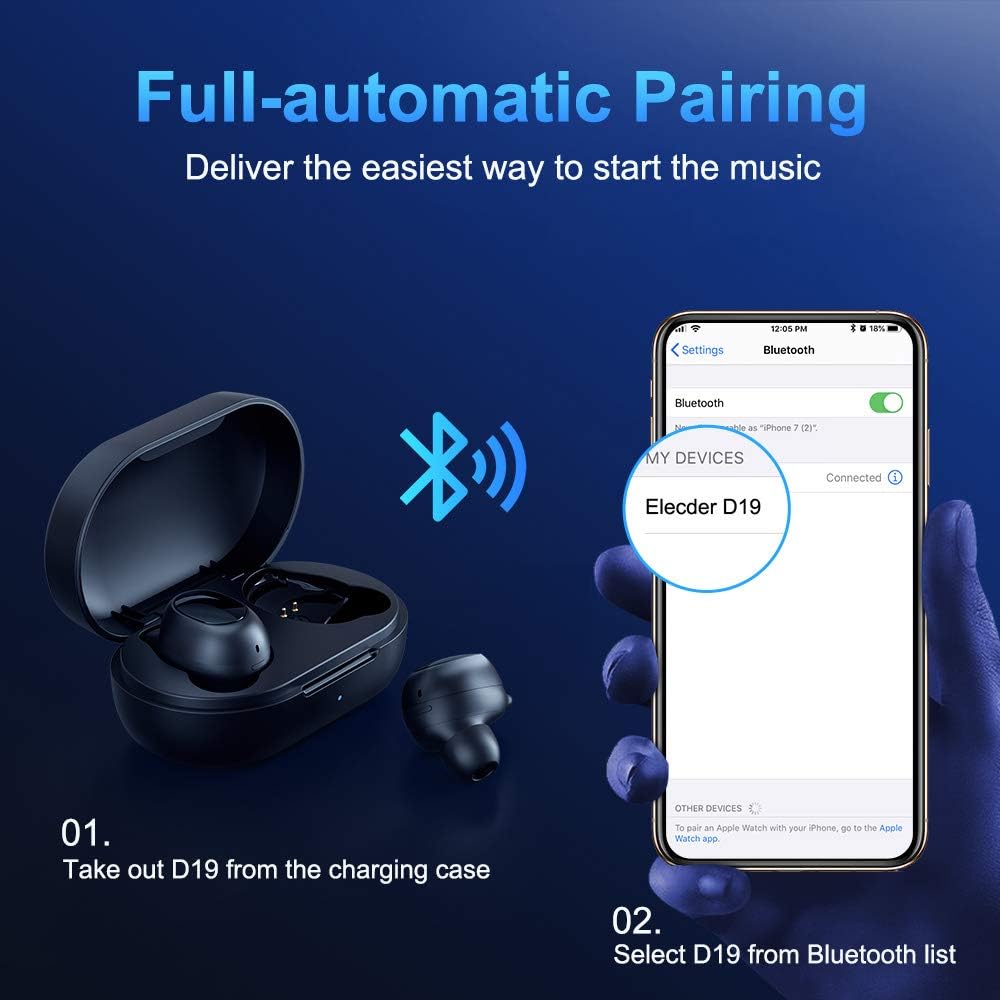
Figure 3.2: A visual guide demonstrating the automatic pairing process. The image shows the earbuds being taken out of the case and then the "Elecder D19" option appearing in a smartphone's Bluetooth settings for connection.
After the initial pairing, the earbuds will automatically connect to the last paired device when taken out of the charging case.

Figure 3.3: An illustration showing the stable Bluetooth connection between the ELECDER D19 earbuds and various smart devices, including smartphones and tablets.
4. Иштөө нускамалары
4.1 Кулакчындарды тагынуу
For optimal sound quality and comfort, choose the ear tips that best fit your ears. The earbuds come with S, M, and L sizes. Insert the earbuds into your ears and gently rotate them to find a secure and comfortable fit. The ergonomic ear-fin design helps ensure stability during movement.
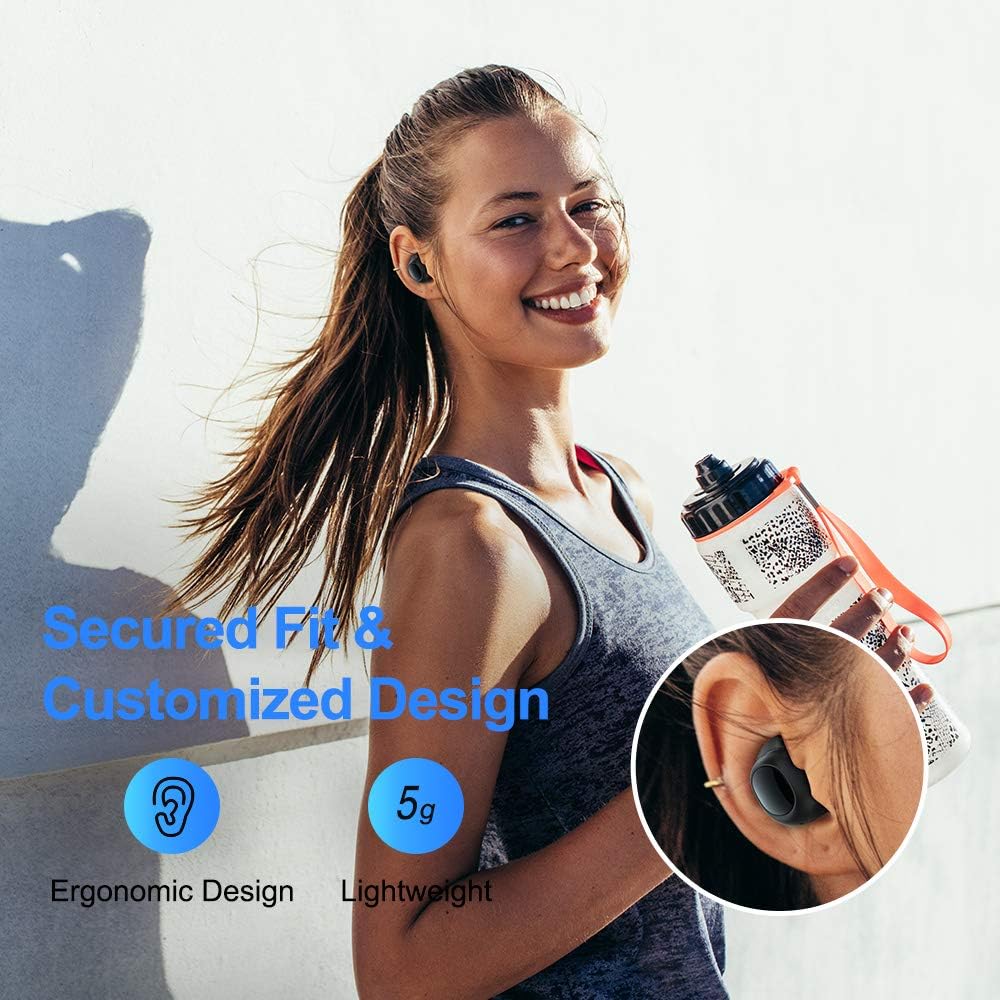
Figure 4.1: A person wearing the ELECDER D19 earbuds during a workout, demonstrating the secure and comfortable fit provided by the ergonomic design and customizable ear tips.
4.2 Медианы башкаруу
The ELECDER D19 earbuds feature physical buttons for media control. Specific button functions may vary slightly based on the device and operating system, but common controls include:
- Ойнотуу/тындыруу: Кулакчынга бир жолу басыңыз.
- Кийинки трек: Оң кулакчынды эки жолу басыңыз.
- Мурунку трек: Сол кулакчынды эки жолу басыңыз.
- Көлөмү: Оң кулакчынды үч жолу басыңыз.
- Үнүн азайтуу: Triple press on the left earbud.
4.3 Чалууларды башкаруу
Чалууларыңызды түздөн-түз кулакчындардан башкарыңыз:
- Чалууга жооп берүү/аяктоо: Кулакчынга бир жолу басыңыз.
- Чакырууну четке кагуу: Кулакчындардын бирин 2 секунд басып туруңуз.
- Үн Жардамчысын жандыруу: Кулакчындардын бирин (мисалы, Siri, Google Жардамчысы) 3 секунд басып туруңуз.
5. Техникалык тейлөө жана кам көрүү
Proper maintenance ensures the longevity and optimal performance of your ELECDER D19 earbuds.
5.1 Тазалоо
- Кулакчындарды жана заряддоо кутусун жумшак, кургак, түксүз чүпүрөк менен дайыма тазалап туруңуз.
- Кулагынын учтарын алып салып, жумшак самын жана суу менен тазалаңыз, анан кайра кийер алдында жакшылап кургатып алыңыз.
- Use a cotton swab or small brush to gently clean the charging contacts on both the earbuds and the case.
- Абразивдүү материалдарды, спиртти же химиялык тазалоочу каражаттарды колдонуудан алыс болуңуз.
5.2 Сууга туруктуулук (IPX7)
The ELECDER D19 earbuds are IPX7 waterproof, meaning they can withstand submersion in up to 1 meter of water for 30 minutes. This makes them suitable for protection against sweat, rain, and accidental splashes.

Figure 5.1: The ELECDER D19 earbuds shown with water droplets, illustrating their IPX7 waterproof rating, which protects them from sweat, rain, and splashes.
Эскертүү: The charging case is not waterproof. Ensure earbuds are dry before placing them back into the charging case.
5.3 Сактоо
Колдонулбаганда, кулакчындарды коргоо жана кубаттоо үчүн кубаттоочу кутучага сактаңыз. Корпусты салкын, кургак жерде, экстремалдык температурадан жана түз күндүн нурунан алыс сактаңыз.
6. Кыйынчылыктарды
If you encounter issues with your ELECDER D19 earbuds, refer to the following common solutions:
| Көйгөй | Мүмкүн себеп | Чечим |
|---|---|---|
| Кулакчындар түзмөк менен жупташкан жок. | Түзмөктө Bluetooth өчүк; кулакчындар жупташтыруу режиминде эмес; мурда жупташтырылган түзмөк тоскоолдук жаратууда. | Ensure Bluetooth is enabled. Place earbuds back in case, then take them out to re-enter pairing mode. Forget "Elecder D19" from your device's Bluetooth list and re-pair. |
| Бир гана кулакчын иштейт. | Earbuds not paired with each other; low battery on one earbud. | Place both earbuds back into the charging case, close the lid, wait a few seconds, then open and take them out again. Ensure both earbuds are charged. |
| Үн жок же үнү төмөн. | Device volume too low; ear tips not properly sealed; debris in earbud nozzle. | Increase volume on your device. Adjust earbud position or try different sized ear tips for a better seal. Clean earbud nozzles. |
| Заряддоо куту заряддалбай жатат. | Faulty cable/charger; improper placement on wireless charger. | Try a different USB cable and power adapter. Ensure the case is correctly aligned on the wireless charging pad. |
| Bluetooth байланышы туруксуз. | Interference; distance from device; low earbud battery. | Reduce distance between earbuds and device. Avoid environments with strong Wi-Fi or other Bluetooth signals. Ensure earbuds are fully charged. |
7. Техникалык шарттар
Detailed technical specifications for the ELECDER D19 True Wireless Earbuds:
| Өзгөчөлүк | Деталь |
|---|---|
| Модель аты | ELECDER D19 |
| Байланыш технологиясы | Зымсыз (Bluetooth 5.0) |
| Bluetooth диапазону | 33 Фут |
| Кулак жайгаштыруу | Кулакта |
| Форма фактору | Кулакта |
| Noise Control | Active Noise Cancellation (CVC8.0) |
| Микрофон | камтылган |
| Сууга туруктуулук деңгээли | IPX7 суу өткөрбөйт |
| Батареянын иштөө мөөнөтү (наушник) | Up to 4.5 hours (music) / 4 hours (calling) |
| Charging Case Additional Playtime | 18 саат |
| Заряддоо убактысы | Болжол менен 2 саат |
| Заряддоо интерфейси | Micro USB, Wireless Charging |
| Элемент Салмагы | 1.92 ounces (total) / 5g (each earbud) |
| Продукциянын өлчөмдөрү | 3.89 x 3.89 x 1.65 дюйм |
| Шайкеш түзмөктөр | iOS and Android Smartphones |
| Материал | Silicone (ear tips) |
| Түс | Кара |

Figure 7.1: An infographic detailing the battery life of the ELECDER D19 earbuds and charging case, showing 4 hours for calls, 4.5 hours for music, and a total of 18 hours with the 500mAh charging case.
8. Кепилдик жана колдоо
ELECDER products are manufactured to high quality standards. For information regarding warranty coverage, technical support, or service inquiries, please refer to the contact information provided with your product packaging or visit the official ELECDER webсайт.
Көбүрөөк жардам алуу үчүн, сиз продуктуну сатып алган сатуучуга да кайрылсаңыз болот.


