1. Киришүү
The HXSJ J200 Wired Gaming Mouse is designed for both gaming enthusiasts and everyday office use, offering a blend of performance, customization, and comfort. Featuring 7 programmable buttons, adjustable DPI settings up to 6400, and vibrant RGB lighting, this mouse provides a precise and immersive experience. Its ergonomic design ensures comfortable use over extended periods, and the removable weight system allows for personalized feel and control.

1-сүрөт: жогорудан ылдыйга view of the HXSJ J200 Wired Gaming Mouse.
2. Өзгөчөлүктөрү
- 7 Программалануучу баскычтар: Customize your gaming and work experience with easily programmable keys for macros and shortcuts.
- Жөнгө салынуучу DPI жөндөөлөрү: Seamlessly switch between 800, 1600, 3200, and 6400 DPI to match your precision needs for various tasks and games. High precision 6400 DPI ensures stable transmission and accurate analysis.
- Professional Gaming Chip: Equipped with a professional IC 198 sports game engine for stable transmission and high analytical precision, compatible with all types of large online games.
- Cool RGB Lighting Effect: Enjoy 16.8 million colorful backlight modes. The lighting changes with DPI adjustments, adding a dynamic visual element to your setup.
- Removable Weight Design: Personalize the mouse's feel with two removable 5g weights. Adjust the mouse weight to your preference without needing to disassemble the mouse.
- Кеңири шайкештик: Compatible with Windows 2000/XP/Win7/Win8/Win10 Vista 32-bit, IOS, and newer operating systems.
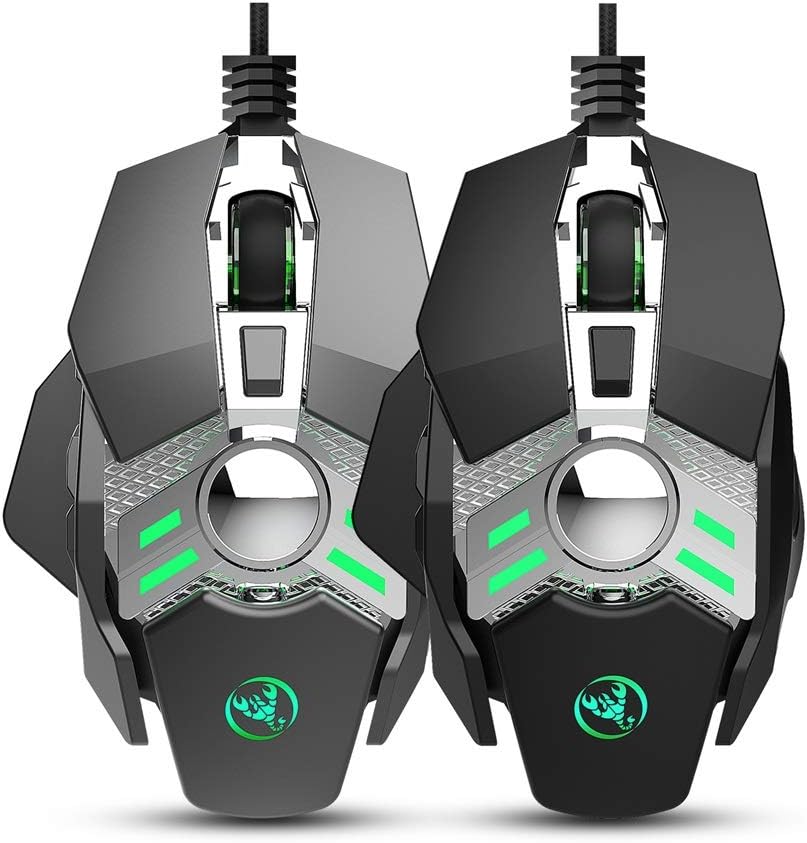

Figure 2: The HXSJ J200 mouse available in black and light grey, showcasing анын дизайны жана RGB жарыктандыруу.
3. Орнотуу
The HXSJ J200 Gaming Mouse is a plug-and-play device, requiring no special drivers for basic functionality.
- Чычканды таңгактан чыгаруу: Carefully remove the mouse and its accessories from the packaging.
- Компьютерге туташуу: Insert the USB connector of the mouse into an available USB port on your computer.
- Системаны таануу: Your operating system (Windows, macOS, etc.) will automatically detect and install the necessary generic drivers. This may take a few moments.
- Функционалдуулугун текшерүү: Once installed, the mouse cursor should be controllable. Test basic movements and clicks.
- Программалык камсыздоону орнотуу (кошумча): For advanced customization, such as macro programming for the 7 programmable buttons, you may need to download specific software from the manufacturer's website. Refer to the included user manual for details on where to find this software.
4. Иштөө нускамалары
4.1 Button Functions (Office Mode)
The mouse operates in Office Mode by default. The button assignments are as follows:
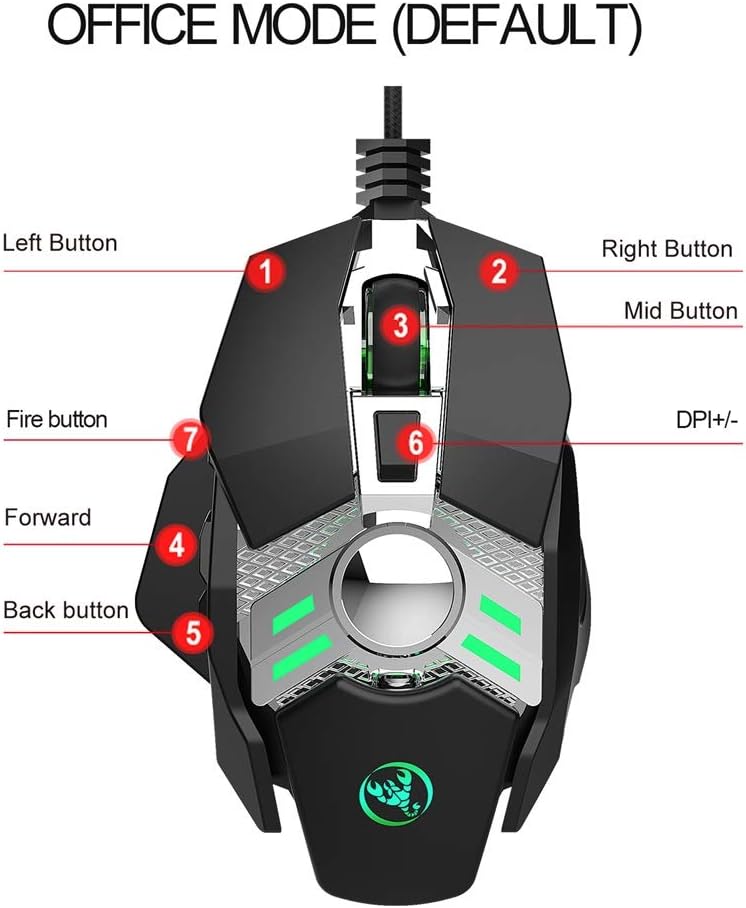
Figure 3: Button layout and functions in Office Mode.
- 1. Сол баскыч: Стандарттык сол чыкылдатуу функциясы.
- 2. Оң баскыч: Стандарттык оң баскычты чыкылдатуу функциясы.
- 3. Mid Button (Scroll Wheel): Scroll up/down, middle-click.
- 4. Алдыга жылдыруу баскычы: Алга карай жылдырат web браузерлер же file изилдөөчүлөр.
- 5. Артка баскычы: Артка карай багыт алат web браузерлер же file изилдөөчүлөр.
- 6. DPI +/- Button: DPI жөндөөлөрү аркылуу цикл жасайт (800/1600/3200/6400).
- 7. Fire Button: Default function for rapid firing in games, or programmable for other actions.
4.2 Switching to Game Mode
To switch from Office Mode to Game Mode, long press the DPI button (6) for 3 seconds. The mouse's lighting may change to indicate the mode switch.
4.3 Button Functions (Game Mode)
In Game Mode, some button functions are optimized for gaming:

Figure 4: Button layout and functions in Game Mode.
- 1. Сол баскыч: Стандарттык сол чыкылдатуу функциясы.
- 2. Оң баскыч: Стандарттык оң баскычты чыкылдатуу функциясы.
- 3. Middle Button (Scroll Wheel): Scroll up/down, middle-click.
- 4. M16 Fire: Pre-programmed for M16 rapid fire in compatible games.
- 5. AKM Fire: Pre-programmed for AKM rapid fire in compatible games.
- 6. M4 Fire: Pre-programmed for M4 rapid fire in compatible games.
- 7. Gun Key Fn: Function key for specific in-game actions, often programmable.
4.4 Adjusting Mouse Weight
The HXSJ J200 mouse features a removable weight system to customize its feel.

Figure 5: Location of removable weights for customization.
- The mouse comes with two 5g removable weights.
- To access the weights, locate the weight compartment, typically at the bottom or rear of the mouse.
- You can add or remove these weights to achieve your desired mouse feel and balance.
5. Техникалык тейлөө
Proper maintenance ensures the longevity and optimal performance of your HXSJ J200 Gaming Mouse.
- Тазалоо: Чычкандын бетин сүртүү үчүн жумшак, кургак чүпүрөктү колдонуңуз. өжөр кир үчүн, бир аз гampчүпүрөктү суу же жумшак тазалоо эритмеси менен жууп салыңыз. Катуу химиялык заттардан же абразивдүү материалдардан алыс болуңуз.
- Сенсорго кам көрүү: Так көз салуу үчүн чычкандын түбүндөгү оптикалык сенсорду чаңдан же таштандыдан таза кармаңыз.
- Кабелдик башкаруу: Зыяндын алдын алуу үчүн USB кабелин курч ийилүүдөн же ашыкча тартуудан алыс болуңуз.
- Сактагыч: Узак мөөнөткө колдонулбаганда чычканды күн нурунан жана экстремалдык температурадан алыс, таза, кургак чөйрөдө сактаңыз.
6. Кыйынчылыктарды
If you encounter issues with your HXSJ J200 Gaming Mouse, try the following troubleshooting steps:
- Чычкан жооп бербейт:
- USB кабели компьютериңиздеги иштеген USB портуна бекем сайылганын текшериңиз.
- Чычканды башка USB портуна сайып көрүңүз.
- Компьютериңизди өчүрүп күйгүзүңүз.
- Көйгөй чычкан мененби же сиздин системаңыз мененби, аныктоо үчүн чычканды башка компьютерде сынап көрүңүз.
- Так эмес көз салуу же курсордун артта калуусу:
- Чычкандын түбүндөгү оптикалык сенсорду тазалаңыз.
- Ensure you are using the mouse on a clean, non-reflective mouse pad or surface.
- Adjust the DPI setting using the DPI button (6) to see if a different sensitivity improves tracking.
- Баскычтар иштебейт:
- Verify that the mouse is not in an unexpected mode (e.g., Game Mode when you expect Office Mode).
- If using custom macros, ensure the programming software is correctly configured and running.
- Try reinstalling the mouse drivers (if applicable, via device manager).
- RGB Lighting Not Working/Changing:
- Чычкан туура туташтырылганын текшериңиз.
- Some lighting effects are tied to DPI changes; try cycling through DPI settings.
- If using custom lighting profiles, check the mouse software settings.
7. Техникалык шарттар
| Өзгөчөлүк | Деталь |
|---|---|
| Модел | J200 |
| Түс | Black/Grey (Optional) |
| Ачкычтардын саны | 7 |
| DPI орнотуулары | 800-1600-3200-6400 DPI |
| Интерфейс | USB |
| Кабелдин узундугу | 150 см |
| Life Switch | 20 миллион цикл |
| Тtage/Current Rating | DC 5V/100mA |
| Колдоого алынган системалар | Windows 2000/XP/Win7/Win8/Win10 Vista 32bit, IOS or newer |
| Продукт өлчөмү (L*W*H) | 13 * 8.5 * 3.5 cm / 5.12 * 3.35 * 1.38 inches |
| Продукт Салмагы | Болжол менен 139г / 4.9 унция |
| Пакеттин өлчөмү (L*W*H) | 15 * 9.8 * 5 cm / 5.91 * 3.86 * 1.97 inches |
| Пакет Салмагы | 193 г / 6.81 унция |

Figure 6: Physical dimensions of the HXSJ J200 Gaming Mouse.
8. Кепилдик жана колдоо
This HXSJ J200 Gaming Mouse comes with a standard manufacturer's warranty. Please refer to the warranty card included in your package for specific terms and conditions, including warranty period and coverage details.
For technical support, troubleshooting assistance, or warranty claims, please contact the retailer or the manufacturer directly. Contact information can typically be found on the product packaging or the manufacturer's official webсайт.


