Introduction
Сатып алганыңыз үчүн рахматasing the HXSJ Wired Gaming Keyboard and Mouse Combo. This high-performance combo is designed to enhance your gaming and computing experience with its ergonomic design, adjustable backlighting, and precise optical tracking. This manual provides detailed instructions for setup, operation, maintenance, and troubleshooting to ensure optimal performance and longevity of your product.
Продукт бүттүview
The HXSJ Gaming Combo includes a wired gaming keyboard with 114 keys and a wired optical gaming mouse. Both devices feature LED backlighting for an immersive experience.
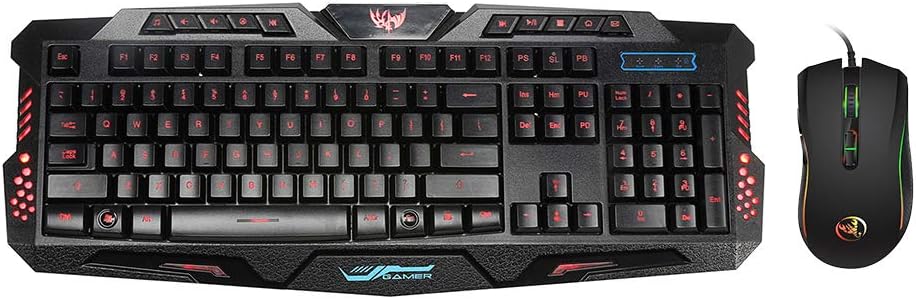
Figure 1: HXSJ Wired Gaming Keyboard and Mouse Combo. This image displays the full keyboard and the accompanying mouse, both featuring LED backlighting.
Баскычтоптун өзгөчөлүктөрү:
- 114-key layout with dedicated multimedia keys.
- Adjustable 3-color LED backlighting (Blue, Purple, Red).
- Four levels of brightness adjustment.
- Ergonomic design for comfortable long-term use.
- Туруктуу пластикалык конструкция.
- Wired USB 2.0 connection.
Чычкан өзгөчөлүктөрү:
- 7 buttons: Left, Right, Scroll Wheel, DPI +, DPI -, Advance, Retreat.
- Adjustable DPI settings: 1200/1600/2400/3200dpi.
- High-end optical tracking system for precise positioning.
- Colorful LED light effect.
- Ыңгайлуу кармоо үчүн эргономикалык дизайн.
- Wired USB 2.0 connection.
Орнотуу нускамалары
Follow these steps to set up your HXSJ Gaming Keyboard and Mouse Combo:
- Unpack the keyboard and mouse from their packaging.
- Компьютериңизден жеткиликтүү USB 2.0 портун табыңыз.
- Баскычтоптун USB туташтыргычын USB портуна сайыңыз.
- Чычкандын USB туташтыргычын башка жеткиликтүү USB портуна сайыңыз.
- Your operating system (Windows 7/8/10/2000/XP/Vista, Mac OS or latest) should automatically detect and install the necessary drivers. No additional software installation is typically required.
- Once drivers are installed, the keyboard and mouse are ready for use.
Иштөө нускамалары
Баскычтоптун иштеши
Жарыкты башкаруу:
- Switching Backlight Colors: Басыңыз FN + SL keys simultaneously to cycle through the three available backlight colors (Blue, Purple, Red).
- Арткы жарыктын жарыктыгын жөндөө:
- Басыңыз FN + ↑ (Up Arrow) арткы жарыктын жарыктыгын жогорулатуу үчүн.
- Басыңыз FN + ↓ (Down Arrow) арткы жарыктын жарыктыгын азайтуу үчүн.
- There are four brightness levels: High, Medium, Weak, and Off.

Figure 2: Keyboard displaying blue backlight. The image highlights the FN and SL keys, indicating their use for switching backlight colors.
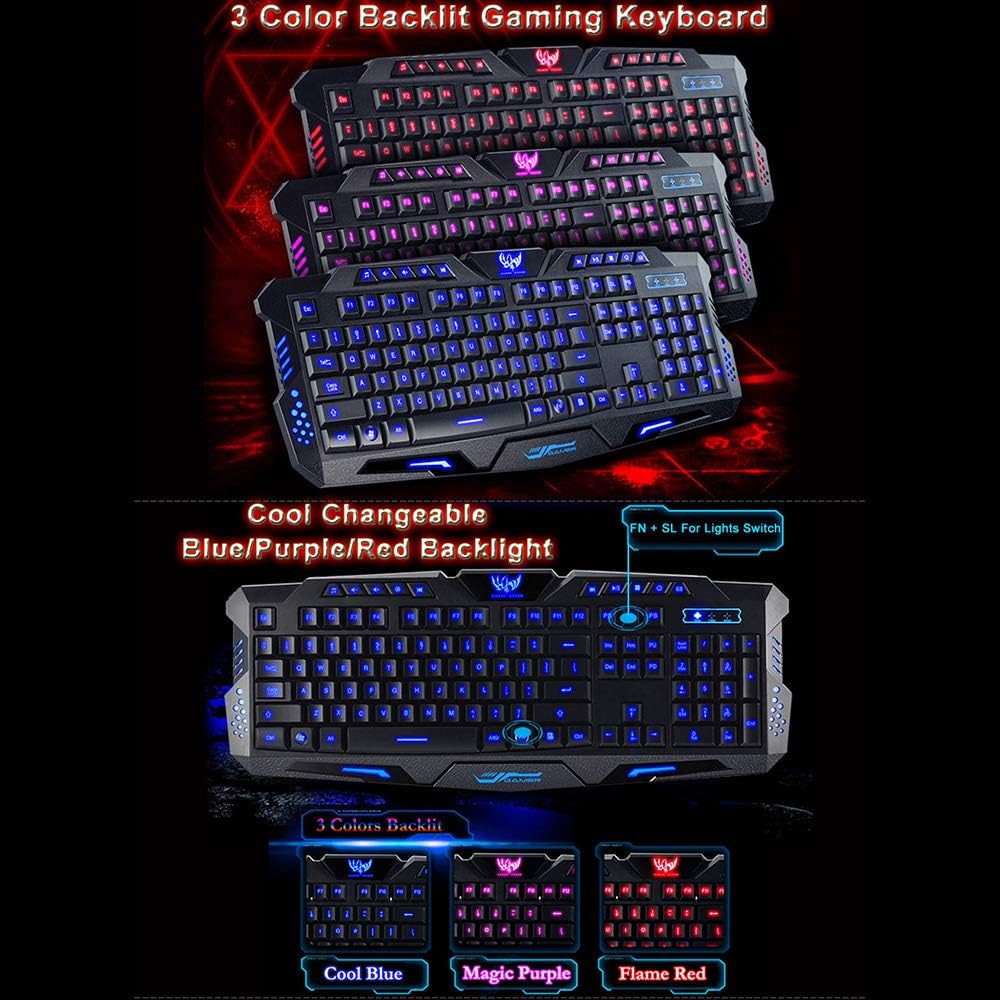
3-сүрөт: Мисamples of the three changeable backlight colors: Cool Blue, Magic Purple, and Flame Red.

Figure 4: Illustration of backlight brightness adjustment using FN + Up/Down arrow keys. Shows visual examples of highest, middle, low, and no light settings.

Figure 5: Visual representation of the four brightness adjustment levels: High Light, Medium Light, Weak Light, and Switch OFF.
Мультимедиа ачкычтары:
The keyboard features 10 dedicated multimedia keys for quick access to various functions. These keys are located at the top of the keyboard.
- Музыка ойноткучу: Open default music player.
- Үнүн азайтуу: Аудионун үнүн азайтыңыз.
- Көлөмү: Аудионун үнүн жогорулатуу.
- Үнсүз: Аудионун үнүн басуу/ачуу.
- Мурунку трек: Мурунку ырга өтүңүз.
- Кийинки трек: Go to the next song.
- Ойнотуу/тындыруу: Учурдагы медианы ойнотуу же тындыруу.
- Токтотуу: Stop current media playback.
- Web Браузер: Ачык демейки web браузер.
- Электрондук почта: Open default email client.

Figure 6: Keyboard displaying the layout of the multimedia function keys at the top, providing quick access to various controls.

7-сүрөт: Башка view of the keyboard, emphasizing the 10 multimedia keys and their functionality for quick and easy access to media controls.
Key Design:

Сүрөт 8: Жакын пландан view of a key, illustrating the wide space design for precise key control.

Figure 9: Image highlighting the ergonomic design and the textured wrist rest area, designed for utmost comfort during extended use.
Чычкан операциясы
DPI жөндөө:
The mouse features adjustable DPI (Dots Per Inch) settings, allowing you to change cursor sensitivity on the fly. This is useful for different tasks, such as precise aiming in games or faster navigation on the desktop.
- басыңыз DPI+ button to increase the DPI setting.
- басыңыз DPI- button to decrease the DPI setting.
- Available DPI settings are 1200, 1600, 2400, and 3200. The mouse's LED lighting may change to indicate the current DPI level.
Техникалык тейлөө
Proper maintenance ensures the longevity and optimal performance of your gaming combo.
- Тазалоо:
- Клавиатуранын жана чычкандын бетин сүртүү үчүн жумшак, кургак чүпүрөктү колдонуңуз.
- өжөр кир үчүн, бир аз гampen the cloth with water or a mild, non-abrasive cleaner. Ensure no liquid enters the device.
- Use compressed air to remove dust and debris from between keyboard keys.
- Сактагыч: Колдонулбаган учурда шаймандарды салкын, кургак жерде, күндүн түз тийген нурларынан жана өтө жогорку температурадан алыс сактаңыз.
- Суюктуктардан алыс болуңуз: Do not expose the keyboard or mouse to liquids. Spills can cause permanent damage.
- Кабельге кам көрүү: Avoid bending or twisting the cables excessively to prevent internal wire damage.
Проблемаларды чечүү
If you encounter issues with your HXSJ Gaming Combo, refer to the following common problems and solutions:
| Көйгөй | Мүмкүн себеп | Чечим |
|---|---|---|
| Баскычтоп/чычкан жооп бербей жатат | Бош USB туташуу, туура эмес USB порт, драйвер маселеси. |
|
| Backlight not working or stuck on one color | Incorrect key combination, software glitch. |
|
| Чычкан курсору туура эмес же жылмакай эмес | Dirty optical sensor, unsuitable mouse pad surface, incorrect DPI setting. |
|
Техникалык шарттар
Баскычтоптун мүнөздөмөлөрү:
| Материал | Пластик |
| Түс | Кара |
| Тил | Англис / Орус |
| Системаны колдоо | Windows XP, Windows 7, Windows Vista, Mac OS, Windows 8, Windows 2000, Windows 10 |
| Интерфейс | Wired USB2.0 |
| Working Voltage | DC 5V |
| Операция агымы | ≤ 400мА |
| Кабелдин узундугу | 1.5 м |
| Элементтин өлчөмү (L*W*H) | 48 * 18.5 * 2.5 cm / 18.86 * 7.27 * 0.98 in |
| Элемент Салмагы | Болжол менен 620 г / 21.87 унция |
| Ачкычтардын саны | 114 |
Чычкан өзгөчөлүктөрү:
| Түс | Кара |
| Материал | ABS |
| Көз салуу системасы | Оптикалык |
| Тtage Rating / Current | DC 5V/100mA |
| Байланыш | Зымдуу |
| Кабелдин узундугу | Болжол менен 150 см |
| Порт | USB 2.0 |
| DPI | 1200/1600/2400/3200dpi |
| Life Switch | 10 миллион цикл |
| Buttons | Left, Right, Scroll Wheel, DPI +, DPI -, Advance, Retreat |
| Light Effect | Түстүү LED |
| Колдоо системасы | Windows 7/8/10/2000/XP/Vista Mac OS or latest |
| Элементтин өлчөмү (L*W*H) | 12.7 * 7 * 4 cm / 5 * 2.76 * 1.57 in |
| Элемент Салмагы | Болжол менен 131 г / 4.62 унция |
Кепилдик жана колдоо
For warranty information or technical support, please refer to the product packaging or contact the retailer/manufacturer directly. Keep your purchase receipt for warranty claims.
Manufacturer: MIS-C8634-EN


