1. Киришүү
This manual provides detailed instructions for the installation, operation, and maintenance of the Hanwha Techwin XNV-8080R 5MP Outdoor Network Dome Camera. This high-performance surveillance camera is designed for outdoor use, offering 5-megapixel resolution, a 3.9-9.4mm varifocal lens, and advanced night vision capabilities to ensure reliable monitoring in various environmental conditions. Please read this manual thoroughly before using the product to ensure proper setup and functionality.
2. Продукт бүтүп калдыview
2.1 Негизги өзгөчөлүктөрү
- 5 мегапикселдик чечилиш: Так жана деталдуу видео азыктарды көрсөтөтtage.
- 3.9-9.4mm Varifocal Lens: Allows for flexible adjustment of the field of view.
- Түнкү көрүнүш: Equipped with IR illumination for surveillance in low-light or no-light conditions.
- Тышкы туруктуулук: IP66 and IP67 rated for protection against dust and water.
- Зымдуу туташуу: Reliable network connection via Ethernet.
- Кыймылды аныктоо: Configurable alerts based on detected motion.
- Оптикалык масштаб: Сүрөттүн сапатын жоготпостон так чоңойтууну камсыз кылат.
- Дубалга орнотуу: Designed for secure wall mounting.
2.2 Камеранын компоненттери
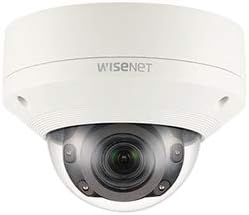
1-сүрөт: Фронт view of the Hanwha Techwin XNV-8080R dome camera, showing the lens, IR illuminators, and dome casing. The Wisenet logo is visible on the top casing.

2-сүрөт: Төмөнкү view of the Hanwha Techwin XNV-8080R dome camera, illustrating the mounting screw holes and sealed cable entry points for power and network connections.

3-сүрөт: A standard blue Ethernet cable with RJ45 connectors, typically used for wired network connectivity with the camera.
3. Орнотуу жана орнотуу
3.1 Камераны орнотуу
- Жайгашкан жерди тандаңыз: Select a suitable outdoor wall mount location that provides the desired field of view and is within reach of power and network cables. Ensure the surface is strong enough to support the camera's weight.
- Бургулоочу тешиктер: Use the provided mounting template (if applicable) to mark and drill pilot holes for the mounting screws.
- Базаны коргоо: Attach the camera's mounting base securely to the wall using appropriate screws and anchors.
- Кабелдик башкаруу: Route the power and network cables through the designated cable entry points on the camera base (refer to Figure 2). Ensure a watertight seal for outdoor protection.
3.2 Зымдар жана тармактык туташуу
- Кубат туташуу: Connect the camera to a compatible AC/DC power source. Refer to the camera's power requirements for correct voltagд жана ampөчүрүү.
- Зымдуу тармак: Connect an Ethernet cable (refer to Figure 3) from the camera's network port to your network switch or router. Ensure the network connection is active and configured for IP camera usage.
- Алгачкы мүмкүндүк: Use the Hanwha Techwin device manager software or a web browser to discover the camera on your network and perform initial configuration, including setting a strong password.
4. Камераны иштетүү
4.1 Негизги операция
- Live кирүү View: Access the camera's live video feed through a web browser, the Hanwha Techwin mobile application (compatible with Android devices), or a Network Video Recorder (NVR) interface.
- Adjusting Lens: If the camera has a varifocal lens, adjust the zoom and focus settings via the camera's web interface or software to achieve the desired field of view and image clarity.
- Жаздыруу: Configure recording schedules and motion-triggered recording settings through the camera's interface or connected NVR.
4.2 Өркүндөтүлгөн функциялар
- Кыймылды аныктоо: Set up motion detection zones and sensitivity levels to trigger alerts or recordings only when movement is detected in specific areas.
- Түнкү көрүнүш: The camera automatically switches to night vision mode in low-light conditions. Ensure the area is clear of obstructions that might reflect IR light.
- Алыстан башкаруу: Utilize the remote control method via the mobile app or web interface to manage camera settings and view footagе каалаган жерден.
5. Техникалык тейлөө
5.1 Камераны тазалоо
- Линзаны тазалоо: Gently wipe the camera lens and dome cover with a soft, clean, lint-free cloth. For stubborn dirt, use a mild lens cleaning solution. Avoid abrasive materials.
- Casing Тазалоо: Clean the camera's exterior casing жарнама мененamp кездеме. Күчтүү жуучу каражаттарды же эриткичтерди колдонбоңуз.
5.2 Микропрограмма жаңыртуулары
Regularly check the Hanwha Techwin official webакыркы микропрограмма жаңыртуулары үчүн сайт. Микропрограмма жаңыртуулары иштин натыйжалуулугун жакшыртып, жаңы функцияларды кошуп, коопсуздукту жогорулатат. Микропрограмма жаңыртуу топтому менен берилген көрсөтмөлөрдү кылдаттык менен аткарыңыз.
6. Кыйынчылыктарды
| Көйгөй | Мүмкүн себеп | Чечим |
|---|---|---|
| Күч жок | Электр кабели ажыратылган; туура эмес электр адаптери. | Check power connections. Ensure the power adapter is functioning correctly. |
| Тармак туташуусу жок | Ethernet cable disconnected; incorrect network settings; IP address conflict. | Verify Ethernet cable connection. Check network settings and ensure the camera has a valid IP address. Restart router/switch. |
| Сүрөттүн сапаты начар | Dirty lens; incorrect focus; low light conditions. | Clean the lens. Adjust focus via the web interface. Ensure sufficient lighting or verify night vision is active. |
| Кыймылды аныктоо иштебейт | Incorrect sensitivity settings; detection zone not configured. | Adjust motion detection sensitivity. Configure detection zones correctly in the camera's settings. |
7. Техникалык шарттар
| Өзгөчөлүк | Деталь |
|---|---|
| Бренд | ХАНВХА |
| Модел | XNV-8080R |
| Видео тартуунун резолюциясы | 5 депутат |
| Натыйжалуу дагы эле чечим | 5 депутат |
| Линзанын түрү | 3.9-9.4mm Varifocal (Optical Zoom) |
| Байланыш технологиясы | Зымдуу (Ethernet) |
| Connectivity Protocol | Wi-Fi (for initial setup/management, primarily wired) |
| Power Source | AC/DC |
| Ички/тышкы колдонуу | Сыртта |
| Өзгөчө өзгөчөлүк | Түнкү көрүнүш |
| Эл аралык коргоо рейтинги | IP66, IP67 |
| Монтаж түрү | Дубалга орнотуу |
| Frame Rate | 30 кадр/сек |
| Төмөн жарык технологиясы | Түнкү түс |
| Эскертүү түрү | Кыймыл гана |
| Шайкеш түзмөктөр | Smartphone (Android), NVR, PC |
| Башкаруу ыкмасы | Remote (via app/web интерфейс) |
| Форма фактору | Купол |
| UPC | 738714010281 |
| ASIN | B08D7RQFKK |
8. Кепилдик маалыматы
Hanwha Techwin products are covered by a limited warranty. Please refer to the official Hanwha Techwin website or your purchase documentation for specific warranty terms and conditions applicable to the XNV-8080R model. Keep your proof of purchase for warranty claims.
9. Колдоо
For technical assistance, product inquiries, or further support, please visit the official Hanwha Techwin support website or contact their customer service. You can typically find contact information and FAQs on their webсайт:
Hanwha Techwin Official Webсайт: www.hanwhasecurity.com
When contacting support, please have your camera model (XNV-8080R) and serial number ready.


