Introduction
Thank you for choosing the Trust Taro Wired Keyboard and Mouse Set. This manual provides essential information for setting up, operating, maintaining, and troubleshooting your new peripheral set. Designed for comfort and efficiency, the Taro set offers a full-size keyboard with a QWERTY UK layout and a comfortable mouse, both featuring quiet operation and plug-and-play functionality.
Жайгашуу
The Trust Taro Keyboard and Mouse Set is designed for simple plug-and-play installation, requiring no additional software or drivers for basic functionality.
Connecting the Set
- Locate an available USB-A port on your computer (PC, Laptop, Mac, Chrome OS device).
- Plug the USB connector from the Trust Taro Keyboard into the USB port.
- Plug the USB connector from the Trust Taro Mouse into another available USB port.
- Wait a few moments for your operating system to automatically detect and install the necessary drivers. The keyboard and mouse will be ready for use once detected.
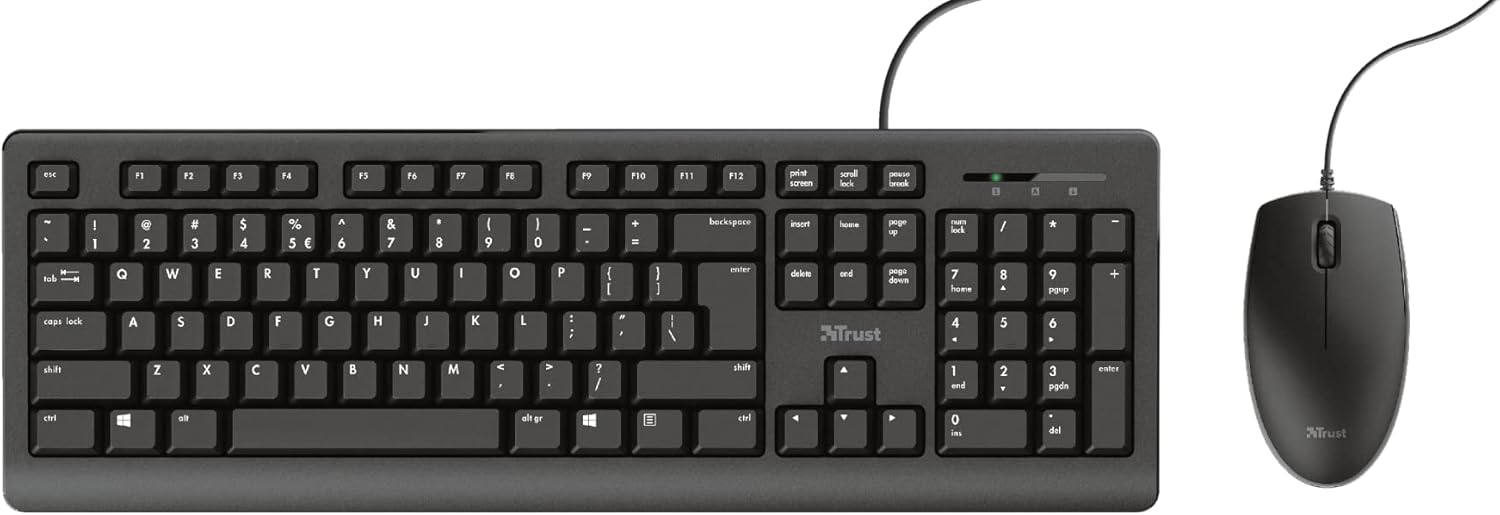
The 1.8-meter long USB cables provide ampар кандай стол орнотуулары үчүн жете аласыз.
Иштеп жатат
The Trust Taro set offers a comfortable and quiet user experience for daily computing tasks.
Баскычтопту колдонуу
- Full-Size UK Layout: The keyboard features a standard QWERTY UK layout, including a dedicated numeric keypad (numpad) for efficient data entry.
- Тынч баскычтар: The keys are designed to be up to 50% quieter than standard keyboards, reducing typing noise in shared environments.
- Функция баскычтары: Standard function keys (F1-F12) are available at the top of the keyboard.

Чычканды колдонуу
- Эки тараптуу дизайн: The mouse is designed to be comfortable for both left-handed and right-handed users.
- Quiet Buttons: The mouse buttons are engineered for quiet clicks, complementing the silent keyboard.
- Жылдыруу дөңгөлөгү: Документтер жана башка документтер аркылуу оңой багыт алуу үчүн жылдыруу дөңгөлөгүн колдонуңуз web барактар.

Техникалык тейлөө
Proper care will ensure the longevity of your Trust Taro Keyboard and Mouse Set.
Тазалоо
- Тазалоодон мурун клавиатура менен чычканды компьютериңизден ажыратыңыз.
- жумшак, бир аз колдонуу damp беттерди сүртүү үчүн чүпүрөк колдонуңуз. Абразивдүү тазалоочу каражаттарды же эриткичтерди колдонбоңуз.
- For dust between keys, use compressed air.
Төгүлүүгө туруктуулук
The keyboard is designed to be spill-resistant. In case of accidental spills:
- Компьютериңизден клавиатураны дароо ажыратыңыз.
- Carefully tilt the keyboard to drain any liquid.
- Бетти таза чүпүрөк менен кургатып сүртүңүз.
- Allow the keyboard to air dry completely for several hours (or overnight) before reconnecting it.
Note: Spill resistance is designed to protect against minor liquid spills. It does not guarantee protection against heavy liquid exposure or submersion.
Проблемаларды чечүү
If you encounter issues with your Trust Taro Keyboard and Mouse Set, try the following solutions:
| Көйгөй | Мүмкүн чечим |
|---|---|
| Клавиатура же чычкан жооп бербей жатат |
|
| Keys not typing or mouse not moving smoothly |
|
| Mouse cursor erratic or jumping |
|
Техникалык шарттар
| Өзгөчөлүк | Деталь |
|---|---|
| Модель аты | Таро |
| Элемент моделинин номери | 24089 |
| Байланыш технологиясы | USB Wired |
| Кабелдин узундугу | 1.8 meters (180 cm) |
| Баскычтоптун жайгашуусу | Full-size QWERTY UK |
| Number of Keys (Keyboard) | 104 |
| Өзгөчөлүктөр | Spill-resistant keyboard, Quiet keys and mouse buttons |
| Шайкеш операциялык системалар | Windows, macOS, Chrome OS, Linux |
| Түс | Кара |
| Продукциянын өлчөмдөрү (клавиатура) | Болжол менен 5.83 x 17.68 x 1.18 дюйм (14.8 x 44.9 x 3 см) |
| Элемент Салмагы | Болжол менен 1.74 фунт (0.79 кг) |
Кепилдик жана колдоо
Trust products are manufactured to high quality standards. For information regarding the warranty period and terms for your Trust Taro Keyboard and Mouse Set, please refer to the warranty card included with your product or visit the official Trust webсайт.
For technical support, frequently asked questions, and driver downloads (if applicable), please visit the Trust support page at www.trust.com/support. You may also find contact information for customer service in your region on the webсайт.


